



Latest Version
August 12, 2025
Tran Thi Giang
Casual
iOS
0
Report a Problem
More About :game
Coloring Master ASMR is a casual art and coloring game developed by Tran Thi Giang. It is available for iPhone and iPad and is listed in the Casual category on the App Store. The current listing shows a 4.5 rating from 703 ratings.
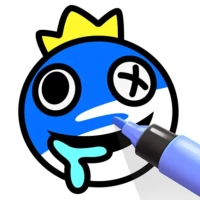
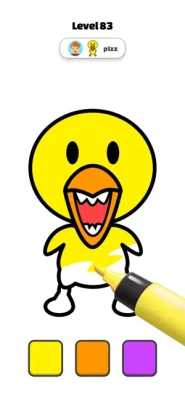
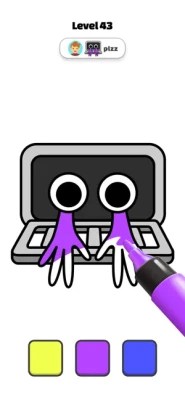
The game is built around a virtual coloring-book concept. Instead of needing physical paper, pencils, or paint, players can complete illustrated pictures directly on their device.
Its main appeal is the combination of simple drawing, coloring, creativity, and a calm pace.
Main Features
Hundreds of Coloring Pictures
The game offers hundreds of pictures to complete and a gallery containing a large collection of coloring pages. The available themes include animals, birds, fruit, nature, and many other designs.
This variety gives the game a broad casual appeal because players can move between different types of artwork instead of repeatedly coloring the same style of picture.
Draw the Outline
One of the most interesting mechanics is the outline step.
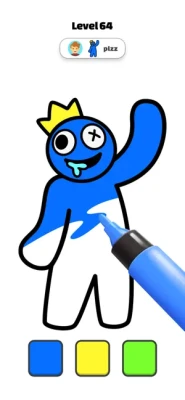
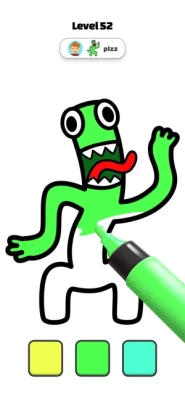
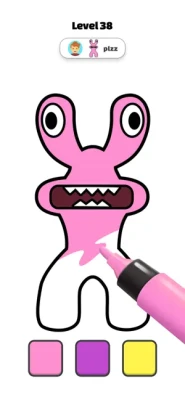
Instead of simply selecting a finished shape, you first follow the object's line and create its outline. After that, you can fill the area with color.
This makes the gameplay feel more interactive than a basic paint-by-number experience.
Color Matching
Color selection can affect accuracy. The game encourages players to match colors in the recommended order, with closer color matches producing higher accuracy.
Players who enjoy completing pictures carefully can therefore treat each level almost like a small precision challenge.
Freestyle Coloring
You are not forced to follow the suggested palette every time.
The game also allows freestyle coloring, giving you room to experiment with unusual combinations and create artwork that looks different from the expected result.
Relaxing Art Experience
The game is designed around taking your time, drawing, coloring, and enjoying a calmer creative activity. The App Store description specifically presents coloring and drawing as ways to relax and unleash creativity.
Gameplay Explained
The basic gameplay loop is easy to understand:
- Select a coloring picture.
- Examine the object or illustration.
- Trace the required outline.
- Complete the enclosed shape.
- Select the appropriate color.
- Fill the area.
- Match the suggested color order when aiming for greater accuracy.
- Experiment with freestyle colors when you want a different result.
- Finish the artwork and move on to another picture.
The combination of tracing and coloring gives each picture two distinct stages rather than making the entire experience a single tap.
Full Strategy Guide
1. Study the Picture Before Drawing
Before touching the screen, look at the entire illustration.
Identify:
- Main objects
- Smaller details
- Separate sections
- Similar colors
- Areas that require careful outlining
This helps you understand how the picture is constructed before you start drawing.
2. Trace Slowly
The outline stage rewards control more than speed.
When tracing an object, avoid making unnecessarily large movements. Follow the shape naturally and try to maintain a steady pace.
A slow, controlled motion is generally easier to manage than repeatedly correcting a rushed line.
3. Pay Attention to Closed Shapes
Because coloring follows the outline stage, the shape you draw matters.
Try to make the outline sufficiently complete so that the intended coloring area is clearly defined.
If an outline is too open or poorly controlled, the coloring stage can become less predictable.
4. Match the Recommended Colors
If your goal is accuracy, use the suggested color sequence rather than immediately switching to random shades.
The game specifically connects color matching and order with accuracy.
This makes following the intended palette useful when you're trying to complete a picture carefully.
5. Save Freestyle for Experimentation
Freestyle coloring is useful when you want creativity rather than maximum accuracy.
Try changing:
- Background colors
- Animal colors
- Fruit shades
- Nature elements
- Decorative details
For example, a bird doesn't have to use realistic colors. You can create a completely different visual style by using bright or unusual shades.
6. Use Similar Colors Carefully
Using several colors that are extremely close to one another can make an image look flat.
Instead, consider using:
- A light shade for highlights
- A medium shade for the main area
- A darker shade for contrast
This gives the finished picture more visual separation.
7. Work From Large Areas to Small Details
A useful coloring order is:
Large objects → medium sections → small details
This allows you to establish the main palette first and then adjust the smaller parts around it.
8. Use Contrast Between Objects
If two neighboring objects have similar colors, they may visually blend together.
Choosing contrasting shades can make the different parts of the picture easier to distinguish.
For example:
- Green leaves against red fruit
- Blue sky against green trees
- Yellow objects against a purple background
The goal is not always realism. Clear visual separation can make a finished picture more attractive.
9. Don't Chase Speed
Coloring Master ASMR is better approached as a creative activity than a race.
Rushing the outline can reduce precision, while rushing color selection can produce a less balanced picture.
Take your time and concentrate on one section at a time.
10. Review the Finished Picture
Before leaving an artwork, look over the complete image.
Check for:
- Incomplete outlines
- Missed areas
- Weak color contrast
- Unbalanced color choices
- Details that need another shade
A quick final review can make a noticeable difference.
How to Get Better at Outline Drawing
The outline mechanic is one of the most important parts of the game.
To improve:
Keep your finger movement smooth. Sudden changes in direction can make tracing harder.
Follow the natural curves. Don't try to force every shape into straight movements.
Avoid unnecessary corrections. A confident continuous movement is often easier than repeatedly stopping.
Practice on simple objects. Use easier pictures to become comfortable with the drawing mechanic before tackling more detailed illustrations.
Animal Coloring Tips
Animal pictures give you plenty of freedom.
For realistic artwork, research-inspired palettes can work well:
- Browns and tans for mammals
- Greens and earthy colors for reptiles
- Blues and grays for birds
- Natural shades for wildlife
For a cartoon style, use brighter colors and stronger contrast.
There is no need to restrict yourself to realistic animal colors when using freestyle mode.
Bird Coloring Tips
Bird illustrations work particularly well with contrasting colors.
Try using one main color for the body and a second strong shade for the wings or decorative areas.
Small features such as the beak and eyes can be given darker colors so they remain visually distinct.
Fruit Coloring Tips
Fruit pictures are ideal for experimenting with recognizable colors.
Examples include:
- Red apples
- Yellow bananas
- Orange oranges
- Purple grapes
- Green pears
- Red strawberries
You can also experiment with fantasy palettes if you want a more playful result.
Nature Coloring Tips
Nature scenes often contain many overlapping elements, so color separation is important.
A simple approach is:
Sky → background → trees → plants → foreground details
Using lighter colors in distant areas and stronger colors in foreground objects can also create a sense of depth.
Accuracy vs Freestyle
One of the game's most useful design choices is that it supports two different approaches.
Accuracy-focused play
Choose this approach when you want to follow the intended artwork closely.
Focus on:
- Correct outline tracing
- Recommended colors
- Color order
- Careful filling
- Precision
Creative play
Choose this approach when you simply want to make your own artwork.
Focus on:
- Unusual palettes
- Strong contrasts
- Bright colors
- Personal preferences
- Experimental combinations
Neither approach needs to dominate every session. Switching between them keeps the experience more varied.
Difficulty
Overall difficulty: Easy to Moderate
The basic controls are simple, but getting a clean outline and high color accuracy requires some attention.
The difficulty comes from precision rather than complicated rules.
New players should be able to understand the core mechanics quickly, while players seeking higher accuracy can spend more time refining their technique.
Graphics and Art Style
The game focuses on illustrated coloring pages rather than realistic 3D environments.
Its artwork spans several broad themes, including animals, birds, fruit, nature, and other designs. This gives the game a colorful virtual coloring-book feel.
Controls
The controls are based primarily around touch interaction.
Players use their finger or compatible pointing input to:
- Trace outlines
- Select colors
- Fill areas
- Navigate between pictures
- Complete artwork
The simple control scheme makes the game approachable for casual players.
Progression
Progression is centered on completing the game's collection of coloring pictures and discovering additional levels.
The App Store version history shows multiple level updates, including new levels in versions 1.1 through 1.4 and further level updates with improvements and bug fixes in version 1.5.
Platform and Requirements
The App Store currently lists Coloring Master ASMR for iPhone and iPad. It requires iOS 11.0 or later, while iPad requires iPadOS 11.0 or later. The listing also indicates compatibility with Apple silicon Macs running macOS 11.0 or later and Apple Vision devices.
The app is listed in English and has a 4+ age rating.
App Information
Game: Coloring Master ASMR
Developer: Tran Thi Giang
Category: Casual
Platform: iPhone, iPad
Age Rating: 4+
Language: English
App Size: About 181.2 MB
Current listed version: 1.5
App ID: 6444018042
Bundle ID: bounce.Coloring.Pages
Player Feedback
The current App Store listing displays 4.5 out of 5 from 703 ratings.
Player feedback is mixed in specific areas. Some reviews describe the coloring as satisfying and calming, while other reviews criticize the frequency of advertisements or ask for more freedom in the coloring experience. These are individual user opinions rather than a universal assessment of the game.
Pros and Cons
Pros
- Hundreds of coloring pictures
- Animals, birds, fruit, nature, and other themes
- Interactive outline-drawing mechanic
- Color matching adds a precision element
- Freestyle coloring provides creative freedom
- Relaxing casual gameplay
- Suitable for short sessions
- Works on iPhone and iPad
Cons
- Players looking for fast-paced action may find the gameplay slow.
- Precision tracing can take practice.
- Some App Store reviewers have complained about advertising frequency.
- The listed version history has not shown an update since December 2022.
Beginner Tips
If you're playing for the first time, keep these tips in mind:
Trace first, color second. The outline is an important part of the gameplay.
Slow down around curves. Precision is more useful than speed.
Follow the suggested colors when accuracy matters.
Use freestyle mode for creativity.
Start with simple artwork. It helps you learn the controls.
Use contrasting colors. They make separate objects easier to see.
Review your picture before finishing.
Frequently Asked Questions
What is Coloring Master ASMR?
Coloring Master ASMR is a casual coloring game for Apple devices that combines outline drawing, color filling, and creative artwork.
Is Coloring Master ASMR free?
The App Store currently lists the game as Free.
What can you color in Coloring Master ASMR?
The game includes many themes, including animals, birds, fruit, nature, and other illustrated designs.
How does the coloring system work?
You first draw the outline of an object and then color the enclosed area. Matching colors in the suggested order can improve accuracy.
Does the game have freestyle coloring?
Yes. The game's description specifically says players can choose to color freely rather than always following the suggested approach.
Is Coloring Master ASMR suitable for children?
The App Store currently gives the game a 4+ age rating. Parents should still review the game's current App Store information and advertising experience for their child's needs.
Can I play Coloring Master ASMR on iPad?
Yes. The App Store lists compatibility with iPad as well as iPhone.
What iOS version is required?
The current listing states that iPhone requires iOS 11.0 or later and iPad requires iPadOS 11.0 or later.
What is the App Store ID?
The App Store ID is 6444018042.
Final Thoughts
Coloring Master ASMR takes a familiar coloring-book concept and adds an interactive tracing mechanic. Instead of simply tapping finished sections, players draw an object's outline before filling it with color. The color-order and accuracy system adds a small precision challenge, while freestyle coloring leaves room for personal creativity.
With hundreds of pictures spanning animals, birds, fruit, nature, and other themes, the game is primarily aimed at players who enjoy relaxed creative activities rather than competitive gameplay.
For anyone looking for a simple coloring game for iPhone or iPad, Coloring Master ASMR offers an accessible combination of drawing, painting, color matching, and casual relaxation.
Rate the Game
User Reviews







Popular Games



















 Android
 iOS
iOS Windows
 Xbox
Xbox