
Latest Version
November 01, 2024
Kolb Apps
Music
0
com.rodrigokolb.funkbrasil
Report a Problem
More About :game
Funk Brasil is a music creation and beat-making app inspired by Brazilian funk and related musical styles. Instead of completing conventional game levels, players interact with drum pads to trigger sounds, combine rhythmic patterns, and create their own mixes.
The app is designed for beginners who want to experiment with music as well as more experienced users looking for a portable beat-making tool. Its pad-based interface makes it possible to start creating rhythms quickly, while custom sound kits and recording features offer more room for experimentation.
You can explore styles such as funk carioca, funk ostentação, brega funk, rap, trap, hip-hop, electronic music, and other rhythm-based genres. The aim is to find combinations that sound good together, keep a consistent groove, and turn individual sounds into a complete musical idea.
Main Features of Funk Brasil
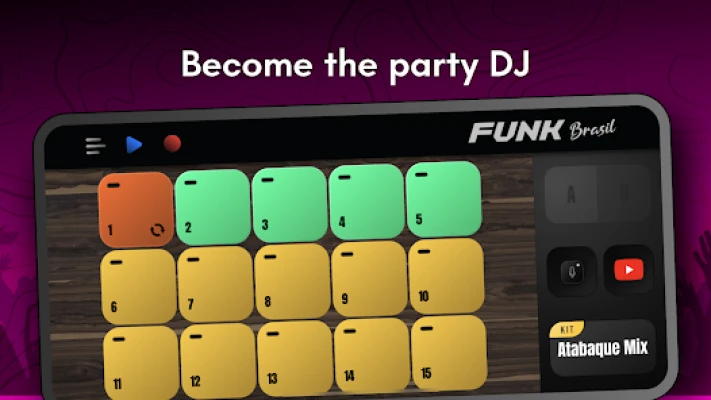
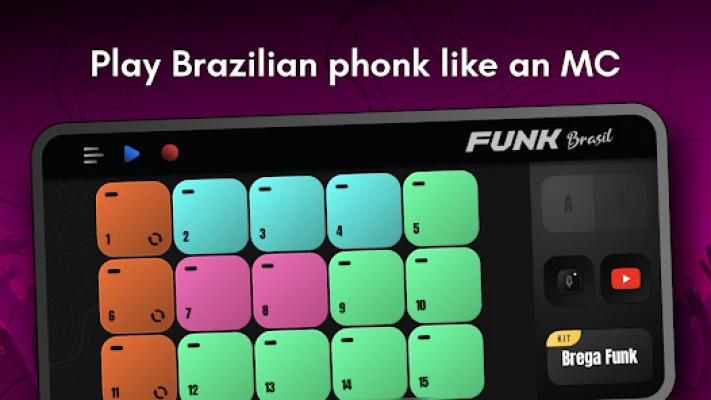
1. Thirty Drum Pads
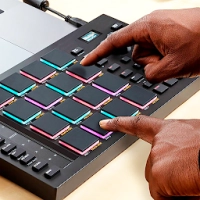
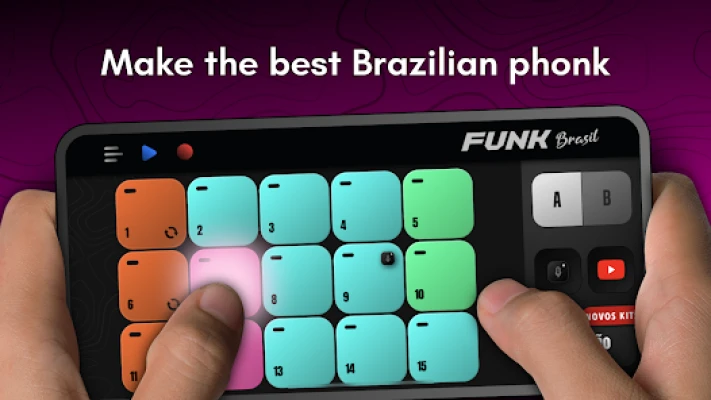
Funk Brasil advertises 30 drum pads that let you trigger different sounds and musical loops. Each pad can contribute a rhythmic element, vocal sample, or other sound, depending on the selected kit.
Learning how the pads work is the first step toward building a beat that sounds coordinated rather than random.
2. More Than 200 Sound Kits
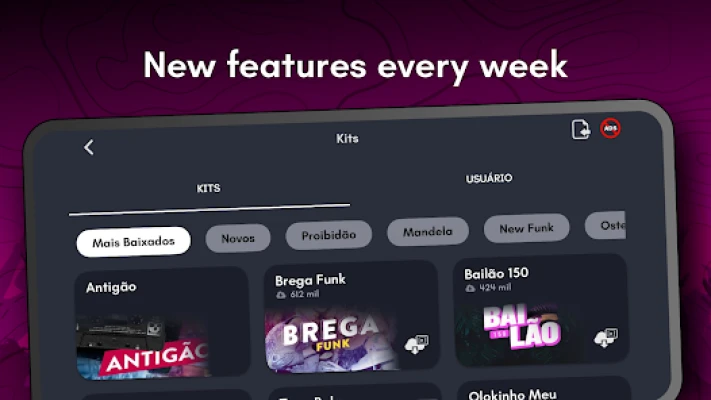
The app advertises a library of more than 200 kits for creating music. These provide different sound combinations and musical possibilities, allowing you to experiment with various moods and styles.
Some kits or content may require additional unlocking, downloading, advertising-based rewards, or in-app purchases.
3. Brazilian Funk and Other Music Styles
The app focuses on Brazilian funk, including funk carioca and related styles, while also offering opportunities to experiment with rap, trap, hip-hop, reggaeton, pop, electronic music, and other genres.
Trying different styles can help you discover which rhythms and sound combinations best match your musical taste.
4. Custom Sound Kits
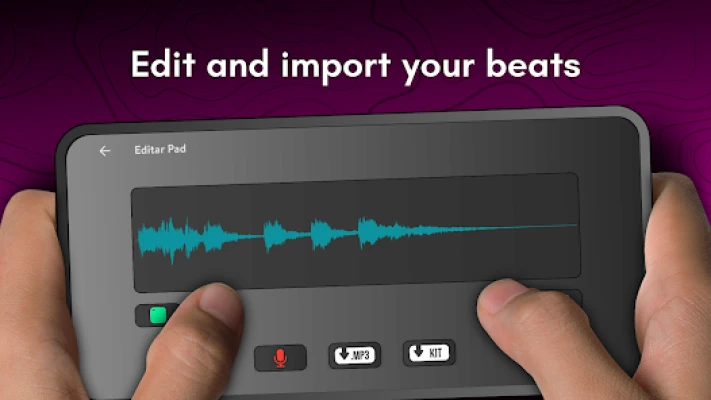
You can personalize your music-making experience by importing compatible sounds and creating your own kits. This feature is useful when you want to move beyond the built-in sound combinations and develop a more individual sound.
Always check the supported file formats and permissions before importing audio.
5. Recording and Audio Export
Funk Brasil includes recording tools for capturing your performances. The app also advertises MP3 export, allowing you to save musical ideas for later listening or sharing.
Recording is particularly valuable for identifying timing problems and comparing different versions of a beat.
6. Multitouch Controls
Multitouch support allows you to activate multiple pads in a compatible setup. This makes it easier to combine sounds and perform more involved rhythmic patterns.
Practise simple combinations first so that every tap has a clear purpose.
7. MIDI Support
MIDI support provides additional possibilities for compatible music equipment and software setups. The exact experience depends on your device, connected equipment, and the app's current capabilities.
8. Built-In Tutorial
The app includes an in-app tutorial to help users understand its basic controls and music-making features. Beginners should work through the introduction before attempting more complex arrangements.
9. Phone and Tablet Support
The interface is designed for mobile devices and tablets, giving you a portable place to experiment with beats. A larger display may make the pads easier to see, while a phone is convenient for quick creative sessions.
How to Play Funk Brasil
Funk Brasil is best approached as a digital beat-making studio. Start by selecting a sound kit, learning what each drum pad triggers, and tapping different combinations to discover how the sounds interact.
Once you understand the basic controls, focus on rhythm. A good beat does not need every pad to be active at once. A clear pulse, a few well-placed accents, and carefully chosen sound combinations can be more effective than constantly triggering new samples.
After creating a pattern you like, use the recording tools to capture it. Listen back, identify what works, and make small changes. As you become more comfortable with the interface, experiment with custom sounds, more complex rhythms, and different musical styles.
Complete Funk Brasil Strategy Guide
Step 1: Learn the Interface Before Making a Full Beat
Begin by opening a sound kit and testing the drum pads individually. Listen carefully to each sound and notice which ones provide a strong beat, which ones add accents, and which ones work as vocal or melodic elements.
Do not try to use every pad immediately. The goal is to understand the sound palette available in your selected kit.
Once you know what several pads do, you will find it easier to build a rhythm intentionally.
Step 2: Choose a Sound Kit That Matches Your Style
Different kits can create very different musical moods. Some may suit energetic funk rhythms, while others may work better for melodic, playful, or heavier beats.
Try two or three available kits and play a simple rhythm with each one. Compare how the sounds work together instead of judging a kit by its individual sounds alone.
Choose the kit that best supports the style you want to create. You can always switch later when you want to explore a new direction.
Step 3: Start With a Simple Rhythm
Your first beat should be easy to repeat. Choose a small number of pads and create a pattern with a clear pulse.
Listen for consistency. If the rhythm feels confusing, remove one sound at a time until the pattern becomes easier to follow.
Once the basic groove sounds steady, add another sound to give it more character. Building gradually makes it easier to understand how each new element affects the beat.
Step 4: Learn the Role of Each Sound
Think about each pad as having a musical purpose. Some sounds establish the main pulse, others provide accents, and some add variation or personality.
Try to avoid using several sounds that compete for attention at the same moment. A balanced beat usually gives the listener something clear to follow.
When testing a new sound, ask yourself whether it strengthens the rhythm, adds an interesting accent, or simply makes the arrangement busier.
Step 5: Use Multitouch Carefully
Multitouch can make performances more expressive, but activating too many pads at once may make the rhythm difficult to control.
Begin with two-pad combinations. Practise activating them in a consistent sequence, then add a third pad when you can repeat the pattern comfortably.
The goal is coordination rather than speed. A simple combination performed cleanly often sounds better than a complicated one with uneven timing.
Step 6: Build a Brazilian Funk Groove
Brazilian funk has a strong rhythmic identity, but different substyles can sound quite different. Use the available kit to explore syncopation, repeated patterns, and contrasting accents.
Start with a steady rhythmic foundation. Add a contrasting sound at selected moments, then listen to how the pattern changes.
Rather than copying a single rhythm without understanding it, experiment with small variations. This helps you develop your own musical ideas while learning what makes a groove feel distinctive.
Step 7: Experiment With Different Genres
Funk Brasil can also be used to explore sounds associated with rap, trap, hip-hop, electronic music, and other styles.
Try building one basic pattern and changing the sound kit. Notice how the same rhythmic idea can take on a different character when you use different samples.
This is a useful exercise for learning how sound selection influences musical style. Keep your experiments short so that you can compare the results easily.
Step 8: Create Your Own Sound Kit
When you are familiar with the built-in kits, experiment with custom sounds if the required import options are available.
Choose samples that serve different roles rather than selecting sounds only because they are interesting individually. For example, a useful collection might include a main rhythmic sound, a complementary accent, a vocal sample, and a distinctive effect.
Listen to every imported sample before using it in a mix. Check that the volume and timing work well with the other sounds.
Step 9: Pay Attention to Timing
Timing is one of the most important skills in beat making. Even strong sounds can feel disconnected when their placement is inconsistent.
Start with a repeated pattern and concentrate on maintaining an even pulse. If you are performing live with the pads, practise the sequence until you can repeat it without hesitation.
Avoid changing the rhythm too often while learning. Establish a stable groove first, then introduce variations.
Step 10: Create Variation Without Losing the Groove
A beat can become repetitive if every section sounds exactly the same. However, changing too many elements can make it difficult to follow.
Try adding one extra accent after several repetitions, temporarily removing a sound, or changing a vocal sample at a suitable moment.
Listen to the transition between the original pattern and the variation. It should feel like a deliberate musical choice rather than an accidental interruption.
Step 11: Use Vocal Samples Effectively
Vocal samples can add personality and help a beat feel connected to a particular style. However, they can also overwhelm the rhythm if they appear too frequently.
Start by adding one vocal sample at a point where it complements the groove. Repeat the pattern and listen to whether the sample improves the overall sound.
For original projects, consider using recordings you created yourself or samples you have permission to use.
Step 12: Record a Short Performance
Once you have a beat that sounds promising, use the recording mode to capture it.
Keep the first recording short. A brief performance is easier to review than a long mix with several different ideas.
Listen for inconsistent timing, accidental pad presses, abrupt transitions, and sounds that are too loud or distracting. Make one or two improvements and record another version.
Step 13: Improve Your Mix
A good mix allows the main rhythm to remain clear. If every sound is equally prominent, the beat can become crowded.
Where the app provides suitable volume or mixing controls, adjust the balance between the main rhythm, supporting sounds, and accents.
Listen to the complete recording rather than evaluating each sound in isolation. A sample that sounds impressive alone may not fit the full arrangement.
Step 14: Export and Review Your Music
Funk Brasil advertises MP3 export. Once you are satisfied with a recording, export it if the option is available in your version.
Listen to the exported file outside the recording screen. This can help you notice problems that were less obvious while performing.
Use clear file names so you can distinguish different versions of the same beat. Keeping earlier versions also lets you compare your progress.
Step 15: Explore MIDI Support
If your setup supports MIDI, investigate how the feature works with compatible equipment or music software.
Check connection requirements and device compatibility first. Do not assume that every MIDI controller or application will work identically.
For beginners, MIDI is an optional extra. You can learn the basic pad layout and rhythmic skills without connecting external equipment.
Step 16: Make the Most of the Built-In Tutorial
Use the in-app tutorial to understand features you have not explored yet. Follow each instruction inside the app rather than trying to memorise everything at once.
After learning a feature, use it in a small project. For example, after learning how to record, capture a short rhythm; after learning about custom kits, experiment with a compatible sample.
This approach turns the tutorial into practical experience instead of passive viewing.
Step 17: Practise in Short, Focused Sessions
A simple 15-minute practice routine could include:
3 minutes: explore the sounds in one kit.
4 minutes: practise a steady basic rhythm.
3 minutes: experiment with accents or vocal samples.
3 minutes: record a short performance.
2 minutes: listen back and choose one improvement.
Adjust the routine to your experience level. Beginners can spend more time learning the interface, while experienced users can focus on original arrangements and more advanced performance patterns.
Step 18: Develop Your Own Musical Style
Once you understand the basics, avoid relying entirely on pre-made combinations. Use them as inspiration and experiment with your own rhythm patterns, custom samples, and sound choices.
Try creating two versions of the same beat with different accents or vocal samples. Compare them and decide which version has the stronger groove.
Over time, save your most successful ideas and use them as starting points for new projects. The more deliberately you experiment, the easier it becomes to recognise what makes a beat sound distinctive.
Best Tips for Funk Brasil Beginners
Start with a small number of drum pads instead of activating every sound.
Learn what each pad does before building a complete arrangement.
Choose a kit that matches the style of music you want to create.
Practise a steady rhythm before attempting complicated combinations.
Use multitouch gradually to improve coordination.
Add vocal samples where they complement the beat.
Keep your mixes clear by avoiding too many competing sounds.
Record short performances and listen back for timing problems.
Explore custom kits after becoming familiar with the built-in sounds.
Use compatible samples and recordings you have permission to use.
Check whether additional kits require unlocking, advertising-based rewards, or purchases.
Experiment with different genres to discover new rhythmic ideas.
Is Funk Brasil Good for Making Music?
Funk Brasil can be a useful starting point for people who want to experiment with Brazilian funk and create beats on a mobile device. Its pad-based controls make it accessible to beginners, while custom sound kits, recording, MP3 export, and MIDI support offer additional creative options.
It is particularly suitable for users who want to explore rhythm without investing immediately in physical music equipment. More experienced beat makers may also find it useful for quick ideas or casual performance practice.
However, the experience depends on the available sounds, the user's approach to timing, and the tools accessible in the current version. It should be viewed as a mobile music-making app rather than a complete replacement for every feature of a professional digital audio workstation.
Advantages and Disadvantages
Pros
Easy-to-understand drum pad concept.
Focuses on Brazilian funk and related musical styles.
Advertises more than 200 sound kits.
Includes 30 drum pads.
Supports custom sounds and sample recording.
Offers recording and MP3 export.
Includes an in-app tutorial.
Supports multitouch and MIDI.
Suitable for beginners, DJs, and music enthusiasts.
Allows users to experiment without purchasing a physical drum machine.
Cons
Some kits or content may require additional unlocking or purchases.
Ads may interrupt the creative process.
A touchscreen may be less comfortable than physical music equipment for some users.
Mixing quality depends on sound selection and timing.
Imported samples may need preparation to work well with a chosen beat.
Compatibility and available functions may vary by device and app version.
Funk Brasil App Information
App name: Funk Brasil: DJ MPC Drum Pads
Alternate English listing name: Brazilian Phonk: Beat Maker
Developer: Kolb Apps
Category: Music and music creation
Platform: Android, with Windows availability indicated in the store listing
Main activity: Creating beats and mixing sounds with drum pads
Drum pads: 30
Sound library: More than 200 advertised kits
Customisation: Import compatible sounds and create custom kits
Recording: Available
Audio export: MP3 export advertised
Additional features: Multitouch, MIDI support, and an in-app tutorial
Monetisation: Free to install, with ads and in-app purchases
Suitable for: Aspiring DJs, beat makers, MCs, music producers, and beginners
Feature availability, kit access, and compatibility can vary by version, device, and region.
Frequently Asked Questions
What is Funk Brasil?
Funk Brasil is a mobile beat-making app from Kolb Apps. It uses drum pads, sound kits, and recording tools to help users create Brazilian funk beats and experiment with other musical styles.
Is Funk Brasil a game or a music app?
It is primarily a music creation app rather than a traditional game with levels or missions. The main activity is making beats, experimenting with samples, and recording performances.
Is Funk Brasil free?
The app is listed as free to install, with ads and in-app purchases. Some sound kits or additional content may require extra steps or payment.
How many drum pads does Funk Brasil have?
The app advertises 30 drum pads. The sounds available on those pads depend on the selected kit.
Can I create my own beats?
Yes. The app is designed for creating beat patterns by combining sounds and loops. You can experiment with different rhythms and record your own performances.
Can I import my own sounds?
The app advertises custom kits that can use imported sounds. Check the supported file formats and the current app version for specific requirements.
Can I record music in Funk Brasil?
Yes. Recording mode is listed as a feature, allowing you to capture your performances and review your musical ideas.
Can I export beats as MP3 files?
MP3 export is advertised. The available export process and options may depend on the version installed on your device.
Does Funk Brasil support MIDI?
Yes, MIDI support is listed among the app's features. Compatibility depends on the device and the connected MIDI equipment or software.
Is Funk Brasil suitable for beginners?
Yes. Beginners can start by exploring individual pads, selecting a sound kit, and practising simple rhythmic patterns before trying more advanced combinations.
Can I make music other than Brazilian funk?
The app promotes Brazilian funk and related styles, and it also advertises possibilities for experimenting with genres such as rap, trap, hip-hop, reggaeton, pop, and electronic music. Your results depend on the available kits and sounds.
Does Funk Brasil require professional DJ equipment?
No physical drum machine is required for basic use. The app is designed to let users create beats on a compatible mobile device, although additional equipment may be useful for certain workflows.
Final Verdict
Funk Brasil is a creative option for anyone interested in Brazilian funk, DJ-style beat making, and mobile music production. Its 30 drum pads, extensive sound-kit library, custom samples, recording mode, MP3 export, and MIDI support provide several ways to experiment with rhythm.
The best way to get started is to choose one kit, learn a handful of sounds, and build a simple groove before adding more layers. With practice, you can create more varied beats, record your performances, and develop a personal approach to music making.
For beginners and experienced music fans alike, Funk Brasil offers a portable space to explore beats and turn rhythmic ideas into recordings.
Rate the Game
User Reviews











Popular Games



















 Android
 iOS
iOS Windows
 Xbox
Xbox