


Latest Version
August 14, 2026
PlayStation Mobile Inc.
Adventure
iOS
0
Report a Problem
More About :game
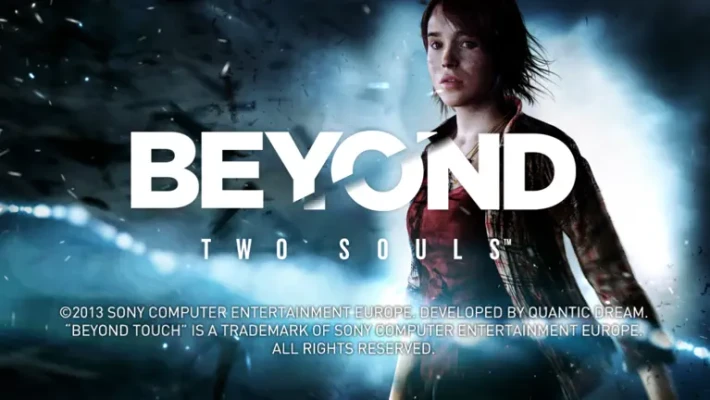
BEYOND Touch is a companion application from PlayStation Mobile that turns an iOS device into a touchscreen controller for BEYOND: Two Souls.
Instead of using a DualShock controller, players can interact with the game through a simplified touch interface on their phone or tablet. The application connects to the PlayStation system over the same Wi-Fi network and then provides the controls needed to play the adventure.
This makes the app particularly interesting for people who want to experience Beyond: Two Souls without relying exclusively on a traditional gamepad.
BEYOND Touch Gameplay Explained
Because BEYOND Touch is a controller rather than a game, its "gameplay" comes from Beyond: Two Souls.
The underlying adventure follows Jodie Holmes, a young woman connected to an invisible supernatural entity called Aiden. The story moves through different periods of Jodie's life, combining cinematic storytelling with exploration, interactive scenes, action sequences, puzzles, and player decisions.
BEYOND Touch provides the touchscreen controls needed to interact with those moments.
How BEYOND Touch Works
Getting started is straightforward:
- Install BEYOND Touch on your compatible iPhone or iPad.
- Make sure your PlayStation system and iOS device use the same Wi-Fi network.
- Start Beyond: Two Souls on the console.
- Select the appropriate controller option.
- Open BEYOND Touch.
- Connect the app to the PlayStation system.
- Use the touchscreen interface to control the game.
The official PlayStation information specifically states that the console and iOS device need to be connected to the same Wi-Fi network.
Touchscreen Controls
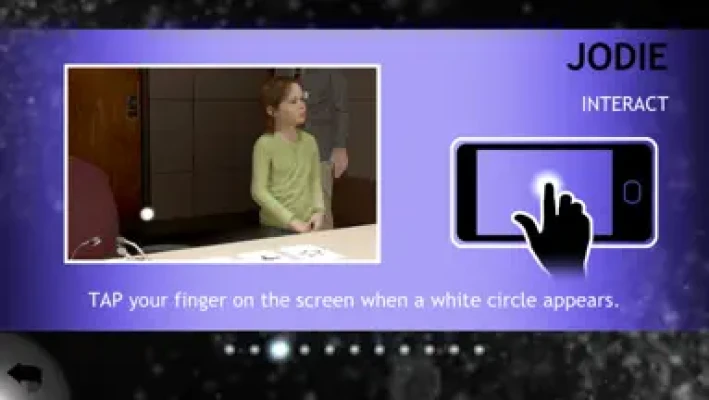
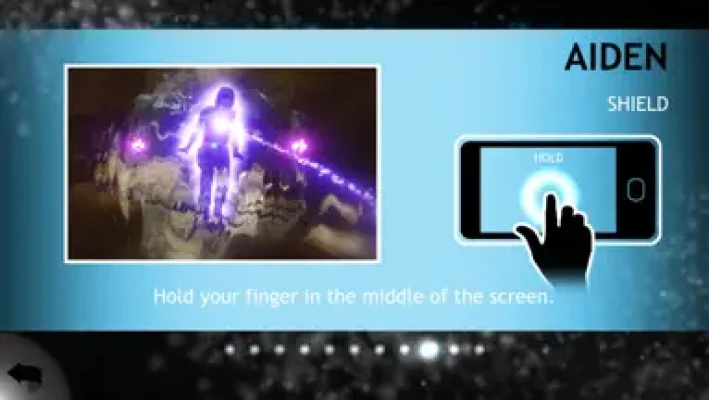
The app replaces traditional controller inputs with touch-based interactions.
Depending on the situation in Beyond: Two Souls, you can use touchscreen gestures and virtual controls to move Jodie, interact with objects, look around environments, and perform actions.
The simplified interface was deliberately designed to make the game easier to approach for players who may not be familiar with console controllers.
Solo Mode
In Solo Mode, one player controls the adventure.
The player can control both Jodie and Aiden as required throughout the story.
BEYOND Touch provides an alternative to using a traditional DualShock controller, allowing the entire experience to be controlled through the mobile device.
Duo Mode
BEYOND Touch also supports Duo Mode, which is one of its most interesting features.
Two people can participate in the adventure using different controller combinations. For example, one person can use a traditional PlayStation controller while another uses an iPhone or iPad. PlayStation also described configurations involving two touch devices.
This allows a second player to participate without necessarily needing another physical controller.
Playing as Jodie and Aiden
Beyond: Two Souls is built around the unusual relationship between Jodie and Aiden.
Jodie is the primary human character, while Aiden is an invisible entity connected to her.
The game switches between their abilities, making their relationship an important part of exploration, puzzles, action sequences, and story progression.
BEYOND Touch allows these interactions to be performed through a mobile touchscreen interface.
Beyond: Two Souls Story
The adventure follows Jodie Holmes through approximately 15 years of her life, taking her through a wide variety of environments and situations.
The story combines psychological drama, supernatural elements, cinematic scenes, exploration, action, and interactive choices.
The original game stars Ellen Page and Willem Dafoe, with the narrative created under the direction of David Cage and developed by Quantic Dream.
Cinematic Adventure Experience
Unlike a conventional action game, Beyond: Two Souls places considerable emphasis on storytelling and cinematic presentation.
Players move through scenes, interact with characters and objects, respond to events, and make choices that contribute to the experience.
BEYOND Touch complements this design by replacing complex physical controller inputs with a more accessible touchscreen interface.
Accessibility for New Console Players
One of the original goals of BEYOND Touch was accessibility for people who weren't comfortable using a traditional PlayStation controller.
PlayStation explained that Quantic Dream designed the application to help non-console gamers participate in Beyond: Two Souls.
That makes BEYOND Touch more than a novelty controller app. It provides an alternative input method specifically designed around the game's cinematic interaction system.
Key Features
- Free companion controller application
- Designed for Beyond: Two Souls
- iPhone and iPad support
- Touchscreen controls
- PlayStation console connectivity
- Same-Wi-Fi connection
- Solo Mode support
- Duo Mode support
- Simplified interface
- Designed for players unfamiliar with traditional controllers
- Supports Jodie and Aiden gameplay
- Available in numerous languages
- No separate game installation required on the mobile device
The current App Store listing identifies the app as 52.2 MB, free, designed for iPad, and available on iPhone and iPad.
BEYOND Touch vs a Traditional Controller
| Feature | BEYOND Touch | Traditional Controller |
|---|---|---|
| Input | Touchscreen | Physical buttons/sticks |
| Device | iPhone/iPad | PlayStation controller |
| Wireless connection | Same Wi-Fi network | Console wireless connection |
| Solo play | Yes | Yes |
| Duo play | Yes | Yes |
| Physical buttons | No | Yes |
| Designed for new players | Yes | Depends on familiarity |
| Requires Beyond: Two Souls | Yes | Yes |
The key advantage of BEYOND Touch is convenience and accessibility rather than replacing a traditional controller in every situation.
Beginner's Guide
Keep Both Devices on the Same Wi-Fi
The most important setup requirement is making sure the PlayStation system and iPhone or iPad are connected to the same Wi-Fi network.
Start the Console Game First
Launch Beyond: Two Souls and select the appropriate controller setup before connecting the mobile application.
Follow the Touch Prompts
The mobile interface provides the controls needed for the current situation.
Use the Tutorial Help
The app includes access to control guidance so new players can learn how the touchscreen interactions work.
Keep Your Device Charged
Since the phone or tablet functions as a controller throughout the session, keeping it adequately charged is important.
Tips for a Better Experience
Use a stable Wi-Fi connection:
Because the mobile controller communicates with the console over Wi-Fi, a stable local network can help avoid connection problems.
Keep the device within comfortable reach:
The phone becomes your controller, so positioning it comfortably makes longer story sessions easier.
Use Duo Mode with a friend:
If you want to experience the game cooperatively, Duo Mode lets players share control through different controller combinations.
Don't expect the iPhone to run the game:
BEYOND Touch transmits controller input. The actual Beyond: Two Souls game runs on the PlayStation system.
Technical Details
| Detail | Information |
|---|---|
| App | BEYOND Touch™ |
| Developer/Seller | PlayStation Mobile Inc. |
| Original Developer | Quantic Dream |
| Category | Adventure |
| Price | Free |
| App Size | 52.2 MB |
| Devices | iPhone, iPad |
| Original Compatibility | iOS 6.0 or later |
| Age Rating | 4+ |
| Languages | English + 18 additional languages |
| Main Purpose | Controller companion app |
| Required Game | Beyond: Two Souls |
| Console Connection | Same Wi-Fi network |
The compatibility information comes from the current App Store listing, which retains the app's original legacy iOS requirements.
Languages
The application supports a wide selection of languages, including:
- English
- Arabic
- French
- German
- Italian
- Spanish
- Portuguese
- Dutch
- Swedish
- Danish
- Norwegian
- Finnish
- Russian
- Polish
- Japanese
- Korean
- Chinese
- Greek
- Czech
- Hungarian
- Croatian
- Turkish
The App Store currently lists English plus 18 additional languages in the application information.
Is BEYOND Touch a Game?
No.
This is the most important point for visitors searching for the app.
BEYOND Touch is a controller application, not a standalone version of Beyond: Two Souls. The App Store explicitly states that the application acts only as a controller and that the game must be purchased separately.
Do You Need Beyond: Two Souls?
Yes.
To use BEYOND Touch for its intended purpose, you need a compatible PlayStation system and a copy of Beyond: Two Souls.
Can You Play Beyond: Two Souls on an iPhone With BEYOND Touch?
Not directly.
The iPhone or iPad does not run the full game through BEYOND Touch. Instead, it functions as a controller for the game running on the PlayStation system.
Does BEYOND Touch Work Without a PlayStation?
No.
The application is specifically designed to connect to and control Beyond: Two Souls on a compatible PlayStation system. It isn't a standalone mobile game.
Can Two People Use BEYOND Touch?
Yes.
Duo Mode allows two players to participate, and PlayStation described several possible controller combinations, including a traditional controller with a touchscreen device or two touchscreen devices.
Can BEYOND Touch Replace a DualShock Controller?
For supported Beyond: Two Souls gameplay, yes. The application was specifically designed to replace the wireless controller with touch controls on an iOS device.
However, it should not be considered a universal replacement for a PlayStation controller because it is designed specifically around Beyond: Two Souls.
App Store Rating and Player Feedback
The current U.S. App Store listing shows 3.4 out of 5 stars from 226 ratings.
Some reviews praise the app for doing exactly what it was designed to do, while others appear to misunderstand that BEYOND Touch is a controller rather than a standalone game. The distinction is important when evaluating the app.
Updates and Version History
The App Store's listed version history is largely historical. Version 1.04 was released in December 2015 and added iOS 7 support and an updated icon. The listing also notes an update that improved functionality and allowed use with a PS4 system with a Sony Entertainment Network account.
Because the application is an older companion tool, users should check current PlayStation and App Store compatibility before relying on it with modern hardware.
Pros and Cons
Pros
- Free to download
- Turns an iPhone or iPad into a controller
- Simple touchscreen interface
- Useful for players unfamiliar with DualShock controls
- Supports Solo Mode
- Supports Duo Mode
- Can make cooperative play easier to set up
- Lightweight 52.2 MB application
- Official PlayStation companion application
Cons
- Not a standalone game
- Requires Beyond: Two Souls
- Requires a compatible PlayStation system
- Requires a local Wi-Fi connection
- Designed for a specific game rather than general PlayStation use
- Legacy application with an old listed iOS requirement
- Modern device and console compatibility should be verified before use
Player Experience
BEYOND Touch is best understood as a clever companion feature rather than a conventional mobile gaming app.
Its greatest benefit is removing the barrier of a traditional controller. Someone who rarely plays console games can pick up an iPhone or iPad and use familiar touchscreen interactions to participate in Beyond: Two Souls.
That was also the original purpose behind the application: PlayStation described it as a way to make the adventure more accessible to people who were less comfortable with a DualShock controller.
Expert Rating
Overall Rating: 7.8/10
| Category | Rating |
|---|---|
| Ease of Use | 8.5/10 |
| Touch Controls | 8.0/10 |
| Accessibility | 9.0/10 |
| Connection Setup | 7.5/10 |
| Duo Mode | 8.5/10 |
| Standalone Value | 2.0/10 |
| Companion App Value | 8.5/10 |
| Overall | 7.8/10 |
The rating reflects the app specifically as a companion controller, not as an independent game.
<iframe width="560" height="315" src="https://www.youtube.com/embed/9gEkmUqBHMs?si=hnOTACTEVIetTMkz" title="YouTube video player" frameborder="0" allow="accelerometer; autoplay; clipboard-write; encrypted-media; gyroscope; picture-in-picture; web-share" referrerpolicy="strict-origin-when-cross-origin" allowfullscreen></iframe>
BEYOND Touch™ is a unique companion application built around one very specific purpose: allowing an iPhone or iPad to control Beyond: Two Souls.
It should not be marketed or described as an iPhone version of the game. Instead, its value comes from turning a touchscreen device into an alternative controller for the PlayStation adventure.
For players who already own Beyond: Two Souls and want a simpler touchscreen control method, BEYOND Touch can be a useful addition. Its Duo Mode also makes it possible for another player to participate using a mobile device alongside a traditional controller.
The biggest limitation is equally clear: you need the compatible PlayStation game and console to actually play. The mobile application itself contains no standalone Beyond: Two Souls adventure.
Frequently Asked Questions
Is BEYOND Touch free?
Yes. The U.S. App Store lists BEYOND Touch as a free application.
Is BEYOND Touch the full Beyond: Two Souls game?
No. It is only a controller application. The game must be purchased separately.
Can I play Beyond: Two Souls directly on my iPhone?
No. BEYOND Touch uses the iPhone as a controller while the actual game runs on the compatible PlayStation system.
Does BEYOND Touch work with iPad?
Yes. The current App Store listing identifies the application as designed for iPad as well as supporting iPhone.
Does BEYOND Touch support two players?
Yes. The app can be used for Duo Mode, including configurations where players use different controller types.
Does BEYOND Touch require Wi-Fi?
Yes. The iOS device and PlayStation system need to be connected to the same Wi-Fi network for the controller connection.
Who developed Beyond: Two Souls?
Beyond: Two Souls was developed by Quantic Dream. The BEYOND Touch application is listed on the App Store under PlayStation Mobile Inc.
Can I use BEYOND Touch as a controller for other PlayStation games?
No. It is specifically designed for Beyond: Two Souls rather than being a general-purpose PlayStation controller.
What is Aiden in Beyond: Two Souls?
Aiden is the invisible entity connected to Jodie and is an important part of the game's story and interactive gameplay.
Is BEYOND Touch still useful?
It can be useful if you have the required compatible game and console and want to use touchscreen controls, but because it is an older companion application, checking current compatibility is recommended before relying on it.
Official App Store listing: BEYOND Touch on the App Store
Official PlayStation information: PlayStation – BEYOND Touch and Beyond: Two Souls
Rate the Game
User Reviews








Popular Games



















 Android
 iOS
iOS Windows
 Xbox
Xbox