
Latest Version
August 12, 2025
Tran Thi Giang
Casual
iOS
0
Report a Problem
More About :game
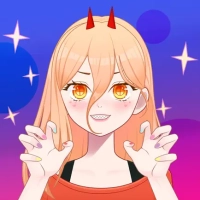
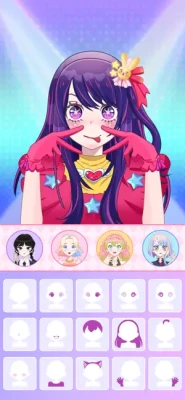
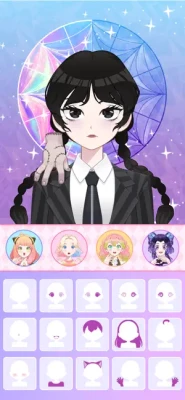
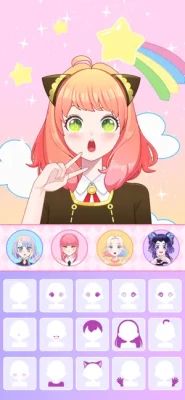
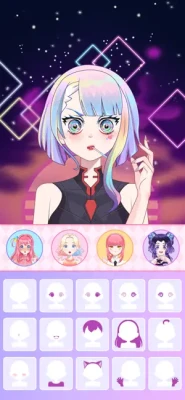
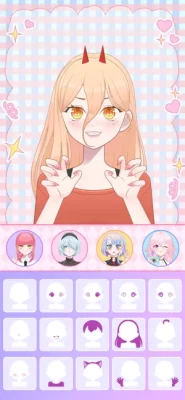
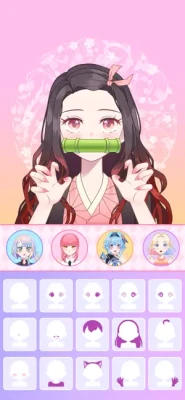
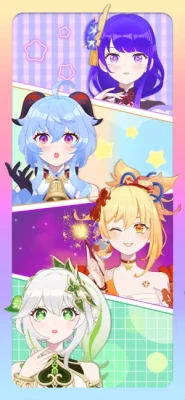
You can customize skin tone, hairstyle, hair color, eyes, expressions, dresses and decorative accessories. The game also supports different themes and full-body anime characters with multiple poses and facial features.
The game has two main modes: Doll Maker and PK. Doll Maker is focused on creating characters, while PK introduces styling challenges where players can create looks and compete in themed fashion challenges.
The App Store currently lists the game as free with in-app purchases, in the Casual category, with a 4+ age rating. It supports iPhone and iPad and requires iOS 13.0 or later.
Game Information
| Category | Details |
|---|---|
| Game | Anime Avatar Maker ASMR |
| Developer | Tran Thi Giang |
| Genre | Casual / Dress-Up / Avatar Maker |
| Main Modes | Doll Maker and PK |
| Platform | iPhone, iPad |
| Size | 210.8 MB |
| Age Rating | 4+ |
| Language | English |
| Compatibility | iOS 13.0+ |
| Monetization | Free + In-App Purchases |
| Current US Rating | 4.6/5 |
| US Ratings Count | 731 |
The App Store listing also identifies the game as designed for iPad and notes that it is not verified for macOS.
What Can You Create?
The central attraction is character customization.
You can combine different visual elements to create characters inspired by several anime fashion styles, including cute anime girls, maid-inspired outfits, sweet lolita looks and gothic doll designs.
The available customization categories include:
- Skin tones
- Hairstyles
- Hair colors
- Eye styles
- Facial expressions
- Dresses
- Decorative accessories
- Full-body appearances
- Poses
- Anime backgrounds
- Different themes
The large number of combinations makes experimentation one of the most important parts of the game.
Doll Maker Mode
Build Your Character From the Ground Up
Doll Maker is the main creative mode.
Rather than selecting a finished character and making a few changes, you can gradually build an anime doll by combining individual appearance categories.
A good creation process is:
Skin → Hair → Face → Outfit → Accessories → Pose → Background
Starting with the basic appearance makes it easier to build a coherent style instead of choosing random items one after another.
Choose a Theme First
Before customizing everything, decide what type of character you want to create.
For example:
Cute Anime Girl
Use soft colors, a friendly expression, a playful hairstyle and lighter accessories.
Gothic Doll
Choose darker clothing, dramatic hair, stronger facial details and matching accessories.
Sweet Lolita
Focus on decorative dresses, coordinated accessories and a softer hairstyle.
Maid Character
Build the outfit around a maid-inspired theme, then select hair, facial expression and accessories that complement it.
Having a theme makes the final avatar look more intentional.
Full Anime Avatar Maker ASMR Strategy Guide
Although this is primarily a creative game, there are useful strategies for building better characters and performing well in the styling challenges.
1. Start With the Character Concept
Don't immediately choose random clothing.
First decide:
Who is this character?
Is she:
- Cute?
- Elegant?
- Gothic?
- Casual?
- Fantasy-inspired?
- Maid-themed?
- Playful?
- Mysterious?
Once you have the concept, selecting the remaining items becomes much easier.
2. Match Hair With the Outfit
Hair is one of the most noticeable parts of an anime avatar.
A complicated outfit usually works better with a relatively clean hairstyle, while a simple outfit can support a more dramatic hairstyle.
Try to create visual balance.
For example:
Detailed outfit + simple hair
or
Simple outfit + distinctive hair
This prevents the character from looking overloaded.
3. Coordinate Colors
You don't need every item to have the same color.
Instead, choose a small palette.
A useful approach is:
Primary color + secondary color + accent
For example, a character might use:
- Black as the primary color
- White as the secondary color
- Pink as the accent
Then repeat those colors subtly through the hair, clothing and accessories.
4. Don't Overuse Accessories
Accessories can improve an outfit, but too many competing items can make the character look cluttered.
Start with one major accessory.
Then add smaller details only if they improve the overall design.
5. Choose the Expression Carefully
The face should match the personality of the character.
A cheerful outfit may work well with a happy expression.
A gothic character might suit a more serious or mysterious expression.
An elegant character may benefit from a calm expression.
The expression can completely change how the same outfit feels.
How to Create Better Anime Avatars
Step 1 – Pick the Skin Tone
Choose the skin tone that fits your intended character design.
Don't think of it as a purely cosmetic decision. It also affects how the hair, eyes and clothing colors appear together.
Step 2 – Choose Hair
Select the hairstyle before the outfit.
This gives you a visual foundation for the character.
Step 3 – Select Hair Color
Use a color that supports the character's theme.
Natural colors can create a more conventional anime appearance, while brighter colors can produce a fantasy-inspired character.
Step 4 – Design the Face
Choose eyes and expression that match the personality.
The eyes are particularly important because they are one of the first things viewers notice.
Step 5 – Build the Outfit
Choose the main clothing item according to your theme.
Don't worry about accessories yet.
Step 6 – Add Decorations
Now add jewelry, hair accessories and other decorative elements.
Keep checking whether each item actually improves the design.
Step 7 – Select the Pose
The game supports full-body characters and different poses.
Choose a pose that matches the character's personality.
Step 8 – Choose the Background
The background should support the character rather than overpower her.
A simple background can make a detailed avatar stand out.
PK Mode Strategy
PK mode adds a competitive styling element to the game.
The App Store describes PK as a mode where players create unique looks for styling challenges and compete with others.
1. Follow the Theme
If the challenge gives you a particular theme, make it immediately recognizable.
Don't create a beautiful character that completely ignores the requested style.
2. Prioritize the Main Outfit
When time is limited, make sure the clothing clearly communicates the theme before spending too much time on small accessories.
3. Create a Consistent Look
The hair, outfit, eyes and accessories should look like they belong to the same character.
Consistency can make a design feel much more complete.
4. Use Accessories as Accents
Accessories should support your concept.
Don't add every available item simply because it is available.
5. Check the Whole Character
Before finalizing your entry, look at the complete avatar.
Ask:
- Does the outfit match the theme?
- Do the colors work together?
- Does the expression fit?
- Are the accessories balanced?
- Does the pose suit the design?
Advanced PK Tips
Think in Silhouette
A strong outfit should be recognizable even before you examine every small detail.
Distinctive hair, a strong outfit shape or an unusual accessory can give the avatar a memorable silhouette.
Use Contrast
Contrast can make important details stand out.
Examples include:
- Dark outfit + bright hair
- Light outfit + dark accessories
- Simple background + detailed character
- Bright accent + neutral clothing
Avoid Color Overload
Using too many unrelated colors can make an avatar look messy.
A controlled palette generally makes the design easier to understand.
Make the Theme Obvious
If the challenge is based around a particular concept, make the concept visible immediately.
For example, a gothic-themed character should look gothic before the viewer notices the smaller details.
Saving and Sharing Your Creations
The App Store listing specifically encourages players to take photos and save their creations to their phone.
This makes the game useful not only as a dress-up experience but also as a simple anime avatar creation tool.
A good workflow is:
Create → pose → select background → take photo → save
You can create several variations of the same character and compare them afterward.
Building a Character Collection
Instead of creating random avatars, try building a collection around themes.
For example:
Collection 1 – Anime School
Create several school-inspired characters with different personalities.
Collection 2 – Gothic
Experiment with dark clothing, dramatic hair and accessories.
Collection 3 – Fantasy
Use unusual colors and more imaginative styling.
Collection 4 – Cute
Focus on bright, cheerful and playful designs.
Collection 5 – Elegant
Use coordinated clothing, refined expressions and simple backgrounds.
Creating themed collections gives the game more replay value.
Common Mistakes to Avoid
Choosing Clothes Before a Theme
Without a concept, your character can become a collection of unrelated items.
Using Too Many Accessories
More decorations don't automatically create a better design.
Ignoring the Face
A great outfit can still look wrong if the expression doesn't match the character.
Using Random Colors
Try to keep a consistent palette.
Ignoring the Background
A background that clashes with the character can weaken the final image.
Changing Everything at Once
When improving an avatar, change one category at a time.
This makes it easier to understand what actually improved the design.
How to Make Better Anime Avatars
A useful design formula is:
Theme + Color Palette + Outfit + Hair + Expression + Accessories + Pose
For example:
Gothic + black/red + dark dress + long hair + serious expression + elegant accessory + confident pose
This approach creates a character with a clear identity rather than simply combining random cosmetics.
Graphics and Presentation
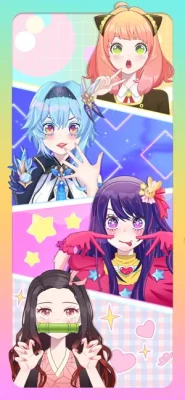
Anime Avatar Maker ASMR uses colorful anime-style artwork with arranged background scenes and full-body character presentation.
The App Store specifically highlights beautiful graphic art, high-quality sound and organized anime background scenes.
The visual presentation is therefore a major part of the experience rather than something secondary to gameplay.
Sound and ASMR Elements
Despite the avatar-creation focus, the game also incorporates high-quality sound and an ASMR-oriented presentation.
This gives the dress-up process a more relaxing feel, particularly when players are creating characters rather than competing in PK challenges.
Progression and Unlocking Items
The game includes free and premium content, with in-app purchases listed on the App Store.
The US storefront currently lists purchases including a Remove Ads Bundle, Starter Packs, Gem Packs, Diamond Pack, Premium Pack and Legendary Pack.
Earlier version history also shows that new items and levels were added during previous updates.
A practical approach is to first experiment with the items available to you rather than immediately trying to acquire everything.
Ads and Player Feedback
The App Store version history shows that the developer previously reduced advertisements and removed app-open ads in version 1.8.
Some user reviews have nevertheless mentioned advertisements as a frustration, while other reviews praise the game's costumes, customization and PK battles. These are individual user experiences rather than universal conclusions.
The current US App Store listing shows a 4.6/5 rating from 731 ratings, while the Saudi storefront currently displays different rating totals, illustrating that App Store ratings can vary by storefront.
Is Anime Avatar Maker ASMR Good for Casual Players?
The game is primarily aimed at players who enjoy anime character creation, fashion customization and creative dress-up.
It is particularly suited to short sessions because you can create an avatar, experiment with a new outfit, participate in a styling challenge or save a finished character without needing to complete a long campaign.
Players looking for combat, exploration or traditional story progression should expect a very different experience.
Honest Gameplay Feedback
The strongest part of Anime Avatar Maker ASMR is its creative freedom. There are enough categories—hair, eyes, clothing, accessories, poses and backgrounds—to let players create noticeably different characters.
The PK mode also gives the customization system a competitive purpose instead of making every session purely about personal creation.
The main limitation is that the experience is centered specifically on anime girl avatar creation. The App Store description and user feedback indicate that character creation is focused on female anime avatars.
For players who enjoy anime dress-up and character design, that focused approach may be exactly what they are looking for.
Pros and Cons
Pros
- Extensive anime character customization
- Multiple hairstyles and hair colors
- Different eye styles and expressions
- Large selection of dresses and accessories
- Doll Maker mode
- PK styling challenges
- Full-body characters and poses
- Anime background scenes
- Save creations to the phone
- Free to download
- Supports iPhone and iPad
Cons
- Character creation focuses on anime girl avatars
- Contains advertising
- Some customization content is tied to premium currency or purchases
- Some players have reported ad-related frustrations
- No traditional action or adventure campaign
Frequently Asked Questions
What is Anime Avatar Maker ASMR?
It is a casual anime avatar and dress-up game where players create customized anime dolls using hairstyles, clothing, facial features, accessories, poses and backgrounds.
What modes are available?
The game has two main modes: Doll Maker and PK.
Can I customize the hairstyle?
Yes. Players can choose from different hairstyles and hair colors.
Can I customize the eyes?
Yes. Eye styles and facial expressions are among the available customization options.
Can I add accessories?
Yes. The game includes numerous decorative items and accessories for customizing anime characters.
Can I save my anime avatars?
Yes. The App Store description specifically says players can take a photo and save their creations to their phone.
Is Anime Avatar Maker ASMR free?
The app is listed as free on the App Store but includes in-app purchases.
What devices support the game?
The current App Store listing supports iPhone and iPad and requires iOS 13.0 or later.
What is the age rating?
The US App Store currently lists the game as 4+.
Final Tips for Creating Better Characters
The best creations usually come from coordination rather than simply using the most items.
Start with a clear theme, choose a small color palette, build the outfit around that concept, then use hair, eyes, accessories and poses to reinforce the character's personality.
For PK challenges, make the theme obvious first and worry about tiny decorative details afterward.
For personal creations, experiment freely. Try unusual combinations, save your favorite designs and build themed collections of characters.
The basic formula is simple:
Choose a theme → build the outfit → match the hair and face → add accessories → select the pose → finish with the right background.
That approach gives Anime Avatar Maker ASMR much more creative depth than simply selecting random clothes.
Rate the Game
User Reviews



Popular Games



















 Android
 iOS
iOS Windows
 Xbox
Xbox