
Latest Version
November 11, 2024
Noodlecake Studios Inc
Sports
iOS
0
Report a Problem
More About :game
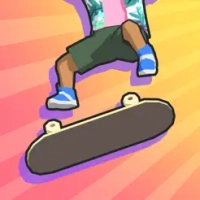
Perfect Grind brings arcade-style skateboarding to iPhone and iPad with a control system designed specifically for touchscreen play. Instead of filling the screen with virtual buttons, the game uses gestures and finger movements to perform skating tricks.
Developed by Noodlecake Studios, Perfect Grind combines accessible controls with trick-based gameplay, challenges, customization and creative park building. Its colorful, stylized presentation gives the game a playful personality, while the trick system encourages players to experiment with different lines and combos.
The game is particularly appealing to players who enjoy casual skateboarding games but still want room to improve their timing, movement and scoring.
Gameplay Overview
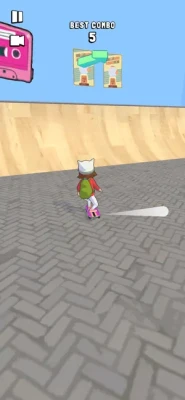
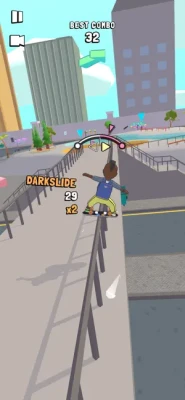
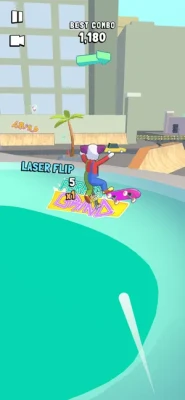
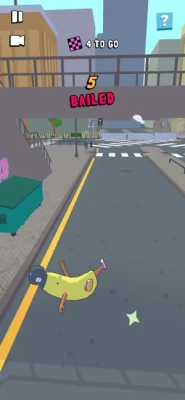
The main attraction in Perfect Grind is its touchscreen skating system. Players guide their skater through skate parks while using swipes and gestures to perform flips, grinds and other tricks.
The controls are intentionally straightforward, allowing beginners to start skating quickly without learning a complicated button layout. At the same time, mastering combinations and maintaining momentum gives experienced players something to work toward.
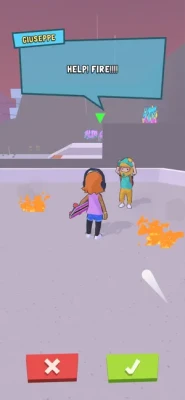
Challenges provide additional goals beyond simply riding around the park. Completing objectives and achieving strong trick scores can help unlock additional content and give each skating session more purpose.
One-Finger Skateboarding Controls
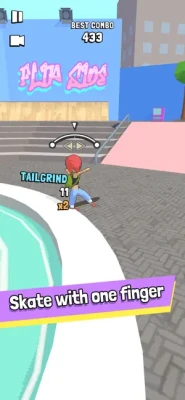
Perfect Grind's biggest gameplay feature is its one-finger control system.
Instead of traditional on-screen controller buttons, the game relies on touch gestures. This keeps the display relatively clean and allows players to focus on the skater, ramps, rails and upcoming obstacles.
The system is easy to understand but rewards practice. Better timing and more controlled gestures can help you land tricks successfully and create longer combinations.
Tricks, Flips and Grinds
Skateboarding in Perfect Grind is centered around building stylish trick sequences.
Players can:
- Perform flip tricks
- Grind rails and other surfaces
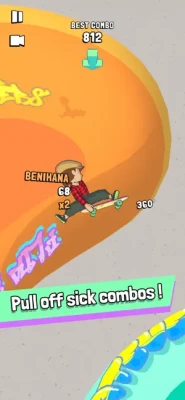
- Connect tricks into longer combinations
- Use ramps and skatepark structures to gain height
- Practice lines repeatedly to improve their scores
- Experiment with different routes through a park
The most satisfying moments come from linking several moves together instead of treating each trick as an isolated action.
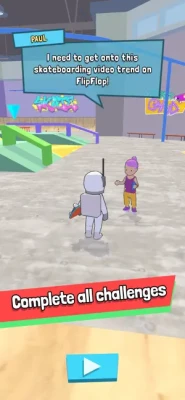
Challenges and Missions
Perfect Grind includes challenges designed to give players specific objectives while skating.
These challenges can encourage you to explore different parts of a park, perform particular tricks, reach score targets or interact with elements of the environment.
The challenge structure also gives players a reason to revisit familiar locations and improve their skating rather than simply completing each level once.
Skate Park Exploration
The game places skating at the center of its environments, giving players room to discover ramps, rails and other objects that can become part of a trick line.
Exploration is important because the best route is not always the most obvious one. A player looking for higher scores can experiment with different combinations of jumps, grinds and transitions.
This makes each park feel like a space for experimentation rather than simply a path from one objective to another.
Create Your Own Skate Park
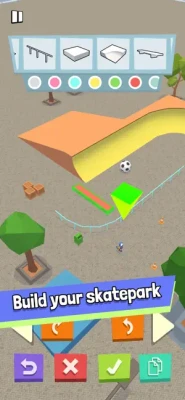
One of Perfect Grind's standout features is its built-in park creator.
Players can construct their own skate areas using more than 50 different prefabricated pieces. These tools allow you to create unusual layouts, add obstacles and design lines around your preferred skating style.
Once a custom park is created, it can be shared with other players, turning the park editor into more than a simple building tool.
It gives creative players an opportunity to design their own skating playground and experiment with layouts that may not appear in the standard game.
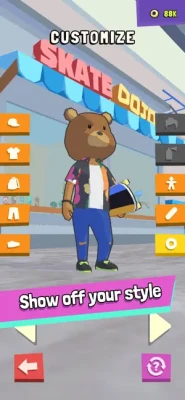
Character Customization
Perfect Grind also gives players ways to personalize their skater.
A variety of characters, outfits and skateboarding equipment can be unlocked or selected, allowing players to give their skater a distinctive appearance.
The customization system adds personality to the game and provides another reason to continue completing challenges and improving your performance.
The App Store has also documented additional skaters and new decks being added in previous updates.
Skateboards and Decks
Your skateboard is another part of the game's customization experience.
Different decks can be collected and used to change the appearance of your skater. Previous updates introduced six new decks, expanding the available customization options.
For players who enjoy collecting cosmetic items, these additions provide another layer of progression beyond simply completing skating challenges.
Visual Style and Atmosphere
Perfect Grind uses a colorful, stylized visual presentation rather than attempting to deliver a realistic skateboarding simulation.
The playful character designs and vibrant environments fit the game's casual approach, making it approachable for younger players while still giving experienced arcade-skating fans plenty of room to experiment.
Apple has also highlighted the game's easy-to-use controls and playful presentation as part of its Editors' Choice coverage.
Progression System
Progression in Perfect Grind revolves around improving your skating, completing challenges and unlocking additional customization.
Rather than requiring players to master complicated controls immediately, the game allows them to start with basic movements and gradually become more comfortable with trick combinations.
As your understanding of the controls improves, you can focus on:
- Higher trick scores
- Longer combinations
- Better landings
- More efficient routes
- Additional challenges
- New characters
- New decks
- Custom park creation
This creates a natural skill-based progression loop.
How to Play Perfect Grind
Step 1: Learn the Touch Controls
Start by becoming comfortable with the game's swipe and touch gestures. Don't worry about achieving huge scores immediately.
Step 2: Practice Basic Tricks
Learn how your skater responds to different gestures and practice landing consistently.
Step 3: Use the Environment
Look for rails, ramps and other objects that can extend your trick combinations.
Step 4: Attempt Challenges
Once you're comfortable skating, begin completing objectives and missions to progress further.
Step 5: Experiment With Combos
Try connecting several tricks instead of immediately ending a run after one successful move.
Step 6: Customize Your Skater
Unlock and select different characters, outfits and decks to create your preferred skating style.
Step 7: Build a Custom Park
Use the park creator to design your own skatepark and share your creation with other players.
Beginner's Guide
New players should concentrate on control and consistency rather than chasing the biggest possible combo.
Start with simple tricks and learn how much movement is required for each gesture. Once you can land basic moves reliably, begin combining them.
A useful approach is to study the environment before attempting a difficult line. Rails, ramps and open spaces can each serve a different purpose in a combo.
Most importantly, don't rush. Perfect Grind is designed around quick-to-learn controls, but becoming highly consistent still takes practice.
Advanced Skating Tips
Plan Your Line
Look ahead before performing a trick. A successful landing is more valuable when it naturally sets up the next movement.
Use Rails Effectively
Grinding can help extend a combination and connect different parts of a park.
Practice Timing
Touch controls are easy to understand, but precise timing becomes increasingly important when attempting longer trick sequences.
Chase Better Scores
Once you understand the controls, replay familiar areas and experiment with alternative routes.
Build Parks Around Combos
When using the park editor, place ramps, rails and other objects in ways that create interesting transitions rather than simply filling every available space.
Game Modes and Activities
Perfect Grind focuses on several connected activities:
Skatepark Challenges
Complete objectives and improve your performance.
Free Skating
Explore the environment and practice tricks at your own pace.
Trick Scoring
Experiment with combinations and aim for higher scores.
Park Creation
Design custom skateparks using a large collection of prefabricated pieces.
Community Sharing
Share custom park creations and discover what other players have built.
Characters and Customization
The game features a collection of quirky and distinctive skaters rather than relying on a single protagonist.
Previous updates added characters including a Robot and a Maid, giving players more options for customizing their skating experience.
This playful approach fits the game's overall tone and makes customization feel like part of the fun rather than a purely cosmetic afterthought.
Game Features
- One-finger touchscreen skateboarding
- Flip tricks and grinding
- Touch-based trick controls
- Skatepark challenges
- Character customization
- Multiple skaters
- Different skateboard decks
- Custom skatepark creation
- More than 50 park-building prefabs
- Shareable custom parks
- Stylized visuals
- Game Center support and leaderboards
- iPhone and iPad support
Difficulty
Perfect Grind is easy to start but offers additional depth for players who want to improve their trick execution.
The basic controls can be learned quickly, while achieving better scores and creating longer combinations requires practice.
That makes the game suitable for casual sessions as well as players who enjoy score-chasing and mastering movement.
Is Perfect Grind Good for Casual Players?
Yes. The game's one-finger control system makes it particularly approachable for players who want a skateboarding game that can be picked up quickly.
You don't need to memorize a large collection of controller commands before you can start skating. The challenge comes naturally as you attempt more complicated tricks and combinations.
Is Perfect Grind Good for Skateboarding Fans?
Players who enjoy arcade skateboarding should find plenty to appreciate here.
The game emphasizes tricks, grinding, combos, challenges and park exploration rather than realistic simulation. Its touchscreen controls also give it an identity that feels specifically designed for mobile devices.
Offline and Single-Player Experience
Perfect Grind is primarily built around a single-player skateboarding experience. The Android listing identifies the game as single-player and offline, while the iOS version supports Game Center features including leaderboards.
This makes it a good choice for players who want to practice tricks or explore skateparks without relying on a traditional multiplayer experience.
Pros and Cons
Pros
- Simple one-finger controls
- Easy to pick up
- Satisfying trick-based gameplay
- Lots of customization
- Creative park-building system
- More than 50 construction pieces
- Challenges provide additional goals
- Colorful and friendly visual style
- Supports Game Center leaderboards
Cons
- Players looking for a realistic skateboarding simulator may find the arcade approach too simple
- Gesture-based controls can take time to master for more advanced tricks
- Players wanting extensive multiplayer features may prefer another game
Technical Information
Game: Perfect Grind
Developer: Noodlecake Studios Inc.
Publisher: Noodlecake
Genre: Sports / Skateboarding
Platform: iPhone, iPad
Age Rating: 4+
App Size: 285.5 MB
Required iOS: iOS 11.0 or later
Required iPadOS: iPadOS 11.0 or later
Languages: English, French, Japanese, Portuguese, Simplified Chinese and Spanish
In-App Purchases: Yes
Game Center: Supported
Full Version: $3.99 on the U.S. App Store at the time of research
Updates and New Content
The App Store version history shows several content and maintenance updates.
Among the notable additions were:
- Additional free challenges for the Skate Park
- Six new skateboard decks
- Two additional skaters
- Various bug fixes and performance improvements
The listed iOS version is 1.3.4, dated August 30, 2023.
Perfect Grind Ratings
The U.S. App Store currently lists Perfect Grind at 4.3 out of 5 from 298 ratings. Apple has also featured the game as an Editors' Choice title.
Ratings can change over time as additional players submit reviews.
Perfect Grind vs. Traditional Skateboarding Games
Traditional console skateboarding games often rely on numerous physical buttons and complex combinations.
Perfect Grind takes a different approach. Its controls are designed around touch gestures, making the experience more natural for phones and tablets.
The result is less about recreating a full console controller and more about creating a skateboarding system that works comfortably on a touchscreen.
Perfect Grind vs. Realistic Skateboarding Simulators
Perfect Grind is better described as an arcade skateboarding experience than a serious simulation.
The colorful presentation, simplified controls and focus on quick tricks make it more accessible than games that attempt to reproduce every technical aspect of real skateboarding.
If you want realism, a dedicated skateboarding simulator may be a better choice. If you want quick tricks, accessible controls and creative skateparks, Perfect Grind is a strong mobile alternative.
Similar Games
Players who enjoy Perfect Grind may also want to explore:
- Touchgrind Skate 2
- True Skate
- Skateboarding arcade games
- Mobile trick-based sports games
- Casual skatepark games
Each offers a different interpretation of mobile skateboarding, from physics-focused skating to more arcade-oriented trick systems.
Who Should Play Perfect Grind?
Perfect Grind is a good fit for:
- Skateboarding fans
- Arcade sports gamers
- Casual mobile players
- Players who enjoy trick-based games
- Fans of score-chasing gameplay
- Players who enjoy customization
- Creative players who like building levels
- Anyone looking for a skateboarding game designed around touch controls
Who Might Not Enjoy It?
The game may be less appealing to players who specifically want:
- A highly realistic skateboarding simulator
- A large competitive multiplayer mode
- Console-style controller controls
- A heavily story-driven sports game
Expert-Style Rating
Gameplay: 9/10
Controls: 9/10
Graphics: 8.5/10
Customization: 8.5/10
Replay Value: 8.5/10
Creativity: 9/10
Accessibility: 9/10
Overall: 8.8/10
Our Verdict
Perfect Grind succeeds because it understands what mobile skateboarding should feel like.
Rather than attempting to squeeze a traditional console control scheme onto a phone, it builds its gameplay around simple touch gestures. The result is a skateboarding experience that is approachable within minutes but still gives players reasons to practice, experiment and improve.
The combination of tricks, challenges, customization and user-created skateparks gives the game more personality than a basic arcade skating title.
Its park creator is especially appealing for creative players. With more than 50 prefabs and the ability to share creations, players aren't limited to the layouts supplied by the developers.
For anyone searching for a fun skateboarding game on iPhone or iPad, Perfect Grind is worth considering.
Final Summary
Perfect Grind is a colorful arcade skateboarding game from Noodlecake that puts touchscreen controls at the center of the experience. Players can perform flips and grinds, complete challenges, customize their skater, collect different decks and build their own skateparks.
Its simple one-finger controls make it approachable, while combo building, score chasing and park creation give experienced players reasons to keep skating.
If you're looking for a mobile skateboarding game, skatepark game, arcade skating game, or a creative iPhone skateboarding game, Perfect Grind offers a distinctive combination of accessible controls and creative gameplay.
Frequently Asked Questions
What is Perfect Grind?
Perfect Grind is a mobile skateboarding game developed by Noodlecake. It features one-finger controls, skating challenges, character customization and a custom skatepark creator.
Is Perfect Grind free?
The U.S. App Store lists Perfect Grind as free with in-app purchases. A Full Version purchase is listed at $3.99 and unlocks the complete game experience without ads.
Can you create your own skatepark in Perfect Grind?
Yes. The game includes a park creator with more than 50 different prefabs that can be combined to create custom skateparks and shared with others.
Does Perfect Grind have one-finger controls?
Yes. One-finger touch controls are one of the game's defining features, allowing players to perform flips, grinds and other tricks using gestures.
Is Perfect Grind available on iPhone?
Yes. Perfect Grind is available for iPhone and iPad and requires iOS 11.0 or later.
Does Perfect Grind support iPad?
Yes. The App Store lists Perfect Grind as designed for iPad and requires iPadOS 11.0 or later.
Does Perfect Grind have different characters?
Yes. Players can unlock and customize different skaters, and previous updates added additional characters including a Robot and a Maid.
Can you customize your skateboard?
Yes. Perfect Grind includes different decks, with six new decks added in one of its previous updates.
Does Perfect Grind have leaderboards?
Yes. The iOS version supports Game Center, including leaderboards.
Is Perfect Grind suitable for beginners?
Yes. Its one-finger control system is designed to make skating easy to learn. Players can start with basic tricks and gradually work toward more advanced combinations and higher scores.
Rate the Game
User Reviews






Popular Games



















 Android
 iOS
iOS Windows
 Xbox
Xbox