
Latest Version
November 22, 2026
Pixelvoid Games Ltd
Simulation
iOS
0
Report a Problem
More About :game
Space Flight: Rocket Simulator – Complete Game Overview
What Is Space Flight: Rocket Simulator?
Space Flight: Rocket Simulator is a space-themed simulation game designed for players who are fascinated by rockets, spacecraft, astronomy, and space exploration. It provides an interactive experience where players can discover how rockets are assembled, learn about different spacecraft components, and experience the excitement of preparing a vehicle for launch.
The game combines educational information with creative rocket-building activities. Instead of simply watching rockets travel through space, players can explore the construction process and understand how different components contribute to a successful mission.
Building a rocket requires attention to detail. Every part has a purpose, and assembling the components in the correct order is an important part of the experience.
Players can explore different rocket models, learn interesting facts about their development, and discover historical information about space missions. This makes the game appealing to both space enthusiasts and younger players who want to learn more about the technology behind space travel.
One of its interesting features is augmented reality support, which allows players to experience rocket models in their surroundings using a compatible device. This creates a more interactive connection between virtual spacecraft and the real world.
The game also includes customization opportunities, allowing players to personalize rocket models with creative stickers.
Whether you are interested in famous spacecraft, rocket construction, or discovering how space missions work, Space Flight: Rocket Simulator offers an entertaining way to explore these subjects.
Main Features of Space Flight: Rocket Simulator
Explore Different Rocket Models
The game features a collection of rocket models inspired by real-world space exploration.
Players can select different spacecraft and discover their designs, components, and historical backgrounds.
Each rocket offers an opportunity to learn more about the engineering and technology used in space exploration.
Exploring different models also helps players understand how rockets have evolved throughout the history of space travel.
Build Rockets Through Interactive Puzzles
Rocket assembly is one of the central activities.
Players must arrange different rocket components in the correct order to complete construction challenges.
These assembly puzzles encourage attention, observation, and logical thinking.
Understanding how individual parts fit together makes the building process more interesting and educational.
Experience Augmented Reality Rocket Models
Augmented reality is one of the game's standout features.
On compatible devices, players can use AR functionality to experience rocket models in their physical surroundings.
This creates an interactive way to examine spacecraft and appreciate their design.
It also makes learning about rockets more engaging by connecting digital models with the real environment.
Discover Historical Space Missions
Space Flight: Rocket Simulator introduces interesting information about rockets and their missions.
Players can explore historical details and learn about the development of different spacecraft.
This educational element makes the game more than a simple construction activity.
It provides an introduction to the achievements and technology that helped humanity explore space.
Learn About Rocket Components
Every rocket contains different components that contribute to its construction and operation.
The game provides information about individual parts and their functions.
Players can discover how various components work together to create a complete spacecraft.
This is particularly useful for beginners who want to understand the basic principles of rocket engineering.
Customize Rockets with Stickers
Personalization adds a creative element to the experience.
Players can use available AI-powered sticker customization features to give rocket models a distinctive appearance.
This allows you to experiment with different visual designs and create spacecraft that reflect your imagination.
Collect Achievements and Rewards
The game includes a rewards system that encourages players to explore its different activities.
Achievements provide additional goals and give players reasons to continue discovering rocket models and completing available challenges.
Explore Educational and Entertainment Content
The combination of assembly puzzles, rocket models, historical information, and interactive features creates a learning experience that does not feel like a traditional classroom lesson.
Players can discover new information while enjoying the process of building and customizing spacecraft.
Gameplay Mechanics and Important Systems
Rocket Selection
The first step is choosing a rocket model.
Different models provide opportunities to explore various spacecraft designs and discover their historical backgrounds.
Take time to examine the available information before beginning an assembly activity.
Understanding the rocket you are building makes the experience more meaningful.
Rocket Assembly
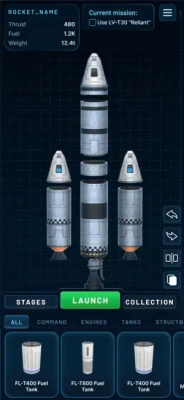
The assembly system challenges players to place components in the correct sequence.
Pay attention to the shape, position, and purpose of each part.
Following the correct construction order helps complete the rocket successfully.
Rocket Customization
Customization allows you to personalize your selected rocket using available stickers and creative elements.
Experiment with different designs while keeping the original spacecraft recognizable.
Historical Information
The educational sections provide details about rocket development and space missions.
Reading this information helps players understand why different rocket designs were created and how they contributed to space exploration.
Augmented Reality Mode
AR mode allows compatible devices to display virtual rocket models within real-world surroundings.
This feature provides another way to interact with the spacecraft and examine their appearance.
Some advanced features and expanded content may require a subscription.
Complete Strategy Guide for Space Flight: Rocket Simulator
Beginner Guide: How to Get Started
When starting Space Flight: Rocket Simulator, begin by exploring the available rocket models.
Do not rush through the selection process. Take time to examine the different spacecraft and read their descriptions.
This will help you understand what makes each model interesting.
Once you select a rocket, move on to the assembly activity.
Pay close attention to the construction instructions and the position of each component.
If you are unfamiliar with rocket terminology, use the educational information to understand the purpose of the parts.
The best beginner strategy is to learn gradually rather than attempting to complete every activity as quickly as possible.
Best Rocket Assembly Strategy
Successful rocket construction requires patience and careful observation.
Start by identifying the major components and understanding how they fit together.
Examine the available assembly instructions before placing parts.
Avoid randomly positioning components because their arrangement is important for completing the puzzle.
If you make a mistake, review the construction process and identify where the incorrect placement occurred.
Learning the assembly sequence will make future rocket-building challenges easier.
How to Understand Rocket Components
Understanding individual rocket components is one of the most valuable parts of the game.
Different parts have different purposes, and together they form a functional spacecraft.
Learn the names and basic functions of the components as you encounter them.
Pay attention to how the parts connect and how their positions contribute to the complete rocket structure.
Instead of memorizing everything immediately, focus on understanding one component at a time.
This approach makes the educational experience easier and more enjoyable.
How to Explore Different Rocket Models
Try to explore the available rocket collection instead of concentrating on a single spacecraft.
Different models can introduce you to different engineering approaches and historical missions.
Compare their shapes, component arrangements, and design characteristics.
Look for differences in their structures and consider why certain features might be necessary.
Reading the historical information associated with each model can make these comparisons even more interesting.
Best Strategy for Augmented Reality Mode
AR mode provides an opportunity to experience virtual rocket models in a real-world environment.
For the best experience, use a compatible device and choose a location with sufficient space and lighting.
Move your device carefully while examining the model.
Try viewing the rocket from different angles to appreciate its overall structure.
Pay attention to the proportions and individual sections.
If the model does not appear correctly, check your device's AR compatibility and camera permissions.
Remember that certain AR features may be limited depending on your subscription.
How to Customize Rockets Effectively
Rocket customization allows you to express your creativity.
Start with a clear visual idea before applying stickers.
Choose designs that complement the rocket's original appearance.
Avoid adding too many unrelated decorative elements because they can make the spacecraft look visually confusing.
Experiment with different combinations until you find a design that you like.
Customization is a creative activity, so there is room to explore different styles.
How to Complete Achievements
Achievements provide additional objectives beyond the basic rocket assembly activities.
Check the available achievement requirements and focus on activities that contribute to your progress.
Explore different rocket models, complete construction puzzles, and investigate the educational content.
Try to understand the requirements before beginning a challenge so that you can avoid unnecessary repetition.
Regularly checking your progress can help you identify activities you have not yet completed.
How to Make the Most of the Educational Content
One of the best ways to enjoy the game is to treat every rocket as a learning opportunity.
Read the information about each model and discover the historical missions associated with it.
Pay attention to how rocket engineering has changed over time.
Try to connect the information about individual components with the assembly activities.
This creates a more complete understanding of spacecraft construction.
Common Beginner Mistakes to Avoid
Rushing through rocket assembly is one of the most common mistakes.
Players may overlook important instructions and place components incorrectly.
Another mistake is ignoring the educational descriptions. These details explain the purpose of different rocket parts and make the experience more valuable.
Some players also focus entirely on customization without exploring the historical information and assembly challenges.
To enjoy the full experience, explore all the available activities rather than concentrating on only one feature.
Finally, remember that certain advanced features may require a subscription. Check the available access options before expecting every activity to be unlocked.
Advanced Tips and Tricks
Explore different rocket models to discover their unique designs.
Read the historical information before starting unfamiliar assembly puzzles.
Examine every component carefully before placing it.
Follow the correct construction sequence.
Learn the function of individual rocket parts.
Use AR mode on compatible devices to examine virtual spacecraft.
Experiment with different sticker combinations.
Complete available achievements to track your progress.
Compare rocket designs to understand their structural differences.
Take your time when solving difficult assembly challenges.
Explore the educational sections instead of skipping them.
Check subscription requirements before accessing premium activities.
Revisit previously explored rockets to improve your understanding of their construction.
Frequently Asked Questions
What is Space Flight: Rocket Simulator?
Space Flight: Rocket Simulator is an educational rocket simulation game that allows players to explore spacecraft models, complete rocket assembly puzzles, customize designs, and discover information about space exploration.
Can you build rockets in the game?
Yes. The game includes interactive assembly puzzles where players arrange rocket components in the correct order to complete different spacecraft models.
Does Space Flight: Rocket Simulator support augmented reality?
Yes. The game offers augmented reality functionality that allows compatible devices to display virtual rocket models in real-world surroundings.
Can you customize rocket designs?
Yes. Players can personalize rocket models using available sticker customization features.
Does the game include real historical rockets?
The game features rocket models inspired by space exploration and provides historical information about their development and missions.
Is Space Flight: Rocket Simulator educational?
Yes. It combines interactive construction activities with information about rocket components, spacecraft designs, and historical space missions.
Can children play Space Flight: Rocket Simulator?
The App Store lists the game with a 4+ age rating. Its educational rocket-building and space exploration activities can be interesting for younger players, although parents should review subscription and purchase options.
Is Space Flight: Rocket Simulator free?
The game is available to download with optional in-app purchases and subscription plans. Some rocket models, missions, AR features, and additional activities may require paid access.
Does the game require an internet connection?
Some features may require an internet connection, particularly content delivery and online functionality. Requirements can vary depending on the activity.
What makes Space Flight: Rocket Simulator different from other space games?
Its combination of rocket assembly puzzles, augmented reality, historical information, and spacecraft customization creates an educational experience focused on understanding rocket design rather than simply controlling a spacecraft.
Final Verdict
Space Flight: Rocket Simulator is an interesting choice for players who enjoy astronomy, spacecraft, rocket engineering, and interactive educational games.
Its biggest attraction is the opportunity to explore rocket construction through hands-on assembly puzzles while learning about the technology and history behind space exploration.
The different rocket models provide plenty of opportunities to discover spacecraft designs, while augmented reality makes the experience more interactive. Customization features also add a creative dimension for players who enjoy personalizing virtual objects.
Whether you are interested in learning about rocket components, exploring historical space missions, or experimenting with augmented reality, Space Flight: Rocket Simulator offers an entertaining introduction to the fascinating world of space technology.
It is particularly appealing to younger space enthusiasts and anyone who wants to combine creativity, discovery, and learning in one interactive experience.
Rate the Game
User Reviews










Popular Games

















 Android
 iOS
 Windows
 Xbox