
Latest Version
September 26, 2026
TINYSOFT
Strategy
iOS
0
Report a Problem
More About :game
Developed by TINYSOFT, Red Command: RTS is available on iPhone and iPad and requires iOS 15 or later. The App Store lists it as a free Strategy game with optional in-app purchases.
The central idea is straightforward: strengthen your war machine, make smart upgrade decisions, survive enemy pressure, and push through increasingly difficult missions. The official description specifically highlights fast real-time battles, upgraded generals, heavy weapons, defenses, and campaign progression.
What Is Red Command: RTS?
Red Command: RTS is a mobile war strategy game designed around quick tactical encounters. Rather than simply watching units fight, the game asks you to think about your army's strength, upgrades, timing, and battlefield pressure.
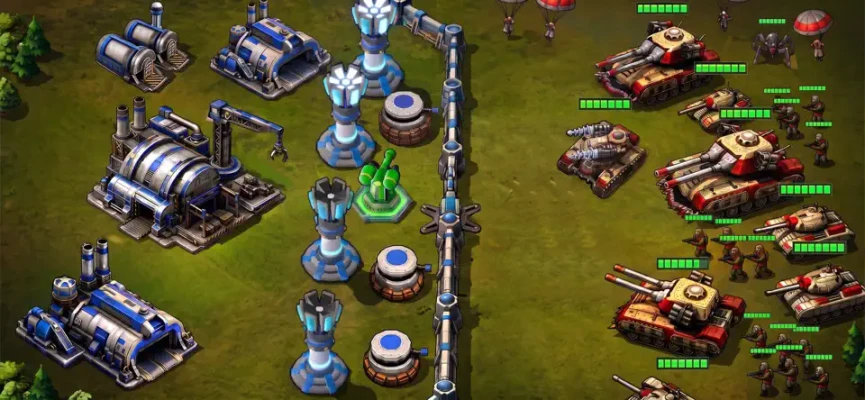
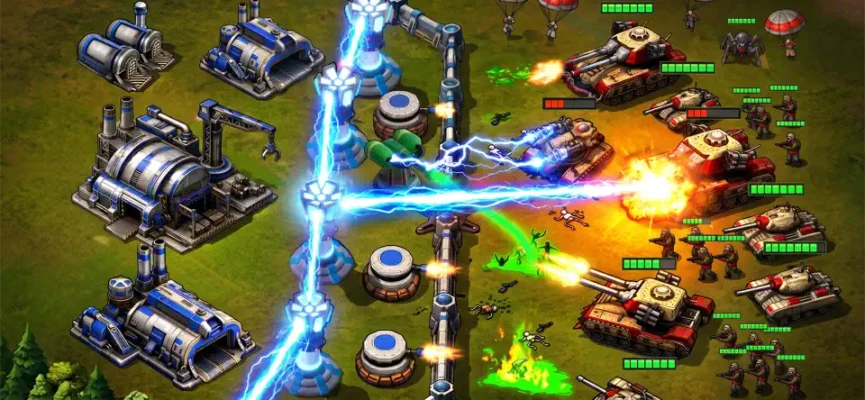
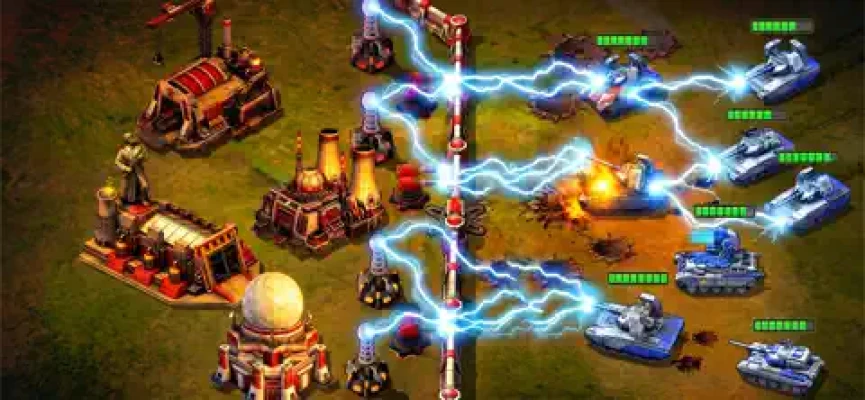
The setting uses a blue-versus-red conflict and a deliberately old-school military atmosphere. Tanks, soldiers, missiles, cannons, and heavy weapons create the battlefield action while generals and upgrades provide the progression system.
The Android version describes the game as a classic-inspired RTS with real-time tactical battles, generals, army progression, a campaign, and leaderboard progression.
Red Command RTS Gameplay
The basic gameplay loop revolves around entering a mission, dealing with enemy attacks, improving your forces, and preparing for the next challenge.
Battles can become progressively more demanding, which means simply repeating the same strategy is not always enough. Your army needs to become stronger as the campaign advances.
The main gameplay elements include:
- Real-time military battles
- Generals and commander upgrades
- Soldiers and tanks
- Missiles and cannons
- Heavy battlefield firepower
- Defensive improvements
- Campaign missions
- Increasing enemy pressure
- Army progression
- Competitive leaderboard progression
The App Store specifically describes missions as compact mobile battles where players strengthen their forces, reinforce their line, upgrade weapons, and attempt to stop enemy advances.
Generals and Army Upgrades
Generals are an important part of the progression system. Improving your commanders can make later missions more manageable and gives you additional reasons to invest in long-term progression.
Do not treat every upgrade as equally important.
A better approach is to identify the upgrades that directly improve the way you normally play. If your strategy depends heavily on defensive firepower, prioritize improvements that help you survive sustained enemy pressure. If you prefer aggressive pushes, concentrate on upgrades that allow your army to eliminate threats more quickly.
The Google Play description also emphasizes strengthening generals and improving the army as the campaign becomes harder.
Red Command RTS Strategy Guide
1. Do Not Rush Every Attack
One of the easiest mistakes in a real-time strategy game is assuming that attacking immediately is always the best option.
Use the opening moments of a mission to understand the battlefield. Pay attention to where enemy forces are coming from and how quickly the pressure develops.
If the enemy is sending repeated waves, surviving the first attacks can give you valuable time to strengthen your position.
2. Upgrade Before Difficulty Becomes a Wall
If you repeatedly lose the same mission, continuing to replay it without changing anything is rarely productive.
Instead:
- Review your recent upgrades.
- Improve your most useful general.
- Strengthen your primary weapons or defenses.
- Re-enter the mission.
- Compare how long your army survives.
- Adjust your strategy again if necessary.
The goal is to turn failed missions into information about what your army is missing.
3. Build Around Your Strongest Advantages
Avoid spreading resources too thinly across every available improvement.
A focused upgrade path usually makes more sense than having many partially developed options.
For example, if your strongest battlefield performance comes from heavy weapons, build around that strength instead of constantly switching between unrelated upgrades.
4. Protect Against Enemy Pressure
Red Command is designed around escalating enemy pressure, so defense matters even when the objective is to advance.
A good commander should always consider two questions:
How quickly can I damage the enemy?
and
How long can my forces survive if the enemy attack becomes stronger?
If you only answer the first question, difficult missions can overwhelm you.
5. Use Heavy Firepower Carefully
Tanks, missiles, cannons, and other heavy weapons are among the defining elements of Red Command's battlefield presentation.
Do not waste your strongest offensive tools simply because they are available.
When enemy pressure increases, save powerful attacks for moments when they can eliminate an important threat or prevent your defensive line from collapsing.
6. Learn Enemy Patterns
After playing a mission several times, start looking for patterns.
Ask yourself:
- Which enemy appears first?
- Which unit causes the most trouble?
- When does the strongest wave arrive?
- Which attack damages your position most severely?
- Where does your army struggle?
- Which upgrade made the biggest difference?
This turns repeated attempts into deliberate practice instead of repetition.
7. Upgrade With the Next Mission in Mind
A useful strategy is to think one mission ahead.
Before spending resources, consider whether the upgrade will help with the type of pressure you expect to face next.
An upgrade that barely changes an easy mission may become extremely useful when enemy strength increases.
8. Keep Your Army Balanced
Heavy firepower is attractive, but a powerful weapon cannot compensate for every weakness.
Try to maintain a reasonable balance between:
- Offensive power
- Defensive strength
- General progression
- Sustained battlefield performance
- Mission-specific requirements
A balanced army gives you more options when a mission does not behave as expected.
Early-Game Tips
The early stages are the best time to learn how Red Command works without wasting too many resources.
Start by becoming familiar with:
- Mission pacing
- Enemy attack patterns
- Upgrade menus
- General progression
- Weapon behavior
- Defensive mechanics
- Reward systems
Do not spend resources simply because an upgrade is available.
Instead, ask whether the upgrade will make your current army more effective.
Mid-Game Strategy
As enemy forces become stronger, raw progression becomes increasingly important.
At this point, identify your core strategy.
If you are consistently surviving but failing to finish missions efficiently, look for additional offensive power.
If your damage output is reasonable but your forces collapse during enemy waves, defensive improvements may need more attention.
If your general is underpowered compared with the difficulty of the current missions, return to progression and strengthen the commander before pushing farther.
How to Deal With Difficult Missions
When a mission feels impossible, avoid changing everything at once.
Use a simple testing process:
Attempt 1: Play normally and identify the problem.
Attempt 2: Improve the upgrade most closely connected to that problem.
Attempt 3: Change your battlefield timing.
Attempt 4: Try a more defensive or aggressive approach.
This makes it easier to understand which change actually improved your performance.
Best General Upgrade Approach
There is no single upgrade order that will work perfectly for every player because the most useful choice depends on your current army and the mission.
A practical priority system is:
First: Upgrade something that directly addresses your biggest weakness.
Second: Improve the general or weapon you use most frequently.
Third: Strengthen defensive capabilities when enemy waves begin overwhelming you.
Fourth: Invest in broader progression after your core battlefield tools are sufficiently strong.
This prevents resources from being scattered across upgrades that provide little immediate benefit.
Red Command RTS Campaign Tips
The campaign is designed around increasing enemy pressure, so expect later missions to require more preparation than earlier ones.
Before starting a new mission:
- Check your available upgrades.
- Strengthen your main general when possible.
- Review your previous defeat.
- Think about where your army failed.
- Enter the mission with a specific tactical objective.
- Do not immediately spend everything after a victory.
Campaign progression should be treated as a cycle:
Battle → Learn → Upgrade → Adapt → Battle Again
That approach is more reliable than simply trying to overpower every mission.
Red Command RTS Tips for Beginners
If you are new to mobile strategy games, keep these principles in mind:
Watch Before You React
Real-time battles move quickly, but acting too quickly can create unnecessary problems.
Do Not Ignore Defense
A strong attack is useful only if your forces survive long enough to use it.
Upgrade With Purpose
Choose improvements that solve a real problem rather than upgrading randomly.
Study Failed Missions
A defeat tells you something about your army. Use it.
Avoid Resource Waste
Save important resources for upgrades that meaningfully improve your battlefield performance.
Adapt
The strategy that worked during the opening missions may not remain effective later.
Red Command RTS Features
According to the current store listings, Red Command: RTS includes:
- Classic-inspired RTS gameplay
- Real-time tactical battles
- Generals to upgrade
- Army progression
- Soldiers and tanks
- Missiles and cannons
- Heavy battlefield weapons
- Defensive upgrades
- Campaign progression
- Increasing enemy difficulty
- Leaderboard progression
- Single-player gameplay on Google Play
The App Store currently lists the game as a Strategy title from TINYSOFT, with iPhone and iPad support.
Red Command RTS Atmosphere
The game's presentation deliberately recalls classic military strategy games.
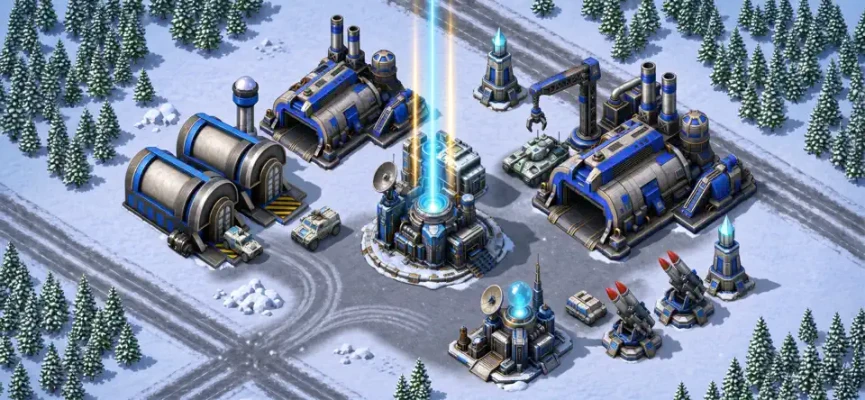
Its battlefield identity is built around industrial war machines, tanks, soldiers, heavy cannons, military upgrades, and the tension of defending against increasingly powerful enemy forces. The developer's App Store description specifically emphasizes the nostalgic classic-RTS atmosphere.
That gives Red Command a straightforward military identity rather than a fantasy or science-fiction strategy setting.
Controls and Mobile Experience
Red Command: RTS is designed for mobile devices, with the App Store listing support for iPhone and iPad. The current requirement is iOS 15.0 or later, while compatible Macs require macOS 12 or later with an Apple M1 chip or later.
The compact mission structure also fits shorter mobile gaming sessions, while the campaign progression provides a reason to return and improve your army.
Red Command RTS Difficulty
The difficulty mainly comes from increasing enemy pressure and the need to keep your army's progression synchronized with campaign advancement.
If a mission suddenly feels much harder, that does not necessarily mean you need to play faster. It may mean your army needs another round of upgrades or that your previous tactical approach is no longer effective.
Use difficult missions as checkpoints for your progression.
Ads and In-App Purchases
Red Command: RTS is listed as free to play with in-app purchases. The App Store also identifies advertising and loot boxes, while available purchases include items such as gems, starter packs, passes, monthly cards, and ad-skip bundles.
The current Google Play listing likewise identifies advertising and in-app purchases.
For players who prefer not to spend money, it is worth treating optional purchases as conveniences rather than requirements and learning which rewards can be earned through normal progression.
Red Command RTS Ratings and Player Feedback
At the time of checking, the U.S. App Store listing showed a 4.9/5 rating from more than 200 ratings.
The Google Play listing showed a 4.7/5 rating with more than 29,000 reviews and 500K+ downloads.
Player feedback is not completely uniform. Some Google Play reviews discuss advertisements, progression, upgrade rewards, and technical issues with rewarded ads. These are individual user reports rather than independently verified findings, but they are useful context when evaluating the current player experience.
Red Command RTS Pros and Cons
Pros
- Fast real-time strategy battles
- Classic military RTS atmosphere
- Generals and army progression
- Tanks, soldiers, missiles, and cannons
- Compact missions suitable for mobile
- Increasing tactical challenge
- Campaign progression
- Available on iPhone and iPad
Cons
- Advertising is part of the free-to-play experience
- In-app purchases are available
- Loot boxes are listed on the App Store
- Some player reviews report concerns about advertisements and progression
- The game requires a relatively modern iOS version
The store information confirms the advertising, loot-box, and purchase elements; player complaints about them should be understood as individual reviews rather than universal conclusions.
Red Command RTS System Requirements
iPhone: iOS 15.0 or later
iPad: iPadOS 15.0 or later
Mac: macOS 12.0 or later with Apple M1 chip or later
Game size: approximately 350.9 MB on the current App Store listing
Language: English
Category: Strategy
Developer: TINYSOFT
Age rating: 13+
The exact requirements and store information can change with future updates, so the App Store listing should be treated as the current reference.
Red Command RTS FAQ
Is Red Command: RTS free?
Yes. The App Store lists Red Command: RTS as free with optional in-app purchases. Advertising is also part of the game.
Is Red Command: RTS an RTS game?
Yes. The game is marketed as a classic-inspired real-time strategy experience featuring real-time battles, generals, army upgrades, weapons, and campaign progression.
Can I play Red Command on iPhone?
Yes. The App Store lists support for iPhone and requires iOS 15.0 or later.
Can I play Red Command on iPad?
Yes. Red Command: RTS is designed for iPad and requires iPadOS 15.0 or later.
Does Red Command have tanks?
Yes. Tanks are specifically mentioned among the battlefield units and heavy-firepower elements of the game.
Does Red Command have generals?
Yes. General upgrades are one of the game's main progression features.
Does Red Command have a campaign?
Yes. The game features campaign progression with increasingly difficult enemy pressure.
Does Red Command have leaderboards?
The Google Play listing describes competitive leaderboard progression where players can complete missions, upgrade generals, win battles, and rise through rankings.
Is Red Command single-player?
The current Google Play listing categorizes it as single-player.
What is the best strategy for Red Command?
Rather than relying on one fixed build, focus on identifying the main reason you are losing a mission, then upgrade the general, weapon, or defensive capability that directly addresses that weakness. Adapt your approach as enemy pressure increases.
Final Strategy Advice
The most useful mindset for Red Command: RTS is to think like a commander rather than simply trying to deal the maximum damage as quickly as possible.
Watch the battlefield, recognize enemy patterns, protect your position, upgrade with a purpose, and adapt when a previously successful strategy stops working.
As the campaign becomes harder, preparation becomes increasingly important. A stronger general, better upgrades, and a more disciplined approach can make the difference between barely surviving a mission and controlling the battlefield.
Red Command: RTS is built around that simple loop: fight, learn, upgrade, adapt, and command the next battle.
Rate the Game
User Reviews









Popular Games



















 Android
 iOS
iOS Windows
 Xbox
Xbox