
Latest Version
September 26, 2026
Neptune Corp.
Puzzle
Android
0
com.mgameday.openpuzzlebox
Report a Problem
More About :game
The game starts with straightforward challenges before introducing more complicated puzzles and tricks. It features multiple difficulty levels, different stage objectives and a wide selection of puzzle stages. Google Play describes it as a single-player, offline puzzle game with simple controls and an emphasis on thinking differently.
With more than 5 million downloads and roughly 91,700 Google Play reviews, Open Puzzle Box has attracted a substantial audience of players looking for short, self-contained brain challenges.
What Is Open Puzzle Box?
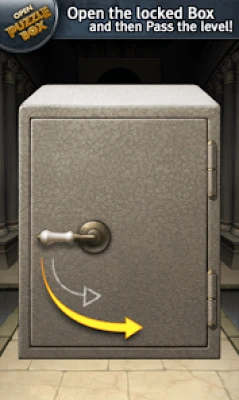
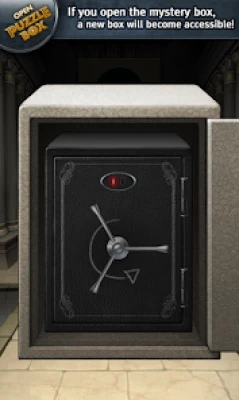
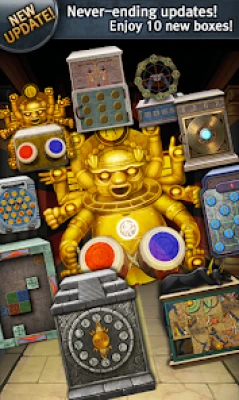
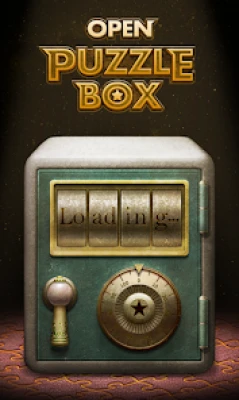
Open Puzzle Box is a brain-teasing puzzle game from Neptune Corp. Instead of matching colored blocks or solving traditional word puzzles, the game puts the player in front of mysterious locked boxes and asks them to figure out how each one works.
The controls include:
- Tap
- Drag
- Dual touch
The challenge is discovering how these interactions affect the box and identifying the correct sequence or action needed to open it.
The concept sounds easy, but later puzzles can require considerably more observation and experimentation.
Open Puzzle Box Gameplay
The central gameplay loop is:
Observe the box → interact with its mechanisms → experiment → discover the solution → open the box → move to the next challenge.
Unlike games where the solution is always obvious from the start, Open Puzzle Box encourages experimentation.
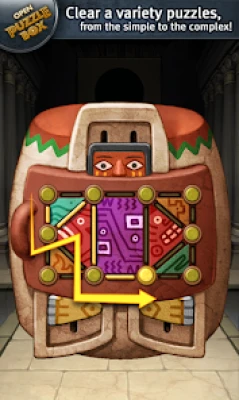
A button may not be the only important object on the screen. A surface may respond to dragging, while another mechanism may require tapping or using more than one touch point.
That is why paying attention to the entire box is more useful than immediately searching for a single button.
How to Play Open Puzzle Box
The basic controls are intentionally simple.
Tap
Tap visible objects and suspicious areas of the box.
A tap may activate a mechanism, change an object's state or reveal another part of the puzzle.
Drag
Try dragging objects or mechanisms that appear movable.
If something looks like it could slide, rotate or shift, dragging is one of the first interactions worth testing.
Dual Touch
Some puzzles use two-touch interaction.
When a puzzle appears impossible with ordinary tapping or dragging, consider whether the game expects a simultaneous touch interaction.
Open Puzzle Box Beginner Guide
1. Examine the Entire Box
Before interacting randomly, look carefully at everything visible.
Check:
- Buttons
- Lines
- Panels
- Handles
- Openings
- Shapes
- Moving parts
- Unusual markings
The visual design can provide clues about which parts of a box are interactive.
2. Test One Interaction at a Time
Do not change several things simultaneously.
Try a tap and observe what happens.
Then try a drag.
Then investigate whether another object reacts.
This makes it much easier to understand the puzzle's logic.
3. Look for Cause and Effect
Good puzzle solving is often about understanding what changed after an action.
If tapping something causes another part of the box to move, remember that relationship.
The next step may depend on the state you just created.
4. Think Beyond the Obvious
The game's own description emphasizes thinking outside the box.
If repeatedly pressing the most obvious button does nothing, stop and reconsider the puzzle.
Ask:
What have I not interacted with yet?
5. Pay Attention to Movement
If an object moves slightly after an interaction, that movement may be a clue.
Small changes can indicate that you are moving in the correct direction.
6. Do Not Rush
Open Puzzle Box is a thinking game rather than a reaction-based challenge.
Take a moment to inspect the puzzle before making your next move.
Open Puzzle Box Puzzle-Solving Strategy
A systematic approach can make difficult boxes much easier.
Step 1: Observe
Study the entire puzzle before touching anything.
Step 2: Identify Interactive Objects
Look for anything that appears movable, clickable or unusual.
Step 3: Test Simple Actions
Try tapping obvious controls first.
Step 4: Experiment With Movement
If tapping does not work, try dragging objects that appear movable.
Step 5: Consider Dual Touch
Some challenges may require a two-touch interaction rather than a single tap.
Step 6: Record What Changed
If something moves or changes state, use that information to determine the next action.
Step 7: Work Backward
If you know the final objective is to open the box, consider which mechanism appears to control the final lock.
Then work backward from that mechanism.
How to Solve Difficult Open Puzzle Box Levels
When a puzzle becomes difficult, avoid repeatedly performing random actions.
Instead, reset your thinking.
Ask yourself:
- What parts of the box have I already tested?
- Which objects have not moved?
- Did any action cause a small change?
- Could two objects need to be used together?
- Have I tried dragging instead of tapping?
- Could the solution require two touches?
- Is there a hidden relationship between two mechanisms?
This approach turns a confusing puzzle into a process of elimination.
Open Puzzle Box Tips and Tricks
Tip 1: Inspect Before Acting
Take a few seconds to study the box.
Tip 2: Test Obvious Controls First
Simple interactions can reveal how the puzzle works.
Tip 3: Look for Movable Parts
Dragging is an important part of the game's control system.
Tip 4: Remember Previous Actions
If something changed after an interaction, that information can be useful later.
Tip 5: Try Two Fingers
When ordinary controls fail, consider whether dual-touch interaction is required.
Tip 6: Avoid Random Tapping
Random actions make it harder to understand the puzzle's logic.
Tip 7: Think in Sequences
Some puzzles may require multiple actions in the correct order.
Tip 8: Use the Environment as a Clue
The box itself is the puzzle. Look at its shapes, panels and mechanisms rather than searching only for obvious buttons.
Tip 9: Take a Break
If you have stared at the same puzzle for too long, stepping away can help you notice something you missed.
Tip 10: Experiment Carefully
The game is designed around discovery, so experimentation is part of the experience.
Open Puzzle Box Difficulty
Open Puzzle Box includes multiple difficulty levels.
The early stages help players become familiar with the interaction system. As the puzzles become more complex, players need to combine observation with experimentation.
A useful progression is:
Learn the controls → recognize mechanisms → understand puzzle logic → solve multi-step challenges.
Do not judge your ability based on how quickly you solve the first few boxes. The later challenges are intended to require more thought.
Different Stage Objectives
Not every stage necessarily feels identical.
Google Play specifically highlights different stage objectives alongside a variety of puzzles and tricks.
That variety is important because it prevents the game from being reduced to a single repeated interaction.
When starting a new stage, determine what the game is actually asking you to accomplish before deciding how to solve it.
Open Puzzle Box Offline Play
Open Puzzle Box is listed by Google Play as an offline single-player game.
That makes it suitable for playing without a continuous internet connection.
It can work particularly well for:
- Travel
- Waiting rooms
- Short breaks
- Offline gaming
- Casual puzzle sessions
Open Puzzle Box Features
Mystery Box Puzzles
Each challenge centers on unlocking a mysterious box.
Touch Controls
Tap interactions are part of the core puzzle system.
Drag Mechanics
Players can manipulate puzzle elements by dragging.
Dual-Touch Controls
Some challenges make use of two-touch interaction.
Multiple Difficulty Levels
The game offers puzzles designed around different levels of challenge.
Variety of Puzzle Mechanics
Different tricks and puzzle types require players to approach boxes from different angles.
Multiple Stage Objectives
Stages can provide different goals rather than repeating exactly the same challenge.
Simple Interface
The controls are designed to be intuitive and easy to understand.
Offline Single-Player Gameplay
The game can be played offline and is designed for solo puzzle solving.
Open Puzzle Box Progression Guide
The best way to approach progression is to treat each stage as a lesson.
Early puzzles teach you how the game's interactions work.
Later puzzles test whether you can apply those interactions in less obvious ways.
Instead of memorizing individual solutions, try to understand the underlying mechanic.
For example, if a particular type of object responds to dragging, remember that interaction for future puzzles.
This gives you a growing toolbox of puzzle-solving techniques.
Common Open Puzzle Box Mistakes
Randomly Tapping Everything
This may eventually trigger something, but it does not help you understand the puzzle.
Ignoring Dragging
The game explicitly uses dragging as one of its main interaction methods.
Forgetting Dual Touch
Some puzzles require thinking beyond a single finger.
Focusing on One Object
The solution may involve a relationship between several parts of the box.
Repeating the Same Failed Action
If an action produces no useful result, change your approach.
Moving Too Quickly
Taking a moment to inspect the puzzle can reveal details that are easy to miss.
Advanced Open Puzzle Box Strategy
Build a Mental Library of Mechanics
As you progress, remember how different interactions behave.
If a particular mechanism responds to dragging, remember that behavior.
Think in Chains
Instead of asking:
"What opens the box?"
ask:
"What action changes the next mechanism?"
Then:
"What does that mechanism activate?"
This approach is useful for multi-step puzzles.
Look for Hidden Dependencies
One action may change another part of the puzzle.
Always check the entire box after making a significant move.
Use Controlled Experimentation
If you do not know what an object does, test it deliberately and observe the result.
Avoid changing several things simultaneously because you may lose track of what caused the change.
Is Open Puzzle Box Good for Brain Training?
Open Puzzle Box is designed around observation, experimentation and problem solving. Its different puzzle mechanics require players to figure out how interactive objects behave rather than simply following a fixed pattern.
It can therefore provide an entertaining mental challenge, particularly for players who enjoy puzzle games that require experimentation.
It should be viewed primarily as a puzzle game rather than as a formal cognitive-training program.
Open Puzzle Box Pros and Cons
Pros
- Simple controls
- Creative mystery-box concept
- Tap, drag and dual-touch interactions
- Multiple puzzle mechanics
- Different difficulty levels
- Various stage objectives
- Offline gameplay
- Single-player experience
- Easy to start
- Increasingly challenging puzzles
Cons
- Some puzzles can become difficult without obvious solutions.
- Players who prefer action-based gameplay may find the slower puzzle-solving pace less engaging.
- The Google Play listing contains advertisements and in-app purchases.
- The listing's last reported update is from May 2022, so players should not assume that the current stage selection reflects recent development activity.
Is Open Puzzle Box Worth Playing?
Open Puzzle Box is a good fit for players who enjoy mystery puzzles, brain teasers, escape-room-style interactions and tactile mobile puzzle mechanics.
Its biggest strength is the simplicity of its concept. You are presented with a locked box and have to figure out how it works.
The controls are easy to understand, but the puzzles can become considerably more complicated as you progress. The combination of tapping, dragging, dual-touch interactions and different stage objectives gives the game more variety than its basic premise might suggest.
Open Puzzle Box FAQ
What is Open Puzzle Box?
Open Puzzle Box is a single-player puzzle game where players interact with mysterious locked boxes and solve different challenges to open them.
How do you play Open Puzzle Box?
The game uses touch, drag and dual-touch controls. Players experiment with the box's mechanisms to discover how each puzzle can be solved.
Is Open Puzzle Box offline?
Yes. Google Play lists Open Puzzle Box as an offline game.
Is Open Puzzle Box multiplayer?
No. Google Play lists it as a single-player game.
Is Open Puzzle Box free?
The game is available on Google Play with advertisements and in-app purchases.
Is Open Puzzle Box difficult?
The game includes multiple difficulty levels. Some early puzzles are straightforward, while later challenges require more experimentation and problem solving.
Does Open Puzzle Box have different puzzle types?
Yes. The developer describes a variety of puzzles and tricks, along with different stage objectives.
Who developed Open Puzzle Box?
The current Google Play listing identifies Neptune Corp. as the developer.
Can I play Open Puzzle Box without Wi-Fi?
Yes. The Google Play listing identifies the game as offline.
Open Puzzle Box Quick Tips
- Observe first: Study the entire box before interacting.
- Tap carefully: Test obvious interactive elements.
- Drag objects: Look for parts that can be moved.
- Try dual touch: Two-finger interaction may be important.
- Watch for changes: A small movement can reveal the next step.
- Think sequentially: Some puzzles require several actions.
- Avoid random tapping: Experiment with a purpose.
- Remember mechanics: Techniques learned in one puzzle can help with later challenges.
- Take your time: This is a thinking game, not a reaction test.
- Try a fresh perspective: When stuck, stop repeating the same action and inspect the box again.
Final Thoughts
Open Puzzle Box turns the familiar idea of unlocking a box into a collection of interactive mobile puzzles. Its controls remain simple—tap, drag and dual touch—but the challenge comes from discovering how each mysterious box works.
With multiple difficulty levels, different puzzle mechanics, varied objectives and offline single-player support, the game offers a straightforward experience for players who enjoy solving problems at their own pace.
The key to progressing is not speed. Observe the box, experiment with its mechanisms, remember what changes and think about the next step before acting.
Rate the Game
User Reviews






Popular Games



















 Android
 iOS
iOS Windows
 Xbox
Xbox