







Latest Version
August 12, 2025
AI GAMES FZ LLC
Puzzle
iOS
0
Report a Problem
More About :game
The game features classic hidden-object scenes alongside specialized modes and events. Recent updates have added Daily Challenges, a Freeze power-up, new locations, a Stories tab, word-based searching, Patterns, Find It!, and secret locations with additional modes.
The App Store currently lists the game at 4.7/5 from around 12,000 ratings in the US storefront. It is free with advertising and optional in-app purchases.
What Is Hidden Objects: Journey Story?
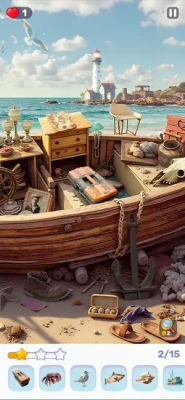
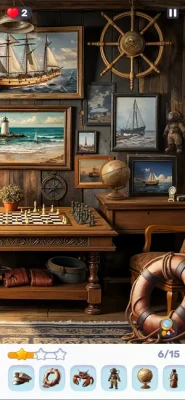
The core idea is straightforward: enter a detailed scene, study the environment, and locate the objects requested by the game.
Scenes can include places such as:
- Cozy cafés
- Vintage shops
- Mountain huts
- Farms
- Beaches
- Amusement parks
- Underwater environments
- Mysterious rooms
- Historical and fantasy-inspired locations
The variety of settings keeps the basic search mechanic visually fresh.
The game has also expanded considerably from its original format. The current version includes several different ways to search rather than relying entirely on one classic hidden-object mode.
How to Play
A typical search level follows this basic pattern:
Read the objective → scan the scene → identify an object → tap it → continue searching → complete the required collection
The important part is not simply recognizing an object. You need to recognize it inside a visually crowded scene.
An object may be:
- Partially covered
- Very small
- Blended into the background
- Similar in color to nearby objects
- Positioned in an unexpected location
- Hidden among several visually similar items
This is why careful scanning is more effective than tapping randomly.
Full Strategy Guide
1. Scan Before You Tap
Don't immediately start clicking around the screen.
Spend the first few seconds looking at the entire scene.
Divide the image mentally into sections:
Top-left → top-center → top-right → middle → bottom-left → bottom-center → bottom-right
This gives your eyes a predictable search pattern.
Once you've searched one section, move to the next instead of repeatedly checking the same area.
2. Search in a Consistent Direction
Randomly moving your eyes around a large image creates unnecessary repetition.
A systematic scan is much better.
For example:
- Start at the upper-left.
- Move horizontally across the scene.
- Drop down one section.
- Scan back toward the opposite side.
- Continue downward.
This resembles reading a page.
The advantage is simple: you know where you've already looked.
3. Look for Unusual Shapes First
When an object is difficult to find, don't necessarily search for its exact color.
Search for its silhouette.
A red object might be partly hidden and appear mostly black or brown because of shadows. Its shape may still be recognizable.
Train yourself to notice:
- Circular outlines
- Long thin objects
- Sharp corners
- Repeated geometric shapes
- Unusual silhouettes
- Objects that don't visually belong
Shape recognition is often faster than color recognition.
4. Use Context
Think about where an object logically belongs.
If you're searching a café scene, common objects may appear near:
- Tables
- Counters
- Shelves
- Windows
- Chairs
- Kitchen equipment
If you're searching a workshop, inspect:
- Tools
- Workbenches
- Storage areas
- Shelves
- Machinery
Context doesn't guarantee the object's location, but it gives your search a useful starting point.
5. Search the Obvious Areas Last
One of the game's tricks is that objects don't necessarily appear where you expect them.
After checking likely locations, deliberately inspect unusual areas.
Look:
- Behind furniture
- Near corners
- Around decorative objects
- Inside shelves
- Along the edges of the scene
- Against similarly colored backgrounds
The object you're missing may be hiding in a visually uninteresting area.
6. Don't Tap While You Are Still Scanning
A common mistake is touching the screen while moving around the scene.
This is particularly important because player feedback has reported that the game can be sensitive to accidental touches when repositioning or navigating a picture, with incorrect selections sometimes counting against the player.
Move deliberately.
If you need to reposition the scene, do it carefully rather than rapidly dragging across objects.
7. Zoom In on Difficult Areas
The Find It! mode specifically added zooming and panning so players can inspect scenes more closely.
Use zoom strategically.
Don't keep the entire image enlarged all the time.
Instead:
- Scan the complete scene.
- Identify a suspicious area.
- Zoom in.
- Search carefully.
- Zoom back out.
- Continue to another section.
This prevents you from losing your sense of where you are in the overall picture.
8. Don't Waste Hints Too Early
Hints are extremely valuable when you genuinely cannot locate an object.
But using them immediately removes part of the challenge and can waste a useful resource.
Try this order:
Full scan → second scan → zoom → contextual search → hint
If you still can't find the item, use the hint.
The game explicitly provides hints to help when players become stuck.
9. Use Hints as a Learning Tool
A hint doesn't just solve one item.
Pay attention to why you missed it.
Was it:
- Too small?
- Partially hidden?
- The same color as the background?
- In an unexpected location?
- Blended into another object?
Learning your own visual mistakes makes later levels easier.
10. Search for Multiple Items Efficiently
When several objects remain, don't constantly jump between distant parts of the scene.
If two requested objects are close together, finish that section before moving elsewhere.
This reduces unnecessary movement and keeps your visual attention concentrated.
11. Prioritize Easy Objects
If you immediately see one or two requested objects, collect them first.
Removing easy targets reduces the list of possibilities and lets you concentrate on the genuinely difficult objects.
Don't waste time staring at the hardest object while several obvious ones are still available.
12. Leave the Most Difficult Object for Last
This is particularly useful in timed modes.
Suppose the list contains five objects and four are obvious.
Take the four quickly.
Then dedicate the remaining time to the difficult one.
This is much more efficient than spending most of the level trying to find one obscure object while the easy points remain untouched.
Timed Levels and Challenges
Some of the game's newer content introduces more time-sensitive searching.
The July 2026 update added Daily Challenges and a Freeze power-up that can stop the countdown and give additional time to find hidden objects.
This changes the strategy.
Best Timed-Level Strategy
First 10 Seconds
Scan for the easiest objects.
Early Phase
Collect obvious targets quickly.
Middle Phase
Start concentrating on objects that require closer inspection.
Final Phase
Use your time-saving tools if the remaining object is difficult.
The key is not to spend the opening seconds staring at one tiny object.
Build momentum first.
How to Use the Freeze Power-Up
The Freeze power-up is particularly useful when:
- The timer is getting low
- Only one or two objects remain
- You are searching a visually complicated scene
- You have already eliminated the easy targets
- You need additional time to inspect a difficult area
The best use isn't necessarily at the beginning.
Save it for the moment when extra seconds have the greatest impact.
Classic Search Strategy
Classic scenes are primarily about observation and pattern recognition.
For these levels, your best routine is:
Scan → collect obvious objects → inspect edges → zoom difficult areas → use hint if necessary
Don't rush simply because the scene looks busy.
A busy image is often easier to solve once you've divided it into smaller sections.
Find It! Strategy
The Find It! mode is designed around closer inspection and allows players to zoom in and out while searching.
For these scenes:
- Start zoomed out.
- Establish the overall layout.
- Search one region.
- Zoom in only when necessary.
- Avoid jumping randomly between areas.
- Zoom out periodically to reset your orientation.
The biggest mistake is becoming so zoomed in that you forget which parts of the scene you've already searched.
Patterns Mode
The Patterns tab adds a different visual challenge: you must find the exact object matches while ignoring similar-looking distractions.
This requires a different mindset.
Don't ask:
“Does this look similar?”
Ask:
“Does this match the target precisely?”
Pay attention to:
- Shape
- Orientation
- Number of details
- Color arrangement
- Small markings
- Proportions
Patterns is therefore less about simply spotting an object and more about visual comparison.
Word-Based Search
A later update introduced a word-based search tab where objects are requested by name.
This mode adds a vocabulary component to the visual search.
If you don't immediately recognize the requested item:
- Read the word carefully.
- Think of its physical appearance.
- Consider synonyms or related forms.
- Search by shape rather than only by color.
- Inspect places where the object would naturally belong.
This is especially useful when an object has a less familiar name.
Daily Challenges
Daily Challenges provide a reason to return regularly and can offer rewards. The July 2026 update introduced them alongside the Freeze power-up.
Treat daily challenges differently from ordinary exploration.
Your objective should be:
Accuracy + efficiency + resource conservation
Don't waste hints or power-ups simply to finish quickly if the challenge doesn't require it.
Secret Locations
The game's newer Daily Goals system can unlock a Secret Location with two additional modes:
- Spot the Duplicates
- Shadow Search
The same update also added a new Lost Flower story and more than 20 Classic locations.
These modes reward careful observation rather than simply searching for named objects.
Spot the Duplicates
Look for repeated visual elements and compare similar objects carefully.
Don't assume that two objects that look nearly identical are the same.
Compare:
- Position
- Shape
- Details
- Orientation
- Small differences
Shadow Search
Think about silhouettes.
Instead of identifying an object by its complete appearance, identify its outline.
This is a good test of visual memory and shape recognition.
Stories and Detective Content
The game has expanded beyond simple object hunting.
A Stories tab was introduced where players can become detectives, find clues, and solve cases, with access tied to VIP subscription according to the App Store update notes.
This gives the game a more investigative flavor than the basic Classic mode.
When playing story-oriented content, don't rush through scenes merely to locate objects.
Pay attention to:
- Repeated visual details
- Objects that look out of place
- Clues around important characters
- Environmental changes
- Items that appear connected to the story
Event Strategy
Hidden Objects: Journey Story frequently introduces themed events.
Past updates have included:
- Valentine's events
- Easter events
- Halloween events
- Christmas events
- Panda events
- Spring Festival events
- Clover hunts
- Collectible badge events
These events can involve finding special objects hidden within normal scenes and unlocking rewards or secret locations.
Best Event Strategy
Don't completely change your normal search method.
Instead, add one extra layer:
Normal object search + event-object awareness
When the event asks you to find a special item, remember that it may be deliberately positioned in an area that already contains significant visual clutter.
Lives, Energy and SkipIt Tickets
The game's progression has included lives or energy-style limitations in some modes, while later updates introduced SkipIt Tickets that can be earned through special events or purchased to bypass rewarded advertisements.
If you are playing without premium access, resource management becomes important.
Don't repeatedly replay difficult scenes immediately after failing.
Take a short break and return with fresh eyes.
Hidden-object games are heavily dependent on visual attention, and fatigue makes small objects significantly harder to recognize.
Best Way to Find Very Small Objects
When an object is extremely difficult to see, use this five-step process:
Step 1 — Identify the Shape
Forget the color temporarily.
Step 2 — Identify the Expected Size
Estimate how large the object should appear in the scene.
Step 3 — Search Logical Locations
Look where the object would naturally belong.
Step 4 — Check Visual Boundaries
Inspect where two objects overlap.
Step 5 — Zoom
If the game mode permits it, enlarge the suspicious region.
This method is much more reliable than sweeping your finger randomly across the screen.
How to Avoid False Taps
False taps are particularly frustrating in hidden-object games.
Before tapping:
Stop moving the screen → identify the object → confirm its outline → tap once
Avoid rapidly tapping several nearby locations.
A mistaken tap can cost you more than a second of careful observation.
Common Mistakes to Avoid
Searching Randomly
Random searching creates repeated work.
Looking Only at the Center
Important objects can be hidden near edges and corners.
Relying Only on Color
Lighting and shadows can dramatically alter an object's apparent color.
Using Hints Immediately
Try a complete search first.
Zooming Too Much
Extreme zoom can make you lose track of the overall scene.
Ignoring the Environment
The setting often provides clues about where an object may logically be located.
Rushing Timed Levels
Speed matters, but accuracy matters too.
Repeatedly Searching the Same Area
Use a systematic scan so you know what you've already checked.
Advanced Observation Techniques
Peripheral Vision
Don't stare at the exact center of the screen constantly.
While scanning one region, allow your peripheral vision to notice unusual shapes nearby.
Sometimes an object is easier to detect when you're not looking directly at it.
Negative Space
Look at the empty areas around objects.
An unusual gap or silhouette can reveal that something is hidden there.
Edge Scanning
Run your eyes around:
- Borders
- Corners
- Furniture edges
- Window frames
- Shelves
- Doorways
Small objects are often difficult to notice because they blend into larger visual structures.
Color Isolation
If the target has a distinctive color, temporarily ignore everything else.
Search for that color across the scene first, then confirm the shape.
Graphics and Atmosphere
The game's strongest visual feature is its detailed collection of illustrated environments.
The official listing highlights locations ranging from cozy cafés and vintage shops to mountain huts, while later updates expanded the library into underwater scenes, mysterious rooms, farms, beaches and amusement parks.
The result is a calm, colorful atmosphere that suits players who prefer observation and exploration over action.
Controls
The controls are intentionally simple.
Most gameplay consists of:
- Tapping objects
- Navigating the scene
- Zooming
- Panning
- Using hints
- Activating available power-ups
The challenge is therefore almost entirely visual.
Progression and Content
The game has grown substantially through updates.
Notable additions include:
- Find It!
- Patterns
- Word-based search
- Stories
- Daily Challenges
- Freeze power-up
- Seasonal events
- Secret locations
- Spot the Duplicates
- Shadow Search
- New Classic scenes
- New story content
These additions give the game considerably more variety than its original basic hidden-object format.
Current Version and Requirements
The US App Store currently lists version 1.29.13, with an August 11 update adding Daily Goals, a Secret Location containing Spot the Duplicates and Shadow Search, a new Lost Flower story, and more than 20 Classic locations.
The App Store lists:
- iPhone: iOS 13.0 or later
- iPad: iPadOS 13.0 or later
- Mac: macOS 11.0 or later with Apple M1 or later
- Size: about 291 MB
- Category: Puzzle
- Age rating: 13+
- Free with in-app purchases
- Advertising: Yes
The Android version is also available and currently shows 1M+ downloads, a rating around 4.5/5, and support for Android and Windows.
Ratings and Player Feedback
The US App Store currently shows approximately 4.7/5 from 12K ratings, suggesting strong overall reception.
However, player opinions aren't universally positive.
Some reviewers praise the variety of themes and relatively restrained advertising, while others have criticized timers, advertisements, sensitive touch detection, and occasional glitches in individual events.
Android feedback is similarly mixed. One recent reviewer argued that the game was much easier and simpler than promotional material suggested, while another appreciated that advertisements were generally placed between levels rather than interrupting gameplay.
That is useful to know before recommending the game as a serious brain-training challenge: its main strength is relaxing visual searching, not extremely difficult deduction.
Pros and Cons
Pros
- Large variety of illustrated locations
- Relaxing hidden-object gameplay
- Multiple search modes
- Find It! zoom-and-search mechanics
- Patterns mode adds visual comparison
- Word-based search adds variety
- Daily Challenges
- Seasonal events
- Secret locations
- Stories and detective-style content
- Regular content updates
- Helpful hints
- Strong overall App Store rating
Cons
- Some modes introduce timers
- Advertising can affect the experience
- Certain players report sensitive touch detection
- Some events may contain bugs or glitches
- Difficulty can feel low for experienced hidden-object players
- Premium/VIP content limits access to some features
- Resource systems can make longer sessions less relaxed
Is Hidden Objects: Journey Story Worth Playing?
Yes, particularly if you enjoy hidden-object games, visual scavenger hunts, relaxing puzzle games, and detailed illustrated environments.
Its biggest strength is variety. What begins as a straightforward find-the-object game has expanded into several modes, events, story content, daily challenges, and secret locations.
The game is less convincing if you're looking for extremely demanding puzzles. Some recent player feedback specifically describes certain searches as very easy.
For casual players, however, that can actually be an advantage.
Final Verdict
Hidden Objects: Journey Story is a polished and content-rich hidden-object game that works best as a relaxing observation experience.
The smartest way to play is not to rush around the scene. Search systematically, use shape and context, zoom when necessary, conserve hints, and change your technique depending on whether you're playing Classic, Find It!, Patterns, Word Search, or one of the newer challenge modes.
Best for: Hidden-object fans, casual puzzle players, visual search enthusiasts, relaxing-game players, and players who enjoy themed events.
Gameplay style: Hidden Objects • Search & Find • Puzzle • Casual • Single Player • Visual Discovery
Frequently Asked Questions
What is Hidden Objects: Journey Story?
It is a search-and-find puzzle game where players explore illustrated scenes and locate hidden objects.
Is Hidden Objects: Journey Story difficult?
The difficulty varies by mode. Classic searches are generally accessible, while timed challenges, Patterns, Shadow Search, and other specialized modes can require greater concentration.
Does the game have different modes?
Yes. The current game includes Classic, Find It!, Patterns, word-based search, Stories, Daily Challenges, and newer secret-location modes such as Spot the Duplicates and Shadow Search.
Does Hidden Objects: Journey Story have a timer?
Some newer challenges use countdown mechanics. The Freeze power-up was specifically added to stop the countdown and provide additional searching time.
Are there hints?
Yes. Hints are available to help when you cannot locate an object.
Can you zoom in?
Yes. The Find It! mode specifically supports zooming and panning for closer inspection.
What is Patterns mode?
Patterns requires players to identify exact object matches while ignoring similar-looking distractions.
Does the game have story content?
Yes. The game has added a Stories tab with detective-style clue searching, as well as additional story content such as Lost Flower.
Is Hidden Objects: Journey Story free?
Yes. The App Store lists it as free with advertising and optional in-app purchases.
Is it available on Android?
Yes. The Google Play listing shows the Android version with more than 1 million downloads.
What is the best strategy for difficult scenes?
Search systematically instead of randomly. Divide the scene into sections, clear obvious objects first, inspect edges and unusual shapes, zoom into suspicious areas, and save hints for genuinely difficult targets.
How can I improve at hidden-object games?
Train yourself to recognize silhouettes, negative space, unusual shapes and environmental context instead of relying only on color. Most importantly, avoid repeatedly searching the same area.
Rate the Game
User Reviews














Popular Games



















 Android
 iOS
iOS Windows
 Xbox
Xbox