

Latest Version
October 04, 2026
Tim Kretz
Puzzle
iOS
0
Report a Problem
More About :game
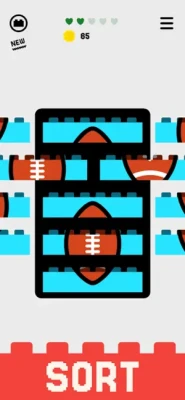
The unusual part is what happens when pieces are stacked. Parts of an image that sit on the studs disappear from view, meaning that the picture can initially appear duplicated or confusing. You have to understand how the pieces overlap before you can determine whether your arrangement is correct.
That simple idea gives Bits On Bricks a distinctive visual-spatial challenge. The game combines sorting, pattern recognition, image reconstruction, spatial reasoning, and colorful brick puzzles in short sessions designed for quick play.
The current App Store listing categorizes Bits On Bricks as a Puzzle game and lists it for iPhone and iPad. It requires iOS 13 or later, is free with in-app purchases, and includes Game Center support and leaderboards.
What Is Bits On Bricks?
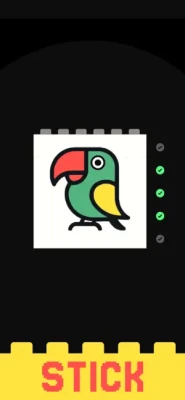
Bits On Bricks asks you to take apparently disassembled pictures and reconstruct them using colorful building blocks.
The central challenge is that the visual information changes when bricks are stacked. A section that looks visible on one piece may disappear when it sits over another brick's studs.
This means you cannot always solve a puzzle simply by matching what you see at first glance.
You need to think about:
Brick position
Image alignment
Overlapping pieces
Hidden sections
Colors and patterns
Shapes
Words and visual clues
The final appearance after stacking
The result is a puzzle experience that rewards careful observation rather than fast tapping.
Bits On Bricks Gameplay Features
Brick Sorting Puzzles
The basic gameplay revolves around sorting colorful bricks into the correct arrangement.
Each level presents a visual problem that must be decoded by identifying which pieces belong together and where they should be placed.
Unique Stacking Mechanic
The most important feature is the way images behave when bricks are stacked.
The game explains that the portion of an image positioned on the studs disappears after stacking. This means some parts of a picture can appear twice before the pieces are correctly assembled.
Learning to recognize this visual behavior is essential for solving later puzzles.
Image Reconstruction
Some puzzles involve rebuilding disassembled pictures.
Rather than simply matching two identical pieces, you must understand how the image should look after the blocks have been placed together.
Word and Image Puzzles
Bits On Bricks also uses colorful brick arrangements to decipher words and images, giving the game more variety than a simple color-sorting puzzle.
Unlock New Motifs
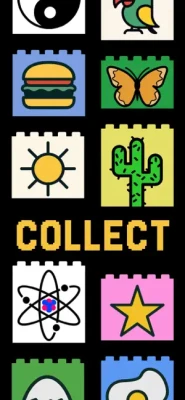
Successfully completing puzzles allows you to reconstruct pictures and unlock new motifs, providing a sense of progression as you move through the game.
Short Puzzle Sessions
The game is designed for quick, accessible puzzle sessions. That makes it suitable when you want something you can play for a few minutes without committing to a long story or complicated progression system.
Full Bits On Bricks Strategy Guide
1. Study the Entire Puzzle Before Placing Bricks
Don't immediately start stacking pieces.
First, look at the available bricks and identify:
Dominant colors
Repeated patterns
Unique shapes
Visible letters
Image edges
Matching visual sections
This gives you an idea of what the finished picture or word should look like.
2. Learn How the Studs Affect the Image
This is the most important concept in Bits On Bricks.
A visual section can appear on both a brick and the studs beneath it before the pieces are stacked.
Once the brick is positioned correctly, part of the image disappears.
Therefore, don't assume every visible duplicate needs to remain visible.
Sometimes the apparent duplication is actually a clue that two pieces belong together.
3. Look for Unique Pieces First
If a puzzle contains many similar bricks, begin with the pieces that have distinctive features.
For example:
A unique color
A letter
A sharp image boundary
A recognizable symbol
An unusual pattern
Unique pieces give you an anchor from which you can build the rest of the solution.
4. Use Image Edges as Guides
Edges can be more useful than colors.
If you see a clear border or outline, determine whether it appears to continue onto another brick.
This can help establish the correct order even when several pieces use similar colors.
5. Don't Trust the First Visual Impression
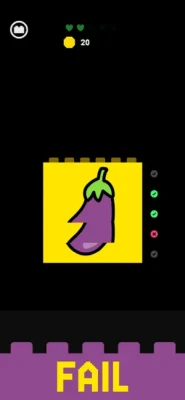
Bits On Bricks deliberately creates situations where the image can look confusing before the bricks are correctly stacked.
If something appears duplicated, don't immediately assume you have the wrong pieces.
Instead ask:
"Will this duplicated section disappear when these bricks are stacked?"
That question can reveal the intended arrangement.
6. Match Patterns, Not Just Colors
Color alone is not always enough.
Two bricks can share a similar color while belonging to completely different areas of the image.
Look for:
Lines
Shapes
Texture
Letter fragments
Image contours
Repeating patterns
Pattern continuity is usually a stronger clue than color by itself.
7. Build From the Most Obvious Section
When a puzzle looks complicated, identify the easiest part first.
Find a section where the arrangement is obvious and use it as your starting point.
Once one part is correct, neighboring pieces become easier to identify.
8. Check the Final Image After Every Important Stack
After making a significant placement, stop and look at the result.
Ask:
Does the image look more complete?
Did a duplicated section disappear correctly?
Do the colors continue naturally?
Does a word begin to make sense?
Did the shape become more recognizable?
If the answer is yes, continue building around that arrangement.
9. Don't Force a Piece Into Place
If a brick seems to fit only because of its color but creates a strange image when stacked, reconsider it.
Bits On Bricks rewards accurate visual reasoning.
A piece that appears to fit initially may actually belong somewhere else.
10. Work From Large Patterns to Small Details
Start with broad visual relationships.
For example:
Main color → image section → shape → pattern → small detail
This is generally easier than trying to identify tiny details before understanding the overall image.
Advanced Bits On Bricks Tips
Use Negative Space
Sometimes the empty or disappearing section tells you more than the visible artwork.
When a brick is stacked, pay attention to what disappears.
That missing section can confirm whether the underlying piece is positioned correctly.
Think in Layers
Instead of seeing the puzzle as a flat picture, imagine it as a collection of layers.
Think:
Base brick → upper brick → visible image → hidden image
This mental model makes the game's unusual stacking system easier to understand.
Identify Symmetry
If an image has symmetrical elements, use them as reference points.
A matching shape or color on one side can help you determine where another piece should go.
Read Letters as Complete Shapes
For word-based puzzles, don't focus only on individual letters.
Look at the entire word pattern.
A partial letter may become obvious only after another brick is stacked over it.
Take Your Time
There is little benefit in rushing a visual puzzle based on spatial reasoning.
A few extra seconds spent examining the arrangement can prevent multiple incorrect placements.
Bits On Bricks Beginner Tips
If you're just starting, keep these rules in mind:
Look before stacking.
Learn what happens to images on the studs.
Start with unique pieces.
Use image edges and patterns.
Don't rely on color alone.
Check how the picture changes after stacking.
Think in layers instead of a flat image.
Use the easiest section as your starting point.
Don't force pieces that create strange patterns.
Let the final image confirm your solution.
Bits On Bricks Difficulty
Bits On Bricks is easy to understand at the basic level but can become more demanding as visual arrangements become more complicated.
The challenge comes primarily from spatial reasoning and visual interpretation, rather than fast reflexes.
Players need to understand that what they see before stacking is not necessarily what they will see afterward.
That makes the game particularly interesting for people who enjoy:
Brain-training puzzles
Sorting games
Visual puzzles
Pattern recognition
Image reconstruction
Word puzzles
Casual logic games
One App Store reviewer described the levels as challenging while also praising the game's potential, while another review described it as relaxing and fun.
Bits On Bricks Progression
Bits On Bricks uses completed puzzles and reconstructed motifs as part of its progression.
The developer has also added additional levels through updates. The App Store version history shows version 1.0.0 released in July 2025 and version 1.0.1 released in November 2025, with additional levels noted in the update history.
This means the game has continued to receive new puzzle content rather than remaining fixed at its original level count.
Bits On Bricks Game Center
Bits On Bricks supports Game Center, including leaderboards.
This adds a competitive element for players who want to compare their progress with other players rather than treating the game purely as a solo puzzle experience.
Bits On Bricks iPhone and iPad Information
Game: Bits On Bricks
Developer: Tim Kretz
Genre: Puzzle
Platforms: iPhone and iPad
Age Rating: 13+
Price: Free with in-app purchases
Current Listed Size: 104.5 MB
Required Version: iOS 13.0 or later
Languages: English, French, German, Spanish
Game Center: Supported
Leaderboards: Supported
Ads: Contains advertising
Remove Ads: $3.99
Mac: Compatible with Macs using Apple silicon and macOS 11 or later according to the App Store listing.
Bits On Bricks Pros and Cons
Pros
Original brick-stacking puzzle mechanic
Colorful visual presentation
Combines sorting and image reconstruction
Interesting spatial reasoning challenges
Word and image puzzles add variety
Easy to play in short sessions
Game Center leaderboards
Additional levels have been added through updates
Free to start playing
Cons
The disappearing-image mechanic can initially be confusing
Similar-looking pieces can make some puzzles difficult
Players who prefer action games may find the pace too slow
Advertising is included
The full experience includes in-app purchases
Is Bits On Bricks Worth Playing?
Bits On Bricks is worth trying if you enjoy visual and spatial puzzle games with an unusual mechanic.
Its biggest strength is that the bricks aren't simply tiles that you match together. The interaction between the brick surface and the studs changes what you see after stacking, forcing you to think about the puzzle in layers.
That gives the game a different feel from conventional sorting games.
It is especially appealing to players who enjoy color puzzles, image matching, brain games, sorting games, word puzzles, and casual logic challenges.
Frequently Asked Questions
What is Bits On Bricks?
Bits On Bricks is a colorful puzzle game where you sort and stack building blocks to reconstruct pictures and decipher words.
How do you play Bits On Bricks?
You examine the colorful bricks, determine how their visual elements connect, and stack them in the correct arrangement to complete the hidden image or word.
What makes Bits On Bricks different from other puzzle games?
Its distinctive mechanic involves images appearing on both bricks and their studs before stacking. When the blocks are correctly placed, the portion of the image sitting on the studs disappears.
Is Bits On Bricks free?
Yes. The App Store currently lists Bits On Bricks as free with in-app purchases.
Does Bits On Bricks have ads?
Yes. The current App Store listing indicates that the game contains advertising and offers a $3.99 in-app purchase to remove ads.
Can I play Bits On Bricks on iPhone?
Yes. The game supports iPhone and requires iOS 13 or later.
Can I play Bits On Bricks on iPad?
Yes. Bits On Bricks is designed for iPad and requires iPadOS 13 or later.
Does Bits On Bricks support Game Center?
Yes. The game supports Game Center and includes leaderboards.
Is Bits On Bricks a brain game?
Yes. Its combination of pattern recognition, spatial reasoning, image reconstruction, sorting, and visual problem solving makes it a good fit for players looking for a casual brain-training style puzzle.
How do I solve difficult Bits On Bricks puzzles?
Start with unique pieces, identify image edges and patterns, understand which sections disappear when stacked, and build the picture gradually rather than trying to place every brick at once.
Final Verdict
Bits On Bricks takes the familiar idea of building blocks and turns it into an unusual visual puzzle.
The key to mastering the game is understanding that the image you see before stacking isn't necessarily the final image. Once you learn how the studs hide portions of the artwork, the puzzles become much easier to read.
For fans of sorting puzzles, colorful brain games, image-matching challenges, word puzzles, and casual spatial-reasoning games, Bits On Bricks offers a distinctive experience that is easy to pick up but gives you plenty to think about.
Rate the Game
User Reviews






Popular Games



















 Android
 iOS
iOS Windows
 Xbox
Xbox