
Latest Version
Visit PageMore About :game
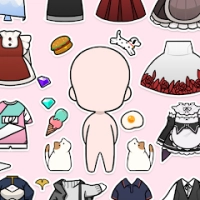
Unnie Doll is a casual dress-up and character customization game developed by Supercent, Inc. It focuses on creating cute, stylized characters and transforming them with different hairstyles, clothing, accessories, facial details, and decorative elements.
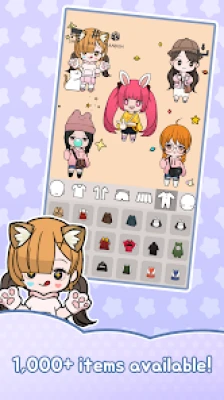
Instead of following a traditional adventure or fighting through difficult levels, players can concentrate on designing their own dolls. The customization system offers a range of options for building unique appearances, from simple everyday outfits to more elaborate fashion combinations.
The game also lets you save your creations in different formats. Square character images can be used as emoticon-style pictures, while widescreen images can become personalized mobile wallpapers. Speech bubbles and expressions provide additional ways to give your characters personality.
Whether you enjoy anime dress-up games, kawaii fashion, chibi art, or virtual doll makers, Unnie Doll offers a creative space to experiment with different looks.
Main Features of Unnie Doll
1. Create Your Own Anime Doll
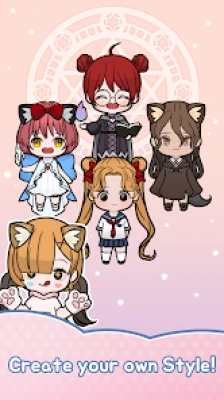
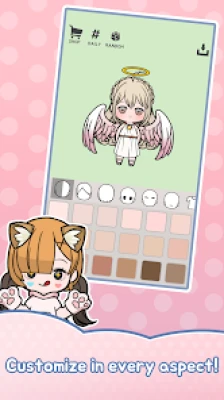
The main attraction of Unnie Doll is its character creator. You can combine different facial features, skin colors, hairstyles, and other appearance options to create a doll that feels distinctive.
Start with a general idea of your character and build the design one detail at a time. A few carefully chosen features can create a recognizable style without making the appearance too busy.
2. Explore More Than 1,000 Decorative Items
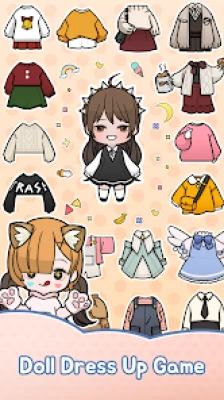
Unnie Doll offers more than 1,000 decoration and customization items across categories such as hair, faces, clothing, wings, stickers, and other character details.
This variety gives you room to experiment with different themes and visual styles. You can create several dolls with different personalities instead of repeating the same design.
3. Dress Up with Fashionable Costumes
Fashion is a central part of the experience. Choose clothing and combine different pieces to create outfits that suit your character.
The game also features premium costume collections inspired by luxury fashion, music videos, concerts, and Halloween. These options are useful when you want to create a more elaborate or themed appearance.
4. Customize Hairstyles and Facial Features
A character's face and hair can change the entire impression of a design. Try different combinations to find a look that matches the clothing and accessories.
For a coordinated result, choose a hairstyle that complements the outfit's shape and color palette. You can also create contrast when you want a more playful or dramatic character.
5. Add Wings, Stickers, and Decorations
Additional decorations help transform a basic doll into a more personal creation. Wings can give a character a fantasy-inspired appearance, while stickers add extra visual detail.
Use these elements to support a particular theme rather than adding everything at once. A balanced design often makes the most important features easier to appreciate.
6. Create Emoticon-Style Images
Unnie Doll allows players to save character images in a square 1:1 format and use them like emoticons in supported messaging applications.
Expressions and speech bubbles make these images more expressive. You can design a character for a cheerful message, a playful reaction, or a cute personal profile image.
7. Make Personalized Mobile Wallpapers
The game also supports saving images in a widescreen 16:9 format for custom mobile wallpapers.
You can design a character, choose a suitable background, and arrange the composition so the doll stands out. Consider leaving some open space around the main character to keep the image visually balanced.
8. Enjoy Relaxed Offline Creativity
Unnie Doll is listed as a single-player game with offline support. This makes it suitable for players who want to spend time designing characters without needing a competitive multiplayer experience.
Some services or features may still depend on the game's current version and device configuration.
How to Play Unnie Doll
Unnie Doll is straightforward to approach, even if you have never played a character creator before. The main activity is choosing appearance options and combining them into a complete design.
Step 1: Start with the Character's Appearance
Begin by selecting the doll's basic features. Choose a skin color and facial appearance that fit the character you want to create.
Think about the overall personality you want to communicate. A soft, gentle look may call for different choices from a bold, energetic design.
Step 2: Choose a Hairstyle
Explore the available hairstyles and select one that complements the face. Hair is often one of the most noticeable parts of a character, so it can help establish the entire visual theme.
If you are unsure which hairstyle works best, try several options before selecting clothing.
Step 3: Build a Complete Outfit
Browse the available fashion items and combine them into a coordinated look. You can experiment with casual clothing, elaborate costumes, and different combinations of accessories.
Pay attention to color, shape, and balance. An outfit can feel complete without using every available decoration.
Step 4: Add Accessories and Decorative Details
Once the main appearance is ready, consider whether wings, stickers, or other decorative items improve the design.
Use them to reinforce your theme. For example, a fantasy-inspired doll may benefit from wings, while a simple fashion portrait may look better with fewer extras.
Step 5: Add an Expression or Speech Bubble
Use the available expressions and speech bubbles to give your character more personality. This is particularly useful when creating images intended for messaging or sharing.
Choose an expression that fits the message rather than treating it as an unrelated decoration.
Step 6: Create a Background
When your character is ready, arrange a background for the final image. Consider the background's colors and visual details so that it complements rather than overwhelms the doll.
A simple background can work especially well when the outfit already contains many details.
Step 7: Save Your Creation
Choose the appropriate image format for your intended use. Square images are suited to emoticon-style pictures, while 16:9 images can be used as wallpaper designs.
Review the final composition before saving. Small adjustments to the character's placement or decorations can make the result feel more polished.
Complete Unnie Doll Strategy Guide
Unnie Doll does not use conventional combat strategies, character levels, or boss battles as its main progression system. Success comes from making thoughtful design choices, learning how customization categories work, and using the available items creatively.
1. Plan the Character Before Choosing Clothes
One of the easiest mistakes is selecting individual items without considering the finished character. Before you begin, choose a simple theme.
For example, your character could be a cute everyday doll, a glamorous performer, a fantasy-inspired figure, or a seasonal Halloween design.
Having a theme helps you choose matching hair, clothing, accessories, and decorations. It also makes it easier to decide which items you actually need.
2. Use a Three-Color Rule
A practical approach to outfit design is to choose three main colors:
Primary color: The dominant color of the outfit.
Supporting color: A shade that complements the primary color.
Accent color: A smaller splash of color that draws attention to a detail.
This method helps create a coordinated appearance without making every piece identical. You can break the rule when you want a deliberately colorful design, but it is a useful starting point for beginners.
3. Match Hair to the Overall Outfit
Hair should work with the clothing rather than compete with it. If the outfit contains many decorative details, a simpler hairstyle may create better balance. If the clothing is understated, a more distinctive hairstyle can become the main feature.
Try changing the hair before replacing the entire outfit. Sometimes a single adjustment is enough to make a character feel completely different.
4. Make Facial Details a Priority
The face gives a character much of its personality. Pay attention to the relationship between facial features, hair, and the overall style.
For a soft, cute appearance, choose features that support a gentle expression. For a more energetic design, experiment with expressions that communicate excitement or confidence.
Avoid adding decorative elements automatically. The goal is to create a recognizable character, not simply to use the largest number of items.
5. Use the Large Item Collection Efficiently
With more than 1,000 decorative items, browsing can become time-consuming. A useful method is to work through the available categories in a consistent order.
First choose the face and hair. Next select the main outfit. Then consider accessories, wings, stickers, and other finishing details.
This approach prevents you from spending too much time on small decorations before the character's basic design is complete.
6. Build Several Different Character Styles
Instead of creating several dolls that look almost identical, experiment with different themes. You could create one character with a casual style, another with a glamorous costume, and another with a fantasy-inspired appearance.
Vary the hairstyle, facial details, clothing, and accessories together. Changing only one item may not be enough to give each character a distinct identity.
7. Design Around the Final Image Format
Think about how you plan to use the creation before finishing it.
For a square emoticon-style image, keep the character's face and expression easy to see. Avoid placing important details too close to the edges.
For a 16:9 wallpaper, consider the entire composition. Leave enough space around the character and avoid filling every part of the background with stickers.
Planning the format early can save time and reduce the need to rearrange the finished design.
8. Make Better Use of Speech Bubbles
Speech bubbles can turn a character image into a playful reaction or message. Choose wording that fits the expression and keeps the character as the main focus.
Short messages usually work better than long sentences in small images. If you plan to use the image in a messaging application, consider whether the text will remain easy to read at a reduced size.
9. Approach Premium Costumes Thoughtfully
Premium costumes can add variety to your collection, but you do not need to build every design around premium items. First explore the options already available to you and decide which style you enjoy most.
If you consider an optional purchase, review its cost and contents before confirming. Randomized item purchases may not guarantee a particular result, so avoid spending more than you intended while searching for a specific look.
10. Use Backgrounds to Strengthen the Theme
A background should support the character's appearance. A visually elaborate costume may work best with a relatively simple background, while a minimal outfit can allow more decorative freedom.
Check the contrast between the character and the background. If the hair or clothing blends into the surroundings, adjust the composition or choose a different color combination.
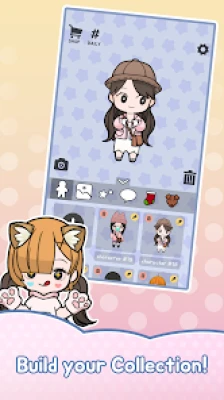
11. Keep a Collection of Your Favorite Designs
If your device supports screenshots or image organization, keep copies of your favorite creations. You can use them as references when building new characters or experimenting with a different color palette.
This is especially helpful when you discover an outfit combination you like and want to use the same visual idea in another design.
12. Experiment Without Rushing
The best part of a character creator is the ability to try ideas that might not work on the first attempt. Change the hairstyle, switch the outfit, test different decorations, and compare the results.
There is no single correct way to create a doll. A design that feels unusual at first may become one of your favorites after a few adjustments.
Unnie Doll Character Design Ideas
Cute Pastel Doll
Build a soft, kawaii-inspired appearance using gentle colors and a coordinated hairstyle. Keep accessories limited to a few details so the character remains the focus.
Glamorous Fashion Doll
Choose an elaborate outfit and coordinate the hair and facial appearance with its style. Use decorative elements selectively to create a polished look.
Music Star Character
Take inspiration from stage fashion and music-video costumes. Combine a distinctive hairstyle with a coordinated outfit and an expressive pose or speech bubble.
Fantasy Fairy Doll
Experiment with wings and decorative elements to create a fantasy-inspired character. A consistent color palette can help the design feel cohesive rather than overcrowded.
Halloween Doll
Use the game's Halloween-themed costume options to build a seasonal character. Choose complementary colors and decorations that reinforce the theme.
Messaging Emoticon Character
Design a doll around a clear facial expression and a short speech bubble. Keep the image focused so the expression remains recognizable when the image appears small.
Personalized Wallpaper Character
Create a character that stands out against a carefully selected background. Arrange the composition in a widescreen format and leave open space where possible for a clean result.
These are suggested creative themes rather than official missions or separate game modes.
Unnie Doll Game Information
Game Title: Unnie Doll
Developer: Supercent, Inc.
Genre: Casual simulation, dress-up, lifestyle, and character customization
Main Gameplay: Creating anime-inspired dolls, choosing hairstyles and clothing, adding accessories, and designing images
Customization Options: Skin color, hair, face, tops, bottoms, wings, stickers, and other decorative items
Item Collection: More than 1,000 decorative items
Special Features: Premium costumes, expressions, speech bubbles, square emoticon-style images, and 16:9 wallpaper creation
Game Modes: Single-player creative gameplay
Platform: Android, with Windows availability through Intel technology listed on Google Play
Internet Requirements: Listed as playable offline
Business Model: Free to play, with advertisements and optional in-app purchases
Content Rating: Everyone on Google Play
Is Unnie Doll Free to Play?
Unnie Doll is available as a free-to-play game, with advertisements and optional in-app purchases. Players can begin creating characters without buying the game, while some premium costumes and item options may involve additional spending.
The availability and cost of particular items can change. Check the current in-game options before assuming a costume or decoration is free.
Can You Use Unnie Doll Characters as Wallpapers?
Yes. The game describes an option to save custom creations in a 16:9 format for use as mobile wallpapers. You can arrange your character and background to create a personalized image.
For a better result, make sure the character is easy to see and the background does not compete with the main design.
Can You Make Emoticons in Unnie Doll?
Yes. Unnie Doll supports saving square 1:1 images that can be used like emoticons in supported messaging applications. The game also includes expressions and speech bubbles to make these images more expressive.
Whether an image can be used in a particular application depends on that application's image and sharing support.
Is Unnie Doll an Offline Game?
Google Play lists Unnie Doll as an offline, single-player game. This makes it a suitable option for players who want to spend time customizing characters without participating in competitive multiplayer matches.
Individual features or external sharing options may still require an internet connection.
Is Unnie Doll Suitable for Beginners?
Yes. The game is built around selecting appearance options and combining decorative items, making it approachable for newcomers to dress-up games. Beginners can start with a simple character and gradually experiment with more elaborate designs.
The best way to learn is to explore one customization category at a time instead of trying to perfect every detail immediately.
Advantages and Limitations of Unnie Doll
Advantages
More than 1,000 decorative and customization items.
A wide range of hairstyles, clothing, and character details.
Premium costumes inspired by different fashion themes.
Options for adding wings, stickers, expressions, and speech bubbles.
Square images for emoticon-style creations.
Widescreen images for personalized wallpapers.
Relaxed gameplay centered on creativity and self-expression.
Offline single-player support.
Limitations
Some items and costumes may require in-game currency or real money.
Advertisements may interrupt the experience.
Players looking for action, missions, or competitive challenges may find the gameplay limited.
Creating a highly detailed character can take time when browsing many item categories.
Randomized purchases may not provide a particular item on demand.
Frequently Asked Questions
What is Unnie Doll?
Unnie Doll is a casual anime-inspired dress-up game that lets you create and customize cute characters with hairstyles, clothing, facial details, accessories, and stickers.
Who developed Unnie Doll?
Unnie Doll was developed by Supercent, Inc.
How many items are available in Unnie Doll?
The game's description advertises more than 1,000 decorative items, including options for hair, faces, clothing, wings, and stickers.
Can I customize my doll's hairstyle and face?
Yes. Hair and facial features are among the main customization options. You can combine them with different outfits to create distinctive characters.
Does Unnie Doll have premium costumes?
Yes. The game features premium costumes inspired by luxury fashion, music videos, concerts, and Halloween.
Can I create a wallpaper in Unnie Doll?
Yes. The game supports saving images in a 16:9 format that can be used as personalized mobile wallpapers.
Can I make messaging stickers or emoticons?
You can save square 1:1 character images and use them like emoticons in supported messaging applications. Expressions and speech bubbles add personality to the images.
Does Unnie Doll require an internet connection?
It is listed as an offline single-player game. External sharing and certain other features may require connectivity.
Is Unnie Doll free?
The game is listed as free to play with advertisements and optional in-app purchases.
What is the best strategy for creating a cute doll?
Start with a clear theme, choose a coordinated hairstyle and outfit, and add accessories only when they improve the design. Pay attention to color balance and facial expression.
Is Unnie Doll a game with levels and battles?
Its main focus is creative character design rather than traditional levels, combat, or boss battles.
What makes Unnie Doll different from a basic dress-up game?
In addition to dressing up characters, it offers a large collection of decorative items, expressions, speech bubbles, and options for creating square emoticon-style images and widescreen wallpapers.
Final Thoughts on Unnie Doll
Unnie Doll is a relaxed character-creation game for players who enjoy cute anime-inspired designs, virtual fashion, and personalized artwork. Its large selection of decorative items makes it possible to create characters with different appearances, while expressions, speech bubbles, and custom backgrounds offer ways to turn those designs into images for everyday use.
The most rewarding approach is to experiment with hairstyles, clothing, and color combinations before adding the final decorative touches. Whether you want to create a fashionable doll, a fantasy-inspired character, a messaging emoticon, or a personalized wallpaper, Unnie Doll gives you a creative space to develop your own style.
Rate the Game
User Reviews

Popular Games







 Android
 iOS
 Windows
 Xbox