





Latest Version
September 24, 2026
Neon Game
Puzzle
Android
0
com.neongame.tilewings
Report a Problem
More About :game
Alongside the main puzzle levels, Tile Wings features multiple game modes, a villa-building system, pets that can help in battles, and daily challenge events.
What Is Tile Wings: Offline Match 3?
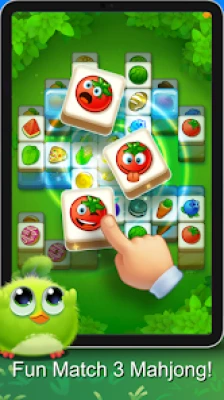
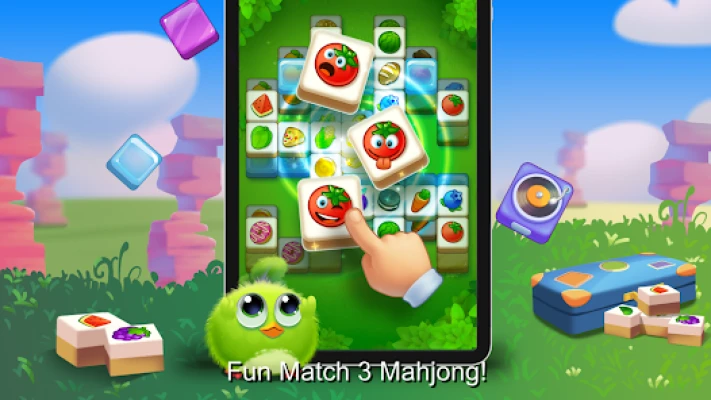
Tile Wings is a tile-matching and casual puzzle game designed around careful selection rather than traditional swapping.
Instead of moving tiles around a grid, you tap tiles and place them into a box. Every three identical tiles are collected. Your goal is to remove all the tiles from the puzzle without filling the box with unmatched pieces.
This creates a simple but important strategic rule:
Don't tap a tile unless you have a plan for what will happen to it.
A move that looks harmless can occupy valuable box space and make the next several moves much harder.
Tile Wings Game Information
| Feature | Details |
|---|---|
| Game Title | Tile Wings: Offline Match 3 |
| Developer | Neon Game |
| Genre | Puzzle / Match 3 / Casual |
| Core Gameplay | Tile matching and triple collection |
| Advertised Levels | 2,000+ |
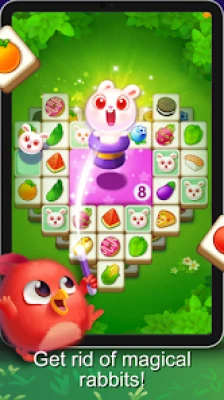
| Game Modes | Ice Mode, Magical Rabbit, Eating Pizza, Reverse Tile, Line-Up Number and others |
| Villa Building | Yes |
| Pets | Yes |
| Daily Challenge | Yes |
| Offline Play | Yes |
| Single Player | Yes |
| Content Rating | Everyone |
| Downloads | 1M+ |
| Google Play Rating | 4.5 stars |
| Reviews | 24.3K shown on the store listing |
| Ads | Yes |
| In-App Purchases | Yes |
| Package Name | com.neongame.tilewings |
| Latest Listed Update | August 28, 2026 |
The current Google Play page identifies Tile Wings as a Puzzle, Match 3, Match 3 Adventure and Casual game, and lists it as an offline single-player title.
How to Play Tile Wings
Step 1: Find Available Tiles
Look at the board and identify tiles that can currently be selected.
Don't immediately tap the first tile you see.
Instead, look for groups of identical tiles that can potentially be collected together.
Step 2: Place Tiles in the Box
Tap an available tile and it moves into the collection box.
The box is your main resource.
Every empty position matters.
Step 3: Create Groups of Three
When three identical tiles reach the box, they are collected.
For example:
Apple + Apple + Apple = Collected
After the group disappears, valuable space becomes available again.
Step 4: Avoid Filling the Box
This is the central danger.
If the box becomes full before you can create matching triples, the level fails.
Step 5: Clear Everything
Continue selecting tiles and forming triples until every tile required by the level has been collected.
Full Tile Wings Strategy Guide
1. Think About the Box Before the Board
Many players concentrate entirely on the tiles.
A better strategy is to think about both the board and the box.
Before tapping a tile, ask:
Where will this tile go, and when will I be able to remove it?
This simple question prevents many unnecessary mistakes.
2. Prioritize Existing Pairs
If two identical tiles are already available, they can be valuable because you only need one more copy to complete the triple.
For example:
Blue tile + Blue tile → find the third Blue tile
Keep track of these pairs while examining the board.
3. Avoid Creating Too Many Singles
Suppose the box contains:
Apple – Star – Moon – Heart
You now have several different unmatched tiles occupying space.
If you continue selecting unrelated tiles, the box can quickly become dangerous.
Whenever possible, choose a tile that matches something already in the box.
4. Complete a Triple Before Starting Another
A useful beginner rule is:
Finish what you started.
If you already have two matching tiles in the box and the third is safely accessible, completing that triple can be much better than starting another unmatched group.
This frees space immediately.
5. Look Several Moves Ahead
Tile Wings rewards planning.
Before selecting a tile, look at what it may reveal or block.
A good sequence can look like:
Select tile → reveal another tile → complete pair → collect triple → regain box space
This is much safer than randomly tapping available tiles.
6. Pay Attention to Blocked Tiles
Some tiles may become accessible only after another tile has been removed.
When you see a potentially useful tile underneath or behind another piece, consider how to reach it.
Sometimes the correct move is not the tile you ultimately want—it is the tile that is preventing access to it.
7. Don't Fill the Box With Unmatched Tiles
This is the most important survival rule.
If you have only a few spaces left, avoid taking a tile unless you can reasonably see how it will become part of a triple.
A nearly full box containing unrelated tiles is one of the most dangerous positions in the game.
8. Use the Board to Predict Future Matches
When a tile is removed, another tile may become available.
Before taking a tile, check what it might expose.
A move can therefore have two benefits:
- It contributes toward a triple.
- It reveals another useful tile.
Those are often the strongest moves.
Advanced Tile Wings Tips
Keep the Box Organized
Try to mentally group the tiles in your box.
For example:
2 Apples + 1 Star + 2 Hearts
The Apples and Hearts are close to completion, so your next move should ideally search for one of those missing tiles.
This makes the box easier to manage.
Use a "Two-Tile Rule"
Whenever possible, avoid allowing too many different single tiles into the box.
If you already have several unmatched pieces, prioritize completing existing pairs before creating another one.
This isn't an absolute rule, but it's a useful way to control the board.
Don't Always Take the Most Obvious Tile
An available tile may look attractive because it matches something.
But ask whether another move could produce an even better sequence.
Sometimes taking the matching tile immediately can prevent you from accessing another important tile.
How to Beat Difficult Tile Wings Levels
When a level becomes challenging, use this sequence:
Step 1: Count the box space
Know how many empty positions remain.
Step 2: Identify existing pairs
Find tiles that are already close to being collected.
Step 3: Search for the missing third tile
If it is accessible, prioritize it.
Step 4: Check what each move reveals
A tile may expose something more useful underneath.
Step 5: Avoid unnecessary singles
Don't fill the box with unrelated tiles.
Step 6: Complete groups quickly
Every completed triple creates more room.
Step 7: Reassess after every collection
Once three tiles disappear, the situation has changed.
Start scanning again.
Tile Wings Game Modes
The Google Play listing identifies several gameplay modes, including:
- Ice Mode
- Magical Rabbit
- Eating Pizza
- Reverse Tile
- Line-Up Number
The developer says these different modes are intended to add variety to the core tile-matching formula.
Ice Mode
Ice Mode introduces a different visual and gameplay setting.
When playing a special mode, don't automatically assume that the standard approach will work exactly the same way.
First identify what has changed in the board or objective, then adapt your normal matching strategy.
Magical Rabbit
The Magical Rabbit mode adds a character-themed variation to the puzzle experience.
Pay attention to the specific mechanics presented in the mode rather than relying only on the standard tile pattern.
Eating Pizza
The pizza-themed mode gives the otherwise abstract matching system a more playful presentation.
The same fundamental principle remains important:
Manage the box and avoid collecting too many unrelated pieces.
Reverse Tile
Reverse Tile changes the normal puzzle presentation and requires greater attention to what is currently available.
Take extra time to examine the board before making a sequence of moves.
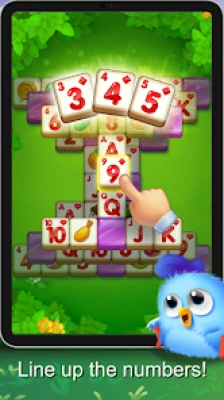
Line-Up Number
Line-Up Number introduces numerical elements into the puzzle experience.
For this type of mode, slow down and identify the relationship between the available numbers before committing valuable box space.
Tile Wings Pets
Tile Wings includes a pet system.
The Google Play description states that players can grow pets, and that pets can help during battles.
This gives the game an additional progression layer outside the tile puzzles.
If you're interested in the game's broader progression, don't focus only on completing levels. Pay attention to the rewards and systems that develop your pets over time.
Build Your Villa
Players can also earn stars to build their own sweet villa.
This adds a light home-building and customization element to the puzzle progression.
It means that successful puzzle completion can contribute to something visible beyond the current level.
Daily Challenge Event
Tile Wings includes a Daily Challenge Event that offers additional rewards.
Daily challenges are useful for players who want more variety beyond the standard level progression.
If you're playing regularly, checking the daily event can also provide another way to collect resources and rewards.
Tile Wings Offline Gameplay
Tile Wings is listed by Google Play as an offline game.
That makes it convenient for:
- Travel
- Short breaks
- Areas with unreliable internet
- Casual puzzle sessions
- Playing without a continuous connection
The core single-player puzzle experience is therefore not dependent on being online.
How to Manage the Tile Box
The collection box is effectively the heart of the game.
Think of it as a limited inventory.
Safe position
Several empty spaces + one or two matching pairs
You have room to maneuver.
Risky position
Many different single tiles + very little empty space
You are approaching failure.
Strong position
Multiple pairs with accessible third tiles
You can quickly collect groups and recover space.
Learning to recognize these positions is one of the biggest steps toward becoming a better Tile Wings player.
Common Tile Wings Mistakes
Mistake 1: Tapping Random Tiles
Random selections fill the box quickly.
Better approach: choose tiles with a clear matching plan.
Mistake 2: Ignoring Existing Pairs
A pair is already halfway to a completed group.
Better approach: look for the missing third tile.
Mistake 3: Filling the Box With Singles
Too many unrelated pieces can leave no room for useful moves.
Better approach: complete groups before creating unnecessary new ones.
Mistake 4: Forgetting What a Move Reveals
A selected tile may uncover something important.
Better approach: inspect newly available tiles after every significant move.
Mistake 5: Playing Too Fast
The game may look simple, but the limited box makes careless decisions expensive.
Better approach: pause and plan.
Beginner Tips for Tile Wings
Tip 1: Start With Pairs
Find two identical tiles and search for the third.
Tip 2: Protect Box Space
Empty space is valuable.
Tip 3: Look Under and Behind Tiles
Removing one tile may reveal another useful piece.
Tip 4: Complete Groups Quickly
A completed triple gives you more room.
Tip 5: Don't Rush
Tile Wings rewards observation more than speed.
Tip 6: Watch the Mode Rules
Special modes can change how you should approach the puzzle.
Tip 7: Re-scan After Every Triple
Once three tiles disappear, new possibilities can appear.
Advanced Box Management Strategy
One of the strongest habits you can develop is mentally separating your tiles into three categories:
Ready
Three identical tiles are available.
Collect them.
Almost Ready
Two matching tiles are available.
Look for the third.
Uncertain
Only one tile is present and you don't know when another will become available.
Be careful about adding more uncertain tiles.
This simple classification can make complicated boards easier to understand.
Tile Wings Difficulty
The basic rules are easy to learn, but later levels can demand significantly more planning.
A recent Google Play review from December 2025 describes the game as fun but says that some later levels became very difficult and that the player relied heavily on earned boosters. This is one player's experience rather than a universal assessment, but it illustrates how the challenge can increase over a long progression.
The best response to difficult levels is usually better box management rather than faster play.
Honest Gameplay Impressions
Tile Wings has a straightforward core mechanic that is easy to understand but can become surprisingly strategic because the collection box has limited capacity.
Its broader feature set—different puzzle modes, villa building, pets and daily challenges—gives the game more variety than a basic tile-matching title.
The current Google Play listing shows 1M+ downloads and a 4.5-star rating, indicating substantial player activity. At the same time, user reviews include criticism of advertisements and difficulty in later levels, so the experience may vary depending on how far you progress and how you feel about the game's monetization.
For players who enjoy Mahjong-style tile matching, triple-match puzzles and relaxing casual games, the limited-box mechanic gives Tile Wings its main strategic identity.
Tile Wings Pros and Cons
Pros
- Simple tile-matching controls
- Easy to learn
- Strategic box-management mechanic
- 2,000+ advertised levels
- Multiple gameplay modes
- Ice Mode
- Magical Rabbit
- Eating Pizza
- Reverse Tile
- Line-Up Number
- Pet system
- Villa building
- Daily challenges
- Offline gameplay
- Suitable for all ages
- Large player base
Cons
- Ads are included
- In-app purchases are available
- Later levels can become difficult
- The limited box can make mistakes costly
- Some user reviews criticize advertising frequency
- Some players have reported needing boosters on harder stages
Google Play currently lists ads and in-app purchases, while the store's user reviews include both positive feedback and complaints about advertisements and difficulty.
Who Should Play Tile Wings?
Tile Wings is a good choice for players who enjoy:
- Tile matching games
- Triple-match puzzles
- Mahjong-inspired games
- Match-3 games
- Relaxing puzzle games
- Offline Android games
- Casual brain teasers
- Long level collections
- Pet games
- Home decoration games
It is especially interesting for players who like puzzles where careful planning matters more than fast reactions.
Frequently Asked Questions
What is Tile Wings: Offline Match 3?
Tile Wings is a casual tile-matching puzzle game from Neon Game where players place tiles into a box and collect groups of three identical tiles.
How do you play Tile Wings?
Tap available tiles to place them in the box. Every three matching tiles are collected. Clear all the required tiles without filling the box.
What happens if the box becomes full?
If the box fills before you can collect the required tiles, you fail the level.
How many levels does Tile Wings have?
The Google Play description advertises 2,000+ levels.
Is Tile Wings an offline game?
Yes. Google Play currently lists Tile Wings as an offline game.
What game modes are available?
The store listing mentions Ice Mode, Magical Rabbit, Eating Pizza, Reverse Tile and Line-Up Number, along with other gameplay variations.
Does Tile Wings have pets?
Yes. Players can grow pets, and the developer says pets can help in battles.
Can you build a villa in Tile Wings?
Yes. Players can earn stars and use them to build a sweet villa.
Does Tile Wings have daily challenges?
Yes. The game includes a Daily Challenge Event with additional rewards.
Is Tile Wings suitable for children?
Google Play currently lists the game with an Everyone rating.
Does Tile Wings contain ads?
Yes. The current Google Play listing states that the game contains ads and in-app purchases.
What is the Android package name?
The Android package name is com.neongame.tilewings.
Who developed Tile Wings?
Tile Wings was developed by Neon Game.
Final Thoughts
Tile Wings: Offline Match 3 takes the familiar idea of matching three identical pieces and turns it into a game of careful inventory management.
The most important lesson is simple:
Don't just ask which tile you can take. Ask which tile you can safely take.
Every tile placed into the box uses valuable space. Completing triples quickly, protecting empty slots, recognizing pairs and thinking about what each move reveals are the foundations of successful play.
With its 2,000+ advertised levels, multiple modes, pets, villa building, daily challenges and offline support, Tile Wings offers plenty of content for players who enjoy relaxing but strategic tile-matching puzzles.
Rate the Game
User Reviews












Popular Games



















 Android
 iOS
iOS Windows
 Xbox
Xbox