


Latest Version
January 06, 2026
Candy Room Games & RabbitCo
Adventure
Android
0
com.candyroom.clubcraft
Report a Problem
More About :game
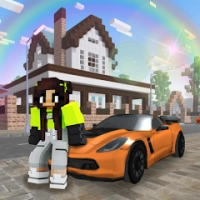
The game combines elements of a life simulator, sandbox, adventure game and casual role-playing experience. Instead of following one fixed mission path, players have considerable freedom to decide what they want to do.
You can spend time shopping for outfits, designing a house, driving around the city, visiting the beach, going to the cinema, dancing at the disco, playing mini-games, using paintball equipment or simply exploring different areas.
The current Google Play listing describes the game as a cubic life simulator aimed at schoolchildren and teenagers. It is rated 3+, includes user interaction, and is listed as single-player, offline, sandbox, casual, stylized and pixelated.
As of September 2026, Google Play shows 100M+ downloads and a 4.4-star rating from about 2.19 million reviews. These numbers can change as new players download and review the game.
What Is School Party Craft?
School Party Craft gives you an open city where you can create your own activities instead of simply following a traditional story.
The city includes places such as:
- School
- Market
- Park
- Beach
- Restaurant
- Cinema
- Disco
- Bank
- Car dealership
- Gas station
- Swimming pool
There are also houses, mansions, shops, vehicles and interactive locations to discover.
The main idea is freedom. You decide whether your session is about building, decorating, exploring, driving, fashion, social activities or mini-games.
School Party Craft Gameplay Features
Open City Exploration
The city is the central playground.
Rather than moving through a sequence of small levels, you can travel around different areas and discover activities at your own pace.
Exploration is particularly useful early in the game because it helps you learn where important shops, entertainment locations and services are located.
Take time to learn the city before spending all your resources.
Character Customization
School Party Craft lets you personalize your character and create a look that matches your preferred style.
Fashion is an important part of the experience, especially because the game is designed around social and lifestyle activities.
You can experiment with:
- Clothing
- Skins
- Accessories
- Character appearance
- Different styles
The goal isn't simply to have the strongest character. Your appearance becomes part of the creative experience.
Building and Crafting Guide
Building is one of the deepest activities in School Party Craft.
The game includes large plots and mansions where you can create your own home. The official listing describes a large collection of construction blocks and hundreds of furniture types.
Start With a Simple Layout
Don't immediately fill every available space.
Start by deciding where you want the main rooms to go.
A useful basic layout might include:
- Living room
- Bedroom
- Kitchen
- Bathroom
- Storage area
- Outdoor space
Once the basic structure works, start adding decorative details.
Plan Before Decorating
A common building mistake is buying furniture before deciding where everything belongs.
Instead:
- Create the walls.
- Establish entrances.
- Divide the rooms.
- Decide where large furniture will go.
- Add smaller decorations.
- Finish with plants, lighting and accessories.
This produces a cleaner house and prevents wasted space.
How to Design a Better House
School Party Craft includes furniture such as chairs, tables, sofas, beds, wardrobes and other decorative objects. Doors, plants and chandeliers can also be used to complete the interior.
Try giving every room a purpose.
Living Room
Use sofas, chairs and tables to create a comfortable central area.
Bedroom
Keep the bed as the main visual focus and avoid filling every available space.
Kitchen
Use counters, tables and other suitable furniture to create a functional-looking layout.
Outdoor Area
Leave enough open space around the house so the property doesn't feel crowded.
Decorative Areas
Plants, lighting and smaller objects are excellent for filling empty corners without overwhelming the room.
School Party Craft Building Tips
Use Empty Space
Not every square needs furniture.
Open areas can make a house feel larger and easier to navigate.
Create a Theme
Instead of placing random furniture everywhere, choose a theme.
For example:
- Modern apartment
- Luxury mansion
- Cozy family home
- Colorful teenage bedroom
- Beach house
- Fantasy cottage
Build Around Function
A beautiful room is even better when it remains easy to walk through.
Keep doors and pathways accessible.
Decorate Gradually
You don't need to finish your dream house in one session.
Build the structure first, then improve it over time.
Money and Resource Tips
Money is important because many activities involve purchasing items, properties, vehicles, furniture or other customization options.
One of the easiest ways to avoid wasting money is to explore before spending.
Visit the market and other locations first so you understand what is available.
Look for Coin Chests
The game includes chests containing coins and other bonuses.
When exploring the city, keep an eye out for these opportunities.
Rather than spending every coin immediately, save some for major purchases.
Protect Your Coins
The official description includes a paintball activity involving hooligans who take coins. Shooting them allows the coins to be returned.
This makes exploration more than simply sightseeing.
Paintball Guide
Paintball is one of the game's more action-oriented activities.
The available equipment includes different types of paintball weapons, including miniguns, pistols, assault rifles and several unusual options.
The game uses colored projectiles rather than conventional ammunition.
Paintball Tips
Keep Moving
Standing still makes it harder to react when opponents are nearby.
Watch Your Position
Don't rush into a crowded area without knowing where your targets are.
Use the Right Weapon
Different weapons can feel more comfortable depending on the situation.
Focus on Accuracy
Rapidly firing without aiming can waste opportunities.
Recover Stolen Coins
If your objective is recovering coins, concentrate on the relevant enemies rather than simply shooting everything you see.
Cars and Driving Guide
Vehicles are another major part of School Party Craft.
The game includes:
- Cars
- Motorcycles
- Bicycles
- Scooters
- Skateboards
There are also vehicle tuning options.
Driving Tips
Learn the City Roads
Knowing shortcuts can make getting from one activity to another much easier.
Visit the Car Dealership
The dealership is one of the city's important locations.
Use Different Vehicles
Don't assume that every vehicle is best for every situation.
A car may be useful for longer trips, while smaller vehicles can be more enjoyable for casual exploration.
Explore Before Tuning
If resources are limited, understand how you want to use a vehicle before investing heavily in customization.
Social and Character Interaction
School Party Craft's city contains many characters with whom you can interact.
The official description says players can communicate with characters, make friends, walk together, visit restaurants and parks, ride cars and spend time in entertainment locations. Characters can also be added to the phone book for SMS communication.
This gives the game a social-simulator element even though the current Google Play listing identifies the game as single-player.
Build Your Own Routine
A simple social routine could be:
- Meet a character.
- Add them to your phone book when appropriate.
- Visit a park or restaurant.
- Explore the city together.
- Visit an entertainment location.
- Return home and customize your character or house.
School Party Craft Activities
There is much more to do than simply attend school.
The city includes multiple forms of entertainment.
Disco
The disco includes music and dancing, and the game allows players to interact with DJs.
Beach
Visit the beach, relax on sun loungers and swim.
Cinema
The cinema provides another destination for casual exploration.
Restaurant
The restaurant includes an interactive mini-game involving the bartender.
Park
The park provides an open area for walking and social activities.
Pool
The city pool is another place to swim and explore.
Mini-Games Guide
School Party Craft includes several mini-games, including bartender activities and a game of smiles.
These activities are useful when you want a break from building or exploration.
Don't feel that you need to focus on one activity for an entire session. The game's variety works best when you rotate between different activities.
Swimming and Water Activities
Swimming is available both at the beach and in pools.
If you're exploring the city, water locations are worth visiting simply because they provide a change of environment.
The beach can also work as part of a larger exploration route alongside nearby city locations.
Weather and Time of Day
School Party Craft includes changing weather and time of day.
This helps make the city feel less static.
A useful way to enjoy this feature is to explore the same location at different times.
A busy daytime city and a nighttime city can have very different atmospheres, especially around entertainment locations such as the disco.
First-Person and Third-Person Camera
The game supports both first-person and third-person camera perspectives.
Third Person
Third person is useful for:
- Driving
- Character movement
- Exploring
- Seeing your outfit
- Navigating larger areas
First Person
First person can be useful when you want a closer view of interiors, objects or specific locations.
Switching perspectives can make exploration feel more varied.
Interactive Furniture
Furniture isn't purely decorative.
The game allows interaction with objects, including actions such as sitting and sleeping.
When designing a house, think about interactive furniture as part of the home's layout.
For example, don't place a sofa somewhere that makes it difficult to reach.
Best Beginner Strategy
If you're starting School Party Craft for the first time, avoid trying to do everything immediately.
Use this progression:
Step 1: Explore the City
Visit the major locations and learn where they are.
Step 2: Learn the Controls
Practice walking, driving, interacting and switching camera views.
Step 3: Find Coin Sources
Look for chests, activities and opportunities to earn or recover coins.
Step 4: Choose a Home
Once you're comfortable with the city, begin working toward your preferred property.
Step 5: Build the Basic Structure
Create rooms and pathways before worrying about decorations.
Step 6: Customize Your Character
Choose an outfit that fits your preferred style.
Step 7: Buy a Vehicle
Once your finances allow it, choose a vehicle that fits your play style.
Step 8: Explore Entertainment
Visit the beach, park, restaurant, cinema and disco.
Step 9: Try Paintball
Use the paintball activities for a more action-focused change of pace.
Step 10: Continue Expanding
Gradually improve your home, collection, vehicles and character.
How to Avoid Wasting Money
One of the easiest ways to slow your progress is buying everything that looks interesting.
Instead, divide your spending into three categories:
Essential: Items that directly help your current goals.
Useful: Items that improve convenience or customization.
Optional: Cosmetic items that you can buy later.
If your current objective is building a house, prioritize construction and furniture rather than spending all your resources on cosmetic items.
School Party Craft Advanced Tips
Create Multiple Areas
Instead of building one huge room, divide your property into distinct spaces.
This creates a more interesting home and gives each area a clear purpose.
Use Vehicles as Exploration Tools
Don't only drive randomly.
Create routes that connect your favorite locations.
For example:
Home → Market → Restaurant → Park → Beach → Home
This turns ordinary exploration into a routine.
Change Activities Regularly
The game's strength is its variety.
If you've spent 30 minutes building, try driving.
If you've been driving for a while, visit the beach.
If exploration becomes repetitive, try paintball or a mini-game.
Keep Improving Your Home
A house doesn't need to be finished immediately.
Return later and improve individual rooms.
This makes building feel like a long-term project rather than a one-time task.
School Party Craft Latest Update
The current Google Play listing was updated on September 23, 2026. The listed update is titled Season 1 – Summer! and adds several new elements, including:
- Dinosaur T-Rex
- Helicopter
- Palm trees
- Robot character
- Navi character
- Albino Cyborg Gorilla
- Additional robots
The developer also asks players to leave feedback and suggestions for future updates.
This is important for returning players because the game continues to receive new content rather than remaining unchanged.
School Party Craft Performance
The Google Play description states that the game is optimized for weaker devices, with support starting from devices with 1 GB of RAM. It also offers customization for gameplay and control buttons.
Actual performance can still vary according to the device, operating system, background applications and graphics settings.
If performance is inconsistent, reducing unnecessary background activity and using the game's available customization options may help.
School Party Craft Ads and Connectivity
The Google Play listing currently indicates that the game contains ads.
Google Play also lists School Party Craft as an offline game, although some connected functionality may depend on network access.
The developer's data-safety disclosure currently says that no data is shared with third parties, no data is collected, data is encrypted in transit, and data can't be deleted. These disclosures are developer-provided and can change over time.
Pros and Cons
Pros
- Large cubic-style city
- Building and home customization
- Hundreds of furniture options
- Character customization
- Cars and vehicle tuning
- Motorcycles, bicycles, scooters and skateboards
- Paintball activities
- Multiple mini-games
- Beach, pool, park and disco
- First-person and third-person cameras
- Changing weather and time of day
- Interactive furniture
- Offline support
- Designed to run on relatively modest hardware
Cons
- The large number of activities can initially feel overwhelming.
- Players looking specifically for a traditional story may find the sandbox structure different from a conventional adventure game.
- Ads are included.
- Some player reviews request additional customization, larger areas or multiplayer-style features; these are individual player suggestions rather than confirmed shortcomings for every player.
School Party Craft Game Information
Game: School Party Craft
Developer: Candy Room Games & RabbitCo
Genre: Adventure / Simulation / Sandbox / Casual
Style: Cubic / Pixelated / Stylized
Mode: Single player
Offline: Yes
Content Rating: Rated 3+
Downloads: 100M+
Google Play Rating: 4.4 stars
Reviews: About 2.19 million
Ads: Yes
Latest listed update: September 23, 2026
Minimum RAM mentioned by developer: 1 GB
Current store statistics and ratings may change over time.
Frequently Asked Questions
What is School Party Craft?
School Party Craft is a cubic-style life simulator and sandbox game where players explore a large city, customize characters, build homes, drive vehicles and participate in various activities.
Can you build houses in School Party Craft?
Yes. Players can purchase properties and use construction blocks, furniture, doors, plants and other decorative elements to create and customize homes.
Can you drive cars?
Yes. Driving and vehicle tuning are among the game's listed features. Motorcycles, bicycles, scooters and skateboards are also available.
Does School Party Craft have paintball?
Yes. The game features paintball weapons and colored projectiles, with activities involving hooligans who can take coins.
Can you swim?
Yes. Swimming is available at the beach and in pools.
Can you play School Party Craft offline?
Google Play currently lists the game as supporting offline play.
Does School Party Craft have multiplayer?
The current Google Play listing categorizes the game as single player. Some player reviews have requested multiplayer features, but those requests should not be confused with a currently listed multiplayer mode.
Is School Party Craft free?
The Google Play listing is available to install and currently indicates that the game contains ads.
What can you do in School Party Craft?
You can build houses, decorate interiors, shop, change outfits, drive vehicles, visit the school, park, beach, cinema, restaurant, disco and pool, play mini-games, interact with characters, swim and participate in paintball activities.
What was added in the latest update?
The September 23, 2026 listing includes the Season 1 – Summer update with additions such as a T-Rex, helicopter, palm trees, robot characters, Navi, an albino cyborg gorilla and more robots.
Final School Party Craft Strategy Guide
School Party Craft works best when you treat the city as your personal sandbox rather than trying to complete everything at once.
Start by learning the city and finding the locations that interest you. Build a simple home before worrying about elaborate decoration, save resources for important purchases, and explore different activities instead of repeating the same one.
For builders, planning is the key. Create the structure first and decorate afterward.
For explorers, learn useful routes between the home, market, park, beach, restaurant and other major locations.
For players who enjoy action, paintball and vehicles provide a different side of the game.
And for players who simply want a relaxing experience, changing outfits, decorating a house, visiting the beach or spending time around the city can be enough.
The biggest advantage of School Party Craft is its variety: you can build, drive, explore, socialize, customize and experiment without being locked into one particular play style.
Rate the Game
User Reviews









Popular Games


















 Android
 iOS
iOS Windows
 Xbox
Xbox