
Latest Version
October 02, 2026
TINYSOFT
Casual
iOS
0
Report a Problem
More About :game
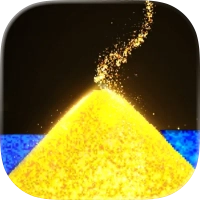
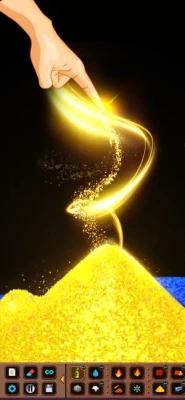
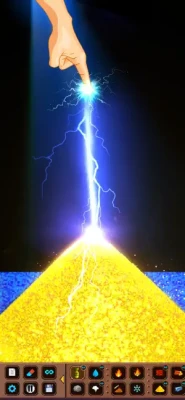
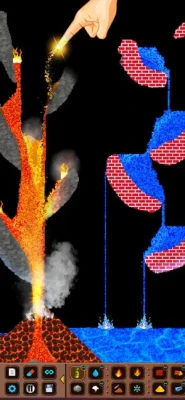
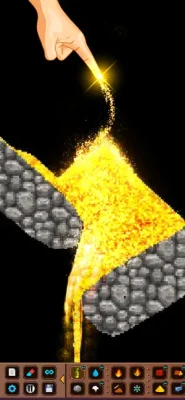
The game is designed around powder physics, allowing particles to move and interact with one another. You can combine materials, test reactions, construct objects, create chain reactions, experiment with heat and explosions, and simply watch the simulation develop.
Alongside its freeform sandbox, the game has a single-player campaign with puzzle-style challenges and a community mode featuring player-created levels. Previous updates also added new materials, bombs, eight new layouts, and improvements to particle simulation.
What Makes SandBox - sand box Different?
Most casual games give you a specific objective and a limited set of actions. SandBox - sand box takes the opposite approach.
The main attraction is experimentation.
You decide what to build, which elements to combine, and what happens next. There is no single correct way to use the sandbox, which makes the game particularly suitable for players who enjoy physics experiments, creative building, puzzle solving, and unpredictable reactions.
The current App Store description highlights realistic-feeling particle interactions, different elements, full rotation capabilities, and the ability to combine materials to create reactions.
SandBox - sand box Game Information
| Feature | Details |
|---|---|
| Game | SandBox - sand box |
| Developer | TINYSOFT |
| Genre | Casual / Physics Sandbox |
| Platforms | iPhone, iPad |
| Price | Free |
| Age Rating | 4+ |
| App Size | About 156.9 MB |
| Main Gameplay | Powder physics simulation |
| Campaign | Yes |
| Community Mode | Yes |
| Player Levels | Yes |
| Materials | Multiple elements |
| Bombs | Yes |
| Layouts | Multiple layouts |
| Physics | Particle-based simulation |
| Languages | English + 7 more |
The App Store currently lists the game as free, developed by TINYSOFT, with an age rating of 4+, and available for iPhone and iPad.
How SandBox - sand box Gameplay Works
The basic gameplay loop is simple:
Choose an element → place it in the sandbox → observe its behavior → introduce another material → experiment with the reaction → modify the setup.
The fun comes from what happens between those steps.
You might create a structure and then introduce a different material that changes how particles move. You can also experiment with heat, explosions, gravity-like movement, barriers, and other physical interactions depending on the available tools.
This makes SandBox - sand box more of an interactive physics laboratory than a conventional game.
Understanding Powder Physics
The most important skill is learning how different particles behave.
Instead of thinking only about individual objects, think about movement and interaction.
Watch for:
Falling particles
Accumulation
Flow
Pressure
Heat
Explosions
Reactions
Containment
Structural changes
Chain reactions
When you understand the behavior of one material, try combining it with another.
That is where the sandbox becomes much more interesting.
Best Way to Start Experimenting
If you're new to SandBox - sand box, don't immediately try to create a complicated machine.
Start with small experiments.
Experiment 1: Test One Material
Place a small amount of one material into an empty area.
Watch how it moves.
Does it fall directly downward? Does it spread? Does it pile up? Does it react with the environment?
Experiment 2: Add a Second Material
Now introduce another element.
Place the two materials close together and watch what happens.
Experiment 3: Change the Shape
Build walls or containers around your materials.
This lets you see how the same particles behave differently when their movement is restricted.
Experiment 4: Create a Chain Reaction
Once you understand individual reactions, try connecting multiple elements.
The goal is to make one event trigger another.
Creative Building Guide
The sandbox can also be used as a construction space.
You can create:
Towers
Bridges
Containers
Traps
Mazes
Particle machines
Destruction experiments
Simple structures
Physics demonstrations
Puzzle solutions
The best builds don't necessarily need to look complicated.
A simple structure that produces an interesting physical reaction can be more entertaining than a large construction that does nothing.
Campaign Mode Guide
SandBox - sand box isn't limited to completely free experimentation. The game also includes a single-player campaign with puzzle-style challenges.
Campaign levels change the way you think about the sandbox.
Instead of asking:
"What can I make?"
you need to ask:
"What does this level require me to accomplish?"
That difference is important.
Campaign Strategy
First, inspect the entire level before placing anything.
Look for:
Starting positions
Obstacles
Gaps
Dangerous materials
Target locations
Available building space
Existing structures
The route an object or character must take
Then create the simplest solution possible.
How to Solve Difficult Campaign Levels
When a campaign puzzle seems impossible, don't immediately add more materials.
Instead, restart and simplify.
Step 1: Identify the Objective
Know exactly what must happen for the level to succeed.
Step 2: Find the Critical Problem
Determine what is preventing the objective from being completed.
Step 3: Change One Variable
Move one wall, add one material, change one bridge, or modify one part of the setup.
Step 4: Test
Run the simulation.
Step 5: Observe
Look at where the solution fails.
Step 6: Adjust
Make another small change.
This process is much more effective than randomly adding elements.
Community Mode
The game also includes a community mode with player levels. This was introduced alongside the campaign and additional materials and bombs in earlier updates.
Community-created levels are valuable because they provide situations you may not encounter in the standard campaign.
They can also inspire your own creations.
When you find an interesting level, study how it was constructed rather than simply trying to complete it.
Ask yourself:
Why was this material placed here?
Why is the structure shaped this way?
What triggers the reaction?
Could I build something similar?
Could I solve it using fewer materials?
Materials and Element Reactions
Materials are the foundation of SandBox - sand box.
The game has expanded its collection of materials through updates, with the developer specifically mentioning new materials and improved particle simulation.
Don't think of materials as isolated objects.
Think of them as components in an experiment.
A material can be used for:
Movement
Containment
Reaction
Destruction
Protection
Construction
Triggering another event
The most useful way to learn the element system is experimentation rather than memorizing every possible interaction.
Bombs and Explosions
Bombs add another layer to the physics playground.
They can be used for destruction experiments, chain reactions, and testing how structures respond to sudden forces. The developer specifically added new bombs in an earlier major update.
Explosion Experiment
Build a small structure first.
Place the explosive element nearby.
Then observe:
The initial explosion
How nearby particles move
Which structures survive
Which materials react
Whether the explosion triggers another event
Once you understand the result, increase the size of your experiment.
How to Create Better Chain Reactions
Chain reactions are among the most entertaining experiments in a physics sandbox.
The basic principle is:
Trigger A → affects B → activates C → produces D
Don't make the chain too complicated at first.
Build a three-stage reaction.
Once that works consistently, add another stage.
This makes it easier to identify the point where an experiment fails.
Building a Physics Machine
You can approach the sandbox almost like a miniature engineering laboratory.
Start with a goal.
For example:
Goal: Move a particle from one side of the screen to another.
Then construct a system that accomplishes that goal.
You might need:
A starting container
A pathway
Barriers
A trigger
A reaction
A final destination
Once the basic system works, try to make it smaller or more efficient.
Layout Strategy
The game has received additional layouts through its updates, including eight new layouts in version 2.1.0.
Different layouts change the space available for experimentation.
Before beginning a large project:
Inspect the entire layout.
Identify open areas.
Locate natural barriers.
Determine where particles can accumulate.
Decide where your main reaction will occur.
Leave enough space for expansion.
Planning the layout first can save considerable trial and error.
Thermal Vision and Physics Observation
The App Store description highlights a thermal-vision-style presentation as part of the sandbox experience.
When experimenting with reactions involving heat, visual feedback can help you understand how the simulation is changing.
Don't simply watch the final result.
Observe the process.
Look for the moment when the reaction begins and what happens immediately afterward.
That information can help you reproduce the result.
Advanced SandBox - sand box Strategies
Use Small Test Areas
If you're testing a new reaction, don't fill the entire sandbox.
Use a small controlled area.
This makes the result easier to understand.
Change One Thing at a Time
If you change five elements simultaneously, you won't know which change caused the result.
Change one variable and test again.
Save Successful Ideas
If the game allows you to share or retain your creations, keep interesting builds as references. An App Store reviewer specifically reports that players can share what they create with others.
Build From Simple to Complex
A complicated machine should be constructed from smaller systems that already work.
Experiment After Completing a Puzzle
Campaign levels can teach you useful mechanics.
After solving a puzzle, recreate the important mechanism in the free sandbox and modify it.
Beginner Tips
Tip 1: Watch Before Acting
The simulation itself provides information. Observe how particles behave before adding more elements.
Tip 2: Start Small
Small experiments are easier to understand.
Tip 3: Use Barriers
Walls and containers let you control particle movement and create more predictable experiments.
Tip 4: Test Reactions Separately
Before creating a huge chain reaction, test the individual interactions.
Tip 5: Don't Fear Failure
A failed experiment can teach you more than a successful one because it shows which part of your design doesn't work.
Tip 6: Rebuild Interesting Results
If you accidentally create an interesting reaction, try reproducing it deliberately.
Tip 7: Use Campaign Levels as Tutorials
The campaign gives you specific problems to solve, making it a useful way to learn the physics system.
Advanced Tips for Creative Players
Create Controlled Chaos
The most interesting experiments often combine controlled structures with unpredictable particle interactions.
Use Symmetry
Try building two similar structures and introducing the same material into both.
Then change one variable and compare the results.
Create Multiple Stages
Instead of one reaction, design a sequence.
For example:
Material release → movement → collision → explosion → secondary reaction
Test Structural Failure
Build a bridge or tower and gradually change what supports it.
Observe exactly when the structure collapses.
Create Your Own Puzzles
Once you understand the mechanics, design a challenge for yourself.
Set a goal such as:
Move a particle through an obstacle course
Protect one area from an explosion
Trigger three reactions in sequence
Build a structure that survives a blast
Create a self-contained particle loop
Offline Play
One App Store reviewer reports being able to play the game without an internet connection. This is a player report rather than an official feature statement, so offline availability can depend on the current version and circumstances.
Ads and Player Feedback
The App Store currently shows a strong overall rating of 4.6/5 from about 45K ratings, but individual reviews vary considerably.
Some players praise the physics experimentation, campaign, community levels, and creative possibilities. Other reviews complain about advertising frequency, limited content, or particular campaign problems. These comments represent individual experiences rather than universal characteristics of the game.
This is worth mentioning for visitors who are deciding whether the game fits their preferred style of casual play.
SandBox - sand box Pros and Cons
Pros
Creative physics sandbox
Particle-based simulation
Many materials to experiment with
Element reactions
Bombs and destruction experiments
Campaign puzzle mode
Community-created levels
Multiple layouts
Thermal-vision-style presentation
Relaxing open-ended gameplay
Suitable for experimentation and creative building
Cons
Some players report frequent advertising interruptions
Content availability can vary by version
Campaign puzzles may occasionally be frustrating
Players looking for conventional action or story gameplay may find the open-ended format unusual
The latest listed version is not particularly recent, with version 2.4.1 dated January 25, 2024.
Update History
The game's update history shows several stages of development.
Version 2.4.1 – January 25, 2024
Bug fixes and improvements.
Version 2.4.0 – December 31, 2023
Bug fixes and improvements.
Version 2.2.1 – June 15, 2023
Bug fixes and improvements.
Version 2.1.2 – March 17, 2023
The update added new materials, bombs, improved particle simulation, a single-player campaign, and a community mode with player levels.
Version 2.1.0 – March 1, 2023
Added new materials, eight new layouts, UI updates, and bug fixes.
Is SandBox - sand box Good for Creative Gameplay?
The game's design is particularly suited to players who enjoy experimenting rather than following a fixed objective.
The sandbox gives you freedom to construct your own experiments, while campaign levels provide more structured challenges. Community levels add another layer by allowing players to explore creations made around the game's physics system.
Its appeal therefore comes from the interaction between freedom and experimentation rather than traditional progression.
Who Should Play SandBox - sand box?
The game may appeal to players who enjoy:
Physics simulations
Sandbox games
Creative experiments
Particle games
Casual puzzle games
Destruction simulations
Engineering-style challenges
Building and testing machines
Chemistry-style element reactions
Relaxing experimental gameplay
It may be less appealing to someone looking primarily for character progression, competitive multiplayer, or a traditional story campaign.
Frequently Asked Questions
What is SandBox - sand box?
SandBox - sand box is a casual powder-physics playground where players experiment with particles, materials, reactions, structures, and explosions.
Is SandBox - sand box free?
Yes. The App Store currently lists the game as free.
Is SandBox - sand box a physics game?
Yes. Its core gameplay is based on particle and powder physics, with materials interacting through the simulation.
Does SandBox - sand box have a campaign?
Yes. The game has a single-player campaign featuring puzzle-style challenges.
Can you create your own levels?
The game has a community mode with player levels, and an App Store reviewer reports that players can share their creations.
Does the game have bombs?
Yes. Bombs were added as part of a major update alongside new materials and improved particle simulation.
How do you get better at SandBox - sand box?
Start with small experiments, learn how individual materials behave, use barriers to control particles, and then combine multiple reactions into larger systems.
What is the best strategy for campaign levels?
Read the entire level first, identify the objective, determine what prevents you from completing it, and then change one part of your setup at a time. This makes difficult physics puzzles much easier to troubleshoot.
Can SandBox - sand box be played offline?
An App Store reviewer reports playing without internet, but the current official listing does not explicitly guarantee offline play.
Final Thoughts
SandBox - sand box takes a simple concept—putting materials into a physics playground—and turns it into an open-ended collection of experiments.
The best way to play isn't to search for one perfect strategy. Instead, learn how the particles behave, control the environment, experiment with combinations, and gradually build more complicated systems.
The campaign provides structured puzzles for players who want objectives, while the sandbox and community modes give creative players considerably more freedom. With materials, reactions, bombs, layouts, and particle simulation, there is plenty of room to create experiments that behave differently every time.
Rate the Game
User Reviews











Popular Games



















 Android
 iOS
iOS Windows
 Xbox
Xbox