
Latest Version
November 17, 2026
Minimax PTE LTD
Music
iOS
0
Report a Problem
More About :game
Specific Game Information
Game Title: RollerCraft: Rolling Dash
Developer: Minimax PTE LTD
Genre: Music, Rhythm, Arcade, Casual, Action
Platform: iOS
Supported Devices: iPhone and iPad
Price: Free to download with optional in-app purchases
Age Rating: 13+
Game Category: Music
Minimum Operating System: iOS 15.0
Game Size: Approximately 817.8 MB (App Store listing)
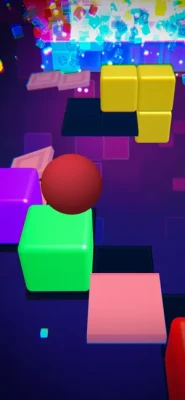
Main Gameplay: Control a rolling ball, avoid obstacles, follow rhythmic tracks, and complete challenging levels.
Control System: One-finger touchscreen swiping
Music Style: EDM, Phonk, and electronic music
Offline Play: Supported for compatible gameplay content
Special Features: Custom level editor, community-created levels, character collection, adventure challenges, and multiplayer map editing.
What Is RollerCraft: Rolling Dash?
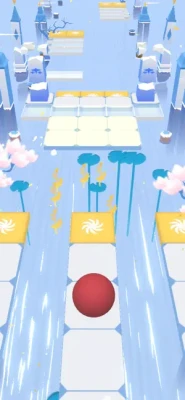
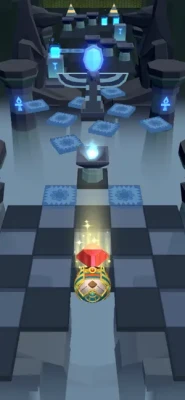
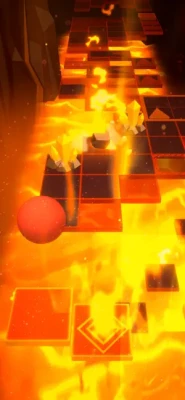
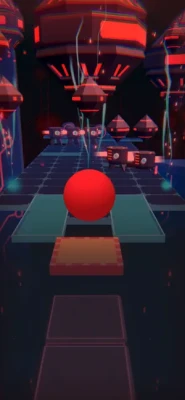
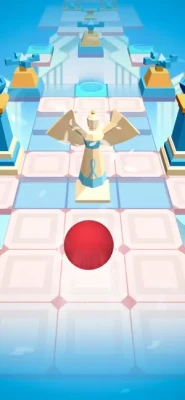
RollerCraft: Rolling Dash is a music-based arcade game that challenges players to guide a rolling ball through colorful three-dimensional environments filled with obstacles, narrow platforms, sudden turns, and unexpected hazards.
The concept is simple to understand but increasingly challenging to master. Players control the ball using one-finger swipes, moving it across the track to avoid obstacles and remain on the path. Every movement requires attention, timing, and quick reactions, especially when the track becomes more complicated.
What makes RollerCraft particularly interesting is its connection between music and gameplay. Electronic music, Phonk rhythms, and energetic sound effects create an immersive atmosphere in which the visual environment and the movement of the ball work together.
However, the game is much more than a traditional rolling-ball runner. Its level editor gives creative players the opportunity to design their own challenges, experiment with different visual effects, and share custom levels with other players.
This combination of rhythm-based action and user-generated content gives RollerCraft a distinctive identity. Players can enjoy the official adventure challenges, improve their reaction skills, or spend time creating original tracks.
Main Features of RollerCraft: Rolling Dash
Fast-Paced 3D Rolling Gameplay
The central experience revolves around controlling a rolling ball through floating tracks. Players must react quickly to obstacles, gaps, and changing paths while trying to reach the end of each level.
Electronic Music and Phonk Soundtracks
Music plays an important role in the overall experience. Energetic electronic tracks create an exciting atmosphere, making each run feel more dynamic and engaging.
Simple One-Finger Controls
The control system is easy to understand. Players swipe to move the ball and adjust its position on the track. Although the basic controls are simple, mastering precise movement requires practice.
Challenging Adventure Levels
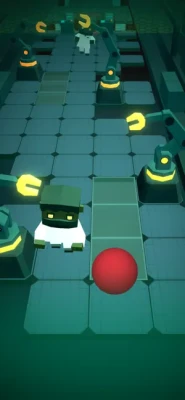
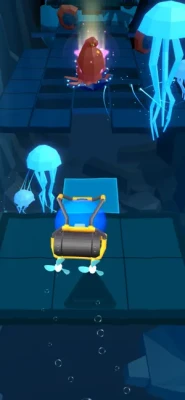
The adventure mode offers different themed environments and challenges. Levels introduce new visual styles, obstacles, and gameplay situations that test players' timing and coordination.
Powerful Custom Level Editor
One of the game's most interesting features is its level creation system. Players can build original tracks, arrange obstacles, adjust visual effects, and experiment with different gameplay elements.
Community-Created Levels
RollerCraft allows players to discover and play levels created by other users. This feature adds variety beyond the official challenges and gives creative players a reason to keep exploring.
Character Collection
The game includes different characters with distinctive appearances. Players can explore the collection system and work toward obtaining additional characters.
Offline Gameplay
The App Store description advertises offline play, allowing players to enjoy compatible gameplay without a constant internet connection.
Multiplayer Map Editing
The game has also introduced multiplayer map-editing functionality, adding another creative dimension to its level-building experience.
Understanding the Different Game Modes
Adventure Mode
Adventure mode is an excellent place to begin. It introduces players to the main mechanics and provides a selection of official levels with different themes and difficulty levels.
Some challenges focus on basic movement and obstacle avoidance, while others require more precise reactions and careful navigation.
Challenge Levels
Challenge levels provide additional tests for players who want to improve their skills. They feature different difficulty ratings and introduce more demanding track layouts.
Some officially introduced challenges include Crystal, Byte Surf, Chip Crisis, Deep Sea, Iron Apex, Divine Strike, Star Clash, and other themed stages.
These levels offer opportunities to practice advanced movement techniques and improve consistency.
Custom Levels
Custom levels provide a different experience from the official adventure content.
Instead of following only developer-created tracks, players can explore original designs made by the community. These levels can introduce unusual obstacle combinations, visual effects, and creative layouts.
Level Creation Mode
The editor is one of the most distinctive parts of RollerCraft. It allows players to design their own tracks using different objects, triggers, backgrounds, and environmental effects.
It takes more time to understand than the regular running gameplay, but it offers considerable creative freedom.
Complete RollerCraft: Rolling Dash Strategy Guide
Master the Basic Controls
The first step toward becoming a better RollerCraft player is understanding how the ball responds to your finger movements.
The game uses simple swipe controls, but successful navigation requires accuracy. Moving too far in one direction can send the ball toward an obstacle or off the edge of a platform.
Practice making short, controlled swipes instead of large movements. Try to become comfortable with the distance and timing required to move between different track positions.
The most important control techniques include:
Use short swipes when making small adjustments.
Avoid unnecessary movements when the track is straight.
Make directional changes before reaching an obstacle.
Keep your attention on the upcoming section.
Practice controlling the ball at different speeds.
Consistency is more important than speed when learning the controls.
Learn to Read the Track Ahead
One of the biggest mistakes beginners make is concentrating only on the ball.
Although keeping track of its current position is important, experienced players also pay attention to what is coming next.
Look ahead whenever possible. Identify upcoming turns, gaps, obstacles, and narrow sections before reaching them.
This gives you additional time to prepare your next movement instead of reacting at the last possible moment.
Try to develop a habit of looking several sections ahead while maintaining awareness of the ball's immediate surroundings.
Improve Your Timing
Timing is essential in a rhythm-based rolling game.
Some obstacles require immediate directional changes, while others demand patience and carefully timed movements.
Avoid making every movement at the same speed. Instead, adjust your reactions according to the track layout.
When approaching a difficult obstacle, identify the safest moment to move. A movement that is too early may place the ball in the wrong position, while a late reaction can leave insufficient room to avoid danger.
Practice recognizing these situations until your movements become more natural.
Follow the Music Without Depending Entirely on It
The electronic soundtrack adds energy to the experience and helps create a connection between movement and rhythm.
However, players should not rely exclusively on the music when navigating difficult sections.
Some obstacles require attention to visual positioning rather than simply following the beat.
A useful strategy is to combine musical awareness with visual observation. Listen to the soundtrack to understand the rhythm while watching the track carefully for changes in direction and upcoming hazards.
If a particular section is difficult, concentrate on the visual layout rather than trying to synchronize every movement perfectly with the music.
Handle Narrow Platforms
Narrow platforms are among the situations that demand the most precise control.
A small movement can make the difference between staying on the track and falling into the surrounding space.
Approach these sections with controlled swipes. Avoid unnecessary corrections once the ball is properly positioned.
If the platform includes a turn, prepare for it before reaching the corner. Making adjustments in advance gives you a better chance of maintaining a stable path.
Navigate Obstacles Successfully
Different obstacles require different reactions.
Some can be avoided by moving sideways, while others require careful positioning and quick directional changes.
The best approach is to identify the obstacle type and understand how much space is available.
Do not assume that the same movement will work for every obstacle. Observe its position, surrounding platforms, and the direction in which the track continues.
With practice, you will become better at recognizing familiar obstacle patterns and reacting more efficiently.
Improve Your Performance on Difficult Levels
When a level becomes challenging, resist the temptation to make random movements.
Instead, divide the track into smaller sections.
Focus on completing one difficult sequence at a time. Learn where obstacles appear, identify safe positions, and practice the movements needed to pass each section.
If you repeatedly struggle with the same area, pay attention to the moment when your previous attempt failed.
Was the movement too early? Did you swipe too far? Did you overlook an upcoming obstacle?
Understanding the reason behind a mistake is one of the fastest ways to improve.
Choose Characters and Customize Your Experience
RollerCraft includes a collection of different characters, each offering a distinct appearance.
Explore the available collection and unlock characters through the game's progression and reward systems.
When choosing a character, focus on personal preference and visual style. Do not assume that a different appearance automatically provides better gameplay performance unless the game explicitly indicates a gameplay advantage.
Collecting characters also adds another objective beyond completing levels.
How to Use the RollerCraft Level Editor
The level editor is one of the strongest features of RollerCraft: Rolling Dash. It allows players to move beyond playing existing challenges and start creating their own.
Although the editor offers many possibilities, beginners should learn its basic functions before attempting complicated designs.
Start With a Simple Track
Your first custom level should focus on a straightforward layout.
Begin with a basic platform arrangement and create a path that allows the ball to travel from the starting point to the finish.
Avoid adding too many obstacles or visual effects immediately.
A simple first project helps you understand how the editor works without making the process unnecessarily complicated.
Learn the Available Objects
The editor includes different construction elements that can be used to build the track.
Experiment with individual objects and observe how they affect the player's movement.
Try to understand their size, position, appearance, and relationship with neighboring elements.
Once you become comfortable with the basic objects, you can start combining them to create more interesting layouts.
Understand Color Triggers
Color triggers allow creators to change the appearance of elements throughout a level.
They can be used to create colorful transitions, synchronized visual effects, and different atmosphere changes.
For a beginner-friendly design, start with a small number of color changes.
Make sure the visual presentation remains clear enough for players to recognize the track and approaching obstacles.
Experiment With Visibility Triggers
Visibility triggers provide control over when particular elements appear or disappear.
This feature can create surprising challenges and more dynamic environments.
For example, creators can use visibility changes to introduce temporary visual elements or create unexpected track sequences.
However, avoid making important obstacles impossible to recognize. A well-designed level should challenge players without relying on confusing or unfair visual surprises.
Use Lighting and Visual Effects
The editor includes several post-processing and environmental options, including bloom, vignette, chromatic aberration, color adjustment, white balance, and motion blur.
These effects can give a custom level a distinctive appearance.
Try using a consistent visual theme instead of combining every available effect.
Too many visual effects can make it difficult for players to recognize important track details.
Experiment With Track Bending and Camera Perspective
Advanced editing options allow creators to modify the track's shape and camera perspective.
These tools can help produce unusual environments and more visually interesting levels.
Start with small adjustments and test the result regularly.
Major changes to the track or camera can make navigation difficult, so always check whether the finished layout remains playable.
Create Dynamic Obstacle Movement
Motion and rotation triggers allow creators to introduce moving and rotating elements.
These options can make custom levels more challenging and entertaining.
Begin by experimenting with one moving object at a time.
Observe how it behaves during gameplay before introducing additional moving elements.
Adjust the Game Speed
Speed triggers can modify the movement speed of the character.
Changing the speed can create exciting sequences, especially when combined with carefully arranged obstacles.
However, avoid making the entire level unnecessarily fast.
A balanced design should include opportunities for players to understand the track and prepare for more demanding sections.
Test Every Custom Level
Testing is essential before sharing a finished creation.
Play the entire track and check for problems such as unreachable platforms, poorly positioned obstacles, confusing camera angles, and unexpected collisions.
Pay particular attention to transitions between different sections.
A level should feel challenging but fair. If you struggle to understand your own track, other players may find it equally confusing.
Share Your Creations
RollerCraft supports uploading and discovering community-created levels.
The game's version history has also introduced custom-level uploads, search functionality, and downloadable community creations.
The listed editor update specifies a 2,000-point requirement for unlocking uploads, so check the current in-game requirements before planning to publish your first creation.
Best Strategies for Exploring Community Levels
Community-created content offers a different kind of challenge because every creator has their own design style.
Some levels emphasize speed, while others focus on precise movements, unusual visual effects, or complicated obstacle combinations.
Start by choosing levels that match your current skill level.
Do not immediately attempt the most difficult community creations. Completing easier tracks first can help you understand different obstacle patterns and improve your confidence.
When you discover an interesting level, pay attention to how its creator uses track arrangements, lighting, and visual effects.
You can learn useful design techniques simply by exploring well-made custom levels.
If you decide to create your own version of a particular gameplay idea, use original arrangements rather than simply copying another creator's work.
Daily Progress and Rewards
RollerCraft has introduced daily challenge tasks, weekly rankings, and reward-related features in its update history.
These activities can provide additional goals beyond ordinary level completion.
A good strategy is to check available challenges before starting a gaming session.
Focus on completing tasks that match your current abilities instead of spending too much time on activities that are significantly above your skill level.
Weekly rankings can also encourage you to improve your consistency and compare your performance with other players.
Remember that regular practice is more valuable than attempting to complete every challenge in a single session.
Common Mistakes to Avoid
Making Large Unnecessary Swipes
Large movements can cause the ball to move farther than intended. Use controlled swipes and make small corrections whenever possible.
Watching Only the Ball
Concentrating exclusively on the ball makes it harder to prepare for upcoming obstacles. Keep your attention on the track ahead.
Reacting Too Late
Waiting until an obstacle is immediately in front of you leaves very little room for correction. Learn to recognize hazards early.
Moving Without a Clear Direction
Random movements often create additional problems. Understand the path you want to follow before changing direction.
Ignoring Track Patterns
Repeated obstacle arrangements can reveal useful movement patterns. Recognizing these patterns makes later sections easier to understand.
Using Too Many Effects in Custom Levels
Excessive lighting, motion, and visual effects can make a custom level difficult to navigate. Keep gameplay clarity in mind.
Publishing Without Testing
Always test a custom track before sharing it. Check every section to make sure the level works as intended.
Frequently Asked Questions
What is RollerCraft: Rolling Dash?
RollerCraft: Rolling Dash is a 3D music rhythm runner where players control a rolling ball, avoid obstacles, and navigate colorful tracks accompanied by electronic music.
Who developed RollerCraft: Rolling Dash?
The game was developed by Minimax PTE LTD.
Is RollerCraft free to play?
Yes. It is free to download, with optional in-app purchases.
Can I play RollerCraft offline?
Yes. The developer advertises offline gameplay. However, online features such as community content and account-related functions may require an internet connection.
How do you control the ball in RollerCraft?
You control the rolling ball using one-finger touchscreen swipes to change its position and avoid obstacles.
Does RollerCraft have a level editor?
Yes. The game includes a level editor that lets players create custom tracks using different objects, triggers, and visual effects.
Can I play levels created by other players?
Yes. RollerCraft supports discovering and playing community-created levels.
Can I create my own music levels?
The editor allows players to design custom tracks, and the game has supported custom music-related functionality, including custom MP3 use in player-reported experiences. Availability and supported formats should be checked in the current version.
Does RollerCraft include different characters?
Yes. The game features a character collection with different designs and unlockable characters.
What music does RollerCraft feature?
The game focuses on electronic music, including EDM and Phonk-inspired tracks.
Is RollerCraft suitable for beginners?
Yes. Its one-finger control system is easy to understand. However, advanced tracks require good timing, accurate movements, and practice.
Does RollerCraft have multiplayer features?
The game has introduced multiplayer map-editing functionality. The availability of specific multiplayer experiences depends on the current version.
How can I improve my performance?
Practice controlled swipes, study the upcoming track, learn obstacle patterns, and avoid making unnecessary movements.
What makes RollerCraft different from other rolling-ball games?
Its combination of rhythm-based running, electronic music, character collection, adventure challenges, and a customizable level editor gives it more creative possibilities than a conventional rolling-ball runner.
Final Thoughts
RollerCraft: Rolling Dash brings together fast-paced arcade gameplay, electronic music, and creative level design in one mobile experience. Its simple controls make it easy to start playing, while increasingly difficult tracks provide opportunities to develop better reflexes and movement accuracy.
The level editor is particularly appealing because it allows players to become creators rather than simply completing challenges designed by someone else. Combined with community-created content, character collection, and adventure levels, it offers several ways to enjoy the game.
The best way to improve is to practice consistently, study obstacle patterns, and learn to anticipate changes in the track. For creative players, experimenting with the editor and sharing original designs adds another rewarding dimension.
Whether you enjoy rhythm games, rolling-ball challenges, electronic music, or creating your own gaming experiences, RollerCraft: Rolling Dash offers an energetic and creative adventure worth exploring.
Rate the Game
User Reviews




Popular Games







 Android
 iOS
 Windows
 Xbox