


Latest Version
October 20, 2026
SayGames Ltd
Simulation
0
com.life.dream
Report a Problem
More About :game
Game Overview
Game Title: Life Dream: Build Dream Home
Developer: SayGames Ltd
Genre: Home Design, Renovation, Lifestyle Simulation
Platform: Android, with Windows availability through supported distribution
Game Mode: Single-player
Gameplay Style: Casual, creative, relaxing, and simulation-based
Main Objective: Renovate properties, decorate interiors, and expand your design projects
Key Activities: Cleaning, furniture removal, painting, flooring, furnishing, and decorating
Monetization: Free to play, with advertisements and optional in-app purchases
Suitable For: Players who enjoy home improvement, creative design, and casual games
Life Dream focuses on creative freedom rather than traditional combat, complicated puzzles, or intense competition. Its main appeal is the satisfaction of turning neglected spaces into attractive homes while gradually unlocking more opportunities for renovation and decoration.
What Makes Life Dream: Build Dream Home Special?
1. Complete Home Renovation Gameplay
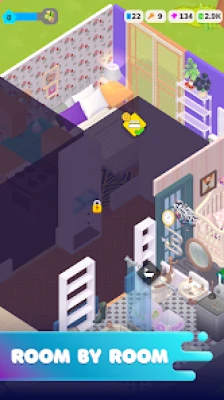
The game starts with a property that needs attention. Players remove unwanted objects, clean dirty surfaces, and prepare rooms for a fresh design. Each improvement helps transform the original space into a more welcoming home.
The renovation process gives players the satisfaction of seeing visible progress, making even small improvements feel rewarding.
2. Creative Interior Design
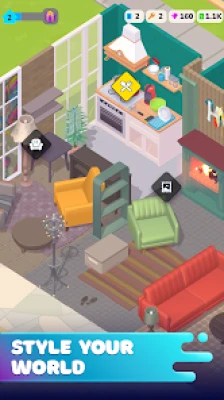
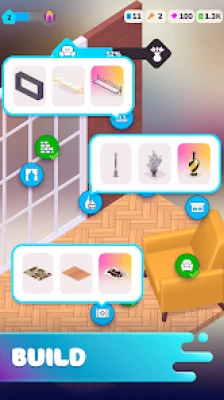
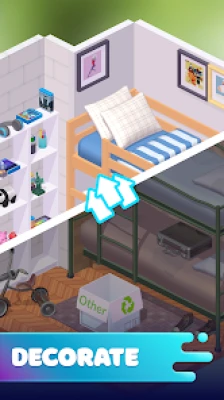
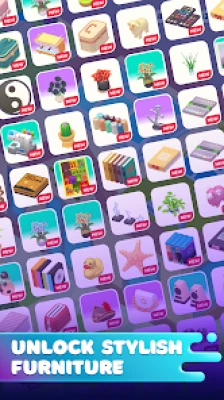
Interior decoration is at the heart of Life Dream. Players can customize different parts of a home using furniture, plants, wallpaper, flooring, and other decorative elements. Different combinations can create a modern apartment, a cozy cottage, or a colorful family home.
3. Furniture and Decoration Choices
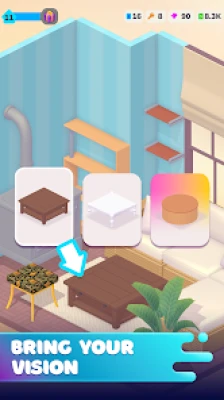
Furniture placement helps define the purpose and personality of each room. Players can experiment with layouts, coordinate decorative elements, and create interiors that reflect their preferred style.
4. Expanding Beyond One Home
The game offers opportunities to progress from a single property to additional renovation projects. Its broader design experience includes different types of buildings and larger areas, giving players more opportunities to experiment as they advance.
5. Relaxing, Casual Gameplay
Life Dream is designed for players who prefer a calm experience without the pressure of constant competition. You can work through renovation tasks at a comfortable pace and enjoy the creative process.
Full Life Dream Strategy Guide
Step 1: Understand the Renovation Process
When starting a new property, take time to understand the available tasks and the condition of the room.
Begin by identifying what needs to be removed, cleaned, repaired, or replaced. Follow the tasks presented by the game and complete the basic preparation before concentrating on decorative details.
Strategy tip: Treat every room as a sequence of small projects. Completing the essential renovation work first makes the remaining design process easier to manage.
Step 2: Remove Old Furniture and Unwanted Objects
A cluttered room can make it difficult to plan a new layout. Remove the objects that the game identifies as unwanted before placing replacement furniture.
Pay attention to the selected object and the available interaction controls. Move carefully when dragging items, particularly when the room contains several objects close together.
Best approach:
Clear unnecessary furniture before decorating.
Work on one section of the room at a time.
Check whether an object needs to be moved, collected, or discarded.
Avoid rushing through object interactions.
Confirm that the selected item has been handled correctly before continuing.
This approach can help reduce mistakes and make the renovation process feel more organized.
Step 3: Clean the Room Thoroughly
Cleaning is an important part of turning a neglected property into a comfortable home. Depending on the task, you may need to remove stains or deal with other untidy areas.
Complete the available cleaning objectives before spending too much time on furniture placement. Clean surfaces and an organized room provide a better foundation for the rest of the makeover.
Pro tip: If progress seems to have stopped, inspect the room for unfinished tasks rather than immediately repeating actions you have already completed.
Step 4: Plan the Interior Layout
Good interior design begins with placement, not decoration. Think about how each part of the room should function before positioning large furniture pieces.
For example, a living room should have a comfortable seating arrangement, while a bedroom needs enough space for essential furniture and movement.
Use these general layout principles:
Keep important furniture accessible.
Avoid crowding small spaces with too many objects.
Leave practical walking areas between large items.
Arrange related furniture pieces together.
Consider how decorations complement the overall layout.
Even when the game allows playful or unconventional arrangements, a clear layout can help your finished room feel more intentional.
Step 5: Choose Matching Furniture
Furniture selection has a major effect on the appearance of a room. Rather than combining every available option, establish a consistent style.
A modern interior might use simple furniture and neutral colors. A cozy design might feature warm tones, soft-looking furnishings, and plants. A playful room can use brighter colors and more expressive decorations.
Try to maintain a visual connection between major pieces of furniture.
Important tip: You do not need to fill every empty area. Leaving some space around furniture can make a room look cleaner and more balanced.
Step 6: Select Suitable Wallpapers and Flooring
Walls and floors help establish the atmosphere of an interior. Their colors and patterns influence how furniture and decorations appear.
When selecting these finishes, consider the room's overall palette. Light colors can make a compact room feel more open, while darker shades can create a more dramatic appearance.
If flooring or wallpaper materials are limited or consumed when applied, check your available resources before making experimental changes. Avoid using valuable materials on an area you might want to redesign immediately.
Step 7: Add Decorations and Plants
Once the essential furniture is in place, introduce smaller decorative elements to give the room personality.
Plants, ornaments, and other accessories can make a space feel more complete. However, too many decorations may make a carefully planned room appear crowded.
A useful method is to decorate gradually:
Place the essential furniture.
Check the balance of colors and shapes.
Add a few complementary accessories.
Review the room from different viewing angles.
Make final adjustments where necessary.
This method helps you avoid spending time on details before the main layout is ready.
Step 8: Complete Every Available Objective
Follow the renovation requirements shown for the current property or task. Some projects may involve several types of work, so completing only the visible decoration may not be enough.
Before moving on, check for remaining cleaning, furniture, or finishing tasks.
A simple completion checklist is useful:
The precise requirements depend on the active project, so use the in-game task indicators as your main guide.
Step 9: Manage Resources Carefully
Renovation games can encourage experimentation, but some materials and purchases may be limited. Plan major design decisions before committing resources to a room.
Prioritize required improvements over optional decoration when your available resources are low. If the game presents a choice between spending resources on immediate progress and purchasing extra items, consider which option helps you advance more effectively.
Practical resource-management habits include:
Check your available materials before starting a redesign.
Avoid repeatedly changing flooring or wallpaper without a plan.
Prioritize items needed for current objectives.
Review optional purchases carefully.
Save premium currency for features you genuinely want.
This strategy is especially useful for players who prefer progressing without making unnecessary purchases.
Step 10: Expand Your Renovation Projects
As you progress, explore the opportunities available on the game map. New properties and larger projects can introduce different design challenges and let you try additional styles.
Do not assume that every property should use the same layout or color scheme. A small cottage, an apartment, and a larger building may each benefit from a different approach.
Use earlier projects to develop your design skills, then apply those lessons to new spaces.
Best Interior Design Strategies for Life Dream
Modern Home Design
Recommended style: clean, simple, and balanced.
Choose furniture with straightforward shapes and use a limited color palette. Keep decorations selective and organize the room around its main function.
Best strategy: Start with the largest furniture pieces, establish a consistent visual theme, and add smaller accessories only after the layout is complete.
Cozy Home Design
Recommended style: warm, comfortable, and inviting.
Use complementary warm colors, comfortable-looking furniture, and a few plants or decorative accents. Arrange furniture to create a welcoming atmosphere without blocking movement.
Best strategy: Focus on the relationship between furniture, colors, and accessories rather than adding as many objects as possible.
Minimalist Interior Design
Recommended style: uncluttered and functional.
Use fewer decorative elements and give important furniture pieces enough space. Select finishes that complement one another and avoid unnecessary visual distractions.
Best strategy: Before adding another object, consider whether it improves the room's appearance or function.
Colorful and Creative Interiors
Recommended style: expressive and playful.
Experiment with contrasting colors, distinctive decorations, and unusual combinations. Keep one or two dominant colors so that the design still feels connected.
Best strategy: Introduce bold elements in stages. This makes it easier to see which combinations work well together.
Beginner Tips and Tricks
New players can make steady progress by focusing on the basic renovation mechanics before attempting complicated designs.
Follow the task instructions: They help you understand what each property needs.
Clean before decorating: Finish essential preparation before arranging furniture.
Think before spending: Plan the layout before using limited decorative materials.
Work in sections: Completing one part of a room at a time reduces confusion.
Experiment with styles: Try different combinations to discover your preferred look.
Avoid overcrowding: Empty space can improve the appearance of a finished room.
Check for incomplete tasks: Look for remaining objectives before leaving a property.
Take your time: The relaxed pace allows you to focus on design instead of rushing.
Advanced Tips for Better Renovation Results
Build a Consistent Design Theme
Choose a central idea before selecting furniture and finishes. A clear theme makes individual design decisions easier and prevents the room from becoming visually inconsistent.
Prioritize Large Furniture
Large furniture pieces usually have the greatest influence on a room's layout. Position these first, then use smaller accessories to fill suitable spaces.
Use a Balanced Color Palette
A practical approach is to select one dominant color, one complementary color, and a smaller accent color. This creates variety without making the design feel chaotic.
Review Your Work Before Finishing
Take a final look at the room after completing the main tasks. Check the placement of furniture, the balance of colors, and whether any required interactions remain unfinished.
Avoid Unnecessary Redesigns
Changing a completed area repeatedly can consume time and potentially use materials. Decide on the broad layout first and make smaller adjustments only when needed.
Common Mistakes to Avoid
Decorating Before Completing Essential Tasks
Adding furniture too early can complicate the renovation process. Follow the project's requirements and prepare the room before focusing on its appearance.
Using Materials Without Planning
Wallpaper and flooring choices can affect the whole room. Check what is available and decide on the desired style before applying finishes.
Placing Too Many Decorations
A room does not automatically look better when it contains more objects. Leave enough open space for the main furniture and let selected accessories provide the finishing touches.
Ignoring Object-Placement Controls
If an object is difficult to position, slow down and check the selected item and placement area. Repeated rapid dragging may make controls harder to manage, especially in crowded spaces.
Spending on Optional Extras Too Quickly
Optional purchases may be appealing, but they are not always necessary for completing a renovation. Understand the available progression options before spending real money.
Moving On With Unfinished Objectives
A room may appear complete while a required task remains. Review the game's indicators before assuming the renovation is finished.
Is Life Dream: Build Dream Home Offline?
The game's store listing identifies offline availability. However, certain features, advertisements, purchases, or updates may still depend on an internet connection or platform requirements. Availability can vary by device and game version.
If you plan to play without internet access, test the game on your device before relying on offline play for an extended period.
Does Life Dream: Build Dream Home Have Ads?
Yes. The Android listing identifies advertisements and optional in-app purchases. Players can enjoy the core renovation experience without treating every optional purchase as necessary, although the availability of specific features may vary.
If advertisements interrupt your experience, review the game's current settings and available purchase options before deciding whether to spend money.
Is Life Dream: Build Dream Home Suitable for Beginners?
Yes. Its casual simulation format makes it approachable for players who are new to interior design games. The basic activities involve interacting with objects, cleaning spaces, choosing furnishings, and following renovation tasks.
Players do not need professional design knowledge to enjoy the game. A little planning and experimentation can help beginners produce attractive interiors while learning how the mechanics work.
Frequently Asked Questions
What is Life Dream: Build Dream Home?
Life Dream: Build Dream Home is a home renovation and interior design simulation game in which players clean properties, replace unwanted furniture, decorate rooms, and expand their design projects.
How do you progress in Life Dream?
Progress by following the available tasks, completing renovation work, furnishing rooms, and exploring additional properties when they become available. The exact objectives depend on the active project.
How can I make my house look better?
Start with a clear layout, select furniture that suits the room, coordinate wall and floor finishes, and add decorations gradually. Avoid overcrowding the space.
What is the best furniture strategy?
Place essential furniture first and arrange smaller decorative objects afterward. Choose items that complement one another and leave sufficient room for movement.
Can I play Life Dream for free?
The game is listed as free to download with advertisements and optional in-app purchases. Some additional options may require payment.
Is Life Dream a multiplayer game?
The Android listing identifies Life Dream as a single-player game. Its main focus is personal renovation and creative interior design rather than multiplayer competition.
Can I design different types of properties?
Yes. The game describes progression beyond a single house, with opportunities to renovate and decorate different properties and expand into larger areas.
What should I do if an object will not move correctly?
Check that you have selected the intended object and are interacting with the correct placement area. Try slower, more deliberate movements and check for available updates if the problem continues.
How do I avoid wasting resources?
Plan your design before applying materials, prioritize required objectives, and avoid repeatedly replacing finishes. Review optional purchases carefully.
Is Life Dream suitable for relaxing gameplay?
Yes. The game emphasizes a laid-back renovation experience that lets players focus on cleaning, decorating, and developing their own design ideas at a comfortable pace.
Final Verdict
Life Dream: Build Dream Home is an appealing option for players who enjoy house renovation, interior decoration, and casual simulation games. Its combination of cleaning, furniture placement, surface customization, and property expansion offers plenty of ways to express creativity.
The best approach is to complete essential renovation tasks first, plan each room before spending materials, and build a consistent design theme around the furniture and decorations available. By managing resources carefully and checking objectives before moving forward, players can make their renovation journey more efficient and enjoyable.
Whether you prefer modern interiors, cozy living spaces, or colorful creative designs, Life Dream provides a relaxed setting in which to experiment, improve neglected properties, and gradually build your dream home.
Rate the Game
User Reviews














Popular Games



















 Android
 iOS
iOS Windows
 Xbox
Xbox