QR Code
LetraKid PRO: Cursive Writing

LetraKid Cursive: Complete Kids Handwriting Learning Guide

by ParKel Soft
(0 Reviews) April 10, 2024
LetraKid PRO: Cursive Writing LetraKid PRO: Cursive Writing LetraKid PRO: Cursive Writing LetraKid PRO: Cursive Writing LetraKid PRO: Cursive Writing

Latest Version

Update
April 10, 2024
Developer
ParKel Soft
Categories
Educational
Platforms
Android
Views
1
Package Name
com.parkelsoft.letrakid.cursive.edu
Visit Page

More About :game

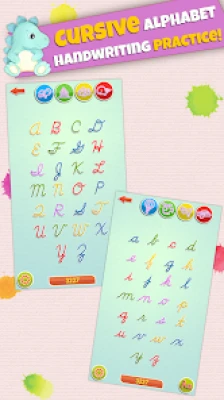
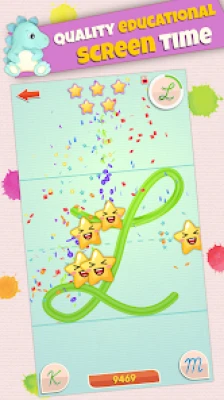
LetraKid Cursive: Kids Writing is an educational handwriting app designed for children aged 4–8. It teaches cursive writing through interactive tracing exercises, progressive lessons, and real-time feedback that helps young learners improve handwriting, letter recognition, and fine motor skills while having fun. The app supports multiple languages, works offline, and is suitable for home learning, homeschooling, and classroom activities.

Learning cursive handwriting can be challenging for many children, but LetraKid Cursive transforms handwriting practice into an enjoyable educational experience. Instead of repetitive worksheets, children interact with colorful tracing activities that gradually build writing confidence.

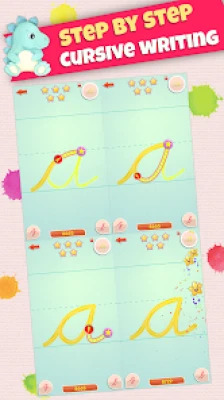
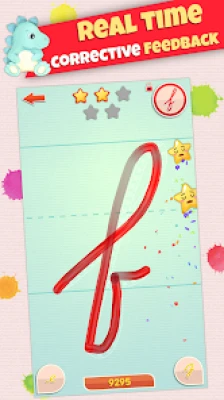
The app focuses on correct letter formation, stroke direction, spacing, and handwriting accuracy. Every completed exercise provides instant visual and audio feedback, helping children recognize mistakes and improve naturally.

Parents and teachers appreciate the structured learning path because it allows children to progress at their own pace while monitoring improvement over time.


Main Features

  • Interactive cursive alphabet tracing
  • Uppercase and lowercase letters
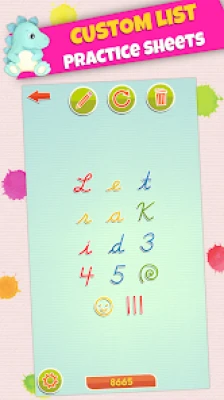
  • Number writing practice
  • Shape tracing exercises
  • Five handwriting difficulty levels
  • Instant handwriting evaluation
  • Real-time voice guidance
  • Progress tracking
  • Multiple handwriting fonts
  • More than 16 supported languages
  • Offline learning
  • Kid-friendly interface
  • Parent controls
  • Classroom-friendly design
  • Reward stickers that encourage regular practice

Educational Benefits

Children can improve several important skills, including:

  • Cursive handwriting
  • Letter recognition
  • Pencil control
  • Hand-eye coordination
  • Fine motor development
  • Writing confidence
  • Concentration
  • Alphabet knowledge
  • Number recognition
  • Writing accuracy

How to Use LetraKid Cursive

  1. Select a child profile.
  2. Choose the preferred handwriting font.
  3. Begin with the easiest tracing level.
  4. Follow the animated stroke guide.
  5. Listen to pronunciation instructions.
  6. Complete each letter carefully.
  7. Earn stars and rewards.
  8. Repeat difficult letters until accuracy improves.
  9. Unlock more advanced handwriting practice.

Learning Progress System

The learning system gradually increases difficulty.

Beginner Level

  • Guided tracing
  • Visual checkpoints
  • Large writing areas

Intermediate Level

  • Less tracing assistance
  • Better stroke control
  • Improved letter spacing

Advanced Level

  • Freehand writing
  • Strict handwriting evaluation
  • Independent cursive practice

This progression helps children gain confidence without becoming overwhelmed.


Tips for Parents

  • Practice for 10–15 minutes daily.
  • Encourage slow and careful writing.
  • Celebrate improvement instead of perfection.
  • Use a stylus when available for better pencil control.
  • Repeat difficult letters before moving ahead.
  • Allow children to learn at their own pace.
  • Review progress together every week.

Classroom Recommendations

Teachers can use LetraKid Cursive for:

  • Morning handwriting practice
  • Writing centers
  • Homework support
  • Individual learning sessions
  • Special education activities
  • Montessori learning
  • Small group handwriting exercises

The app also includes parental controls and profile management, making it suitable for classrooms and families.


Game Atmosphere

Unlike fast-paced educational games, LetraKid Cursive creates a calm and encouraging learning environment.

Bright colors, friendly animations, simple menus, and positive audio feedback help children stay focused while reducing learning anxiety. Every successful letter feels rewarding, making handwriting practice enjoyable instead of stressful.


Helpful Guidelines for Better Results

  • Practice consistently rather than for long sessions.
  • Keep the device steady while tracing.
  • Use proper finger or stylus positioning.
  • Start with uppercase letters if handwriting is completely new.
  • Move to lowercase letters after mastering basic strokes.
  • Encourage neat writing instead of rushing.
  • Take short breaks if the child becomes tired.

What Players Like

Parents, teachers, and many users commonly praise:

  • Easy-to-understand lessons
  • Excellent handwriting guidance
  • Helpful tracing feedback
  • Suitable for preschool and elementary students
  • Offline functionality
  • Multi-language support
  • Child-friendly interface
  • Strong educational value

Many reviewers say the app effectively improves handwriting confidence and keeps children motivated through rewards and progress tracking.


Common Feedback

Some users mention:

  • The free version provides only part of the available content.
  • More complete word and sentence practice would be appreciated.
  • Some families would like additional customization options.

Despite these suggestions, many parents still consider it one of the better cursive handwriting learning apps available.


Best For

  • Preschool children
  • Kindergarten students
  • Elementary school learners
  • Homeschool education
  • Classroom handwriting practice
  • Parents teaching cursive at home
  • Children improving fine motor skills

Advantages

  • Educational and engaging
  • Easy for young children
  • Offline support
  • Progressive learning levels
  • Multiple handwriting fonts
  • Excellent handwriting feedback
  • Kid-safe environment
  • Teacher Approved on Google Play

Things to Consider

  • Full content requires purchase.
  • Focuses primarily on letter formation rather than extended writing.
  • Best results come with regular daily practice.

Frequently Asked Questions

Is LetraKid Cursive suitable for beginners?

Yes. It starts with guided tracing and gradually introduces more advanced handwriting exercises.

Can children use it without an internet connection?

Yes. Most handwriting activities work offline.

What age group is recommended?

The app is designed primarily for children between 4 and 8 years old.

Does it support multiple languages?

Yes. The app includes support for over 16 languages and multiple handwriting styles.

Is it useful for schools?

Yes. Many teachers use it for handwriting practice in classrooms, homeschooling, and educational activities.


Final Verdict

LetraKid Cursive: Kids Writing is a thoughtfully designed educational app that helps children build strong cursive handwriting skills through interactive tracing, structured lessons, and encouraging feedback. Its offline support, progressive difficulty levels, multilingual features, and classroom-friendly design make it a valuable learning tool for parents, teachers, and young students. For families looking to improve handwriting in a fun and engaging way, LetraKid Cursive is a dependable choice.

Rate the Game

Add Comment & Review

User Reviews

Based on 0 reviews
5 Star
0
4 Star
0
3 Star
0
2 Star
0
1 Star
0
Add Comment & Review
We'll never share your email with anyone else.