

Latest Version
September 08, 2026
Wildlife Studios
Educational
iOS
0
Report a Problem
More About :game
Developed by Wildlife Studios, the app is designed to help learners build foundational math skills while practicing at their own pace. The App Store listing highlights thousands of exercises, online and offline use, no ads, handwriting recognition and regularly added learning content.
What Is Math Learner: Learning Game?
Math Learner is a mobile mathematics learning game that turns traditional practice problems into a more interactive experience.
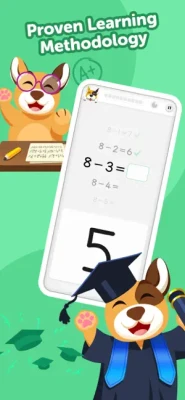
Instead of simply presenting a worksheet of equations, the app encourages learners to work through lessons and levels while interacting directly with mathematical problems. Its high-accuracy digit recognition technology is designed to recognize numbers written by the player, creating a more hands-on approach to answering questions.
The app is aimed at younger learners and carries a 4+ age rating on the US App Store. It is available for iPhone and iPad and is categorized under Education.
Math Learning Gameplay
The core experience revolves around solving mathematical exercises and progressing through structured learning content.
A typical learning session can involve:
- Reading a mathematical problem
- Working out the answer
- Entering the answer interactively
- Practicing through repeated exercises
- Progressing through levels
- Unlocking additional learning content
- Trying different play modes
- Building confidence through regular practice
The goal is to make repetition feel more like a game than conventional homework.
Main Learning Features
Thousands of Math Exercises
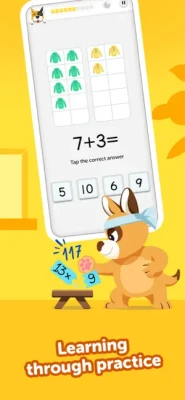
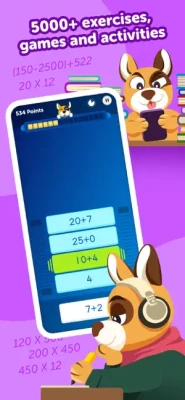
Math Learner offers a large collection of exercises designed for continued practice. The App Store describes the app as containing thousands of exercises and lessons, giving learners substantial material to work through.
Game-Based Learning
Rather than relying entirely on traditional worksheets, the app incorporates game-based strategies to make mathematical practice more engaging.
Step-by-Step Lessons
Parents and learners can work through lessons progressively instead of jumping randomly between unrelated problems.
Handwriting Recognition
One of the app's distinctive features is its digit-recognition technology. Learners can write numbers as part of the answering process, allowing the app to interpret handwritten digits.
Multiple Play Modes
Version 3.0 introduced additional play modes alongside new levels and rewards, expanding the ways learners can interact with the mathematics content.
Speak Your Answer
The 3.0.1 update introduced a Siri-powered speech-recognition feature that allows learners to answer certain math exercises by speaking their answers.
Offline Learning
The App Store listing states that the app can be used online or offline, making it practical for learning sessions without a constant internet connection.
No Ads
The current App Store description specifically states that the app has no ads.
How Math Learner Works
Math Learner is built around a simple learning loop:
Learn → Practice → Answer → Progress → Repeat
This structure helps turn mathematics into a regular habit rather than a single activity.
A child can work through available exercises, become familiar with different types of problems and gradually progress through the available learning content.
Levels and Progression
Progression is one of the elements that separates Math Learner from a basic calculator or collection of worksheets.
The app's updates have introduced new levels and play modes, while its learning structure is intended to let users work through mathematics progressively.
A useful progression strategy is to focus on understanding each level instead of rushing through it. Accuracy and confidence are more valuable than simply reaching the next stage quickly.
Recommended Progression Approach
- Begin with the learner's current level.
- Complete exercises carefully.
- Repeat difficult problem types.
- Move forward once the concepts become comfortable.
- Revisit earlier exercises when needed.
- Use different play modes to keep practice varied.
Math Skills and Practice Areas
Math Learner focuses on foundational mathematics rather than functioning as a general academic platform.
Depending on the learner's progression, practice can cover core mathematical operations and increasingly challenging exercises.
The App Store describes the app as a way to build foundational math skills and accelerate progress through structured practice.
The emphasis is therefore on developing familiarity, accuracy and confidence through repetition.
Interactive Number Writing
The handwriting component gives Math Learner a more physical interaction than simply tapping multiple-choice answers.
Learners can write digits, while the app's recognition technology attempts to interpret those handwritten numbers. This makes the activity feel closer to writing answers on paper while still receiving immediate digital feedback.
This feature can be particularly useful for children who are more comfortable physically writing their answers rather than selecting numbers from a keyboard.
Speak Your Answer Feature
A later version added Speak Your Answer, using Siri-powered speech recognition for certain math exercises.
This gives learners another way to interact with problems and adds variety to the traditional write-or-tap answering process.
It also demonstrates how the app has evolved beyond simple arithmetic worksheets into a more interactive learning environment.
Rewards and Game Elements
The app's major 2021 update introduced new interface elements, gifts, additional play modes and new levels.
These game-like elements are intended to make continued practice feel more rewarding.
For children, this can be useful because completing another exercise or reaching another level provides a small sense of progress beyond simply getting a correct answer.
Beginner's Guide
Start at the Right Level
Avoid jumping immediately into difficult problems. Starting at a comfortable level helps learners understand the app's interaction system and build confidence.
Write Carefully
If using handwriting recognition, make numbers clear and reasonably consistent.
Don't Rush
Math practice is more effective when the learner thinks through the problem rather than guessing repeatedly.
Repeat Difficult Exercises
Getting a problem wrong is part of learning. Repeating a difficult type of question can help reinforce the underlying concept.
Practice Regularly
Short, consistent sessions can be more manageable than attempting a very long learning session occasionally.
Parent Guide
Parents can make the app more effective by treating it as a supplement to normal learning rather than a complete replacement for classroom instruction.
Create a Routine
A short daily practice session can be easier to maintain than an irregular marathon session.
Encourage Understanding
Ask the child to explain how they reached an answer instead of focusing only on whether the answer was correct.
Watch for Frustration
If a learner repeatedly struggles with the same problem type, stepping back to easier exercises can be more productive than continuing to push forward.
Celebrate Progress
Small improvements in accuracy and confidence are worth recognizing.
Advanced Learning Strategy
For children who already understand the basics, the best approach is to use Math Learner as a practice tool.
Increase Difficulty Gradually
Moving through levels should be based on understanding rather than speed.
Focus on Weak Areas
If a particular type of calculation repeatedly causes mistakes, spend additional time practicing it.
Use Different Interaction Methods
When available, alternate between written answers and spoken answers to keep practice sessions varied.
Reduce Guessing
Encourage learners to calculate first and enter the answer second.
Review Mistakes
Incorrect answers can reveal which mathematical concepts need additional practice.
Educational Experience
Math Learner is designed to bridge the gap between education and casual mobile gameplay.
Its colorful, interactive approach can make repeated arithmetic exercises less intimidating, while the progression structure provides a reason to continue practicing.
The App Store currently shows approximately 121,000 ratings with a 4.6/5 score in the US, indicating strong overall reception.
User feedback is not completely uniform, however. Some reviewers praise the app's fun learning approach, progression and child-friendly experience, while others have raised concerns about the subscription model and handwriting recognition accuracy.
Difficulty
Difficulty Rating: 5.5/10
Math Learner is intended to adapt to different levels of mathematical ability rather than presenting one fixed difficulty.
The earliest exercises are designed to be approachable, while progression can introduce more challenging mathematical practice.
The real difficulty therefore depends on the learner's existing skills and the level being studied.
Game Modes
Math Learner is primarily an educational practice experience rather than a traditional game with combat or competitive multiplayer.
Its game-style variety comes from:
- Structured lessons
- Multiple play modes
- Different levels
- Interactive exercises
- Rewards and gifts
- Written-answer interaction
- Speech-based answers for supported exercises
The 3.0 update specifically introduced additional play modes and levels.
Controls and Interface
The app is designed around touch interaction on iPhone and iPad.
Depending on the exercise, interaction can involve:
- Tapping interface elements
- Writing numerical answers
- Moving through lessons
- Selecting activities
- Speaking answers where supported
The handwriting system is particularly notable because it changes the experience from simply selecting a pre-written answer to actively producing the number yourself.
Offline Learning
One useful feature for parents is the ability to use the app online or offline.
That means practice does not necessarily have to depend on a continuous internet connection, according to the App Store description.
This can make it convenient for travel, waiting rooms or other situations where connectivity may be unreliable.
Accessibility and Child-Friendly Design
The app is designed for young learners and has a 4+ age rating on the US App Store.
Its combination of written answers, touch controls and speech interaction gives learners multiple ways to interact with mathematical exercises.
Parents should still supervise younger children and adjust the learning pace according to the child's ability.
Technical Details
| Detail | Information |
|---|---|
| Game/App | Math Learner: Learning Game |
| Developer | Wildlife Studios |
| Category | Education |
| Genre | Educational / Math / Puzzle |
| Platforms | iPhone, iPad |
| Price | Free with In-App Purchases |
| Age Rating | 4+ |
| App Size | 270.7 MB |
| iOS Requirement | iOS 11.0 or later |
| Languages | English + 11 more |
| Offline Use | Yes |
| Ads | No ads stated in listing |
| Multiplayer | No |
| Latest Listed Version | 3.0.3 |
The current App Store listing identifies Wildlife Studios as the seller, lists the app at 270.7 MB, supports iPhone and iPad, and requires iOS 11.0 or later.
Updates and Version History
The latest version listed by Apple is 3.0.3, released on December 19, 2023. The update included fixes for relevant bugs.
Version 3.0.3
- Bug fixes
- Improvements intended to reduce learning interruptions
Version 3.0.1
- New user interface improvements
- Gifts
- Additional play modes
- New levels
- Speak Your Answer
- Siri-powered speech recognition
Version 3.0
- Major interface update
- New learning experiences
- Additional play modes
- New levels
The App Store's version history records a series of earlier performance and bug-fix updates as well.
Subscription and In-App Purchases
Math Learner is free to download but offers in-app purchases.
The App Store states that subscriptions can provide access to the full list of mathematics lessons. Subscription options can renew automatically unless auto-renewal is disabled according to Apple's subscription rules.
The US listing currently displays several Math Plus purchase options.
Parents should therefore check the current App Store purchase screen before subscribing and make sure they understand the selected plan and renewal terms.
Pros and Cons
Pros
- Thousands of math exercises
- Game-based learning approach
- Structured lessons
- Interactive handwriting recognition
- Multiple play modes
- Level-based progression
- Speech recognition for supported exercises
- Offline use
- No ads according to the listing
- Available on iPhone and iPad
- Strong overall App Store rating
Cons
- Full lesson access requires a subscription
- Handwriting recognition may not always interpret digits correctly
- Some users may prefer traditional worksheets
- Younger learners may still need parental guidance
- The latest listed version is from 2023
Math Learner vs Traditional Math Worksheets
Traditional worksheets are excellent for focused practice, but they can become repetitive.
Math Learner adds interaction, progression and game-like rewards to the same fundamental idea of repeatedly solving mathematical problems.
Math Learner
- Interactive
- Digital
- Game-based
- Progression-focused
- Immediate interaction
- Handwriting recognition
- Speech interaction for supported exercises
Traditional Worksheets
- Physical
- Simple and inexpensive
- Easy to customize
- No device required
- Familiar classroom format
The two approaches can work well together. Math Learner is best viewed as an additional practice tool rather than a replacement for teaching.
Who Should Play Math Learner?
Math Learner is particularly suitable for:
- Young children learning foundational math
- Parents looking for interactive practice
- Children who enjoy game-based learning
- Learners who benefit from repetition
- Students who like writing answers on screen
- Families looking for offline math practice
- Children who need additional arithmetic practice
It may be less appealing to learners who prefer conventional paper worksheets or children who already find basic arithmetic extremely easy.
Expert Rating
Overall Rating: 8.6/10
| Category | Rating |
|---|---|
| Educational Value | 9/10 |
| Learning Variety | 8.5/10 |
| Interactive Features | 9/10 |
| Child-Friendly Design | 9/10 |
| Progression | 8.5/10 |
| Controls | 8.5/10 |
| Replay Value | 8/10 |
| Offline Learning | 9/10 |
| Content Variety | 8.5/10 |
| Overall | 8.6/10 |
Final Verdict
Math Learner: Learning Game takes a familiar concept—practicing mathematics—and gives it a more interactive mobile format.
Its biggest strengths are the large collection of exercises, structured progression, handwriting recognition, multiple play modes and speech-based answering. The combination gives children several ways to interact with math rather than simply tapping through multiple-choice questions.
The subscription requirement for full lesson access is the main consideration for parents, while handwriting recognition may occasionally require patience.
Overall, Math Learner is a strong choice for families looking for a playful mathematics practice app that can supplement classroom learning and provide additional opportunities to build foundational skills.
Frequently Asked Questions
What is Math Learner: Learning Game?
Math Learner is an educational mobile app designed to help children practice mathematics through thousands of exercises, structured lessons and game-based learning.
Is Math Learner free?
The app is free to download but offers in-app purchases and subscription options for access to additional lessons.
Is Math Learner suitable for children?
Yes. The US App Store gives Math Learner an age rating of 4+.
Does Math Learner work offline?
Yes. The App Store description states that the app can be used online or offline.
Does Math Learner contain ads?
The current App Store description states that the app has no ads.
Can children write their answers?
Yes. Math Learner includes digit-recognition technology designed to recognize handwritten numbers.
Can children speak their answers?
The app introduced a Speak Your Answer feature using Siri-powered speech recognition for certain exercises.
Does Math Learner have different levels?
Yes. The app uses levels and structured learning content, with later updates adding new levels and play modes.
Is Math Learner available on iPad?
Yes. The current listing supports both iPhone and iPad.
Who developed Math Learner?
The current App Store listing identifies Wildlife Studios as the developer/seller.
What age is Math Learner for?
The current US App Store age rating is 4+.
Math Learner: Learning Game transforms mathematics practice into an interactive mobile learning experience. With thousands of exercises, structured levels, game-based activities, handwriting recognition, offline support and speech-based answers, it provides children with several ways to practice foundational math skills while making repetitive learning more engaging.
Rate the Game
User Reviews








Popular Games



















 Android
 iOS
iOS Windows
 Xbox
Xbox