
Latest Version
October 01, 2026
Edujoy Games Sociedad Limitada
Educational
iOS
0
Report a Problem
More About :game
The game gradually introduces important programming concepts including basic programming logic, sequences, loops, and functions. Its simple controls make it accessible to younger players while giving them practical experience with logical thinking and step-by-step instructions.
What Is Coding Skills Game?
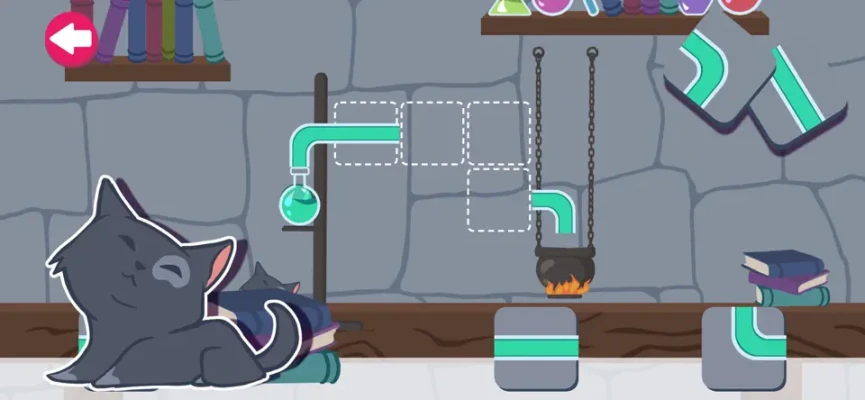
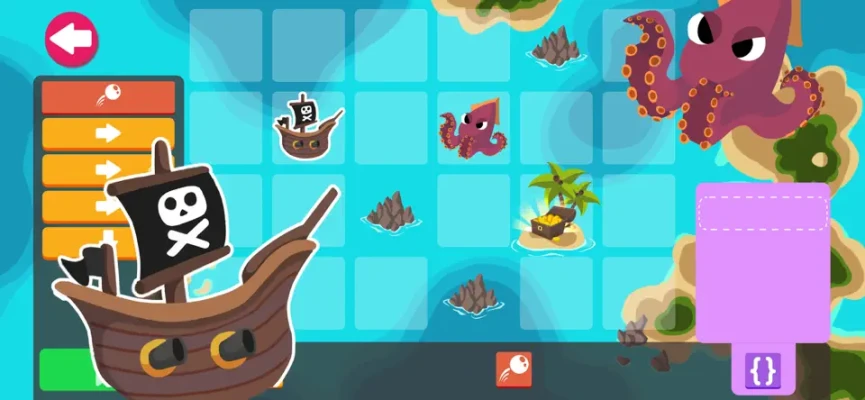
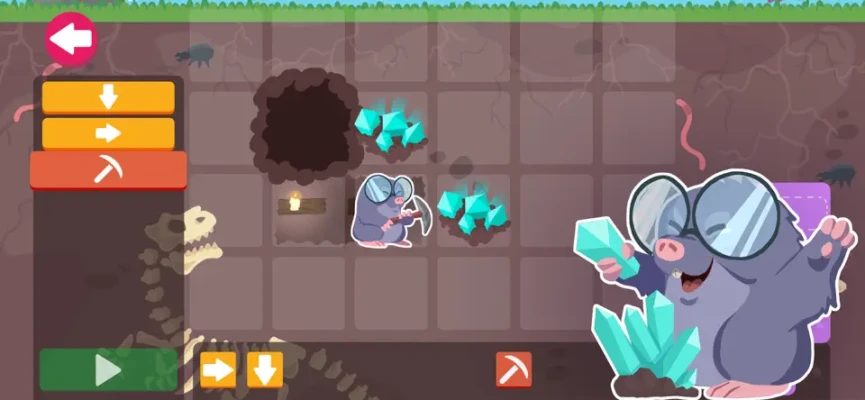
Coding Skills Game is designed to introduce programming concepts through gameplay. Each puzzle asks you to create a sequence of actions that allows a character to reach a destination or collect prizes.
Rather than typing programming languages, you build instructions using buttons such as move forward, turn left, turn right, rotate, and jump. The challenge is deciding which actions are needed and placing them in the correct order.
As the game progresses, the puzzles introduce more advanced concepts. The four main learning stages cover basic programming, sequences, loops, and functions.
Coding Skills Game Features
Learn Basic Programming Logic
The first stage introduces the basic idea behind programming: instructions need to be organized logically.
You learn to look at a problem, determine the actions required, and place those actions into an appropriate sequence.
This provides a simple introduction to algorithmic thinking without requiring traditional programming syntax.
Build Code Sequences
Sequences are one of the foundations of programming, and Coding Skills Game turns the concept into a visual puzzle.
Players must determine which instruction should happen first, which should come next, and how the complete series of commands will guide the character.
A sequence that contains the right actions in the wrong order may not solve the puzzle, making careful planning important.
Understand Loops
The loop section introduces repetition.
Instead of manually entering the same action several times, players learn to recognize when a group of instructions can be repeated.
This teaches one of the most useful concepts in programming: repeating a set of commands efficiently.
Learn Functions
The fourth stage introduces functions.
Players learn that a collection of instructions can be grouped together to perform a particular task. This provides an early visual introduction to the idea of reusable blocks of code.
Reach the Goal
Some puzzles ask you to create a path that allows the character to reach a specific destination.
Before pressing the action sequence, examine the route and work out every required movement.
Collect Prizes
Other challenges require the character to collect prizes along the route.
These puzzles are more demanding because reaching the destination is not necessarily enough. You must plan a route that collects the required rewards while avoiding obstacles.
Avoid Obstacles
The puzzle environments contain obstacles that prevent characters from simply moving directly toward their destination.
You therefore need to inspect the environment before deciding which commands to use.
Progressive Difficulty
The game gradually increases its difficulty as new programming concepts are introduced.
This creates a learning path that starts with basic instructions and eventually introduces sequences, loops, and functions.
Offline Play
The App Store description states that Coding Skills Game can be played without an internet connection, making it suitable for learning and puzzle sessions away from Wi-Fi or mobile data.
The Four Coding Levels Explained
Level 1 – Basic Programming
The first level establishes the fundamentals.
You learn how individual commands work and how a character responds to different instructions. The goal is to understand the relationship between an action and its result.
Best Approach
Start by identifying the destination and then work backward. Ask yourself:
Where is the character starting?
Where is the goal?
Which direction should the character face?
How many movements are required?
Are there obstacles in the route?
Once you have the route, arrange the commands in order.
Level 2 – Sequences
The second level focuses on the order in which instructions are executed.
This is where planning becomes especially important. A correct collection of commands can still fail if the sequence is wrong.
Best Approach
Break the puzzle into small sections.
For example:
Move → Move → Turn → Move → Jump
Think about what each instruction will do before adding the next one.
Level 3 – Loops
Loops introduce repetition.
If a character needs to perform the same action several times, look for an opportunity to use a repeated sequence instead of treating every movement as an unrelated command.
Best Approach
Look for patterns.
If you notice something like:
Forward → Forward → Forward → Forward
consider whether the puzzle is teaching you to recognize a repeated action.
The objective is not simply to complete the level but to understand why repetition can simplify instructions.
Level 4 – Functions
Functions take the idea of reusable instructions one step further.
A group of commands can represent a particular task, allowing you to think about the puzzle in larger building blocks.
Best Approach
Look for groups of actions that always work together.
Instead of thinking about every movement individually, identify the repeated task and treat it as a single logical unit.
Full Coding Skills Game Strategy Guide
1. Study the Entire Puzzle Before Acting
Do not immediately start entering commands.
First inspect the complete environment.
Identify:
Starting position
Goal
Obstacles
Prize locations
Available movement options
Direction the character is facing
A few seconds of planning can prevent a long sequence of failed attempts.
2. Think Like a Programmer
The key to Coding Skills Game is not fast reactions.
Think in terms of:
Problem → Instructions → Execution → Result
Ask what you want the character to accomplish first, then determine the smallest sequence of actions needed.
3. Plan the Route on the Screen
Imagine the character moving through the level before executing the commands.
For example, if the target is directly ahead but an obstacle blocks the route, you might need to:
Move forward
Turn
Move around the obstacle
Turn again
Continue toward the target
Planning the route visually makes complex puzzles easier to understand.
4. Count Your Movements
Counting spaces can help prevent unnecessary instructions.
If the character needs to move three spaces forward, make sure your command sequence reflects that distance rather than adding random movements.
5. Pay Attention to Direction
Turning changes everything that happens afterward.
A common mistake is correctly planning the number of movements but forgetting that the character is facing a different direction.
Before adding a movement command, ask:
Which direction is the character facing now?
6. Separate Movement From Turning
Think about movement commands and turning commands as two different types of instructions.
For example:
Move → Move → Turn → Move
is easier to analyze than treating the entire sequence as one complicated action.
7. Use Patterns to Solve Loops
When you reach the loop section, actively search for repetition.
If the same group of actions appears multiple times, consider whether those actions form a repeating pattern.
This is one of the most important skills for solving the later puzzles efficiently.
8. Understand Why a Loop Works
Do not use a loop simply because it looks shorter.
Ask what the loop is actually repeating.
Understanding the repeated pattern makes it much easier to solve future challenges.
9. Look for Reusable Actions in Functions
Functions are useful when a group of commands performs a recognizable task.
Try to identify these groups before building the final solution.
For example, a particular combination of movements might repeatedly take the character around an obstacle.
10. Collect Every Required Prize
In prize-collection challenges, reaching the final destination may not be the only objective.
Check the locations of all required prizes before planning your route.
A shorter route is not necessarily the correct route if it leaves prizes behind.
11. Avoid Obstacles Before They Become a Problem
Do not wait until the character reaches an obstacle.
Identify obstacles while planning the route and determine how the character will get around them.
12. Test Your Logic
Before executing a long command sequence, mentally simulate it.
Follow the character step by step:
Command 1 → Result → Command 2 → Result → Command 3 → Result
If the character would face the wrong direction halfway through, correct the sequence before running it.
13. Learn From Failed Attempts
A failed solution can still provide useful information.
Instead of changing the entire sequence, identify the exact point where the character stopped behaving as expected.
Then change only the part that caused the problem.
14. Keep Solutions Simple
When two solutions work, a simpler sequence is generally easier to understand and remember.
The purpose of the game is not just reaching the goal but learning how instructions work.
15. Progress Gradually
Do not rush toward the more advanced concepts.
Make sure you understand basic sequences before trying to reason about loops and functions.
The game's progressive structure is designed to introduce these ideas step by step.
Coding Skills Game Tips and Tricks
Tip 1: Start With the Destination
Always identify the goal before creating the instruction sequence.
Tip 2: Work Backward
If a puzzle is difficult, imagine the final movement into the goal and then determine what must happen immediately before it.
Tip 3: Mark Turns Mentally
Every turn changes the meaning of future movement commands.
Tip 4: Search for Repetition
Repeated actions are particularly important once loops are introduced.
Tip 5: Think in Blocks
When functions become available, look at groups of instructions rather than individual commands.
Tip 6: Check Obstacles First
Obstacles determine the route, so identify them before building your sequence.
Tip 7: Do Not Guess
Random commands may occasionally work on simple puzzles, but careful planning becomes much more useful as difficulty increases.
Coding Skills Game Educational Benefits
Coding Skills Game is built around several skills that are useful when learning programming.
Logical Thinking
Players have to determine how one action leads to another and how a sequence produces a particular result.
Problem Solving
Each level presents a problem that requires a planned solution.
Pattern Recognition
Loops encourage players to identify repeated actions and recognize patterns.
Memory
Remembering sequences and understanding the effects of previous commands can help with more complex puzzles.
Sequential Thinking
The game demonstrates that instructions are normally executed in a specific order.
Algorithmic Thinking
Although players are not writing traditional source code, they are effectively creating step-by-step algorithms to solve visual problems.
The App Store description specifically identifies problem solving, logical thinking, memory, pattern recognition, ordering actions, and visualizing solutions among the game's learning objectives.
Controls and Gameplay
Coding Skills Game uses a simple command-based control system.
Instead of controlling the character directly with a virtual joystick, you select actions and arrange them into an instruction sequence.
Available actions include commands such as:
Move forward
Turn left
Turn right
Rotate
Jump
Additional commands are introduced as needed throughout the puzzles.
This approach makes the game feel more like solving a visual programming problem than playing a traditional action game.
Graphics and Atmosphere
The visual presentation is designed to keep programming approachable.
Rather than using a complicated development environment, the game presents coding ideas through colorful characters, simple environments, paths, obstacles, and prizes.
This helps transform abstract programming concepts into something that can be seen and interacted with directly.
Difficulty
Overall difficulty: Beginner-friendly
The game starts with basic programming concepts and gradually introduces more complex ideas.
The most important difficulty increase comes from moving beyond individual commands into:
Longer sequences
Repeated patterns
Loops
Functions
Obstacle navigation
Multi-objective routes
Players who take time to plan their solutions should find the progression easier to follow.
Who Is Coding Skills Game For?
Coding Skills Game is particularly suited to players who are interested in:
Learning basic coding concepts
Programming puzzles
Logic games
Educational games
Problem-solving challenges
Algorithmic thinking
STEM learning
Beginner programming activities
The App Store gives the game a 4+ age rating, although actual suitability can vary depending on the child's reading ability and familiarity with puzzles.
Game Information
| Feature | Details |
|---|---|
| Game | Coding Skills Game |
| Developer | Edujoy Games S.L. |
| Category | Strategy |
| Type | Educational programming puzzle |
| Age Rating | 4+ |
| Platforms | iPhone, iPad |
| Language | English |
| Size | 96 MB |
| Requires | iOS 14.0 or later |
| Mac Support | macOS 11.0+ with Apple M1 chip or later |
| In-App Purchases | Yes |
| Pro Version | $2.99 on the U.S. listing |
| Offline Play | Supported |
| Latest listed version | 4.0 |
| Latest listed update | March 15, 2024 |
The information above reflects the current U.S. App Store listing.
Pros and Cons
Pros
Introduces programming without requiring traditional code
Covers sequences, loops, and functions
Encourages logical thinking
Includes visual programming puzzles
Progressive difficulty
Simple controls
Includes goal and prize-based challenges
Can be played without internet
Suitable for beginner coding practice
Cons
Designed primarily for introductory programming concepts
Experienced programmers may find the puzzles too simple
The game focuses on visual commands rather than writing real programming languages
The current App Store listing shows the latest version as 4.0 from March 2024
Frequently Asked Questions
What is Coding Skills Game?
Coding Skills Game is an educational puzzle game that teaches introductory programming concepts through visual commands and path-building challenges.
Can you learn coding by playing Coding Skills Game?
The game introduces basic programming concepts such as sequences, loops, and functions through interactive puzzles. It is intended as an introduction rather than a replacement for learning a programming language.
Does Coding Skills Game teach loops?
Yes. The third learning level focuses specifically on loops and repeated sequences.
Does Coding Skills Game teach functions?
Yes. Functions are introduced in the fourth level, where players learn to group instructions together to perform a particular task.
Do you write real programming code?
No. The game uses visual command buttons rather than traditional programming syntax. Players arrange actions to create paths and solve puzzles.
Can Coding Skills Game be played offline?
Yes. The App Store description states that the game can be played without an internet connection.
Is Coding Skills Game suitable for children?
The App Store currently gives Coding Skills Game a 4+ age rating. It is designed around beginner programming, logical thinking, and puzzle-based learning.
Does Coding Skills Game work on iPhone?
Yes. The current listing supports iPhone and requires iOS 14.0 or later.
Does Coding Skills Game work on iPad?
Yes. It supports iPad and requires iPadOS 14.0 or later.
Is Coding Skills Game free?
The App Store lists the game as free with in-app purchases. The U.S. listing currently shows a $2.99 Pro version purchase.
Final Thoughts
Coding Skills Game takes the basic ideas behind programming and turns them into accessible visual puzzles. Instead of starting with complicated programming syntax, players learn by arranging instructions and watching the consequences of those decisions.
The progression from basic programming to sequences, loops, and functions gives the game a clear learning structure. The goal and prize challenges also provide a practical reason to think carefully about every instruction.
For beginners, the most useful habit is simple: look at the entire puzzle, plan the route, identify repeated patterns, and only then build the command sequence. That approach becomes increasingly valuable as the game introduces more advanced programming concepts.
Rate the Game
User Reviews





Popular Games



















 Android
 iOS
iOS Windows
 Xbox
Xbox