

Latest Version
Visit PageMore About :game
The interesting part is that winning isn't simply about moving as quickly as possible. The track presents different choices, and the route you select can have a direct effect on your final result.
Each round becomes a quick test of reaction, positioning, route selection and timing.
What Is Journey Dash 3D?
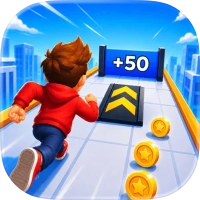
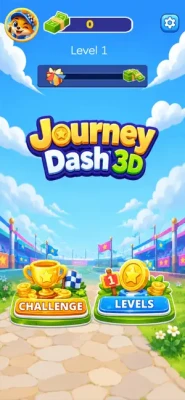
Journey Dash 3D is a casual racing game where you compete against an opponent in short head-to-head challenges.
The basic gameplay loop is:
Start the race → Move across the track → Choose gates → Avoid obstacles → Reach the finish → Compare your result with your opponent.
The controls are intentionally simple, but the changing track layouts create opportunities for strategic decisions.
How to Play Journey Dash 3D
The main control is based on holding and dragging your character.
As the race begins:
- Hold the screen.
- Drag left or right to control your position.
- Watch the upcoming track.
- Choose the most useful route.
- Pass through beneficial gates.
- Avoid obstacles.
- Reach the finish line ahead of your opponent.
The game is easy to understand, but mastering the timing of movement and route decisions takes practice.
Journey Dash 3D Gameplay Features
Hold-and-Drag Controls
The game's primary control system is designed to be simple.
You don't need a collection of complicated buttons or traditional racing controls. Instead, your character moves laterally according to your finger movement.
This makes Journey Dash 3D accessible for quick sessions while still leaving room to improve your timing.
Strategic Route Choices
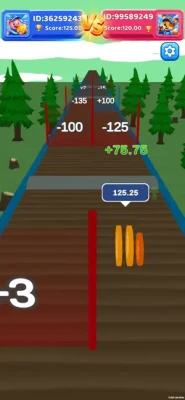
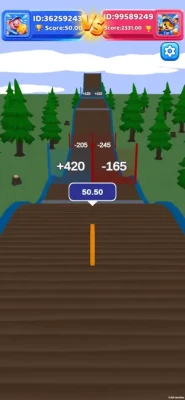
Different gates can produce different effects, so choosing the correct route is an important part of each race.
A route that looks attractive at first may not necessarily be the most useful once you consider the obstacles and gates that follow.
One-on-One Racing Duels
Each challenge is built around an opponent.
Your objective is to produce a better overall performance and reach the finish line ahead of the other racer.
Changing Track Layouts
Journey Dash 3D uses varied track layouts with changing gates, obstacles and route options.
This prevents every race from feeling exactly the same and requires you to pay attention rather than relying entirely on memorized movements.
Character Customization
The game includes customization options that allow players to unlock different visual styles and personalize their gameplay experience.
Short Racing Sessions
The game is designed around quick challenges, making it suitable for short gaming sessions.
You can play a few rounds without needing to commit to a long racing event.
Full Journey Dash 3D Strategy Guide
1. Look Ahead Before Moving
One of the biggest mistakes beginners make is reacting only to what is immediately in front of them.
Try to look farther down the track.
If you can see an upcoming gate or obstacle, begin positioning your character early rather than waiting until the last second.
Good movement is often about anticipation rather than reaction.
2. Don't Always Choose the Closest Route
The nearest gate isn't automatically the best gate.
Before committing to a route, consider:
- What effect the gate provides
- What obstacles follow it
- How much movement will be required afterward
- Whether the route gives you enough space
- Where your opponent is positioned
A slightly longer route can sometimes provide a better overall result.
3. Learn to Move Smoothly
Large, sudden movements can make it harder to maintain your intended position.
Try using controlled lateral movement.
Small corrections are especially useful when you are approaching narrow routes or trying to line up with a particular gate.
4. Avoid Obstacles Early
Don't wait until an obstacle is directly in front of you.
Once you recognize an upcoming obstacle, begin moving toward a safer route.
Late reactions can force you into a poor position and may cause you to lose the advantage you built earlier in the race.
5. Use the Entire Track
Don't stay permanently in the center.
Journey Dash 3D allows you to move from side to side, so use the available space.
Sometimes the best route is on the left, while another section may favor the right.
The ability to change position is one of your main strategic tools.
6. Prioritize the Overall Run
It's easy to focus on one gate and forget what comes immediately afterward.
Instead, think of each section as part of a larger route.
A good decision should ideally put you in a useful position for the next section as well.
7. Don't Panic When Your Opponent Gets Ahead
Seeing the opponent move ahead can encourage rushed decisions.
Stay focused on your route.
A poor reaction can turn a small disadvantage into a much larger one.
Continue choosing the safest and most advantageous path available.
8. Watch for Repeating Patterns
Although track layouts can vary, playing multiple rounds will help you recognize common types of obstacles and route situations.
Use that experience to improve your reactions.
The goal isn't to memorize every race but to develop a better understanding of how quickly you need to respond.
Best Journey Dash 3D Tips for Beginners
Tip 1: Keep Your Finger Movement Controlled
Smooth movement makes positioning easier.
Tip 2: Look Ahead
Don't wait until an obstacle is directly in front of you.
Tip 3: Compare Routes
Check multiple available paths before committing.
Tip 4: Avoid Unnecessary Obstacles
A small detour can be better than taking a route that weakens your run.
Tip 5: Practice Positioning
Learn how far your character moves in response to different dragging movements.
Tip 6: Don't Chase Your Opponent
Your opponent's position can be useful information, but don't let it cause you to make reckless movements.
Tip 7: Think About the Next Section
The best current position is often the one that gives you good options for what comes next.
Tip 8: Stay Flexible
Track layouts can change, so adapt rather than following the same movement pattern every time.
Advanced Journey Dash 3D Strategy
Once the basic controls become comfortable, the game becomes more about route efficiency.
Instead of simply asking:
"Which gate can I reach?"
ask:
"Which route gives me the best position for the rest of the track?"
This distinction can make a major difference.
Plan Two Sections Ahead
If you see a gate followed by an obstacle, don't judge the gate independently.
Consider both sections together.
For example:
Gate → obstacle → open track
may require a different approach from:
Gate → narrow passage → another gate.
Your positioning at the gate should take the next obstacle into account.
Use Your Opponent as Information
The opponent can provide useful information about the track.
If they choose a particular route, watch what happens afterward.
This can help you understand whether a route is advantageous without blindly copying their movement.
However, your own position and the upcoming obstacles should remain the priority.
Improve Your Reaction Timing
If you repeatedly hit obstacles, identify whether your problem is:
- Seeing the obstacle too late
- Moving too slowly
- Moving too far
- Choosing the wrong route
- Returning to the wrong position afterward
Identifying the exact problem makes practice much more effective.
Journey Dash 3D Route Strategy
Route selection is one of the central mechanics of Journey Dash 3D.
The App Store specifically describes different gates as producing different effects, meaning that the player needs to observe the track and choose a route that provides an advantage.
A useful decision process is:
Step 1: Scan
Look at the available routes.
Step 2: Compare
Consider the advantages and risks of each option.
Step 3: Position
Move toward your chosen route early.
Step 4: Commit
Avoid unnecessary last-second changes.
Step 5: Prepare
Immediately look ahead to the next obstacle or gate.
This five-step process can make your movement much more consistent.
How to Avoid Losing Speed
The exact effects of every gate and obstacle can vary by track situation, so it's better to focus on general positioning principles rather than assuming one route is always correct.
To protect your performance:
- Avoid unnecessary obstacles.
- Don't make excessive side-to-side movements.
- Position yourself before reaching a gate.
- Choose routes that leave enough room for the next section.
- Avoid panic movements when your opponent is ahead.
The goal is to make fewer inefficient movements.
Journey Dash 3D One-on-One Duel Tips
Because the game centers on head-to-head challenges, every small mistake can matter.
Stay Consistent
You don't necessarily need a spectacular move.
A clean run with fewer mistakes can be more effective than constantly taking risky routes.
Watch the Finish
Don't relax too early.
Continue controlling your character until the race is completely finished.
Learn From Losses
After losing a duel, think about the exact point where your run deteriorated.
Was it an obstacle?
A poor gate choice?
A late movement?
A bad recovery?
Fixing one recurring mistake can produce noticeable improvement.
Common Journey Dash 3D Mistakes
Moving Too Late
Waiting until an obstacle is extremely close leaves little room for correction.
Overcorrecting
Moving too far to one side and then immediately correcting can create unnecessary movement.
Following the Opponent Blindly
The opponent's route may not be appropriate for your position.
Ignoring Upcoming Obstacles
A gate may be useful, but the section immediately after it can change the value of that route.
Playing Too Quickly
Although the races are fast, rushing your decisions can lead to avoidable mistakes.
Staying in One Lane
The game is designed around lateral movement and route selection. Failing to use the available track space limits your options.
Journey Dash 3D Progression and Customization
Journey Dash 3D includes customization options that allow players to unlock different visual styles and personalize their experience.
While visual customization doesn't replace racing skill, it provides a way to make your character feel more personal as you continue playing.
For new players, concentrate first on understanding the movement system and track decisions before worrying too much about cosmetic progression.
Is Journey Dash 3D Easy to Play?
Yes, the basic controls are straightforward: hold and drag to move across the track.
The challenge comes from deciding where to move and when to move.
The App Store describes the controls as easy to learn while emphasizing that there is room to improve skill through route selection and movement.
This makes the game accessible to beginners while still providing opportunities to develop better racing habits.
Is Journey Dash 3D a Multiplayer Racing Game?
The core gameplay is presented as one-on-one challenges against an opponent. The App Store describes these as quick duels where players compare their final performance at the finish line.
The listing does not provide enough information to claim that every opponent represents a live real-time player, so it is more accurate to describe the experience simply as head-to-head racing challenges.
Journey Dash 3D Game Information
- Game: Journey Dash 3D
- Category: Racing
- Developer: 慧 谢
- Platforms: iPhone, iPad, iPod touch, Mac and Apple Vision
- iOS Requirement: iOS 13.0 or later
- Current Size: Approximately 280.3 MB
- Age Rating: 13+
- Language: English
- Business Model: Free
- Features: One-on-one racing, route selection, gates, obstacles and customization
- Contains: Advertising, loot boxes, contests, infrequent cartoon/fantasy violence and sexual content or nudity
- Current Version: 1.0.2
Journey Dash 3D Rating
The current U.S. App Store listing shows 4.7 out of 5 from approximately 7.1K ratings and currently places the game at #5 in the Racing category.
The rating reflects the App Store's current displayed data and can change as new reviews are submitted.
Important Note About App Store Reviews
The current listing contains a number of recent reviews alleging that advertised cash-reward expectations were not fulfilled and that additional requirements involving levels and advertisements appeared during the process. These are user-submitted claims, not independently verified findings.
For a factual game guide, it is safer to describe the core racing mechanics separately from these user reports rather than presenting the allegations as established facts.
Journey Dash 3D Pros and Things to Consider
Pros
- Very simple controls
- Quick racing rounds
- One-on-one challenges
- Route selection adds decision-making
- Different gates and obstacles
- Changing track layouts
- Character customization
- Suitable for short gaming sessions
- Easy to understand for new players
Things to Consider
- The game contains advertising.
- Loot boxes are listed in the App Store information.
- The App Store lists contests among its content.
- The game has a 13+ age rating.
- Recent App Store reviews contain complaints concerning advertised reward/cash-out expectations; these claims should be treated as individual user reports rather than independently verified facts.
Who Should Play Journey Dash 3D?
Journey Dash 3D is aimed at players who enjoy:
- Casual racing games
- Quick mobile challenges
- One-on-one competitions
- Simple touch controls
- Obstacle courses
- Route-selection games
- Short gaming sessions
- Fast reaction-based gameplay
It is particularly easy to pick up because the basic control system doesn't require learning traditional racing controls.
Frequently Asked Questions
What is Journey Dash 3D?
Journey Dash 3D is a racing game built around quick one-on-one track challenges. Players hold and drag their character, select routes, pass through gates and avoid obstacles.
How do you play Journey Dash 3D?
Hold and drag your character from side to side to control movement. Choose useful routes, pass through advantageous gates and avoid obstacles as you race toward the finish.
Does Journey Dash 3D have different tracks?
Yes. The App Store describes varied track layouts featuring different routes, gates and obstacles.
Does Journey Dash 3D have customization?
Yes. Players can unlock different visual styles and personalize their gameplay experience.
Is Journey Dash 3D free?
The current App Store listing shows Journey Dash 3D as free.
What iPhone does Journey Dash 3D require?
The game requires iOS 13.0 or later. It is also listed for iPad, iPod touch, Mac with Apple silicon and Apple Vision.
How big is Journey Dash 3D?
The current App Store listing shows the game at approximately 280.3 MB.
Does Journey Dash 3D have advertisements?
Yes. Advertising is listed in the App Store's content information.
Does Journey Dash 3D have loot boxes?
Yes. Loot boxes are listed in the current App Store information.
Rate the Game
User Reviews








Popular Games



















 Android
 iOS
iOS Windows
 Xbox
Xbox