




Latest Version
October 16, 2024
Skyloft Games
Simulation
iOS
0
Report a Problem
More About :game
The challenge becomes more interesting as customer demand changes. A product that sells quickly today may become less popular later, forcing you to adjust your inventory and pricing strategy.
The game also includes product licenses, store expansions, additional floors, equipment upgrades, a skill tree and franchise-related systems, giving you several ways to develop your business.
What Is Electronics Store Simulator 3D?
Electronics Store Simulator 3D is a retail business simulation game developed by Skyloft Games.
Instead of simply placing products on shelves, you have to think like a store manager.
Your responsibilities include:
- Ordering electronics
- Managing stock
- Setting product prices
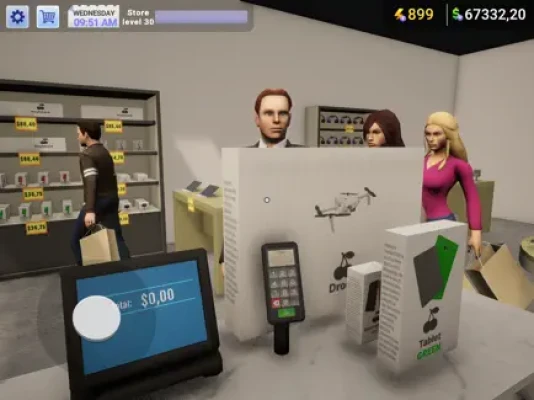
- Serving customers
- Handling checkout
- Watching market demand
- Unlocking new products
- Purchasing licenses
- Expanding the store
- Improving equipment
- Managing your available money
- Responding to changing customer behavior
The objective is straightforward:
Turn a small electronics shop into a profitable technology retail business.
Main Gameplay Features
Build Your Electronics Store
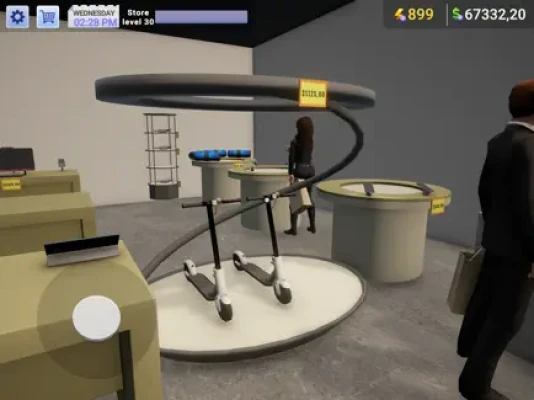
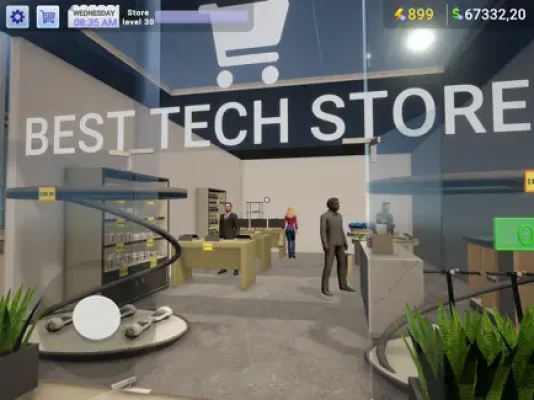
You begin with a relatively modest store and gradually transform it into a larger electronics showroom.
Store expansion can include additional floors and improved equipment, allowing you to display more products and increase your potential sales.
Sell Popular Electronics
The game includes a wide variety of technology products.
Depending on your progression, you can deal with items such as:
- Smartphones
- Laptops
- Computers
- Speakers
- Headphones
- Microphones
- Drones
- Tablets
- Accessories
- Other consumer electronics
This variety makes inventory management an important part of the game.
Manage Supply and Demand
One of the most important mechanics is the relationship between supply and customer demand.
You cannot simply order large quantities of everything.
If demand falls, excess stock can tie up money that could have been used for better opportunities.
Buy Product Licenses
Certain products require licenses before you can sell them.
Licenses therefore become an important part of progression because they allow your business to access more advanced or exclusive merchandise.
Expand Your Store
As your profits increase, you can invest in additional space and equipment.
The goal is not simply to create a bigger building.
You need to make sure the additional space generates enough revenue to justify the investment.
Beginner's Guide
When starting Electronics Store Simulator 3D, your biggest mistake would be spending all your money immediately.
A strong early-game strategy is:
- Stock products with reliable demand.
- Keep your prices competitive.
- Watch what customers actually buy.
- Reorder successful products.
- Avoid excessive inventory.
- Save money for useful licenses and upgrades.
- Expand only when your current store can support the cost.
Your first objective should be stable cash flow, not maximum store size.
How to Make Money
Profit comes from buying products at a reasonable cost and selling them at prices customers are willing to pay.
However, the highest price is not automatically the best price.
If you make a product too expensive, customers may stop buying it.
If you price everything too cheaply, you may generate sales without generating enough profit.
The ideal price is the point where:
Customer demand × profit per item = strong overall revenue
Experiment with pricing and watch how customers respond.
Best Pricing Strategy
Pricing is one of the most useful tools available to a store manager.
Avoid extreme prices
A very high price can produce excellent profit per sale but very few sales.
A very low price may create high sales volume but weak margins.
Test popular products
If an item sells out quickly, gradually test whether the price can be increased without significantly reducing demand.
Protect your best sellers
Popular electronics should generally remain available.
Running out of a high-demand product means losing potential sales.
Watch slow-moving stock
If something remains on the shelf for too long, consider reducing the price or redirecting your money toward products with stronger demand.
Inventory Management Guide
Inventory is effectively your working capital.
Every product sitting on a shelf represents money that you have already spent.
That makes overstocking one of the easiest ways to slow down your business.
Keep popular products stocked
When a product sells consistently, maintain a healthy supply.
Avoid excessive quantities
Do not buy hundreds of units simply because a product is currently popular.
Demand can change.
Check stock regularly
A quick inventory check can reveal:
- Fast-selling products
- Slow-moving products
- Nearly empty shelves
- Overstocked products
- Products that need new pricing
How to Deal With Changing Demand
Electronics retail is especially sensitive to trends.
The game reflects this by requiring you to adapt when demand changes.
A useful strategy is to divide products into three categories.
High demand
Keep these products well stocked.
Medium demand
Maintain a reasonable amount without tying up too much money.
Low demand
Avoid ordering large quantities and consider adjusting the price.
This simple classification makes inventory decisions much easier.
How to Choose What to Sell
Do not choose products based only on how expensive they are.
Instead, consider:
Purchase cost + selling price + demand + stock turnover
A cheaper product that sells constantly can generate more total income than an expensive product that barely moves.
For example, selling ten moderately profitable products may be better than waiting for one expensive item to sell.
Store Expansion Strategy
Store expansion is exciting, but bigger does not automatically mean better.
Before expanding, ask:
- Are my shelves already selling well?
- Do I have enough cash after paying for the expansion?
- Do I have enough products to fill the additional space?
- Will the new floor increase my revenue?
- Can I afford new equipment?
If your existing store is not profitable, expanding it usually makes the underlying problem larger rather than solving it.
When Should You Expand?
A good time to expand is when:
Demand is consistently higher than your current capacity.
For example, if your best-selling products repeatedly run out of shelf space and you have enough money to invest while maintaining your operating cash, expansion can make sense.
The current game supports store upgrades and expansion, including additional floors and advanced equipment.
Product License Strategy
Licenses unlock additional selling opportunities.
However, you should not automatically buy every available license.
Before purchasing one, consider:
- How much does the license cost?
- How expensive is the product?
- Is there enough customer demand?
- Can I afford the required inventory?
- Will the product generate enough profit?
A license is useful when it creates a realistic opportunity for additional revenue.
Skill Tree Strategy
The game also features progression through a skill tree, which can improve different aspects of your business. Player feedback specifically highlights the skill tree as a useful progression system involving multipliers and rewards.
When choosing upgrades, prioritize improvements that directly affect your current weakness.
For example:
Low income → income-related improvement
Slow progression → progression multiplier
Limited capacity → capacity improvement
Avoid spending points randomly.
Customer Management
Customer satisfaction is a major part of successful retail management.
Customers come to your store because they want particular products.
Your job is to make those products available at reasonable prices.
Keep shelves stocked
Empty shelves represent missed sales.
Avoid excessive prices
Customers are less likely to purchase products when pricing becomes unreasonable.
Maintain product variety
A store with only one type of electronics will have fewer opportunities to satisfy different customers.
Keep checkout flowing
Efficient checkout helps maintain the rhythm of your store and prevents customer congestion.
How to Improve Customer Satisfaction
Think about the shopping experience from the customer's perspective.
A customer wants:
Find product → accept price → purchase quickly → leave satisfied
Anything that interferes with this sequence can reduce the effectiveness of your store.
That means product availability and reasonable pricing are more important than simply filling the building with expensive equipment.
Checkout Strategy
The checkout is one of the most hands-on parts of the game.
You need to handle customer purchases and keep the store operating smoothly.
As your store grows, the checkout can consume more of your attention.
This is one reason why expanding gradually is important.
A bigger store means more potential sales, but it can also mean more work.
Store Layout Tips
Think carefully about how you organize your electronics store.
Try to group similar products together.
For example:
Mobile technology
- Smartphones
- Tablets
- Accessories
Computer technology
- Laptops
- Computers
- Related equipment
Audio
- Speakers
- Headphones
- Microphones
Specialty products
- Drones
- Other premium electronics
A logical layout makes the store easier to manage and gives it a more convincing retail atmosphere.
How to Stock Shelves Efficiently
One of the most repetitive tasks in the game is keeping products available.
A practical routine is:
- Check the most popular shelves.
- Restock items that are nearly empty.
- Put new deliveries in their appropriate areas.
- Remove unnecessary clutter.
- Check the inventory screen.
- Reorder products that are selling quickly.
This is especially important because player feedback has repeatedly mentioned that manually keeping shelves stocked can become time-consuming.
Delivery and Ordering Strategy
Ordering too early can tie up money.
Ordering too late can leave your store empty.
Try to develop a rhythm based on your sales rate.
If you consistently sell a certain number of units during a business period, keep enough inventory to cover expected demand plus a small reserve.
The current version history also notes changes to delivery times and improvements to the shopping interface, making ordering more convenient than in earlier versions.
Franchises and Business Growth
Recent updates have reintroduced franchises, adding another layer to the business-management side of the game.
This is particularly useful for players who have already established a successful main store and want progression beyond simply adding shelves.
Think of your first store as the foundation.
Once it becomes consistently profitable, additional business opportunities become more valuable.
Best Early-Game Strategy
Follow this simple progression:
Step 1: Start small
Learn how ordering, pricing and customer service work.
Step 2: Find your best sellers
Watch which products disappear fastest.
Step 3: Build reliable inventory
Keep your strongest products available.
Step 4: Improve pricing
Experiment with margins without destroying demand.
Step 5: Unlock useful licenses
Choose products that can realistically make money.
Step 6: Upgrade the store
Expand when demand justifies additional capacity.
Step 7: Improve your skill tree
Focus on upgrades that solve your current bottleneck.
Step 8: Diversify
Add different product categories and higher-value electronics.
Step 9: Build a larger retail business
Use your increased revenue to support further expansion.
Best Money Management Strategy
A simple financial system can keep your store healthy.
Divide your money into three groups.
Operating cash
Money needed for everyday stock purchases and expenses.
Expansion fund
Money reserved for new floors, equipment and store upgrades.
Emergency reserve
Money you deliberately do not spend.
This reserve protects you when demand changes or an unexpected opportunity appears.
Common Beginner Mistakes
Buying too much inventory
More products do not automatically mean more profit.
Setting prices too high
High margins are useless if customers stop buying.
Setting prices too low
High sales volume does not help much if your profit per sale is tiny.
Expanding too early
A bigger store can increase costs faster than revenue.
Unlocking random licenses
Choose products that match actual demand.
Ignoring slow-moving products
Unused inventory is tied-up capital.
Focusing only on expensive products
Some cheaper electronics can provide more reliable turnover.
Forgetting to restock
An empty shelf means a missed opportunity.
Spending all your money
Always keep enough cash to keep the store operating.
Advanced Profit Strategy
Once you understand the basics, start thinking about turnover rather than individual profit.
Suppose one product earns a large margin but sells very rarely.
Another product earns a smaller margin but sells constantly.
The second product may actually be more valuable to your business.
A useful question is:
How much profit does this product generate over an entire business cycle?
That is more useful than looking at the profit from one sale.
How to Handle Slow Products
When a product does not sell, don't immediately assume the product is useless.
Check:
- Is the price too high?
- Is demand currently low?
- Is the product positioned poorly?
- Is another product competing with it?
- Did customer preferences change?
Then adjust your strategy.
Possible solutions include:
- Lowering the price
- Ordering less
- Moving the product
- Reallocating shelf space
- Waiting for demand to recover
How to Build a High-Profit Store
A strong electronics store should have a mixture of products.
Everyday products
These provide consistent sales.
Mid-range products
These increase average transaction value.
Premium products
These can produce larger individual profits.
Specialty products
These help differentiate your store and take advantage of licenses and changing demand.
This mixture is generally safer than relying entirely on one category.
Advanced Store Layout
As your store expands, use dedicated sections.
For example:
Front area
Popular, frequently purchased products.
Main floor
Mainstream electronics.
Premium section
More expensive technology.
Specialty section
Licensed or unusual products.
Back area
Storage and operational space.
This arrangement can make a large store easier to manage.
How to Progress Faster
Progression becomes much easier when you avoid unnecessary spending.
Focus on upgrades that improve one of these:
- Sales
- Inventory capacity
- Product availability
- Customer satisfaction
- Profit margins
- Store capacity
- Business efficiency
If an upgrade does not contribute to one of these areas, consider saving your money.
Electronics Store Simulator 3D Tips and Tricks
Keep your best sellers available
Popular products should rarely be allowed to remain out of stock.
Monitor demand
Customer behavior is more useful than assumptions.
Don't over-expand
Every expansion should have a financial reason.
Use licenses strategically
Unlock products when you can afford to stock them.
Keep a cash reserve
Never leave yourself unable to reorder important products.
Improve your weakest area
The best upgrade is usually the one that fixes your biggest current problem.
Diversify gradually
Add new product categories instead of trying to sell everything immediately.
Think long term
A profitable store today is more valuable than a huge store with poor cash flow.
Latest Updates
The current App Store listing shows version 1.31.7, with recent updates described as bug fixes and quality-of-life improvements. Earlier major updates introduced improvements to the store interface, reintroduced franchises, adjusted delivery times and improved graphics, models, colors and lighting.
This is important for returning players because the current experience is not identical to the game's original release.
Electronics Store Simulator 3D Game Information
Game: Electronics Store Simulator 3D
Developer: Skyloft Games
Genre: Simulation
Platforms: iPhone, iPad, iPod touch, compatible Apple silicon Mac and Apple Vision
Current listed version: 1.31.7
Price: Free with in-app purchases
App Size: 397.8 MB
Required iOS: iOS 15.0 or later
Required iPadOS: iPadOS 15.0 or later
Age Rating: 13+
Game Center: Supported
Language: English
The U.S. App Store currently shows approximately 4.6/5 from 3.1K ratings.
Pros and Cons
Pros
- Detailed electronics retail simulation
- Large selection of products
- Supply-and-demand gameplay
- Product licenses
- Store expansion
- Additional floors
- Skill tree progression
- Franchises
- Customer management
- 3D environment
- Game Center achievements
- Regular quality-of-life updates
Cons
- Stocking shelves can become repetitive
- Managing inventory becomes more demanding as the store grows
- Some player reviews report bugs and lost progress
- The game contains advertising
- Some players have requested better automation for repetitive tasks
- Larger stores can require considerable manual management
The current App Store rating is strong overall, although player reviews also highlight issues involving optimization, inventory work, bugs and the desire for additional helpers or automation.
Frequently Asked Questions
What is Electronics Store Simulator 3D?
It is a business simulation game where you build and manage an electronics store, order products, set prices, serve customers, manage inventory and expand your retail business.
What products can you sell?
The game features electronics including smartphones, laptops, drones and speakers, with additional categories becoming available through progression and licenses.
Can you expand the store?
Yes. Store upgrades can include additional floors and new equipment.
Does Electronics Store Simulator 3D have licenses?
Yes. Licenses allow you to access additional or exclusive products.
Does the game have a skill tree?
Yes. The progression system includes a skill tree that can improve your business and provide additional rewards.
Does Electronics Store Simulator 3D have franchises?
Yes. Franchises were reintroduced in a major recent update.
Is Electronics Store Simulator 3D free?
Yes. The App Store lists the game as free with optional in-app purchases.
Does the game support Game Center?
Yes. The App Store lists Game Center support and achievements.
What iOS version is required?
The current listing requires iOS 15.0 or later.
Final Verdict
Electronics Store Simulator 3D is a good choice for players who enjoy turning a small business into a larger operation. Its appeal comes from the combination of electronics retail, inventory management, pricing, customer service, product licenses and store expansion.
The most important lesson is that bigger is not automatically better. A successful store depends on maintaining the right products at the right time, pricing them intelligently and expanding only when your revenue can support the investment.
Start with dependable products, learn what your customers actually want, avoid excessive inventory and save money for meaningful upgrades. Once your store has reliable cash flow, licenses, additional floors, specialty products and franchise opportunities can take your electronics business to the next level.
If you enjoy electronics store games, retail management simulators, business games, shop tycoon games and store-building simulations, Electronics Store Simulator 3D offers a surprisingly detailed mobile management experience.
Rate the Game
User Reviews














Popular Games



















 Android
 iOS
 Windows
 Xbox