
Latest Version
September 16, 2026
SUD Inc.
Racing
0
om.ansangha.drdriving
Report a Problem
More About :game
The game has built a huge following over the years, with more than 500 million downloads on Google Play. It is also designed to work offline, while online features allow players to compete and connect through multiplayer.
What Is Dr. Driving?
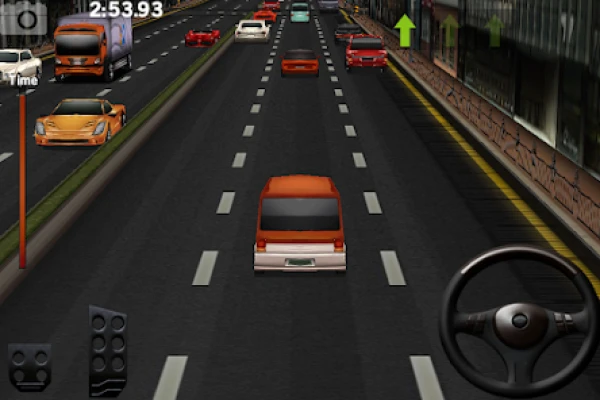
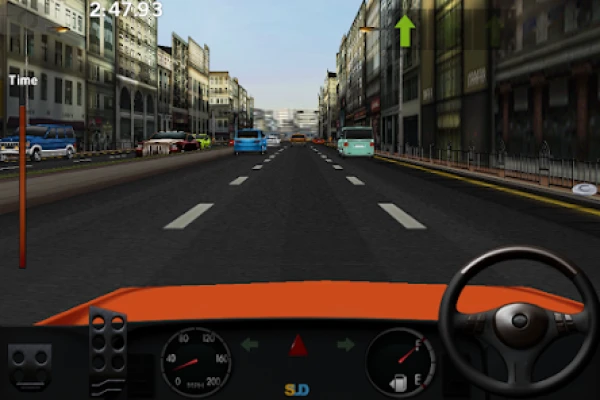
Dr. Driving is a mobile car-driving game built around short challenges and straightforward controls. You drive through city streets, deal with traffic and complete different objectives while trying to keep your vehicle under control.
Unlike many arcade racing games, speed is not always the answer. Braking at the right moment, staying in your lane, making clean turns and avoiding collisions can be just as important as reaching your destination quickly.
The game is available for Android and Windows and contains ads and optional in-app purchases.
Dr. Driving Gameplay
The main attraction is its simple but surprisingly demanding driving system.
You control the car through city roads while watching traffic and completing the objective assigned to each challenge. A successful run requires more than pressing the accelerator. You have to judge distances, slow down for turns and avoid unnecessary contact with other vehicles.
The compact challenges make Dr. Driving easy to pick up for a few minutes, but improving your driving technique can keep the game interesting for much longer.
Main Features
City Driving
Dr. Driving puts you on urban roads filled with traffic and obstacles. The streets give you plenty of opportunities to practice steering, braking and positioning.
Driving Missions
Missions give each trip a purpose. Rather than simply driving around without an objective, you work toward completing specific tasks and earning rewards.
Different Cars
You can use different vehicles and improve your garage as you progress. Choosing the right vehicle can make certain driving situations more comfortable.
Vehicle Upgrades
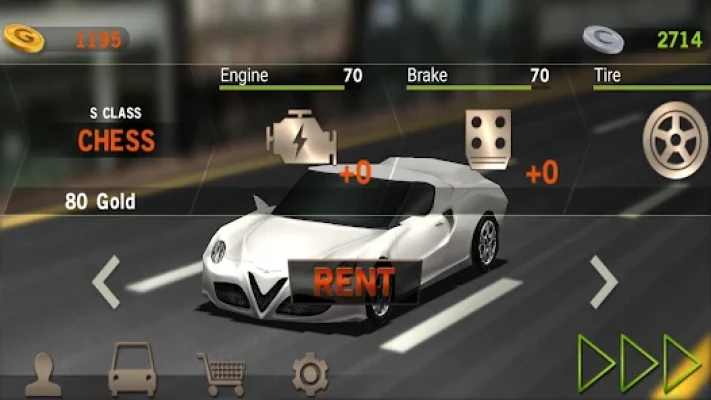
Money earned from successful driving can be used to improve your vehicles. Upgrading your car becomes increasingly useful as you tackle more demanding challenges.
Online Multiplayer
Dr. Driving supports online multiplayer, allowing players to compete against other drivers rather than limiting the experience to solo challenges.
Offline Gameplay
One of the game's convenient features is its ability to be played offline. This makes it suitable for short sessions when you do not have a reliable internet connection.
Controls and Driving Basics
The controls are deliberately simple, but mastering them takes practice.
Use the steering controls smoothly instead of making sudden movements. Small corrections are usually safer than repeatedly moving from one extreme to another.
The accelerator should be treated as a tool rather than something you constantly hold down. When approaching traffic, intersections or tight turns, release the accelerator early and give yourself enough time to react.
Braking is particularly important. Waiting until the last possible second can turn an otherwise successful mission into a collision.
Complete Dr. Driving Strategy Guide
1. Learn to Drive Smoothly
Your first goal should not be maximum speed.
Spend some time learning how quickly your vehicle accelerates, how long it takes to stop and how much steering input is needed for different turns.
Once these movements become familiar, missions become much easier.
2. Look Ahead Instead of Reacting Late
A common beginner mistake is focusing only on the vehicle directly in front of you.
Look farther down the road. If traffic is slowing, prepare early. If you see a turn coming, position your car before reaching it.
Early decisions are usually safer than emergency corrections.
3. Brake Before the Turn
Do not wait until you are already inside a corner to start braking.
Slow down before the turn, then steer through it. Once your vehicle is pointed in the correct direction, gradually accelerate again.
This technique helps prevent wide turns and accidental collisions.
4. Avoid Unnecessary Overtaking
Passing another vehicle may save a little time, but an aggressive maneuver can also end the run.
If there is not enough room, simply stay behind the slower vehicle until the road gives you a safe opportunity.
A clean mission is generally more valuable than a risky shortcut.
5. Keep Your Car Under Control
Fast acceleration can feel satisfying, but excessive speed makes every mistake more expensive.
Try to maintain a speed that allows you to react to traffic. The best drivers are not necessarily the ones who drive fastest; they are the ones who can maintain control throughout the entire route.
6. Use the Road Position Carefully
Avoid constantly driving from one side of the road to the other.
Maintain a predictable position and make small steering adjustments. This gives you more time to react when another vehicle changes direction.
7. Upgrade With a Purpose
Do not spend your money randomly.
Think about what is causing you the most trouble. If your current vehicle feels difficult to control, prioritize improvements that make driving more manageable.
If you are already comfortable with control, save your resources for a vehicle or upgrade that will help with more demanding challenges.
8. Practice Difficult Missions
When a particular mission keeps causing problems, repeating it can be more useful than constantly switching to something else.
Pay attention to exactly where the mistake happens. Is the problem a sharp turn? Traffic? Braking too late? Poor positioning?
Once you identify the problem, change one part of your driving technique rather than simply trying the same approach repeatedly.
9. Protect Your Earnings
Avoid wasting earned money on upgrades that do not solve an actual problem.
Build your resources gradually and spend them when an upgrade provides a noticeable advantage.
This makes progression more efficient and reduces the feeling of constantly being short on money.
10. Treat Multiplayer Differently
Online multiplayer requires a different mindset from ordinary missions.
Against another player, predictable driving can become a disadvantage. Watch what your opponent is doing, avoid unnecessary collisions and take opportunities when the road gives you room.
At the same time, do not turn every situation into an aggressive contest. Maintaining control is still important.
Advanced Dr. Driving Tips
Don't Always Chase Speed
Speed is only useful when you can control it.
A slightly slower but cleaner run can be more successful than a fast drive that ends with a crash.
Use Short Practice Sessions
Because Dr. Driving uses relatively compact challenges, repeated short sessions can be an effective way to improve.
Play a few missions, identify the mistakes you repeatedly make and then focus specifically on correcting them.
Learn Traffic Patterns
The more you play, the easier it becomes to anticipate situations on the road.
Instead of waiting for traffic to surprise you, begin recognizing when you should slow down or prepare for a change in direction.
Keep Your Steering Inputs Small
Large steering movements often create new problems while trying to correct an existing one.
Use small adjustments whenever possible. This is especially helpful when navigating busy streets.
Don't Let One Mistake Ruin the Next Attempt
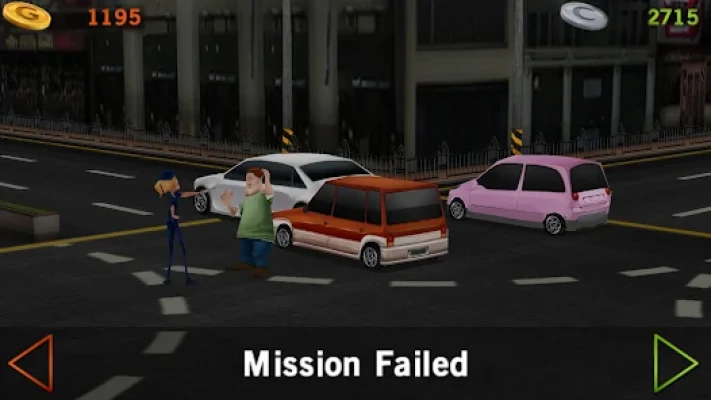
A failed mission is useful if you learn why it failed.
Remember the location and type of mistake, then change your approach on the next attempt.
Beginner Mistakes to Avoid
Driving at full speed everywhere: You lose reaction time and make braking much harder.
Braking too late: Start slowing before the obstacle or turn rather than when you are already beside it.
Oversteering: Excessive steering can make a simple correction turn into a larger mistake.
Taking unnecessary risks: A risky pass is rarely worthwhile when you have enough road ahead to wait.
Ignoring vehicle progression: A suitable vehicle and useful upgrades can make difficult challenges more manageable.
Focusing only on the destination: The journey itself contains most of the challenge.
Cars and Progression
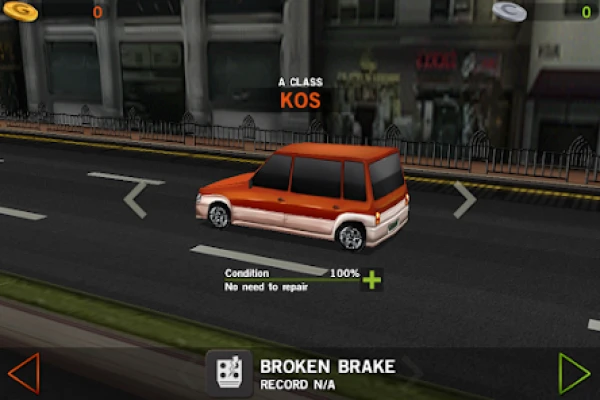
Vehicle progression is an important part of the Dr. Driving experience. Successful driving allows you to build resources that can be used toward cars and upgrades.
Instead of immediately trying to collect everything, consider building a dependable vehicle first. A car that you can control confidently is more useful than a vehicle that looks appealing but does not suit your driving style.
As you become more experienced, you can experiment with different cars and determine which ones fit the challenges you enjoy most.
Dr. Driving Multiplayer
Online multiplayer adds another layer to the otherwise relaxed driving experience.
Playing against another person can make familiar roads feel different because you are no longer simply trying to complete a solo objective. You need to react to another driver's decisions while maintaining control of your own vehicle.
The Google Play listing specifically confirms online multiplayer support through Google account sign-in.
Is Dr. Driving Offline?
Yes. Google Play currently lists Dr. Driving as an offline game while also offering online multiplayer functionality. This combination makes it possible to enjoy the core driving experience without always needing an internet connection.
Dr. Driving Graphics and Atmosphere
Dr. Driving does not try to compete with modern console-style racing games through huge open worlds or photorealistic graphics. Its appeal comes from a much simpler presentation.
The compact city environments, straightforward vehicle designs and short challenges create a lightweight driving experience that is easy to understand.
That simplicity is also part of its charm. You can start a session quickly without spending a long time learning complicated systems.
Honest Feedback
Dr. Driving remains appealing because it keeps its core idea straightforward: drive carefully, complete challenges, earn resources and improve your vehicles.
Its long-running popularity is reflected in the enormous number of Google Play downloads and reviews. Recent player reviews also highlight its nostalgic appeal, simple controls, car progression and multiplayer, while some players have criticized the way coins and gold are earned. These are individual player experiences rather than universal conclusions.
For players who want a lightweight driving game rather than a large open-world racing simulator, the simple mission-based approach can be a good fit.
Who Should Play Dr. Driving?
Dr. Driving is particularly suitable for players who enjoy:
- Casual driving games
- Car simulation on mobile
- Short gameplay sessions
- Traffic and city driving
- Vehicle upgrades
- Simple controls
- Offline gaming
- Online multiplayer
- Classic mobile games
It may be less appealing if you are specifically looking for a large open-world racing game with highly detailed graphics and extensive vehicle customization.
Frequently Asked Questions
Is Dr. Driving a racing game?
Dr. Driving is primarily a driving simulation and casual vehicle game rather than a traditional racing game. Google Play categorizes it around simulation, vehicles and car simulation.
Can you play Dr. Driving offline?
Yes. The current Google Play listing identifies Dr. Driving as an offline game, while online multiplayer is also available.
Does Dr. Driving have multiplayer?
Yes. Players can sign in with a Google account to access online multiplayer features.
Can you upgrade cars in Dr. Driving?
Vehicle progression and upgrades are part of the game's progression system, allowing players to improve their garage as they earn resources.
Is Dr. Driving suitable for beginners?
Yes. Its controls are relatively straightforward, making it easy to start playing. However, completing harder driving challenges efficiently requires practice with steering, braking and traffic awareness.
Is Dr. Driving still available?
Yes. Dr. Driving is currently listed on Google Play and has more than 500 million downloads.
Final Thoughts
Dr. Driving succeeds by keeping mobile driving simple. Instead of overwhelming players with a massive number of systems, it concentrates on steering, traffic, missions, vehicles and short driving challenges.
The combination of offline play, vehicle progression and online multiplayer gives the game more variety than its straightforward presentation might initially suggest. With hundreds of millions of downloads and millions of player reviews on Google Play, it has remained a recognizable name in mobile driving games.
If you approach each mission with patience, brake before turns, avoid unnecessary collisions and spend your resources carefully, you can make much faster progress while enjoying the relaxed side of mobile driving.
Rate the Game
User Reviews






Popular Games



















 Android
 iOS
iOS Windows
 Xbox
Xbox