
Latest Version
October 09, 2024
Amanotes Pte Ltd
Music
iOS
0
Report a Problem
More About :game
The controls are deliberately simple: hold and drag to guide your character while reacting to the track and the objects appearing along the route. The challenge comes from turning those simple controls into accurate movements when the level becomes more demanding.
With a large song selection, neon environments and hundreds of levels, Beat Blader 3D is aimed at players who enjoy music games but want more action than a traditional tap-to-the-beat title.
What Is Beat Blader 3D?
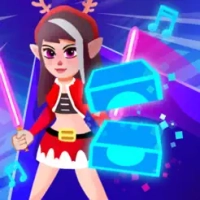
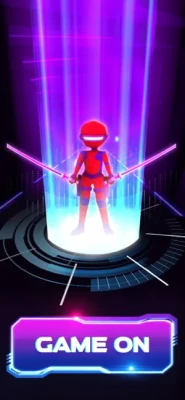
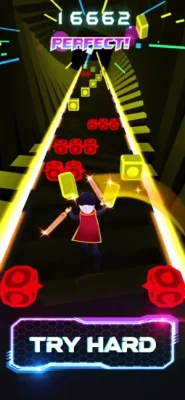
Beat Blader 3D is a music rhythm and action game where the player controls a character running through colorful 3D environments.
Your job is to:
- Follow the musical flow
- Move from side to side
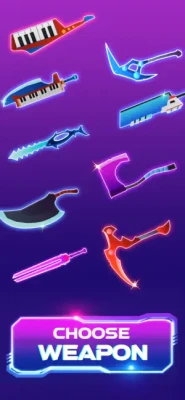
- Slash objects with your saber
- Avoid dangerous obstacles
- Maintain control through increasingly difficult sections
- Complete musical levels
- Improve your performance through practice
The game was originally released in 2020 and is published by Amanotes. Game databases classify it under action, rhythm and music.
Beat Blader 3D Gameplay
The central mechanic is easy to understand but difficult to master.
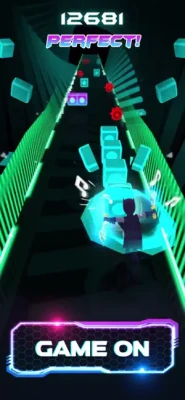
You control the character by holding and dragging. As the character moves forward, musical targets and hazards appear along the route.
Targets should be attacked with the saber, while obstacles need to be avoided.
This creates a combination of:
Music + movement + timing + reflexes
The most successful players learn to anticipate upcoming patterns instead of reacting at the last possible second.
Main Features
Neon 3D Visuals
Beat Blader 3D uses a glowing neon presentation that gives its levels a futuristic arcade atmosphere. Bright colors, illuminated objects and fast-moving environments make the gameplay visually energetic.
Rhythm-Based Action
The game connects its action to music, meaning your movements are not simply about avoiding objects. Timing and rhythm are important parts of successful play.
Saber Combat
The saber is your main offensive tool. When musical targets appear, you need to move into position and slash them rather than simply passing them.
Hundreds of Levels
The game description advertises hundreds of levels, giving players a substantial progression path rather than only a handful of short challenges.
Large Music Selection
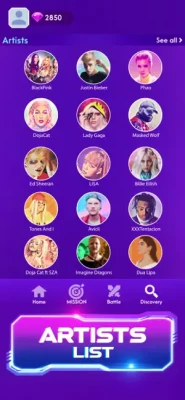
Music is at the center of the experience. The game offers a collection of songs designed to accompany its fast-moving neon stages.
Simple Controls
The basic hold-and-drag control scheme makes Beat Blader 3D easy to pick up. The real difficulty comes from using those controls accurately at higher speeds.
Full Beat Blader 3D Strategy Guide
1. Learn the Movement Before Chasing High Scores
Your first objective should not be a perfect run.
Spend the first few levels learning how far your character moves when you drag your finger across the screen.
Small movements are often enough to change your position.
Once you understand the movement range, avoiding obstacles becomes much more natural.
2. Look Ahead
One of the biggest mistakes beginners make is concentrating only on the object immediately in front of them.
Instead, look farther along the track.
Try to identify:
- The next target
- The next obstacle
- Which side of the track is safer
- Whether several objects are arriving in quick succession
Looking ahead gives you more time to position the character.
3. Don't Overcorrect
Fast swiping can cause unnecessary movement.
If you see an obstacle on one side, don't automatically drag your character all the way to the opposite side.
Move only as much as necessary.
Controlled movement is usually safer than large, sudden movements.
4. Prioritize Survival
A missed target is usually less damaging to your overall run than crashing into an obstacle.
When you have to choose between making an aggressive attack and maintaining a safe position, survival should normally come first.
A completed level gives you another opportunity to practice the difficult section later.
5. Follow the Beat
Although the game requires visual reactions, the music can help you anticipate what is coming.
Listen for repeated rhythms and changes in the track.
Once your brain starts connecting certain sounds with certain movements, your reactions become more automatic.
6. Use the Music as a Timing Tool
Instead of thinking:
"I need to move now."
Try to develop a rhythm such as:
beat → movement → slash → beat → movement
This makes complex sequences easier to understand.
The objective is to synchronize your actions with the game's musical flow.
7. Practice Difficult Sections
If you repeatedly fail at the same point, don't simply play the entire level without changing your approach.
Think about what causes the failure.
Is the character too far to one side?
Are you moving too late?
Are you concentrating on the target instead of the obstacle?
Once you identify the problem, adjust your movement on the next attempt.
8. Keep Your Finger Close to the Screen
Because movement depends on holding and dragging, maintaining comfortable control is important.
Avoid awkward hand positions.
Your finger should be able to move quickly in either direction without losing control of the character.
9. Don't Panic During Fast Sections
The game becomes more difficult when targets and obstacles arrive rapidly.
Panicking usually leads to exaggerated movements.
Instead, keep your movements short and deliberate.
Trust the rhythm you have learned.
10. Learn Patterns
Many rhythm-action challenges become easier when you recognize patterns.
For example, if you repeatedly encounter:
left → center → right
you can prepare for the sequence rather than treating each movement as a completely new problem.
Pattern recognition is one of the most valuable skills for improving at Beat Blader 3D.
Advanced Tips for Better Runs
Watch the Entire Track
Don't stare at the nearest target.
Your peripheral vision can help you notice upcoming hazards while your main focus stays on the current action.
Attack Without Losing Position
Slashing a target is only useful if you remain in a safe position afterward.
After every attack, immediately check where the next obstacle is located.
Avoid Unnecessary Movements
Every movement creates another opportunity to make a mistake.
If your current position is safe, there is no reason to move simply because you can.
Use Short Corrections
Small adjustments are easier to control than dramatic swipes.
If you are slightly too far left, make a small correction rather than crossing the entire screen.
Develop Muscle Memory
After playing the same type of sequence several times, your hands begin to respond automatically.
This is especially useful in difficult levels where there isn't enough time to consciously calculate every movement.
How to Beat Harder Levels
When levels become faster, use this three-stage approach:
Stage 1 – Learn
Play the level without worrying about perfection.
Identify the difficult sections.
Stage 2 – Stabilize
Repeat the level while concentrating on the sections where you previously failed.
Try to make your movements smaller and more predictable.
Stage 3 – Optimize
Once you can reliably finish the level, concentrate on improving your accuracy and overall performance.
This is much more effective than repeatedly restarting without analyzing mistakes.
Beginner Mistakes to Avoid
Moving Too Much
Large movements make it harder to return to the correct position.
Looking Only at the Saber
Your attack is important, but upcoming obstacles are often more important.
Ignoring the Music
The soundtrack can help you anticipate the rhythm and timing.
Trying to Play Perfectly Immediately
Learning the level should come before optimizing it.
Panicking at High Speed
Fast sections require more control, not less.
Best Practice Routine
If you want to improve quickly, try this routine:
- Choose a level that you can almost complete.
- Play it once without worrying about mistakes.
- Identify the first major failure point.
- Replay and concentrate on that section.
- Use smaller movements.
- Listen closely to the rhythm.
- Repeat until the section feels natural.
- Attempt the entire level again.
- Move to a harder level once you can consistently finish it.
Beat Blader 3D Game Information
| Feature | Details |
|---|---|
| Game | Beat Blader 3D |
| Developer | Amanotes Pte. Ltd. |
| Genre | Casual, Music, Rhythm, Action |
| Platform | iPhone, iPad, iPod touch |
| Price | Free with in-app purchases |
| Players | Single-player |
| Core mechanic | Hold and drag |
| Combat | Saber-based |
| Visual style | 3D neon |
| Levels | Hundreds |
| Music | Song-based rhythm gameplay |
| Current listed version | 2.0.10(2) |
| Current listed update | July 27, 2026 |
| iOS requirement | iOS 15.0 or later |
The currently indexed App Store data lists version 2.0.10(2), updated July 27, 2026, and compatibility with iOS 15 or later.
In-App Purchases and VIP
Beat Blader 3D is free to download but includes optional in-app purchases. The listed VIP offering provides access to premium songs and other premium benefits.
Players should check the current App Store purchase screen for the latest subscription price and terms because pricing can vary by region and may change over time.
Is Beat Blader 3D Easy to Play?
Yes, the controls are easy to understand.
The challenge isn't learning the controls; it is using them accurately when the track becomes faster and the level contains more targets and obstacles.
That makes the game approachable for beginners while still giving experienced players room to improve.
Is Beat Blader 3D Good for Rhythm Game Fans?
Beat Blader 3D is a good choice for players who want something between a traditional rhythm game and an action runner.
Rather than simply tapping notes, you are constantly moving through a 3D environment, attacking targets and avoiding hazards.
That extra movement gives the game a more active feel than many conventional music games.
Common Problems and Troubleshooting
If Beat Blader 3D crashes, freezes or fails to load properly, start with the basics:
- Restart the game.
- Check your internet connection.
- Close unnecessary background apps.
- Make sure the game is updated.
- Restart your iPhone or iPad.
- Confirm that your device meets the current iOS requirement.
- If a problem continues, reinstalling the app may help.
Third-party troubleshooting reports have historically included crashes, connection problems and screen-related issues, although that does not mean every player will experience them.
Pros and Cons
Pros
- Easy hold-and-drag controls
- Fast rhythm-based gameplay
- Attractive neon 3D presentation
- Saber combat
- Hundreds of levels
- Music-driven action
- Easy to learn
- Increasing challenge as you progress
Cons
- Some premium content requires payment
- Fast sections can be difficult for beginners
- Repeated patterns may eventually feel familiar
- Performance can depend on the device
Frequently Asked Questions
What is Beat Blader 3D?
Beat Blader 3D is a music and rhythm action game from Amanotes where players control a character through neon 3D levels, slash targets and avoid obstacles.
How do you play Beat Blader 3D?
Hold and drag your finger to control the character. Move into position to attack targets with the saber while avoiding obstacles.
Is Beat Blader 3D free?
Yes. The game is free to download and includes optional in-app purchases.
Does Beat Blader 3D have many levels?
Yes. The game advertises hundreds of levels, providing a long progression path for players who enjoy rhythm challenges.
Does Beat Blader 3D require fast reflexes?
Higher levels do. The basic controls are simple, but faster songs and obstacle patterns require increasingly precise reactions.
What is the best Beat Blader 3D strategy?
Look ahead, use small movements, prioritize avoiding obstacles, listen to the rhythm and learn repeating patterns. Don't sacrifice a safe position just to hit every target.
Can beginners play Beat Blader 3D?
Yes. The hold-and-drag control system is straightforward, making the game easy to pick up. The difficulty comes from mastering timing and movement.
What makes Beat Blader 3D different from ordinary music games?
Instead of simply tapping notes, Beat Blader 3D combines rhythm with 3D movement, saber attacks and obstacle avoidance.
Final Verdict
Beat Blader 3D is a colorful rhythm-action game that takes the familiar idea of playing along with music and adds fast movement, saber attacks and obstacle dodging.
Its strongest feature is the combination of music and active 3D gameplay. The controls are simple enough for newcomers, while harder levels demand better timing, anticipation and movement control.
If you enjoy rhythm games, music games, neon runners, reflex challenges and fast-paced mobile gameplay, Beat Blader 3D is an entertaining game to add to your playlist.
Rate the Game
User Reviews




Popular Games












 Android
 iOS
 Windows
 Xbox