


Latest Version
January 21, 2026
Coco Play By TabTale
Trivia
Android
0
com.BanditBears.ZoomOut3D
Report a Problem
More About :game
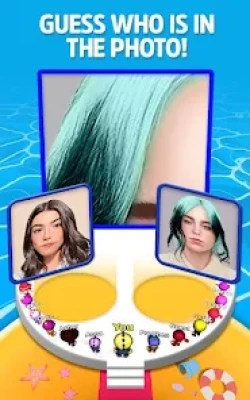
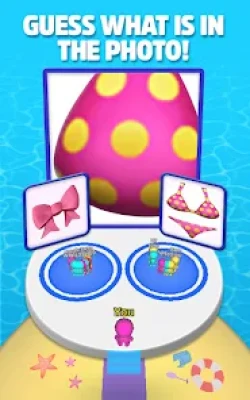
Zoom Out 3D turns a simple guessing question into a visual observation challenge. Instead of showing you a complete picture immediately, the game starts with a zoomed-in section that can be difficult to recognize.
Your task is to look carefully at the available clues and decide what the image represents. It could be a celebrity, an animal, food, furniture, clothing, or another familiar object. Once you make your choice, the game reveals more of the picture and shows whether your guess was correct.
The concept is simple, but the close-up images can be surprisingly deceptive. A small part of an ordinary object can look completely different when you cannot see the full picture.
Zoom Out 3D Gameplay Overview
Each challenge begins with a close-up image. You are presented with possible answers and must select the one you believe matches the hidden picture.
The basic gameplay loop is:
- Examine the zoomed-in image.
- Look for shapes, colors, textures, and recognizable details.
- Compare the possible answers.
- Choose your answer.
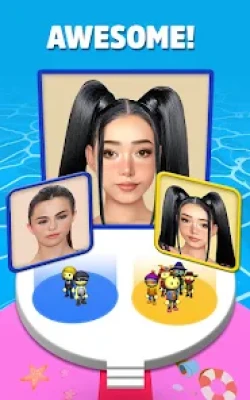
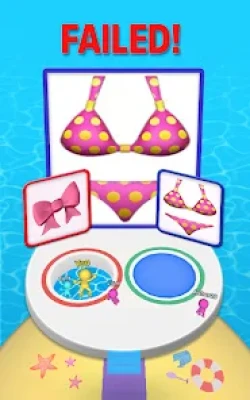
- Zoom out and reveal the complete image.
- Continue to the next picture quiz.
The game uses straightforward tap controls, making it accessible even for players who prefer simple casual games.
Picture Guessing Challenges
The main attraction is the variety of images you have to identify. Some puzzles are immediately recognizable, while others deliberately hide the most obvious clues.
You may need to determine whether the image contains:
- A celebrity
- A singer or actress
- An animal
- Food
- Furniture
- Clothing
- Everyday objects
- Logos or familiar visual elements
- Other unexpected pictures
The variety keeps the central guessing mechanic from becoming too predictable.
Celebrity Guessing Levels
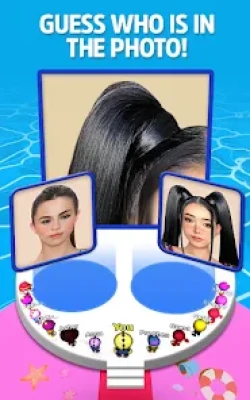
Some challenges focus on recognizing famous people from only a small portion of an image.
A celebrity's face, clothing, hairstyle, or another visual feature can become the clue you need. The challenge becomes more interesting when the initial close-up does not provide enough information for an immediate answer.
If you enjoy celebrity quizzes and visual trivia, these levels add another layer to the standard object-guessing format.
Hidden Object Quizzes
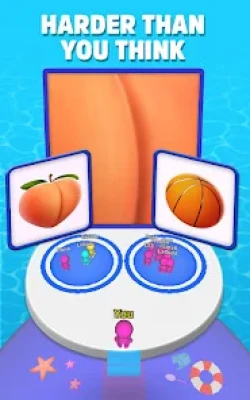
Not every challenge is about people. Zoom Out 3D also asks you to identify ordinary objects hidden behind extremely close-up images.
An image that initially looks like a random texture could turn out to be something completely familiar once the camera pulls back.
This makes the game particularly suitable for players who enjoy:
- Picture quizzes
- Visual puzzles
- Object guessing games
- Brain teasers
- Trivia challenges
- Observation games
Game Features
100+ Picture Quizzes
Zoom Out 3D offers more than 100 picture-based challenges, giving players a substantial collection of images to identify.
Guess Celebrities and Objects
The game combines celebrity recognition with everyday-object guessing, creating different types of visual challenges.
Zoom-Out Reveal Mechanic
The defining feature is the zoomed-in image. You need to make sense of a partial view before the complete picture is revealed.
Simple Controls
The controls are designed around tapping your selected answer, so there is no complicated movement system to learn.
Quick Casual Rounds
Individual challenges are easy to understand and suitable for short gaming sessions.
Observation-Based Gameplay
Success depends on paying attention to visual details rather than learning complicated controls or memorizing a large set of rules.
Play With Friends
The game's official description encourages players to compare answers and share their guesses with friends.
Game Theme and Atmosphere
Zoom Out 3D has a lighthearted casual atmosphere built around curiosity and surprise. The game wants you to look at something familiar from an unfamiliar perspective and then discover what it really is.
The humor comes naturally from the guessing process. A picture can appear obvious after it is revealed, yet be surprisingly difficult to recognize when only a tiny section is visible.
Why Zoom Out 3D Is Challenging
The difficulty does not come from complicated controls or complex rules. Instead, the challenge comes from limited visual information.
A close-up image removes context. Without seeing the entire object, you have to rely on:
- Color patterns
- Shapes
- Textures
- Edges
- Facial features
- Clothing details
- Familiar visual characteristics
- Context from the available answer choices
This makes each question a small test of visual reasoning.
How to Play Zoom Out 3D
Step 1: Study the Picture
Do not immediately select the first answer that looks familiar. Examine the visible area carefully.
Step 2: Search for Distinctive Details
Look for colors, lines, textures, facial features, or unusual shapes that could identify the image.
Step 3: Compare the Answers
Consider every available option before making your decision.
Step 4: Trust Your Observation
If one answer fits the visible clues better than the others, select it.
Step 5: Learn From Wrong Guesses
When an answer surprises you, remember what detail you missed. This can improve your performance on later puzzles.
Controls and Interface Guide
The controls are intentionally simple.
Tap: Select your answer.
Answer selection: Your character moves toward the chosen answer area.
Picture reveal: The correct selection leads to the reveal of the image.
Because the game relies primarily on tapping and visual observation, it is easy for new players to understand within a few moments.
Beginner's Guide
If you are playing Zoom Out 3D for the first time, avoid rushing through the questions.
Start by identifying the most obvious visual characteristics. If you see a particular color, pattern, or shape, think about what objects commonly contain that feature.
For celebrity questions, concentrate on recognizable facial characteristics, hairstyles, clothing, or other visible details.
Most importantly, do not assume that the first thing you see is the complete clue. The game intentionally shows only part of the image.
Advanced Tips and Strategies
Look Beyond the Center
The most useful clue is not always in the middle of the image. Examine the entire visible area.
Use Color as a Clue
Strong or unusual colors can help narrow down the possible answers.
Identify Textures
Wood, fabric, skin, metal, food, and other materials often have distinctive textures.
Compare Before Choosing
If two answers appear plausible, identify what visual evidence supports each one before selecting.
Remember Previous Patterns
As you encounter more puzzles, you may become better at recognizing the visual style of different objects and categories.
Don't Overthink Easy Questions
Observation is important, but sometimes the simplest answer really is correct.
Game Progression
Zoom Out 3D is built around progressing through a collection of picture quizzes rather than a traditional story campaign.
As you complete challenges, you encounter additional images and continue testing your ability to recognize partially hidden pictures. The game focuses on gradually expanding the number of puzzles you can solve rather than requiring a complex RPG-style progression system.
Some gameplay sources also describe rewards such as gold coins, character customization, and victory moves in versions of the game.
Characters and Customization
The player's small character is part of the presentation during answer selection. In some versions and gameplay descriptions, players can earn currency and use it for character skins or victory animations.
This gives the simple quiz mechanic a small layer of personalization beyond answering questions.
Game Modes
Picture Quiz
The primary experience revolves around identifying the hidden image from a zoomed-in view.
Celebrity Guessing
Recognize famous personalities from limited visual information.
Object Guessing
Identify everyday items and other hidden objects.
Casual Challenge
Short rounds make the game suitable for quick sessions.
The current Google Play listing categorizes the game as Trivia, Multiple-choice, and Casual, while also listing it as single-player and offline.
Difficulty
The difficulty is flexible because it depends heavily on how recognizable each image is.
Some pictures can be solved almost immediately, while others deliberately remove enough context to make the answer difficult. The challenge therefore comes from interpreting incomplete visual information rather than mastering complicated mechanics.
Graphics and Presentation
The game uses colorful 3D characters and simple environments to support its picture-quiz format.
The visual presentation is intentionally straightforward: the important element is the image you need to identify, while the surrounding 3D presentation helps turn each question into a small interactive challenge.
Sound and Feedback
Gameplay feedback helps indicate whether your choice was correct or incorrect. Earlier gameplay coverage notes that sound effects accompany answer outcomes, adding a little extra reaction to the otherwise simple quiz format.
Offline Play
The current Google Play listing identifies Zoom Out 3D as an offline game, making it suitable for casual play when you do not have a reliable internet connection.
Age Rating and Platform
Zoom Out 3D is available on Android through Google Play. The current listing shows 10M+ downloads, a 4.1-star overall listing rating, and a PEGI 7 rating with mild violence and in-game purchases indicated.
Developer: Coco Play By TabTale
Package ID: com.BanditBears.ZoomOut3D
Genre: Trivia / Casual / Multiple-choice
Players: Single player
Availability: Android
Downloads: 10M+
Content rating: PEGI 7
Ads: Yes
In-app purchases: Yes
Offline: Listed as supported on Google Play
Latest Google Play update: August 7, 2026
What's New in the Latest Update?
The August 2026 Google Play update focuses on improving the overall experience. The developer's update notes mention fixing issues and making the game smoother and more exciting.
Keeping the game updated is recommended so players can benefit from the latest bug fixes and gameplay improvements.
Zoom Out 3D Tips for Difficult Questions
When a picture is particularly confusing, use a process of elimination.
First, remove answers that clearly do not match the visible colors or shapes. Then compare the remaining possibilities. Think about what the object might look like when viewed from a different angle.
For celebrity questions, focus on the smallest recognizable feature rather than trying to identify the entire person from a tiny image.
Pros and Cons
Pros
- Easy-to-understand gameplay
- 100+ picture quizzes
- Interesting zoomed-in image mechanic
- Celebrity and object guessing
- Quick rounds
- Simple tap controls
- Good choice for casual gaming
- Offline play is listed on Google Play
- Easy to play with friends and compare guesses
Cons
- Some puzzles can feel repetitive after extended sessions
- Advertising can interrupt the experience
- Certain images may be difficult to identify without enough visual context
- Players looking for deep progression or complex gameplay may find the mechanics simple
Recent Google Play reviews show that players enjoy the basic guessing concept, while some users specifically mention the frequency of advertisements.
Who Should Play Zoom Out 3D?
Zoom Out 3D is a good fit for players who enjoy casual trivia, visual puzzles, guessing games, and short challenges.
It is especially appealing if you like games where the rules can be understood immediately but the questions themselves can still surprise you.
You may enjoy it if you are looking for:
- A casual Android guessing game
- A picture quiz game
- Celebrity guessing challenges
- Hidden object-style questions
- Visual brain teasers
- Quick games for short sessions
- Offline casual games
Similar Games
Players who enjoy Zoom Out 3D may also want to explore other casual puzzle and trivia games that focus on observation, recognition, multiple-choice answers, and quick challenges.
The closest alternatives are games that make players identify objects, recognize images, solve visual puzzles, or answer short trivia questions rather than relying on traditional action gameplay.
Zoom Out 3D vs Traditional Trivia Games
Traditional trivia games usually test what you know about facts, history, entertainment, science, or general knowledge.
Zoom Out 3D takes a different approach. Instead of asking a conventional question, it gives you a visual mystery and asks you to recognize what you are looking at.
That makes it closer to a combination of picture quiz, visual puzzle, observation game, and casual trivia.
Expert Rating
Gameplay: 8/10
Visual Concept: 8/10
Controls: 9/10
Challenge: 8/10
Replay Value: 7/10
Casual Appeal: 9/10
Overall: 8/10
Final Verdict
Zoom Out 3D takes an extremely simple idea and turns it into an entertaining visual guessing challenge. The decision to hide most of an image creates curiosity, while the multiple-choice format makes each round quick and easy to understand.
The best part of the game is the moment when a confusing close-up finally becomes recognizable. With more than 100 picture quizzes, celebrity challenges, hidden objects, simple controls, and short rounds, it works particularly well as a casual game for players who enjoy testing their observation skills.
If you enjoy picture quizzes, guessing games, visual brain teasers, or casual trivia, Zoom Out 3D is worth trying.
Frequently Asked Questions
What is Zoom Out 3D?
Zoom Out 3D is a casual picture guessing game where players identify celebrities, objects, and other images from zoomed-in pictures.
How many quizzes are in Zoom Out 3D?
The official Google Play description says the game includes more than 100 picture quizzes.
Is Zoom Out 3D an offline game?
Yes. Google Play currently lists Zoom Out 3D as an offline game.
Can you guess celebrities in Zoom Out 3D?
Yes. Celebrity recognition is one of the game's main picture-guessing challenges.
What kind of objects can you guess?
The puzzles can feature everyday objects, animals, food, clothing, and other recognizable subjects.
Is Zoom Out 3D easy to play?
Yes. The game uses simple multiple-choice and tap-based controls, making the basic gameplay easy to understand.
Is Zoom Out 3D free?
The Google Play listing provides the game as a free-to-install title with advertisements and in-game purchases.
Where can I play Zoom Out 3D?
Zoom Out 3D is available for Android through Google Play.
Does Zoom Out 3D have multiplayer?
The official description encourages players to challenge friends and compare answers, although the current Google Play listing identifies the game as single-player.
Rate the Game
User Reviews













Popular Games



















 Android
 iOS
iOS Windows
 Xbox
Xbox