




Latest Version
September 15, 2026
Etermax
Trivia
iOS
0
Report a Problem
More About :game
The game covers subjects such as history, science, pop culture, movies, and general knowledge, while offering live quizzes, self-paced challenges, interactive flashcards, timed drills, tournaments, private matches, and custom quiz creation.
It is also designed for educational and group settings, allowing quizzes to include multiple-choice, true-or-false, open-ended, and image-based questions.
What Is Trivia X Play & Create?
Trivia X Play & Create turns traditional trivia into a flexible multiplayer experience. Instead of simply answering a fixed collection of questions, players can participate in different types of quiz sessions or build their own content.
The game is designed around three major uses:
- Learning and studying
- Casual trivia with friends and family
- Creating and hosting customized quizzes
This makes Trivia X more than a standard trivia app. You can use it for a quick solo challenge, a competitive match, a study session, or a larger group event.
The App Store lists the game as a free Education app for iPhone and iPad, with English as its listed language.
Main Features
Live Quiz Battles
Live quizzes let players answer questions while competing in real time. The competitive format adds pressure because every answer can affect the leaderboard.
The best approach is to balance speed with accuracy. Answering quickly is useful, but guessing repeatedly can erase the advantage gained from fast responses.
Self-Paced Challenges
Self-paced quizzes are useful when you want to concentrate on particular subjects without the pressure of a live match.
They can also be used as a practical way to identify knowledge gaps.
Custom Quiz Creation
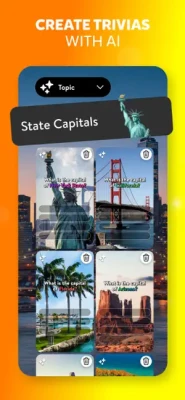
One of Trivia X's defining features is the ability to create your own quizzes.
Players can design questions around specific subjects or themes, with support for content such as photos, videos, and polls.
This can be particularly useful for:
- Family game nights
- Classroom activities
- Study groups
- Trivia competitions
- Team-building events
- Personalized knowledge tests
Different Question Types
Trivia X supports multiple question formats, including:
- Multiple choice
- True or false
- Open-ended questions
- Image-based questions
Using different formats prevents every quiz from feeling identical and can make custom trivia much more engaging.
Flashcards and Timed Drills
For players using Trivia X as a learning tool, interactive flashcards and timed drills provide ways to practice knowledge repeatedly.
Timed practice is particularly useful because it encourages faster recognition instead of relying on long periods of thinking.
Tournaments and Private Matches
The game also supports competitive formats such as tournaments and private matches.
Private matches are useful when you want to create a controlled competition with friends, classmates, or colleagues rather than competing with an unknown group.
Large Group Sessions
The game's App Store description says Trivia X can support game-night sessions with up to 500 players through screen sharing or video calls.
That gives the game a different use case from traditional one-on-one trivia apps.
Full Trivia X Play & Create Strategy Guide
1. Start With Topics You Know
If you're playing competitively, begin by identifying your strongest subjects.
For example, you might be particularly comfortable with:
- History
- Science
- Movies
- Sports
- Geography
- Pop culture
- General knowledge
When a quiz allows topic selection, choosing familiar categories gives you a better foundation than constantly selecting subjects you know little about.
2. Don't Sacrifice Accuracy for Speed
Fast answers can be valuable, especially in live quizzes, but speed should not turn into careless guessing.
A good rhythm is:
Read → identify → eliminate → answer.
If you immediately recognize the answer, respond quickly.
If you are uncertain, quickly eliminate obviously incorrect choices before selecting your final answer.
3. Use Elimination on Difficult Questions
When you don't know an answer immediately, look at the choices carefully.
Ask yourself:
- Which answers are clearly impossible?
- Which answer fits the wording of the question?
- Have I seen this fact before?
- Is the question asking for a specific date, person, place, or concept?
Even when you don't know the answer with certainty, eliminating two unlikely choices can dramatically improve your odds.
4. Build a Personal Knowledge Bank
If you regularly play Trivia X, don't treat incorrect answers as wasted attempts.
Turn them into study material.
For example, if you repeatedly miss questions about world geography, spend a few sessions focusing on:
- Countries and capitals
- Major rivers
- Famous landmarks
- Continents
- Geographic regions
The same method works for history, science, entertainment, sports, and other categories.
5. Use Self-Paced Mode for Weak Areas
Competitive matches reveal weaknesses, while self-paced challenges give you an opportunity to correct them.
A useful routine is:
Play → review mistakes → practice the weak topic → play again.
Over time, this creates a natural feedback loop that can improve your trivia knowledge.
6. Practice With Timed Questions
Knowing an answer and recognizing it quickly are different skills.
Timed drills can help develop faster recall.
Try to avoid spending too much time second-guessing answers that you already recognize. The goal is to develop confidence in your first well-reasoned response.
7. Learn From Repeated Mistakes
If the same type of question catches you repeatedly, make a mental note of it.
For example:
"I always confuse these two historical figures."
That tells you exactly what to study.
The strongest trivia players don't simply memorize random facts. They gradually identify the areas where their knowledge is weakest.
8. Creating Better Custom Quizzes
Trivia X isn't only about answering questions. Creating good quizzes is another major part of the experience.
When making a custom quiz, avoid making every question extremely difficult.
A better structure is:
- Easy opening questions
- Moderate questions in the middle
- A few challenging questions
- One or two memorable final questions
This keeps players involved instead of eliminating everyone early.
9. Write Clear Questions
A good trivia question should have one obvious interpretation.
Avoid unnecessarily complicated wording.
Instead of writing a question with several clauses, keep it short and focused.
For example:
Weak:
"Which famous historical figure, who was born during the 18th century and later became associated with..."
Better:
"Which leader became the first president of the United States?"
Simple wording makes the competition about knowledge rather than decoding the question.
10. Mix Question Formats
Custom quizzes become more interesting when different question types are combined.
A strong quiz can alternate between:
- Multiple choice
- True or false
- Images
- Open-ended questions
The App Store listing specifically identifies these formats as supported by Trivia X.
Multiplayer Strategy
Stay Calm Under Pressure
Multiplayer trivia can create a psychological advantage for players who remain patient.
If another player answers immediately, don't assume they are correct.
Concentrate on your own question rather than watching the leaderboard after every answer.
Use Private Matches for Friendly Competition
Private matches work well when everyone already knows the group.
You can create themed competitions such as:
- Movie Night Trivia
- Football Trivia
- 2000s Trivia
- Science Challenge
- World Geography
- General Knowledge
- Family Trivia
Build Team-Based Events
For larger groups, divide participants into teams and use themed rounds.
This can work especially well for classrooms, family gatherings, clubs, or workplace activities.
Study Strategy
Trivia X can also be approached as a learning tool rather than only a game.
Step 1: Choose a Subject
Pick one area such as science, history, or geography.
Step 2: Take a Practice Quiz
Don't worry about the score. Focus on discovering what you don't know.
Step 3: Record Difficult Questions
Remember the subjects or facts you repeatedly miss.
Step 4: Practice Again
Use flashcards or timed challenges to reinforce those areas.
Step 5: Test Yourself
Return to a quiz later and see whether your recall has improved.
This approach turns trivia sessions into short, repeatable learning exercises.
Tips for Winning More Trivia Matches
Tip 1: Read Every Word
Small details can change the answer completely.
Pay attention to words such as:
- First
- Last
- Largest
- Oldest
- Most
- Only
- Before
- After
Tip 2: Don't Overthink Easy Questions
If you know the answer, trust your knowledge.
Changing a correct answer simply because you become nervous can lead to unnecessary mistakes.
Tip 3: Use Context
Sometimes the wording provides a clue about the expected answer.
Look for dates, locations, professions, names, and other contextual information.
Tip 4: Improve One Category at a Time
Trying to memorize everything at once is inefficient.
Choose one weak category and gradually strengthen it.
Tip 5: Turn Mistakes Into Future Wins
Every wrong answer can become a future correct answer if you remember it.
Best Custom Quiz Ideas
If you're creating quizzes in Trivia X, these themes can work particularly well:
Movies and TV
Questions about famous characters, actors, franchises, quotes, and release years.
World Geography
Countries, capitals, landmarks, flags, continents, and major geographic features.
Science
Space, biology, physics, animals, inventions, and famous discoveries.
History
Ancient civilizations, important events, famous leaders, historical dates, and landmarks.
Sports
Teams, athletes, championships, records, rules, and famous moments.
Pop Culture
Music, entertainment, celebrities, games, television, and internet culture.
Family Trivia
Simple questions that different age groups can answer.
Trivia X Play & Create for Teachers and Study Groups
The game's quiz-building features can also be adapted to education.
Teachers or group leaders can create quizzes around a particular lesson and mix traditional questions with visual content.
Possible uses include:
- Lesson review
- Exam preparation
- Classroom competitions
- Icebreakers
- Team activities
- Subject revision
- Knowledge checks
The app also advertises progress tracking, analytics, and reports for educational and team environments.
Trivia X Play & Create Game Information
Game: Trivia X Play & Create
Developer: Etermax
Genre: Trivia / Quiz / Educational
Platforms: iPhone, iPad, and supported Apple platforms
App Store Category: Education
Price: Free
Language: English
Age Rating: 4+ on the U.S. App Store
Size: 180.8 MB
iPhone Requirement: iOS 16.1 or later
iPad Requirement: iPadOS 16.1 or later
Mac: macOS 13.0 or later with Apple M1 or later
Contains: Advertising, messaging and chat
The App Store currently lists version 1.0.1, with the version history showing improvements and bug fixes.
Frequently Asked Questions
What is Trivia X Play & Create?
Trivia X Play & Create is a customizable trivia game that combines quiz competitions, learning tools, multiplayer matches, and user-created quizzes.
Can I create my own trivia quizzes?
Yes. The game allows users to design quizzes and include content such as photos, videos, and polls.
Can I play Trivia X with friends?
Yes. Trivia X supports multiplayer experiences, private matches, challenges, and larger group sessions.
What subjects are available?
The game description highlights subjects including history, science, pop culture, and other general-knowledge topics. User-created quiz packs can expand the range considerably.
Is Trivia X useful for studying?
It can be. The game includes self-paced challenges, interactive flashcards, timed drills, and adaptive difficulty features intended for learning and practice.
Does Trivia X support different question types?
Yes. Supported formats include multiple choice, true or false, open-ended, and image-based questions.
Can Trivia X be used for classroom activities?
Yes. The developer describes live quizzes, custom quiz creation, classroom or remote sessions, and progress-tracking tools for teachers and teams.
Is Trivia X free?
The App Store lists Trivia X Play & Create as a free app. It also contains advertising.
Final Thoughts
Trivia X Play & Create stands out by combining traditional trivia with quiz creation and learning-oriented features. Instead of limiting players to a single style of competition, it offers live quizzes, self-paced challenges, flashcards, timed drills, private matches, tournaments, and customizable question sets.
For casual players, the appeal is the variety of trivia challenges. For families and friends, custom quizzes can turn the app into a group game-night tool. For students and teachers, the combination of practice questions and quiz creation provides another way to review knowledge.
The best way to approach Trivia X is to treat every question as both a competition and a learning opportunity: answer carefully, identify weak categories, practice them, and return to the next quiz better prepared.
Rate the Game
User Reviews













Popular Games



















 Android
 iOS
iOS Windows
 Xbox
Xbox