

Latest Version
September 08, 2024
Vita Studio.
Puzzle
0
com.vitastudio.senior.jigsaw
Report a Problem
More About :game
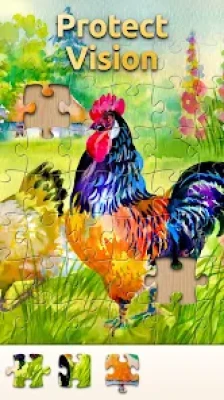
Developed by Vita Studio, the game is aimed particularly at older players while remaining accessible to anyone who enjoys casual jigsaw puzzles. Its interface uses large buttons, oversized images and easy-to-read lists, while a zoom function helps players inspect difficult areas of a puzzle.
The game offers more than 10,000 puzzle images and multiple difficulty levels, ranging from relaxing puzzles with around 36 pieces to much more demanding puzzles containing more than 400 pieces.
Vita Jigsaw for Seniors Game Information
Game: Vita Jigsaw for Seniors
Developer: Vita Studio
Genre: Puzzle / Jigsaw / Casual
Platform: Android
Also available: Windows
Game Mode: Single-player
Style: Realistic and light-hearted
Offline: Yes
Content Rating: Everyone
Downloads: 1M+
Google Play Rating: Around 4.7 stars displayed
Puzzle Collection: 10,000+ images
Difficulty: From approximately 36 pieces to 400+ pieces
Main feature: Large, easy-to-see puzzle pieces
Updated: September 6, 2026
What Is Vita Jigsaw for Seniors?
Vita Jigsaw for Seniors turns traditional jigsaw puzzles into a mobile-friendly experience with an emphasis on visibility and comfort.
Instead of requiring players to work with tiny puzzle pieces and complicated menus, the game uses large pieces, oversized images and a straightforward interface. The result is a casual puzzle experience that can be played at your own pace.
The current Google Play description says the game contains more than 10,000 high-quality images and that its collections are updated regularly.
Main Features
10,000+ Puzzle Images
The large puzzle library is one of Vita Jigsaw's biggest attractions. Players can choose from many different images and themes instead of repeatedly solving the same style of puzzle.
The game emphasizes vibrant colors, sharp details and a broad selection of relaxing and nostalgic scenes.
Extra-Large Puzzle Pieces
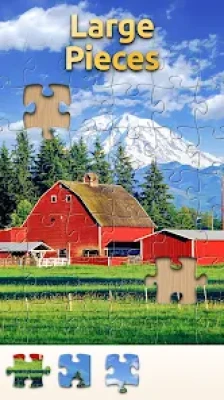
The pieces are intentionally larger than those found in many conventional mobile jigsaw games.
This makes them easier to identify, move and place, particularly when playing on a smaller phone screen.
Zoom Function
Some sections of a jigsaw can be difficult to identify because several pieces may contain similar colors or patterns.
The zoom function gives you a closer look and can make these difficult sections considerably easier to solve.
Adjustable Difficulty
Vita Jigsaw does not force every player into the same difficulty level.
You can begin with a relatively simple puzzle and gradually move toward larger challenges. The game currently advertises options ranging from about 36 pieces to more than 400 pieces.
Relaxing Gameplay
There is no need to rush through a puzzle.
Vita Jigsaw is designed around a calm, casual experience where players can concentrate on matching shapes, colors and image details.
How to Play Vita Jigsaw for Seniors
The basic objective is straightforward:
Choose a picture → Select the difficulty → Arrange the pieces → Complete the image
After selecting a puzzle, examine the available pieces and begin identifying obvious matches.
The easiest way to start is usually by finding pieces belonging to the outer edge of the picture.
Once the border has been assembled, the remaining area becomes easier to organize.
Complete Vita Jigsaw Strategy Guide
Step 1: Choose the Right Difficulty
Do not immediately select the largest available puzzle.
If you are learning the controls, begin with a smaller puzzle. Around 36 pieces provides a much more relaxed introduction than a 400+ piece challenge.
Once you become comfortable with the interface, gradually increase the number of pieces.
Step 2: Study the Reference Image
Before moving pieces around, take a moment to examine the completed picture.
Look for:
Large color areas
Strong lines
Objects with distinctive shapes
Buildings
Flowers
Animals
Sky and clouds
Water
Furniture
Other easily recognizable objects
Knowing where these elements belong can save considerable time.
Step 3: Build the Border First
One of the most reliable jigsaw strategies is to locate the edge pieces.
Edge pieces usually have one straight side, while corner pieces have two straight sides.
Start with the four corners and then connect the remaining border pieces.
A completed border gives you a clear frame for the rest of the puzzle.
Step 4: Sort Pieces by Color
After completing the outside edge, begin grouping pieces according to their dominant colors.
For example:
Blue pieces → sky or water
Green pieces → plants, grass or trees
Brown pieces → buildings, furniture or wood
Yellow pieces → flowers, lights or bright objects
This dramatically reduces the number of pieces you need to consider.
Step 5: Look for Distinctive Patterns
Color alone is not always enough.
Some puzzles contain large areas with similar shades. In these situations, look at:
Lines
Textures
Patterns
Object edges
Shadows
Repeated shapes
A tiny visual detail can tell you exactly where a piece belongs.
Step 6: Use the Zoom Function
When two pieces appear almost identical, zoom in.
This is particularly useful for detailed photographs where small differences in texture or color are difficult to see at normal size.
Do not waste time guessing when the game provides a tool that lets you inspect the area more closely.
Step 7: Work on One Section at a Time
Trying to solve the entire puzzle simultaneously can become confusing.
Instead, divide the picture mentally into sections.
For example:
Top-left → Top-right → Center → Bottom-left → Bottom-right
Finish one recognizable area before moving to another.
Step 8: Save Difficult Pieces for Later
Not every piece has to be placed immediately.
If a piece does not have an obvious location, put it aside mentally and continue working elsewhere.
As more of the picture is completed, its correct position may become much easier to identify.
Best Strategy for 36-Piece Puzzles
Small puzzles are excellent for learning the game.
A good method is:
Find the four corners.
Complete the border.
Identify the largest objects.
Match obvious colors.
Fill the remaining spaces.
Because there are fewer pieces, you can experiment without becoming overwhelmed.
Strategy for 100-Piece Puzzles
At around 100 pieces, sorting becomes more useful.
Start with the border and then divide the remaining pieces into broad groups.
For example:
Sky
Ground
Buildings
People
Animals
Plants
Water
You do not need perfect sorting. Even rough groups can reduce the number of possible matches.
Strategy for 400+ Piece Puzzles
Large puzzles require more patience.
Do not try to solve them by randomly testing pieces.
Instead:
Complete the corners.
Finish the entire border.
Divide the interior into sections.
Identify distinctive objects.
Sort pieces by color and texture.
Use zoom for difficult areas.
Work systematically through each section.
The larger the puzzle, the more valuable organization becomes.
How to Solve Difficult Color Sections
Some of the hardest areas are large regions containing almost the same color.
A blue sky, green grass field or plain wall can contain dozens of pieces that appear nearly identical.
When this happens, examine the shape of the piece rather than relying only on color.
Compare:
The tabs
The gaps
The orientation
The edges
Small variations in texture
A correct piece should fit naturally with its neighbors.
How to Solve Similar-Looking Pieces
When several pieces seem interchangeable, avoid repeatedly trying random combinations.
Instead, compare the image details.
Ask:
Does the line continue?
Does the color gradient match?
Does the texture continue naturally?
Does the object edge line up?
These clues are usually more reliable than color alone.
Relaxing Puzzle Strategy
Vita Jigsaw is designed to be enjoyed at a comfortable pace.
If you are playing for relaxation, there is no reason to make every puzzle a race.
Try choosing:
A familiar image
A moderate piece count
A comfortable difficulty
A quiet environment
The goal is to enjoy the process of gradually rebuilding the picture.
Best Beginner Tips
Start Small
Learn the controls with a smaller puzzle before moving to 400+ pieces.
Complete the Corners
Corners immediately establish the shape of the puzzle.
Build the Border
The outside frame gives you a useful reference for the interior.
Sort by Color
Grouping similar pieces makes large puzzles much easier.
Use Zoom
Do not ignore the zoom tool when details are difficult to distinguish.
Don't Force a Piece
If something does not fit naturally, move on and return to it later.
Work Systematically
A structured approach is much faster than randomly testing pieces.
Advanced Jigsaw Tips
Look at the Image as a Map
Before solving, divide the picture into recognizable regions.
Instead of thinking about hundreds of individual pieces, think:
Sky → Building → Tree → Road → Garden
Then solve one region at a time.
Follow Lines
Straight or curved lines are excellent clues.
If a piece contains part of a roof, road, fence or table edge, find the neighboring pieces that continue that line.
Use Texture
Texture can sometimes be more useful than color.
Wood grain, grass, brickwork and fabric patterns often provide clues that remain visible even when colors are similar.
Rotate Your Thinking
If a piece seems impossible to place, consider the surrounding image rather than the piece itself.
Ask what object should appear next to the area you are working on.
Common Mistakes
Randomly Trying Pieces
This becomes inefficient very quickly on large puzzles.
Ignoring the Border
Starting with random interior pieces makes the puzzle harder to organize.
Choosing Excessive Difficulty Too Early
A huge puzzle can become frustrating if you are unfamiliar with the controls.
Relying Only on Color
Shape and image details are equally important.
Spending Too Long on One Piece
If a piece is difficult, leave it and return later.
Vita Jigsaw for Seniors Pros and Cons
Pros
10,000+ puzzle images
Large puzzle pieces
Easy-to-read interface
Zoom functionality
Multiple difficulty levels
Relaxing gameplay
Single-player experience
Offline support listed on Google Play
Suitable for both seniors and general puzzle fans
Available on Android and Windows
Cons
Advertisements are present
Some images may contain visually similar areas that are difficult to solve
Large puzzles require considerable patience
The experience is intentionally simple rather than competitive
Player feedback is generally positive about the pictures, adjustable difficulty and puzzle experience, although some reviews criticize the frequency of advertisements.
Is Vita Jigsaw for Seniors Worth Playing?
Yes, especially if you enjoy traditional jigsaw puzzles and want a relaxed mobile experience.
Its strongest feature is accessibility. Large pieces, oversized images, readable menus and zoom controls make the game easier to navigate than many puzzle apps designed around small mobile interfaces.
The large collection of images also gives players plenty of variety, while adjustable difficulty means you can choose between a quick relaxing puzzle and a much longer challenge.
Who Should Play Vita Jigsaw?
Vita Jigsaw is particularly suitable for:
Senior puzzle enthusiasts
Casual gamers
Fans of traditional jigsaw puzzles
Players who prefer relaxing games
People who enjoy photography-based puzzles
Players looking for adjustable difficulty
Families who enjoy solving puzzles together
Despite its senior-focused design, the game is not limited to older players. Anyone who enjoys large, easy-to-see jigsaw pieces can use it.
Vita Jigsaw for Seniors FAQ
What is Vita Jigsaw for Seniors?
Vita Jigsaw for Seniors is a casual digital jigsaw puzzle game from Vita Studio featuring large pieces, thousands of images and multiple difficulty levels.
How many puzzles are available?
The current Google Play description advertises more than 10,000 high-quality puzzle images.
Is Vita Jigsaw suitable for seniors?
Yes. The game specifically uses large buttons, oversized images, readable lists, large puzzle pieces and zoom functionality to make the experience easier to see and control.
How difficult are the puzzles?
Difficulty ranges from relaxing puzzles with approximately 36 pieces to challenges with more than 400 pieces.
Can I play Vita Jigsaw offline?
Google Play currently lists the game as supporting offline play.
Is Vita Jigsaw free?
The game is available on Google Play with advertisements and may include in-app purchases.
Does Vita Jigsaw have multiplayer?
The current listing categorizes it as a single-player game.
Is Vita Jigsaw available on Windows?
Yes. The current Google Play listing identifies Android and Windows availability.
What is the best way to solve a difficult puzzle?
Start with the corners and border, then organize the remaining pieces by color, texture and recognizable objects. Use zoom whenever small details are difficult to distinguish.
Final Verdict
Vita Jigsaw for Seniors succeeds by keeping the traditional jigsaw experience simple and accessible.
Its combination of 10,000+ images, large puzzle pieces, adjustable difficulty, zoom functionality and relaxing themes makes it a strong choice for casual puzzle fans. The ability to move from small 36-piece puzzles to challenges exceeding 400 pieces also gives the game enough flexibility for both beginners and experienced puzzlers.
For the best results, start with a manageable difficulty, complete the corners and border first, sort pieces by color and texture, and use the zoom feature whenever an image becomes difficult to read.
The result is a calm puzzle experience where patience and organization matter more than speed.
Rate the Game
User Reviews








Popular Games
















 Android
 iOS
 Windows
 Xbox