



Latest Version
October 25, 2024
SayGames Ltd
Simulation
0
com.staff.staff
Report a Problem
More About :game
From serving customers and rescuing people to feeding pets and cleaning apartments, each activity brings a new task to complete. Smart money management and steady progress are the keys to creating a better virtual life.
What Is Staff! – Job Game?
Staff! is a life simulator that combines job-based mini-games, home renovation, daily responsibilities, and financial decisions. Instead of focusing on battles or competitive matches, the game challenges you to build a more comfortable lifestyle through work and careful spending.
You begin with a modest living space and a list of tasks that need attention. Improving your home requires money, and earning that money means taking on different jobs. As you progress, you experience new activities, unlock additional opportunities, and gradually transform your surroundings.
The central idea is simple: work to earn money, spend it on meaningful improvements, and keep moving toward your goals. However, deciding what to do first can make a noticeable difference to how efficiently you progress.
Main Features of Staff!
Life Simulation Gameplay
Staff! recreates familiar aspects of everyday life in a lighthearted way. Your character must balance work, rest, food, household repairs, and personal ambitions. Each task contributes to the overall experience of managing a virtual life.
A Variety of Jobs
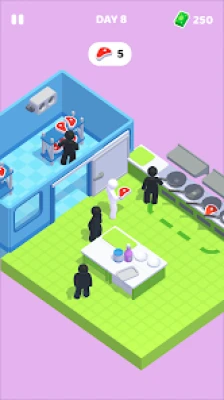
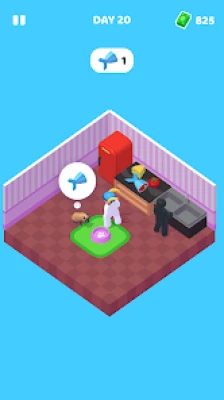
The game includes different job activities that challenge you to complete short tasks. Depending on the level, you may serve customers in a restaurant, put out fires, help rescue people, feed animals, or clean apartments.
These activities keep the gameplay varied and provide opportunities to earn money for your next upgrade.
Home Renovation and Decoration
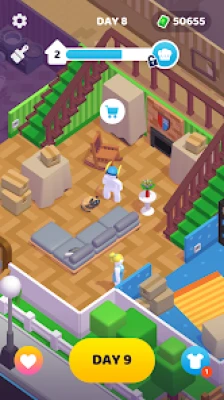
Your house is an important part of the game. You can improve its appearance and comfort by completing renovation tasks such as installing flooring, adding wallpaper, and repairing damaged fixtures.
Every improvement brings you closer to creating a more welcoming living space.
Money Management
Earning money is only one part of the challenge. You must also decide how to spend it. Renovations, household improvements, and other purchases compete for your available funds, so choosing priorities is essential.
Goal-Based Progression
Each stage introduces tasks and objectives that encourage you to keep moving forward. Completing the current goals helps unlock further activities and gives you new reasons to improve your character's lifestyle.
Casual Single-Player Experience
Staff! is designed for individual play and straightforward controls. Its short activities make it suitable for players who want to enjoy a casual simulation without learning complicated systems.
How to Play Staff!
Understanding the basic gameplay loop will help you make better decisions from the beginning.
Complete the Available Tasks
Start by checking the objectives shown in your current level. These tasks indicate what needs to be done next, whether it involves earning money, completing a job, or improving your home.
Focus on the available objectives rather than spending resources on unrelated activities.
Take Jobs to Earn Money
When you need funds for renovations or other improvements, enter the available job activities. Each job presents a small challenge that you must complete to receive your reward.
Pay attention to the instructions before starting. Understanding the goal in advance can help you avoid mistakes and finish the activity more efficiently.
Improve Your Living Space
Once you have enough money, use it to complete the required home improvements. These may include repairing fixtures, changing wallpaper, installing flooring, or adding other upgrades.
Follow the renovation objectives carefully so you can see which improvements are necessary for the next stage.
Manage Everyday Needs
The game also incorporates routine responsibilities such as eating well and sleeping. Keep track of these tasks alongside your work and renovation goals to maintain steady progress through the simulation.
Continue Through New Levels
As you complete objectives, new stages and activities become available. Each level offers additional tasks that expand your experience with different jobs and household responsibilities.
Best Money-Making Strategies
Money is one of the most important resources in Staff! because it determines how quickly you can improve your home and complete financial objectives.
Prioritize Jobs When Funds Are Low
If your available balance is too small for the next renovation, focus on earning money before making additional purchases. Returning to work with a clear spending goal helps you avoid wasting time on activities that do not support your immediate progress.
Complete Jobs Carefully
Do not rush through a mini-game simply to finish it. Read the task instructions and concentrate on meeting the objective accurately. Better familiarity with each activity can help you complete jobs more consistently.
Set a Spending Goal
Before starting another job, identify the improvement you want to purchase next. Having a target gives your work a purpose and makes it easier to decide when you have earned enough money to continue.
Avoid Unnecessary Purchases
Optional improvements may be appealing, but they can delay progress if essential repairs are still unfinished. When your funds are limited, prioritize the items and upgrades required by your current objectives.
Repeat Familiar Activities
If a particular job is easy for you to complete, use it as an opportunity to build your confidence with the game's controls and mechanics. Repeated practice can make familiar activities feel more manageable.
Exact rewards and costs may vary by activity and game version, so pay attention to the amounts displayed during your own playthrough.
Home Renovation Guide
Improving your house is one of the main reasons to earn money in Staff! A better living space represents progress and gives you a clear long-term objective.
Start With Essential Repairs
Look for damaged or unfinished areas that are part of the current task list. Fixing required problems first can help you unlock the next objectives without spending money on less important changes.
Upgrade One Area at a Time
Trying to improve everything at once can make your finances difficult to manage. Concentrate on one room or renovation objective before moving on to the next.
This approach gives you a clearer sense of progress and helps you keep track of your spending.
Choose Improvements Strategically
Wallpaper, flooring, repairs, and other upgrades all contribute to the home's appearance. However, if the game requires a specific improvement to continue, complete that task before spending on other options.
Balance Appearance and Progress
Decorating is enjoyable, but the most attractive option is not always the most practical one when money is limited. Focus on required renovations first, then work toward additional improvements as your budget allows.
Keep Your Long-Term Goal in Mind
A complete home renovation may require several rounds of work and spending. Treat each improvement as part of a larger project rather than expecting to finish everything immediately.
Job Guide: How to Handle Different Activities
Staff! offers a range of job-themed mini-games. Each activity has its own objective, so adapting your approach is more useful than using the same strategy for every job.
Restaurant Work
Restaurant activities involve serving customers and completing service-related tasks. Pay attention to what the game asks you to deliver and follow the sequence of actions carefully.
Avoid unnecessary movements, and focus on completing the required service efficiently.
Firefighting and Rescue Tasks
Some activities involve responding to emergencies and helping people. Read the instructions before acting, identify the main objective, and follow the steps presented by the game.
A deliberate approach can help you avoid overlooking an important part of the task.
Pet Care
Pet-related activities may involve feeding animals or meeting their basic needs. Follow the displayed instructions and make sure you complete each required action before finishing the activity.
Apartment Cleaning
Cleaning tasks focus on making a space tidy by carrying out the actions requested in the level. Check the room carefully and pay attention to any remaining objectives before moving on.
Learning New Jobs
When you encounter an unfamiliar activity, take a moment to understand its controls and purpose. The first attempt is a good opportunity to learn the mechanics, while later attempts may become easier as you gain experience.
Daily Routine and Character Management
Staff! is not only about working and renovating. It also encourages you to think about how everyday responsibilities fit together.
Balance Work With Personal Needs
Work helps you earn money, but routine needs such as eating and sleeping are also part of the simulation. Include these activities in your overall plan instead of focusing exclusively on income.
Follow the Task List
The game encourages you to keep track of what needs to be done. Use the current objectives as a practical checklist so you do not overlook a required action.
Make Consistent Progress
You do not need to complete every possible improvement in one session. Concentrate on the next meaningful goal and continue from there.
A steady approach can make the game's multiple responsibilities easier to manage.
Advanced Tips for Faster Progress
Use a Work-Then-Upgrade Routine
One effective approach is to identify the next required improvement, earn enough money to cover it, and then complete the renovation. Repeat this process as new objectives appear.
This creates a clear cycle and reduces the temptation to spend money without a plan.
Learn the Controls of Each Mini-Game
Different jobs may require different actions. Becoming familiar with the controls can reduce mistakes and make repeated activities more comfortable.
Watch Your Available Balance
Before committing to a purchase, check how much money remains. Keeping a small reserve can help you respond to the next required expense without having to stop and earn more immediately.
Review Objectives After Each Major Task
Completing a renovation or job may reveal a new goal. Check the updated task list before deciding what to do next, since your priorities may have changed.
Be Patient With Expensive Upgrades
Some home improvements may take multiple jobs to afford. Instead of becoming frustrated by slow progress, break the expense into smaller targets and work toward each one.
Learn From Repeated Activities
If a task seems repetitive, use each attempt to improve your familiarity with it. Knowing what to expect can help you complete the activity with fewer errors.
Common Mistakes to Avoid
Spending Money Before Checking Your Goals
Buying an unnecessary improvement can leave you short of the money required for a mandatory repair. Check your current objectives before making a purchase.
Ignoring the Job Instructions
Every mini-game has a specific purpose. Starting without understanding the task may lead to mistakes or incomplete objectives.
Trying to Renovate Everything at Once
A complete home makeover takes planning. Focus on required improvements first and expand your renovation plans as your funds increase.
Forgetting Everyday Responsibilities
Because the game includes routine needs as well as work, ignoring one side of the simulation can disrupt your progress. Check the task list regularly and balance your activities.
Expecting Immediate Financial Progress
Some improvements may require repeated work. Set realistic goals and focus on completing one task at a time instead of expecting large upgrades after every job.
Spending Without a Clear Plan
Even when you have some money available, it is useful to know what you want to achieve next. A clear priority makes financial decisions easier.
Is Staff! a Good Game for Casual Players?
Staff! is a good fit for players who enjoy life simulation, job mini-games, home design, and simple management challenges. It combines familiar daily activities with a progression system built around earning money and improving your surroundings.
The game may appeal to players who enjoy working toward visible goals, completing short tasks, and gradually transforming a basic living space. It also offers variety through different job activities rather than relying on a single type of gameplay.
However, players who prefer fast action or deep financial simulations may find the repeated job and renovation cycle more relaxed than challenging. The experience is best suited to people who enjoy casual progression and everyday-life themes.
Is Staff! Free to Play?
Staff! – Job Game | Simulator is available as a free download on Google Play. The listing includes advertisements and in-app purchases.
The game focuses on single-player simulation, and the Google Play listing also identifies offline play as a supported feature. Availability and individual features can depend on the current version and device.
Frequently Asked Questions
What is Staff! – Job Game?
Staff! is a casual life simulator in which you complete different jobs, earn money, manage everyday needs, and renovate your house.
Who developed Staff!?
Staff! – Job Game | Simulator was developed and published by SayGames Ltd.
How do you earn money in Staff!?
You earn money by completing job activities and following the objectives presented in the game. Use your earnings to pay for required repairs and home improvements.
What jobs can you do in Staff!?
The game features different activities, including restaurant service, firefighting and rescue tasks, pet care, and apartment cleaning.
How do you renovate your house?
Complete the relevant objectives and spend your available money on repairs and improvements such as wallpaper and flooring. Follow the current task list to determine which upgrades are needed.
What is the best way to save money?
Prioritize essential repairs, avoid unnecessary purchases, and work toward a specific upgrade goal. This helps prevent optional spending from delaying important objectives.
Does Staff! have different levels?
Yes. The game uses a level-based structure, with new tasks and opportunities introduced as you progress.
Can I play Staff! offline?
The Google Play listing identifies offline play as a supported feature. Some functions may depend on the current version or require connectivity, so check the game's behavior on your device.
Is Staff! suitable for children?
Google Play lists the game with an Everyone 10+ content rating. Parents and guardians should review the current store rating and in-game purchase options to decide whether it is suitable for a particular child.
Is Staff! only about working?
No. Work is an important part of the game, but you also manage daily routines, handle household responsibilities, and improve your living space.
Final Thoughts
Staff! – Job Game | Simulator offers a lighthearted take on everyday life, combining work, money management, home renovation, and routine responsibilities in one casual experience.
The best way to progress is to understand each job, follow your current objectives, and spend your earnings on the improvements that matter most. By balancing work with household tasks and avoiding unnecessary purchases, you can steadily transform your virtual home and discover more of what the game offers.
Whether you enjoy job mini-games, home design, or life simulation, Staff! provides a relaxed way to work toward goals and build a more comfortable virtual lifestyle.
Rate the Game
User Reviews















Popular Games



















 Android
 iOS
 Windows
 Xbox