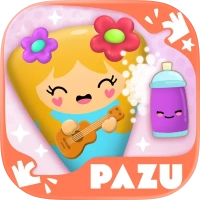
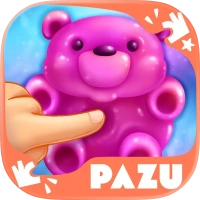




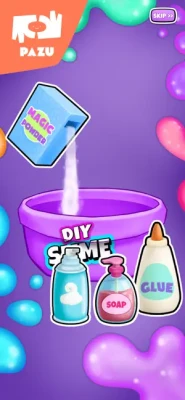

Slime Maker Games for Kids is a relaxing DIY slime simulator where children can create colorful slimes, customize textures, add glitter, and enjoy satisfying squishy interactions in a safe kid-friendly environment.
Slime Maker Games for Kids is a creative DIY simulator designed for children who love slime-making, colorful crafting, and relaxing sensory gameplay. Players can mix ingredients, create unique slime textures, customize vibrant colors, and decorate their slimes using glitter, sparkles, and fun effects.
The game transforms the popular real-world slime trend into a safe and mess-free digital experience. Kids can experiment with fluffy slime, glossy slime, crunchy slime, unicorn slime, and other creative styles while enjoying satisfying squishing, stretching, poking, and pulling interactions. The game encourages imagination and creativity through simple controls and colorful visuals.
Game Theme & Atmosphere
The game features a cheerful and relaxing atmosphere with bright pastel colors, sparkly slime effects, cute animations, and calming sound effects. Every interaction is designed to feel satisfying and stress-free for younger players.
Game Story
Players enter a magical slime laboratory where they become creative slime makers capable of designing colorful gooey creations. From fluffy unicorn slime to crunchy glitter slime, every recipe becomes part of your personal slime collection.
Gameplay Overview
Players can:
Mix slime ingredients
Create multiple slime textures
Add glitter and decorations
Customize slime colors
Stretch and squish slimes interactively
Unlock themed slime designs
Experiment with creative combinations
The gameplay focuses on creativity and sensory fun rather than competition.
Features
DIY slime-making simulator
Multiple slime styles and textures
Relaxing ASMR-inspired interactions
Glitter and decoration customization
Child-friendly touch controls
Bright colorful cartoon visuals
Safe and mess-free gameplay
Creative experimentation mechanics
Unlockable slime themes and effects
Family-friendly design
Controls & Interface Guide
The controls are extremely easy for children:
Tap ingredients to select them
Drag and mix slime materials
Swipe to stretch and squish slime
Tap decorations and glitter effects
Use large colorful buttons for navigation
The interface requires minimal reading and is ideal for younger audiences.
Game Progression System
Players progress by:
Unlocking new slime textures
Gaining additional decorations
Discovering advanced slime recipes
Unlocking colorful glitter packs
Expanding slime customization collections
The more slimes players create, the more creative tools become available.
Characters
Main Slime Creations
Fluffy slime
Crunchy slime
Unicorn slime
Glossy slime
Squishy slime
Glitter slime
Creative Helpers
Friendly tutorial guides
Interactive crafting prompts
Weapons / Items
This game focuses on creativity instead of combat. Important items include:
Slime ingredients
Glitter packs
Coloring tools
Mixing bowls
Sparkly decorations
Texture modifiers
Stretching and squishing tools
How to Play
Choose a slime type
Add ingredients into the mixing bowl
Customize slime colors and textures
Add glitter and decorations
Stretch and squish the slime
Unlock additional slime themes
Create a complete slime collection
Accessibility
The game includes several accessibility-friendly features:
Simple touch controls
Relaxed gameplay pace
Bright visual indicators
Minimal reading requirements
Child-safe design
Easy navigation system
How to Win: Strategy
There is no strict competitive objective. Success comes from creativity and experimentation. Players should:
Try multiple slime combinations
Unlock decorations early
Experiment with texture effects
Mix bright colors creatively
Explore every slime style available
Tips & Tricks
Combine glitter with fluffy slime for stylish effects
Experiment with crunchy textures for satisfying interactions
Unlock new colors regularly
Try unusual slime combinations creatively
Save favorite slime styles for inspiration
Beginner’s Guide
New players should begin by:
Learning how ingredient mixing works
Trying simple slime recipes
Experimenting with beginner glitter packs
Practicing stretching and squishing interactions
The gameplay is intentionally simple and forgiving for younger audiences.
Advanced Pro Strategy
Experienced players can improve creativity by:
Combining layered slime textures
Creating themed slime collections
Unlocking rare glitter combinations
Designing colorful seasonal slimes
Experimenting with advanced decorative effects
Trophy & Achievement Guide
Possible achievements include:
Unlocking every slime type
Creating all texture combinations
Collecting decoration packs
Designing themed slime collections
Unlocking premium glitter effects
Game Difficulty
The game has a very easy difficulty level and is designed specifically for children ages 4–10. The focus is relaxation, creativity, and sensory fun rather than difficult gameplay mechanics.
Players Experience
Players often praise the satisfying slime interactions, colorful visuals, and relaxing gameplay mechanics. Parents appreciate the mess-free alternative to real slime crafting, while children enjoy experimenting with different textures and decorations. Some users mention that time limits and subscriptions can occasionally restrict gameplay sessions.
“The slime madness is here.”
Pros & Cons
Pros
Relaxing and satisfying gameplay
Huge slime customization system
Bright colorful visuals
Child-friendly controls
Mess-free DIY slime experience
Encourages creativity and imagination
Safe family-friendly design
Cons
Some content locked behind subscription
Gameplay sessions may include time limits
Limited challenge for older players
Additional slime packs may require purchases
Tech Details
Detail
Information
Game Name
Slime Maker Games for Kids
Developer
Pazu Games Ltd
Genre
Kids DIY Simulation
Platform
iOS
Age Rating
4+
Size
Around 164 MB
Languages
English
Monetization
Free with in-app purchases
System Requirements
iOS Requirements
Requires iOS 12.0 or later
Compatible with iPhone and iPad
Apple Silicon Mac supported
Game Modes Overview
DIY Slime Mode
Create custom slime recipes using ingredients and textures.
Decoration Mode
Add glitter, sparkles, and colorful effects.
ASMR Interaction Mode
Stretch, squish, poke, and pull slime interactively.
Creative Free Play
Experiment with unlimited slime combinations.
Updates & What's New
Recent updates introduced:
Graphical improvements
Interface enhancements
Bug fixes and smoother gameplay
Additional slime themes
Improved performance optimization
Expanded Pazu subscription features
Comparison Section
Feature
Slime Maker Games for Kids
Super Slime Maker Simulator
Slime Maker DIY Game for Kids
DIY Creativity
Excellent
Excellent
Good
Child Safety
High
High
High
Slime Variety
Extensive
Extensive
Moderate
Graphics
Bright cartoon visuals
Fun colorful style
Cute pastel style
Relaxation Gameplay
Excellent
Excellent
Good
Difficulty
Very Easy
Easy
Easy
User Ratings & Social Proof
The game holds strong App Store ratings and positive feedback from families who enjoy relaxing slime-making gameplay and colorful customization systems. Many parents appreciate the safe child-friendly environment and mess-free slime simulation.
Expert Rating
Category
Score
Graphics
8.9/10
Creativity
9.3/10
Kid-Friendly Design
9.5/10
Gameplay Variety
8.4/10
Replay Value
8.5/10
Overall Expert Score: 9.0/10
Why This Game Stands Out
Slime Maker Games for Kids stands out because it combines relaxing ASMR-inspired slime interactions with creative DIY customization in a safe child-friendly environment. The huge variety of slime textures and colorful decorations makes every slime creation feel unique.
Is It Worth Playing? Honest Verdict
Yes. For children who enjoy slime toys, sensory games, and creative DIY experiences, Slime Maker Games for Kids delivers an entertaining and relaxing gameplay experience. Its satisfying slime mechanics, colorful customization systems, and easy controls make it one of the better slime simulators available for younger audiences.
Competitor Games
Super Slime Maker Simulator
Slime Maker DIY Game for Kids
Slime Games ASMR Simulator
DIY Squishy Simulator
Slime Rancher-inspired casual slime games
Similar Games
DIY arts and crafts simulators
Relaxing ASMR games
Kids creativity games
Squishy toy simulators
Sensory anti-stress games
Final Summary / Conclusion
Slime Maker Games for Kids on App Store delivers a fun and relaxing DIY slime experience packed with colorful creativity, satisfying squishy interactions, and child-friendly gameplay. Its safe environment, easy controls, and huge variety of slime styles make it an excellent choice for younger audiences who love sensory play and imaginative crafting games. Whether players enjoy fluffy slime, crunchy textures, or glitter-filled creations, the game provides hours of creative entertainment.
FAQ
Is Slime Maker Games for Kids free?
Yes, the game is free to download with optional in-app purchases and subscriptions.
Is the game safe for children?
Yes, the game is designed specifically for younger audiences with child-friendly gameplay systems and parental controls.
Can the game be played offline?
Most gameplay features can be enjoyed offline after installation.
What age group is recommended?
The game is mainly designed for children ages 4–10.
Does the game contain real slime crafting?
No. The game simulates slime-making digitally, allowing kids to enjoy creative slime fun without mess or cleanup.
Comments will not be approved to be posted if they are SPAM, abusive, off-topic, use profanity, contain a personal attack, or promote hate of any kind.