
Latest Version
September 08, 2026
Wildlife Studios
Family
iOS
0
Report a Problem
More About :game
What Is Color by Number: Coloring Games?
Color by Number: Coloring Games is a casual coloring experience from Wildlife Studios that focuses on creativity, relaxation and accessible pixel-art painting.
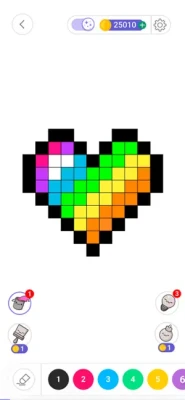
Instead of requiring traditional drawing skills, the game gives each section of an image a number. Players select the corresponding color and fill the correct areas. As more numbered sections are completed, the image gradually transforms from a blank pixel pattern into a finished piece of artwork.
The current App Store listing describes it as a pixel art coloring book game and highlights a broad collection of images, personalized coloring, community sharing and multiple painting tools.
Gameplay Overview
The core gameplay is deliberately simple:
- Choose a coloring picture.
- Examine the numbered sections.
- Select the matching color.
- Tap or fill the appropriate areas.
- Use available tools when necessary.
- Complete the remaining sections.
- Enjoy the finished artwork.
- Share your creation with the community if desired.
There is no combat, complicated storyline or demanding control system. The appeal comes from the satisfying process of gradually completing an image.
That simplicity makes the game suitable for short sessions when you want something creative without a steep learning curve.
Pixel Art Coloring Experience
The defining feature of the app is its pixel-art presentation.
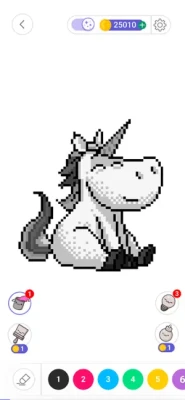
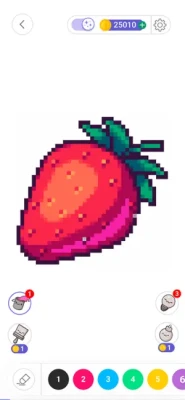
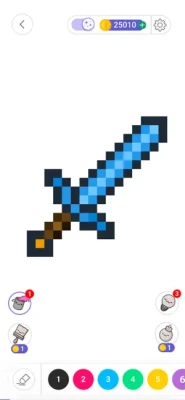
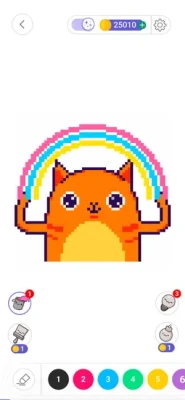
Images are divided into small sections, creating a mosaic-like appearance. At first, the picture can look incomplete or difficult to recognize. As the correct colors are added, details become increasingly visible.
This creates a satisfying visual progression:
Blank Image → Colored Sections → Emerging Picture → Finished Artwork
The format is particularly appealing to people who enjoy detailed coloring but don't necessarily want to draw everything from scratch.
Main Features
Large Collection of Coloring Pictures
The app provides a wide selection of pixel-art images covering different themes and styles. The App Store describes its collection as including artwork from various cultures and artists worldwide.
Color by Number Gameplay
Every picture is divided into numbered areas. Match the number with the correct color and gradually complete the image.
Create Your Own Color-by-Number Pictures
One of the most interesting features is the ability to import a picture from your gallery or take a photo and transform it into a color-by-number artwork.
This means the experience isn't limited to the images supplied by the developers.
Community Sharing
Finished artwork can be shared with the game's community, allowing players to discover creations made by other coloring enthusiasts.
Multiple Coloring Tools
The app includes different painting tools intended to make detailed coloring faster and more convenient.
Relaxing Gameplay
The slow, repetitive nature of filling numbered sections makes the game particularly suited to players looking for a calm activity.
Diverse Artwork
The collection includes artwork representing different cultures and artists, giving the gallery more variety than a simple collection of generic coloring pages.
How to Play
Step 1: Select an Image
Start by choosing an artwork from the available collection.
Consider the amount of detail before beginning. A simple image can be completed quickly, while highly detailed pixel art can provide a much longer coloring session.
Step 2: Find the Number
Look at the image and identify an area containing a particular number.
Step 3: Select the Color
Choose the corresponding color from the palette.
Step 4: Fill the Picture
Tap the matching numbered sections.
Some tools can help you handle larger areas or difficult-to-reach pixels more efficiently.
Step 5: Complete the Remaining Details
Zooming in can make small sections easier to identify.
Step 6: Finish the Artwork
Once all the numbered areas have been filled, your pixel-art image is complete.
Step 7: Share Your Creation
If you want to participate in the community, you can share your finished artwork and discover other players' creations.
Controls and Interface
Color by Number is built around simple touch controls.
The primary interactions include:
- Tapping numbered pixels
- Selecting colors
- Zooming into detailed areas
- Moving around the artwork
- Switching between coloring tools
- Using hints or assistance tools where available
- Opening new pictures
- Sharing completed artwork
The simple control scheme is one of the game's strongest qualities because players can concentrate on the artwork rather than learning complicated controls.
Coloring Tools
The app provides different tools intended to make the coloring process more efficient.
Useful tools can be especially valuable when working on highly detailed pictures containing many tiny numbered sections.
A good approach is to use ordinary coloring for easy areas and reserve assistance tools for places that are difficult to locate or fill.
Custom Photo Coloring
One of the most distinctive features is the ability to turn personal photos into color-by-number artwork.
Players can import an image from their gallery or capture a new photo and use it as the basis for a personalized coloring experience.
This opens up many creative possibilities.
For example, you could transform:
- A favorite pet photo
- A landscape
- A family-friendly picture
- A travel photograph
- A favorite object
- A memorable moment
into a pixel-style coloring project.
Community and Social Features
Color by Number isn't limited to private coloring sessions.
The app includes a community where users can share their creations and discover artwork created by other players.
This adds a social dimension to what would otherwise be a completely individual activity.
Players can therefore approach the app in two ways:
Private creativity:
Color pictures simply for relaxation.
Community creativity:
Create, publish and discover artwork from other users.
The App Store currently identifies user-generated content as part of the app's content classification.
Daily Coloring Routine
Coloring works particularly well as a short daily activity.
Instead of trying to complete a huge image in one sitting, consider creating a simple routine:
5–10 minutes: Quick coloring session
10–20 minutes: Medium artwork
20+ minutes: Detailed pixel-art project
The goal isn't speed. The enjoyable part is the gradual transformation of the image.
Beginner's Guide
Start With Simple Pictures
If you're new to color-by-number games, choose artwork with larger areas and fewer details.
Don't Rush
The game is designed around a relaxed experience. There is little reason to race through an image.
Zoom In
Small pixel sections can be easier to identify when the artwork is enlarged.
Complete One Color at a Time
Choosing one color and locating its numbered areas can make the process more organized.
Use Tools Strategically
Save useful tools for difficult areas rather than using them immediately.
Experiment With Custom Photos
Once you understand the basic system, creating a color-by-number picture from your own photo adds another layer of creativity.
Advanced Coloring Tips
Work From Large Areas to Small Details
Large sections are usually easier to complete first. Once the major areas are finished, the remaining tiny pixels become easier to identify.
Keep the Palette Organized
When several similar colors appear together, pay close attention to the numbers rather than relying only on visual similarity.
Zoom Before You Guess
A small pixel can be easy to miss. Zooming can prevent accidental mistakes and reduce unnecessary searching.
Save Difficult Areas for Later
If one section is difficult to find, move to another part of the image and return to it later.
Choose Images Based on Your Mood
A highly detailed picture can provide a longer creative session, while a simpler image works better when you want something quick.
Relaxation and Creative Experience
The main appeal of Color by Number is not traditional gaming competition.
There are no enemies to defeat and no complicated objectives to master. Instead, the reward comes from watching an unfinished image gradually become complete.
The App Store specifically positions the app around relaxation, creativity and stress relief.
That makes it suitable for players who enjoy:
- Calm activities
- Creative hobbies
- Pixel art
- Digital coloring
- Casual games
- Art-inspired apps
- Short relaxing sessions
Difficulty
Difficulty Rating: 3.5/10
The basic mechanics are extremely easy to understand.
The challenge mainly comes from the complexity of individual images rather than difficult gameplay mechanics.
A simple picture can be completed quickly, while an artwork containing hundreds or thousands of small sections can require much more patience.
Difficulty Factors
| Factor | Difficulty |
|---|---|
| Learning Controls | 1/10 |
| Basic Coloring | 2/10 |
| Finding Small Pixels | 4/10 |
| Detailed Artwork | 6/10 |
| Custom Photo Coloring | 5/10 |
| Overall | 3.5/10 |
Progression and Replay Value
Color by Number does not use progression in the same way as an RPG or traditional arcade game.
Instead, replay value comes from the sheer variety of artwork and the desire to complete new pictures.
The app also continues receiving new images and updates. The current App Store version history shows frequent releases containing new images, bug fixes and improvements.
This live content approach gives regular players a reason to return even after completing many existing pictures.
Events and Special Content
The App Store currently displays a Labor Day Creative Pause special event, encouraging users to create cozy, colorful artwork during the holiday period.
Seasonal and themed content can add variety to the normal picture library and give players another reason to return to the app.
User Experience
Color by Number has a very large user base and strong overall App Store reception.
The current US App Store listing shows approximately 1.8 million ratings with a 4.7/5 average, indicating a highly positive overall response.
User feedback highlights the relaxing nature of the game, the ability to color personal photos and the community features. Some reviewers also mention occasional technical issues, advertising-related frustrations and premium restrictions on certain artwork.
This gives a more balanced picture of the experience: the core coloring concept is widely appreciated, while monetization and occasional app behavior can affect individual users differently.
Pros and Cons
Pros
- Very easy to learn
- Relaxing gameplay
- Large variety of pixel-art images
- Custom photo-to-coloring feature
- Community artwork sharing
- Multiple coloring tools
- Suitable for beginners
- Strong replay value
- Frequent new images
- Supports iPhone and iPad
- Large and highly rated user base
Cons
- Advertising is present
- Some artwork or features may require payment
- Premium content can limit access to certain images
- Highly detailed pictures can become time-consuming
- Some user reviews mention occasional technical issues
- Full access can involve subscriptions or in-app purchases
The App Store currently lists advertising, user-generated content and multiple in-app purchase options, including Color Unlimited subscriptions and item/coin purchases.
Monetization and In-App Purchases
Color by Number is free to download but uses optional in-app purchases.
The current App Store listing includes several purchase options, including Color by Number, monthly and yearly Color Unlimited subscriptions, coins and item packs.
A subscription is positioned as a way to gain broader access to the app's content.
Players who prefer not to spend money can still evaluate the free content before deciding whether additional purchases are worthwhile.
Technical Details
| Detail | Information |
|---|---|
| Game/App | Color by Number: Coloring Games |
| Developer | Wildlife Studios |
| Seller | Wildlife Studios, Inc |
| Category | Entertainment |
| Genre | Coloring / Pixel Art / Casual |
| Platforms | iPhone, iPad, iPod touch, Apple Vision |
| Price | Free with In-App Purchases |
| Age Rating | 4+ |
| App Size | 243.2 MB |
| Required iOS | iOS 14.0 or later |
| Required iPadOS | iPadOS 14.0 or later |
| Languages | English + 14 more |
| Multiplayer | No traditional multiplayer |
| Community | User-generated content and artwork sharing |
These specifications are based on the current US App Store listing.
Supported Languages
The current listing supports English plus 14 additional languages:
- English
- Arabic
- French
- German
- Hindi
- Indonesian
- Italian
- Japanese
- Korean
- Portuguese
- Russian
- Simplified Chinese
- Spanish
- Traditional Chinese
- Turkish
Accessibility
Apple's current listing states that the developer has not indicated specific accessibility features for the app.
The basic coloring interface itself is relatively straightforward, but users who require specific accessibility technologies should check the latest device compatibility and app behavior before relying on it.
Updates and What's New
The app is actively maintained.
The current App Store version is 13.12.2, with the latest update listed as including bug fixes and new images. The version history also shows a long sequence of recent releases, with many updates adding new artwork, improvements and fixes.
Recent Update Pattern
- New coloring images
- Bug fixes
- Performance improvements
- General optimizations
- Ongoing content updates
The frequency of updates suggests that the artwork library and application experience continue to evolve.
Color by Number vs Traditional Coloring Books
Digital color-by-number games provide several advantages compared with physical coloring books.
| Color by Number | Traditional Coloring Book |
|---|---|
| Digital artwork | Printed pages |
| No physical supplies required | Requires pencils, markers or crayons |
| Automatic color matching | Manual color selection |
| Custom photo conversion | Usually fixed artwork |
| Community sharing | Physical sharing |
| Multiple tools | Physical coloring tools |
| Easy to start anywhere | Requires physical materials |
The digital format is particularly convenient for people who want a coloring activity without carrying a physical coloring book and a collection of art supplies.
Color by Number vs Other Pixel Art Games
Color by Number focuses more heavily on relaxation and accessible creativity than competitive gameplay.
It combines:
- Pixel art
- Number matching
- Digital coloring
- Personalized artwork
- Community content
- Relaxation
That combination makes it particularly appealing to casual players who want something creative rather than competitive.
Who Should Play Color by Number?
This app is a good choice for:
- Fans of coloring games
- Pixel-art enthusiasts
- Casual mobile gamers
- People looking for relaxing games
- Creative hobbyists
- Children and families
- Adults who enjoy digital coloring
- Players who like personalized artwork
- Anyone interested in turning photos into pixel art
It may be less suitable for players looking for action, strategy, competitive multiplayer or traditional puzzle challenges.
Expert Rating
Overall Rating: 9.0/10
| Category | Rating |
|---|---|
| Relaxation | 9.5/10 |
| Creativity | 9.5/10 |
| Ease of Use | 9.5/10 |
| Artwork Variety | 9/10 |
| Replay Value | 9/10 |
| Customization | 9/10 |
| Community | 8.5/10 |
| Controls | 9/10 |
| Updates | 9/10 |
| Overall | 9.0/10 |
Final Verdict
Color by Number: Coloring Games succeeds because it understands exactly what makes digital coloring enjoyable: simple controls, attractive artwork and the satisfaction of watching an incomplete picture gradually become something finished.
Its biggest advantage is variety. You aren't limited to predefined coloring pages because the app also lets users transform personal photos into color-by-number creations. Community sharing adds another reason to keep creating, while new images and frequent updates help keep the library fresh.
The monetization system and advertising are worth considering, particularly for users who want completely unrestricted access. Still, the underlying coloring experience is polished, accessible and highly replayable.
For anyone searching for a relaxing pixel-art coloring game on iPhone or iPad, Color by Number: Coloring Games is an excellent choice.
Frequently Asked Questions
What is Color by Number: Coloring Games?
It is a casual pixel-art coloring app where players complete numbered sections using matching colors. It also supports custom photo coloring and community sharing.
Is Color by Number free?
Yes. The app is free to download, but it includes advertising and optional in-app purchases and subscriptions.
Can I color my own photos?
Yes. You can import pictures from your gallery or take a photo and turn it into a personalized color-by-number artwork.
Is Color by Number suitable for children?
The current App Store age rating is 4+. However, parents should review the app's advertising, user-generated content and purchase options before allowing younger children to use it independently.
Can I share my finished artwork?
Yes. The app includes a community feature where users can share their color-by-number creations and discover artwork from other users.
Does the game have pixel-art pictures?
Yes. Pixel art is one of the central elements of the app, and the App Store specifically describes it as a pixel-art coloring book game.
Is Color by Number relaxing?
The app is specifically designed around relaxation and creative coloring, and its App Store description promotes it as a calming activity.
Does Color by Number have new pictures?
Yes. Recent version updates repeatedly mention new images alongside bug fixes and improvements.
Does Color by Number work on iPad?
Yes. The current listing supports iPad as well as iPhone.
What iOS version is required?
The current listing requires iOS 14.0 or later on iPhone and iPadOS 14.0 or later on iPad.
Does Color by Number have subscriptions?
Yes. The App Store currently lists monthly and yearly Color Unlimited subscription options, in addition to other in-app purchases.
Color by Number: Coloring Games combines numbered pixel-art coloring with creative tools, personalized photo conversion and community sharing. Its simple controls make it easy for beginners, while detailed artwork and a constantly refreshed image library provide plenty of replay value.
Rate the Game
User Reviews






Popular Games



















 Android
 iOS
iOS Windows
 Xbox
Xbox