
Latest Version
November 01, 2024
Fun Drive Games
Simulation
0
com.fundrivegames.supermarket.management.simulator
Report a Problem
More About :game
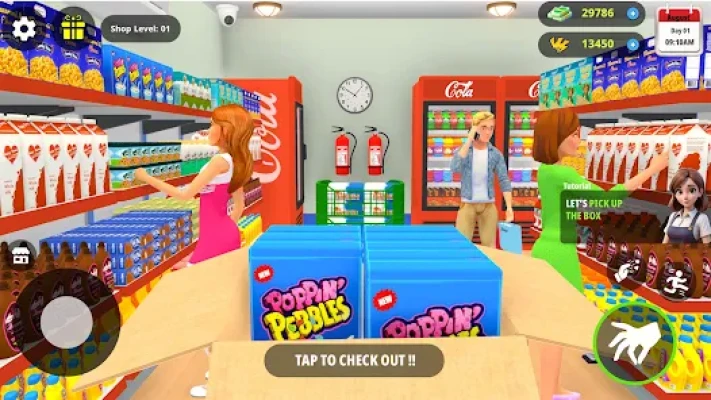
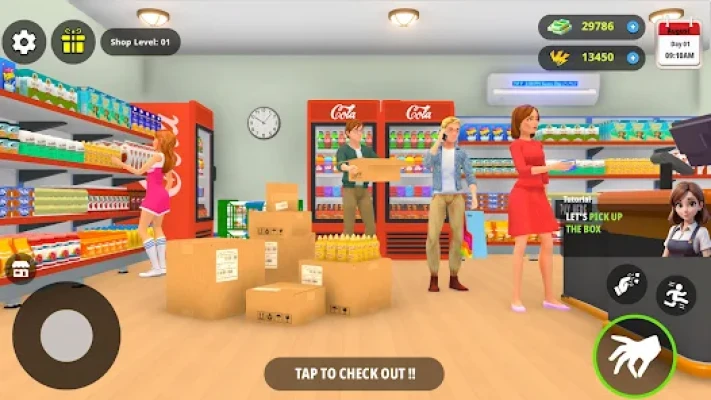
My Superstore Simulator 3D puts you in charge of your own grocery business. Instead of simply shopping in a supermarket, you take responsibility for running one. You need to make sure the shelves contain the products customers want, the checkout process runs smoothly, and your store has the capacity to handle growing demand.
The game combines supermarket management, inventory control, employee management, and business expansion. You begin with a smaller operation and work toward creating a larger, more successful store.
Every part of the business contributes to the overall experience. Empty shelves can limit sales, an overloaded checkout can slow down customers, and poor planning can make it harder to keep up with demand. Learning how to balance these responsibilities is the key to becoming a more effective supermarket manager.
Whether you enjoy casual tycoon games, business simulations, or grocery store management games, My Superstore Simulator 3D offers a straightforward way to experience the challenges of running a retail business.
Main Features of My Superstore Simulator 3D
1. Build and Manage Your Own Supermarket
Take control of a grocery store and develop it into a larger business. Your decisions affect how efficiently the store operates and how well it serves customers.
2. Stock Shelves With Grocery Products
Keep shelves supplied with products such as fruits, vegetables, and other grocery items. Monitoring inventory helps you avoid empty displays and maintain a more reliable shopping experience.
3. Hire and Train Employees
The game allows you to hire staff to help with important tasks, including checkout operations, restocking, and cleaning. Employees can reduce the amount of work you need to handle personally.
4. Expand Your Store
As your supermarket grows, you can expand the business and add more departments. A larger store creates new opportunities, but it also requires better organization and inventory planning.
5. Keep Customers Satisfied
Customers need to find the products they want and move through the store without unnecessary delays. Maintaining stocked shelves and efficient checkout operations can help create a smoother shopping experience.
6. Manage Multiple Business Responsibilities
Running a supermarket involves more than filling shelves. You must consider inventory, staffing, store organization, and future expansion while keeping the business operating efficiently.
7. Accessible Simulation Gameplay
The game is designed to make supermarket management approachable for players who are new to business simulation games. You can learn the main systems gradually and improve your management decisions as the store develops.
8. Free-to-Play Experience
The Google Play listing identifies the game as free to install, with advertisements and optional in-app purchases. Check the current store listing for the latest details.
Gameplay Explained: How to Run Your Supermarket
The main objective is to grow your grocery store into a successful business. To do that, you need to keep products available, organize your daily operations, and use employees to handle work more efficiently.
Stocking Products
Product availability is one of the foundations of supermarket management. Customers cannot purchase items that are missing from the shelves, so regular restocking is important.
Pay attention to which products run out frequently. Replenish popular items before they become unavailable, and avoid spending all your available resources on products that are not selling as quickly.
Managing Employees
Employees help you divide the workload. Cashiers can support checkout operations, restocking staff can help maintain product availability, and cleaning employees can contribute to a more orderly store.
Hiring staff should be based on the needs of your business. If customers are waiting too long at checkout, checkout assistance may be more useful than adding staff to an area that is already running smoothly.
Growing the Business
Expansion is an important part of the game's progression. A larger supermarket can accommodate more products and additional departments, but growth should be supported by effective inventory and staff management.
Before expanding, make sure the existing store is operating efficiently. This gives you a stronger foundation for handling the extra work that comes with a bigger business.
Complete Strategy Guide for My Superstore Simulator 3D
1. Learn the Basic Management Systems First
When starting a new supermarket, avoid trying to expand immediately. Spend your first sessions learning how to order or obtain products, fill shelves, serve customers, and manage the available employees.
Understanding these basic systems will help you make better decisions later. If you expand before learning how the store operates, it can become harder to identify why the business is struggling.
Best strategy: Focus on making your original store function reliably before investing heavily in growth.
2. Keep Shelves Stocked Consistently
Empty shelves represent missed opportunities to serve customers. Make inventory checks a regular part of your management routine.
Look for products that are running low and replenish them before they disappear completely. When several shelves need attention, prioritize the products that customers purchase most frequently.
A store with reliable product availability is easier to manage than one where restocking happens only after shelves become empty.
3. Prioritize Popular Products
Not every product will necessarily sell at the same rate. If the game provides information about demand or sales, use it to decide which items deserve the most attention.
Fast-selling products should generally receive more frequent inventory checks. Slower-moving items may not require the same urgency.
This approach helps you direct your attention toward products that have the greatest effect on day-to-day store operations.
4. Avoid Ordering More Inventory Than You Need
Ordering too much stock can tie up resources that could be used elsewhere. Ordering too little can leave customers facing empty shelves.
Aim for a balance between availability and cost. Start with manageable quantities, observe how quickly products sell, and adjust future orders according to demand.
As your store grows, repeat this process for each important product category.
5. Hire Employees to Solve Specific Problems
Hiring staff is most useful when it addresses a real operational need.
If checkout queues are becoming difficult to manage, prioritize help at the registers. If shelves remain empty while customers are shopping, consider additional restocking support. If cleanliness is falling behind, assign attention to that responsibility.
Do not hire employees simply because you can. Think about which task is limiting the store's efficiency and use staffing to address it.
6. Train Staff When the Game Allows It
Training can be valuable when it improves the performance of your employees. Before spending resources, consider which staff members have the greatest effect on your daily operations.
For example, improving the efficiency of employees who handle frequent tasks may be more useful than training someone whose responsibilities rarely affect customer flow.
The best investment depends on the training options and costs available in your current version.
7. Keep Checkout Operations Moving
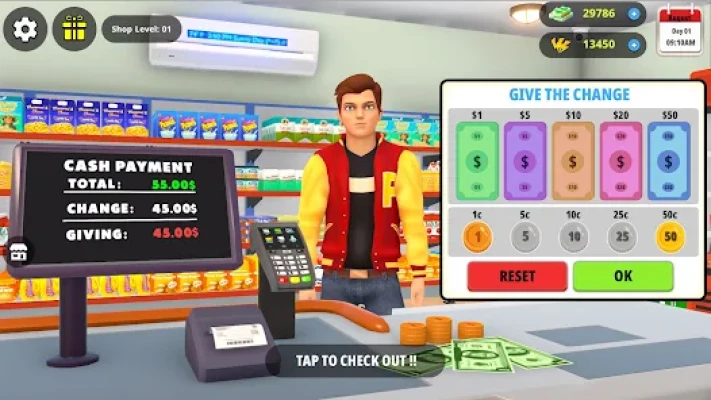
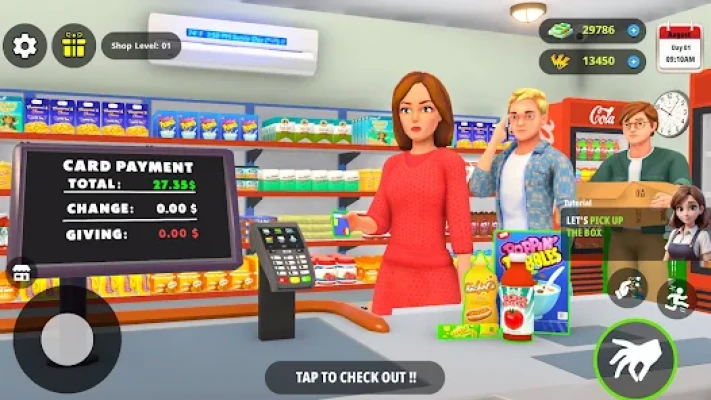
Long checkout delays can make the shopping experience less convenient. Watch how customers move through the store and identify whether the registers are becoming a bottleneck.
If the game allows you to operate a checkout yourself, helping during busy periods may be useful. If staff can handle the registers independently, ensure that enough employees are assigned to meet demand.
Your objective is to keep checkout operations aligned with the number of customers visiting the store.
8. Expand Only When Your Store Is Ready
Store expansion can create more room for products and departments, but it may also increase the amount of inventory and staff management required.
Before expanding, check whether your existing shelves are regularly stocked and your staff can handle their responsibilities. A well-managed small store is a better starting point than an inefficient store that is simply getting bigger.
Expand when you can support the additional workload rather than treating growth as the only measure of success.
9. Add Departments With a Plan
Additional departments can make the supermarket more varied and give customers more reasons to shop there. However, every new section adds another area to manage.
Introduce new departments when you are ready to maintain their products and handle the extra operational demands. Avoid opening more sections than you can support with your current inventory and staffing.
A carefully developed supermarket is easier to run than one that expands without a clear plan.
10. Keep the Store Clean and Organized
The game's description identifies cleaning as one of the responsibilities that employees can handle. Make sure this part of the operation does not get neglected while you focus on inventory or expansion.
When cleaning staff are available, use them to help maintain the store. If you need to handle cleaning yourself, include it in your routine rather than waiting until the task becomes urgent.
A well-organized store is also easier for you to monitor because you can identify problems quickly.
11. Monitor the Business Before Making Major Changes
Before purchasing more inventory, hiring additional employees, or expanding the store, assess the situation.
Ask yourself three questions:
Are customers finding the products they want?
Are the main operational tasks being completed efficiently?
Can the business support the cost of the next improvement?
If the answer to one of these questions is no, address that problem first. This prevents unnecessary spending and helps you develop a more stable supermarket.
12. Use Resources Carefully
Your available money and other in-game resources should support the store's most important needs.
Inventory keeps products available, staff help maintain daily operations, and expansion creates room for future growth. Each choice has a purpose, so avoid spending everything on a single category.
Keep enough resources available to respond when the business needs additional stock or staffing.
13. Balance Inventory and Employee Costs
Inventory and staffing work together. Products are valuable only when customers can buy them, while employees are most useful when they help the store operate more effectively.
If you have plenty of stock but shelves remain empty, your restocking process may need attention. If shelves are full but checkout operations are slow, staffing may be the bigger issue.
Identify the weakest part of the operation before investing more resources.
14. Develop a Daily Management Routine
A consistent routine makes supermarket management easier.
Start by checking shelves and identifying low-stock products. Next, review the store's staffing needs and make sure the most important tasks are covered. Then deal with cleaning or checkout problems before making larger business decisions.
Finish by considering whether your current operation is ready for expansion.
Following the same process regularly helps you catch problems before they become harder to manage.
15. Learn From Slow Sales
If a product is not selling as expected, avoid automatically ordering more of it. Review the available sales information and compare its performance with other products.
The goal is to make purchasing decisions based on observed demand rather than assumptions. If the game offers product or sales statistics, use them to refine your inventory choices.
Better purchasing decisions can help you avoid wasting resources on stock that moves too slowly.
16. Improve One Part of the Business at a Time
It can be tempting to change inventory, staffing, and store layout simultaneously. However, doing everything at once makes it difficult to understand which decision actually improved the business.
Instead, identify one problem and address it. After the change, observe whether the store runs more smoothly. Then move to the next improvement.
This method makes your management decisions easier to evaluate and repeat.
17. Avoid Expanding Too Quickly
A large supermarket may look impressive, but size alone does not guarantee efficient operations.
Rapid expansion can leave you managing more shelves, products, and staff than your current resources can support. Develop a stable operation first, then grow in manageable stages.
This approach gives you time to learn each new system before adding another responsibility.
18. Make Employee Assignments Match Demand
As the business develops, the tasks that require the most attention may change. A small store may need only limited checkout support, while a larger operation may require more help with both registers and restocking.
Review where work is accumulating and adjust staffing accordingly when the game allows it.
The goal is to prevent one task from becoming a bottleneck while other employees have less urgent responsibilities.
19. Keep Progress Sustainable
A successful management strategy should work repeatedly, not just produce a short burst of growth.
Maintain a dependable supply of important products, invest in useful staff support, and expand when your resources allow it. If an upgrade creates new expenses, make sure you can continue operating after purchasing it.
Steady development is easier to maintain than growth based on spending every available resource at once.
20. Best Beginner Strategy
For new players, the most reliable starting plan is straightforward:
Learn how to stock products and serve customers.
Keep the main shelves supplied.
Observe which products sell most frequently.
Hire employees to address the most pressing tasks.
Keep checkout and cleaning responsibilities under control.
Save resources for useful upgrades.
Expand only when the current store is operating efficiently.
These steps establish a solid foundation for building a larger grocery business.
Common Mistakes to Avoid
Letting Shelves Stay Empty
Frequently empty shelves can prevent customers from finding the products they want. Check inventory regularly and replenish important items before they run out.
Hiring Without a Clear Purpose
Additional employees may increase costs without solving the main problem. Identify the task that needs support before hiring.
Expanding Before You Are Ready
A larger store requires more attention. Make sure you can manage the current operation before adding more departments.
Ignoring Product Demand
Ordering the same amount of every product may not be the most efficient approach. Use available sales information to adjust inventory.
Spending All Your Resources Immediately
Keep some flexibility in your budget so that you can respond to unexpected inventory or staffing needs.
Neglecting Cleaning and Checkout Operations
Stocking shelves is important, but the store also needs efficient service and regular cleaning. Balance these responsibilities instead of focusing on only one.
Is My Superstore Simulator 3D Worth Playing?
My Superstore Simulator 3D is worth considering if you enjoy casual business simulations where you build a small operation into a larger enterprise.
Reasons to Try It
Run and develop your own grocery store.
Stock shelves with different grocery products.
Hire employees for checkout, restocking, and cleaning.
Expand the store and introduce additional departments.
Learn inventory and staff management through gameplay.
Enjoy a supermarket tycoon experience with accessible mechanics.
Things to Consider
The game contains advertisements and optional in-app purchases.
Efficient management requires regular attention to stock and staffing.
Expansion becomes more demanding as the store grows.
Some features may depend on the current game version.
Players who enjoy planning, organizing, and gradual business growth may find the supermarket management loop appealing.
Frequently Asked Questions
What is My Superstore Simulator 3D?
My Superstore Simulator 3D is a supermarket management game from Fun Drive Games. You stock grocery shelves, serve customers, hire employees, and expand your store.
Who developed My Superstore Simulator 3D?
The game is developed by Fun Drive Games.
What do you do in My Superstore Simulator 3D?
You manage a grocery store by keeping products available, organizing staff, maintaining store operations, and expanding the business as you progress.
How do I make my supermarket grow?
Keep important products in stock, manage employees effectively, monitor customer demand, and expand when your existing operation can support the extra work.
How important is restocking?
Restocking is one of the core management tasks. Products need to be available on shelves for customers to purchase them, so regular inventory checks are important.
Can I hire employees?
Yes. The game description identifies employees for checkout operations, restocking, and cleaning. Hiring staff helps distribute the workload as your supermarket develops.
Can I train employees?
The store description advertises employee training. The value of training depends on the available options and how they affect staff performance in your current version.
Can I expand the supermarket?
Yes. Store expansion and the addition of departments are part of the game's advertised progression system.
Is My Superstore Simulator 3D free?
The game is listed as free to install on Google Play, with advertisements and optional in-app purchases.
Is My Superstore Simulator 3D available on Windows?
The Google Play listing indicates Android availability and also identifies Windows availability through Intel technology. Check the current store listing for supported device details.
Is the game suitable for beginners?
The game is designed to be accessible to new players. Beginners can start by learning inventory management, stocking shelves, and assigning staff before focusing on expansion.
What is the best way to manage inventory?
Check shelves regularly, prioritize products that sell frequently, and adjust future stock orders according to observed demand. Avoid tying up too many resources in products that move slowly.
Final Verdict
My Superstore Simulator 3D turns grocery store management into a casual business simulation. Players must keep shelves stocked, serve customers, organize staff, and expand the supermarket at a manageable pace.
The strongest strategy is to build a reliable operation before pursuing rapid growth. Monitor inventory, hire employees to solve specific problems, and invest in expansion when the business is ready. With careful planning, you can turn a small grocery store into a more developed supermarket and enjoy the gradual progress of building your own retail business.
Rate the Game
User Reviews














Popular Games



















 Android
 iOS
 Windows
 Xbox