


Latest Version
February 10, 2026
PrizePool Studios
Trivia
iOS
0
Report a Problem
More About :game
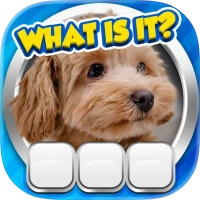
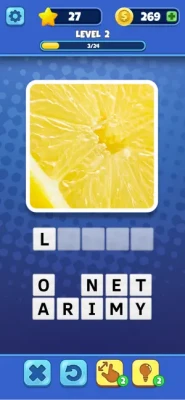
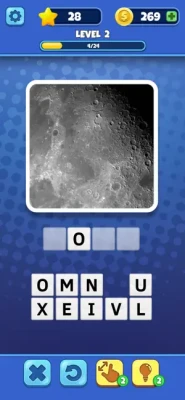
Developed by PrizePool Studios, Guess It: Zoom Pic Trivia takes the "guess the object" genre to a whole new level. Players are presented with a highly magnified portion of an image and must use their deductive skills to figure out what the full picture represents.
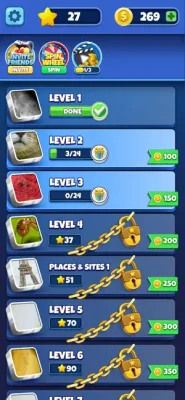
The game features hundreds of levels across diverse categories including Animals, Food, Brands, and Nature. As you progress, the zoom becomes more challenging, and the objects become more obscure. It’s a perfect tool for sharpening observational skills and lateral thinking. With its minimalist interface and smooth gameplay, Guess It offers a satisfying "Aha!" moment with every correctly identified puzzle, making it a favorite for trivia lovers and casual gamers alike.
Key Features
Hundreds of Unique Levels: A vast library of high-resolution zoomed-in puzzles.
Diverse Categories: Challenge yourself with everything from common household items to exotic wildlife.
Helpful Hint System: Use "Expose a Letter," "Remove Letters," or "Solve it" when you hit a mental block.
Daily Bonus Rewards: Log in every day to collect free coins and power-ups.
Progressive Difficulty: Puzzles start simple and evolve into complex visual riddles.
How to Play
Examine the Zoom: Look closely at the textures, colors, and shapes in the magnified image.
Type the Answer: Use the letter tiles at the bottom of the screen to spell out the object's name.
Use Boosters: If the zoom is too extreme, use hints to reveal parts of the word or narrow down the letter pool.
Level Up: Correct guesses unlock the next puzzle and reward you with in-game currency.
How to Win: Strategy
Identify Textures: Focus on the surface—is it metallic, organic, or fabric? Identifying the material often narrows the search down significantly.
Color Associations: Very specific shades (like "Safety Orange" or "Tiffany Blue") are often direct giveaways for specific objects or brands.
The "Squint" Technique: Sometimes looking at the image from a distance or squinting can help your brain "de-pixelate" the zoom and see the larger shape.
Conserve Your Coins: Don't use hints on the first 20 levels. Save your currency for the "Extreme Zoom" stages where the image is nearly abstract.
Tips & Tricks
Check the Letter Count: The number of empty slots tells you exactly how long the word is, which helps eliminate similar-looking objects.
Look for Micro-Details: A tiny screw, a stitch pattern, or a specific seed can be the key to solving a complex food or tech puzzle.
Daily Spin: Never miss your daily spin; it is the most consistent way to get "Solve it" boosters for free.
Context Clues: If you are in a specific themed pack (like "The Kitchen"), remember that every answer must relate to that theme.
Trophy & Achievement Guide
Eagle Eye: Solve 50 puzzles without using a single hint.
Visual Master: Complete the first 5 categories with 100% accuracy.
Daily Observer: Maintain a 7-day login streak.
Fast Thinker: Solve a puzzle in under 5 seconds.
Perspective King: Reach Level 250 in the main campaign.
Player Experience
Players describe Guess It as "refreshingly difficult" and "visually satisfying." The 4.6/5 star rating on the App Store highlights the game's ability to remain challenging without being frustrating. It is frequently cited as a great game for families to play together, as different perspectives often help solve the zoomed-in riddles.
Pros & Cons
Pros:
High-quality, crisp 3D imagery.
Great for brain training and improving focus.
Lightweight app size (~150 MB).
Cons:
Some levels can be highly subjective.
Contains ads (removable via in-app purchase).
Technical Details & System Requirements
Developer: PrizePool Studios
Category: Games / Trivia / Puzzle
Size: 158.4 MB
Compatibility:
iPhone: Requires iOS 11.0 or later.
iPad: Requires iPadOS 11.0 or later.
Mac: Requires macOS 11.0 or later (M1 chip or newer).
Apple Vision: Compatible with visionOS 1.0.
Comparison Section
| Feature | Guess It: Zoom Pic | Standard Picture Quizzes |
| Mechanic | Extreme Magnification | Full Image / Obscured |
| Visual Quality | High-Def Textures | Static / Stock Photos |
| Hint Variety | 3 Specific Types | Usually 1 Type |
| Device Support | iPhone, iPad, Mac, Vision | Mobile only |
User Ratings & Social Proof
App Store Rating: 4.6/5 stars.
Community: Highly recommended for fans of "4 Pics 1 Word" and "Logo Quiz."
Safety: Rated 4+ for all audiences.
Competitor & Similar Games
Close Up Pics: A classic alternative with a large database.
Zoom Quiz: Focused on rapid-fire zoomed-in identification.
Pic vs Pic: A competitive multiplayer take on visual trivia.
Who Is? Celeb Quiz: Another visual hit from PrizePool Studios.
FAQ
Q: Can I play Guess It offline?
A: Yes, once downloaded, the main levels are available without an active internet connection.
Q: Are there multiple languages?
A: Yes, the game is localized for a global audience to ensure everyone can enjoy the puzzles.
Q: Is it safe for kids?
A: Absolutely. It is an educational tool that helps children with spelling and object recognition.
Rate the Game
User Reviews











Popular Games



















 Android
 iOS
iOS Windows
 Xbox
Xbox