

Latest Version
November 26, 2026
duong duc
Sports
iOS
0
Report a Problem
More About :game
Game Overview
Golf 3D Championship combines traditional golf gameplay with accessible mobile controls and attractive three-dimensional environments. The main objective is to complete different golf courses by hitting the ball toward the hole using carefully planned shots.
Although the basic concept of golf is simple, achieving good results requires accuracy, patience, and an understanding of the conditions affecting every shot.
The game features more than 72 holes across different environments, giving players plenty of opportunities to practice their swing and improve their performance.
One of its most interesting features is the inclusion of three separate game modes. Tourism, Cup Club, and Mini Game provide different ways to experience the golf simulation, allowing players to explore courses, participate in golf challenges, and enjoy shorter activities.
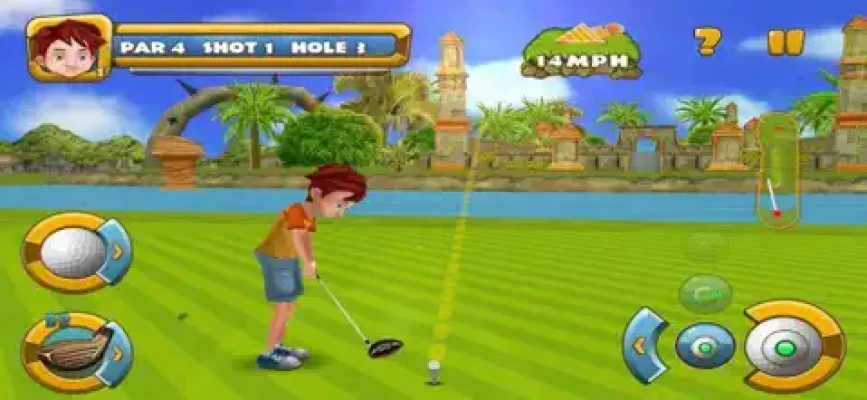
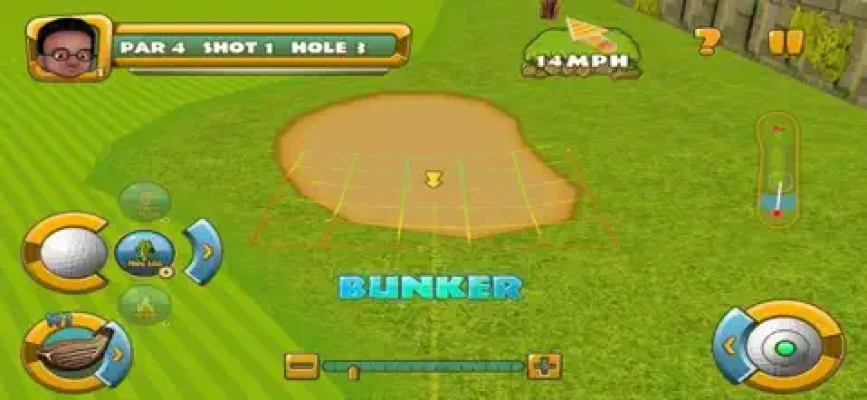
Golf 3D Championship also introduces changing wind conditions. A light breeze or strong gust can influence the ball's movement, making it important to consider environmental conditions before choosing the strength and direction of a shot.
Players can also create personalized golfer avatars using custom clothing and special skills, adding another layer of customization to the experience.
Main Features of Golf 3D Championship
Realistic 3D Golf Simulation
The game uses three-dimensional graphics and physics-based gameplay to recreate the experience of playing golf. Ball movement, shot direction, and environmental conditions contribute to the overall simulation.
More Than 72 Challenging Holes
Golf 3D Championship offers over 72 holes across different golf environments. This provides a substantial collection of challenges for players who enjoy improving their performance over multiple rounds.
Three Different Game Modes
Players can choose between Tourism, Cup Club, and Mini Game. Each mode provides a different way to enjoy the game's golfing activities.
Dynamic Wind Conditions
Wind is an important part of the gameplay. Conditions range from gentle breezes to powerful gusts, requiring players to adjust their shots according to the environment.
Customizable Golfer Avatars
Players can create their own golfing characters by selecting different clothing options and special skills.
Intuitive Touch Controls
The mobile control system is designed to make hitting the ball straightforward. Players can focus on shot direction, power, and accuracy without needing complicated control combinations.
Beautiful Golf Environments
The game features hand-designed graphical environments that provide different visual settings for its golf courses.
Gold and Cash Currencies
The App Store lists gold and cash as in-app purchase currencies. These provide additional monetization options within the game.
Understanding the Three Game Modes
One of the most important aspects of Golf 3D Championship is its selection of three game modes. Understanding their purposes can help players decide how to spend their time and develop their golfing abilities.
Tourism Mode
Tourism is the course-exploration mode of Golf 3D Championship.
It allows players to experience different golfing environments and work through the available holes. This mode is particularly suitable for players who want to enjoy the scenery while developing their understanding of the game's mechanics.
Tourism mode is also a useful place to practice different shots and become familiar with how the ball behaves on different courses.
As you progress, focus on achieving better results on individual holes instead of rushing through the entire course.
One important consideration is course progression. Some App Store player reviews have reported difficulties downloading or unlocking additional courses in Tourism mode. If progression does not work as expected, check your connection and available game updates.
Cup Club Mode
Cup Club provides another way to experience competitive golf gameplay.
The mode adds a club-oriented competition element to the overall experience, appealing to players who enjoy working toward better golfing results.
To perform well, concentrate on accuracy and consistency. Every shot contributes to your final performance, so avoid taking unnecessary risks when a safer shot can produce a better result.
Use this mode to put your knowledge of wind conditions, shot strength, and ball direction into practice.
Mini Game Mode
Mini Game offers a shorter alternative to the longer golfing experience.
It is suitable for players who want to enjoy quick golfing activities without committing to a full round.
Short challenges can also help improve specific skills, including aiming, controlling shot strength, and understanding ball movement.
Use Mini Game mode as a way to practice and become more comfortable with the game's touch controls.
Complete Golf 3D Championship Strategy Guide
Becoming a successful golfer requires more than simply hitting the ball as hard as possible. The most effective strategy combines accurate aiming, controlled power, environmental awareness, and careful planning.
The following guide explains how to approach the game's different challenges.
Master the Touch Controls
Start by becoming familiar with the game's intuitive touch-based control system.
Understanding how your inputs affect shot direction and power is essential before attempting more difficult holes.
Spend some time practicing basic shots. Notice how different input strengths influence the distance the ball travels.
Avoid using maximum power automatically. A shorter, controlled shot can sometimes produce a much better position for your next attempt.
Once you understand the controls, you will be able to make more confident decisions throughout each round.
Understand Golf Shot Power
Shot power is one of the most important factors in Golf 3D Championship.
Too little power may leave the ball far from the target, while excessive power can send it beyond the ideal landing area.
Before taking a shot, consider the distance between your current position and the hole.
For longer distances, stronger shots may be necessary. For shorter approaches, prioritize control and accuracy.
Practice different power levels until you become comfortable estimating how far the ball will travel.
Pay Attention to Wind Conditions
Wind is a major gameplay mechanic and can significantly influence your golfing strategy.
The game features changing conditions ranging from light breezes to strong winds.
Ignoring wind direction can cause the ball to travel away from your intended target.
Before every shot, examine the available wind information.
If the wind is pushing the ball toward one side, consider adjusting your aim in the opposite direction. When wind conditions are particularly strong, avoid relying entirely on your usual shot settings.
The more you practice, the easier it becomes to understand how environmental conditions affect your results.
Improve Your Accuracy
Accuracy is often more important than raw power.
A powerful shot that misses the intended landing area may create additional difficulties, especially when approaching the green.
Try to aim carefully before each swing.
Make small adjustments rather than constantly changing your target direction. Consistent aiming helps you develop a better understanding of the game's physics.
When you are close to the hole, prioritize precision over distance.
Plan Every Shot Before Swinging
One of the biggest mistakes beginners make is hitting the ball without considering what happens next.
A better approach is to think about the entire hole.
Consider your current position, the remaining distance, the wind, and the ideal landing area.
For longer holes, divide the journey into manageable shots instead of attempting to reach the hole immediately.
This strategy can help you maintain better control and avoid unnecessary mistakes.
Use a Different Strategy for Each Hole
Not every hole should be approached in the same way.
Some situations require long-distance shots, while others demand careful positioning and precise control.
For longer holes, concentrate on gaining distance without sacrificing accuracy.
For shorter holes, focus on reaching the target with controlled power.
When the course presents a challenging situation, take a moment to consider the available options before making your next move.
Master Your Approach Shots
Approach shots are especially important because they determine how close you can get to the hole before putting.
A common mistake is using too much power when the ball is already near the green.
Instead, focus on estimating the remaining distance and choosing a suitable shot strength.
Try to position the ball in a location that provides a comfortable final attempt.
A well-controlled approach can make the difference between an easy finish and a difficult recovery.
Improve Your Putting Skills
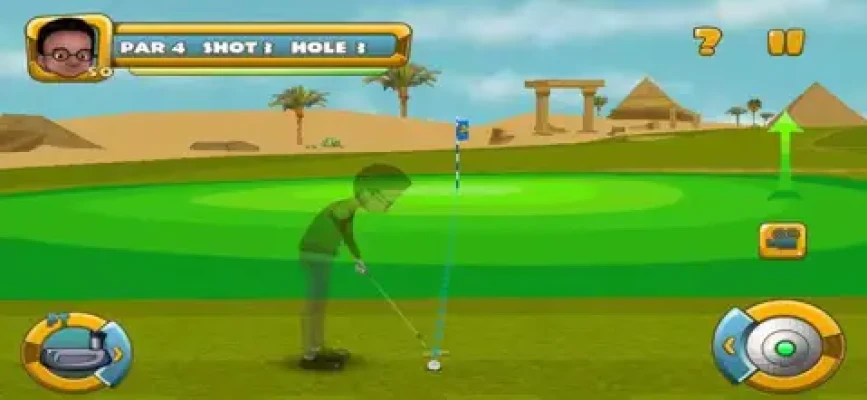
Putting requires careful control because even small mistakes can affect the final result.
When the ball reaches the green, avoid treating the final shot like a long-distance drive.
Concentrate on the remaining distance and apply only the power needed to move the ball toward the hole.
Practice short-distance shots to become familiar with the game's sensitivity.
The goal is to finish each hole with as few unnecessary strokes as possible.
Customize Your Golfer
Golf 3D Championship allows players to create unique avatars using custom clothes and special skills.
Take advantage of the available customization options to create a golfer that matches your preferred appearance and playing style.
If the game allows you to select different skills, examine their descriptions and consider how they may influence your performance.
Prioritize abilities that complement your preferred approach to golfing.
Manage Gold and Cash Carefully
The game includes gold and cash as in-app purchase currencies.
Before spending either currency, examine the available options and determine which purchases provide the most useful benefits.
Avoid spending resources simply because an item is available.
If customization and skill-related purchases are offered, consider whether they improve your overall experience or simply change your golfer's appearance.
A careful spending strategy helps you avoid unnecessary purchases.
Advanced Tips and Tricks
Adjust Your Aim for Wind: Always consider the current wind conditions before taking a shot. Strong wind requires more careful planning.
Avoid Maximum Power on Every Shot: Full power is not always the best solution. Controlled shots can provide better positioning.
Practice in Tourism Mode: Use course exploration to become familiar with different environments and improve your accuracy.
Try Mini Games Regularly: Short challenges provide opportunities to practice your timing and shot control.
Focus on Consistent Results: A reliable series of accurate shots is often better than attempting risky long-distance shots.
Plan Your Approach: Think about where you want the ball to land, not just where you want it to travel.
Experiment With Avatar Skills: Explore available special skills and determine which options best complement your playing style.
Learn From Difficult Holes: If a particular hole gives you trouble, identify whether the problem is shot power, wind adjustment, or inaccurate aiming.
Common Mistakes to Avoid
Ignoring the Wind
Wind conditions influence gameplay. Failing to account for them can make accurate shots more difficult.
Using Too Much Power
Strong shots can be useful for long distances, but excessive power may send the ball away from the ideal position.
Rushing Your Shots
Take time to evaluate each situation. A few seconds of planning can prevent unnecessary mistakes.
Ignoring Course Conditions
Different environments can present different challenges. Adapt your approach instead of using identical shot settings everywhere.
Poor Putting Control
The final part of a hole requires precision. Avoid using excessive power when the ball is close to the target.
Spending Currency Without Planning
Examine available purchases before using gold or cash. Make decisions based on what you actually need.
How to Progress Through More Than 72 Golf Holes
With over 72 challenging holes advertised, Golf 3D Championship offers plenty of opportunities to develop your skills.
The best approach is to concentrate on steady improvement.
Begin by learning the controls and understanding the basic mechanics of each shot. Then gradually improve your ability to account for wind, estimate distances, and position the ball accurately.
Try to achieve strong results on each available hole before moving forward.
If additional courses do not become available after completing the required challenges, check whether the game requires an additional download or whether a technical issue is preventing progression.
This is particularly relevant because some players have reported problems accessing additional courses through Tourism mode.
Is Golf 3D Championship Worth Playing?
Golf 3D Championship is an interesting option for players who enjoy mobile sports simulations and traditional golf gameplay.
Its biggest strengths are the large advertised collection of holes, three different game modes, customizable avatars, and changing wind conditions.
The realistic physics system also gives players an opportunity to develop their skills instead of relying entirely on luck.
However, the available player feedback is limited, and some reviews mention difficulties accessing additional courses. Players should keep this in mind when considering the game.
Overall, it is worth exploring for casual golfers who enjoy practicing their swing, improving their accuracy, and completing different golf challenges.
Game Information
Category | Details |
|---|---|
Game Title | Golf 3D Championship |
Developer | duong duc |
Copyright | © ducky duke |
Genre | Sports |
Subgenre | Golf Simulation |
Platform | iPhone and iPad |
Price | Free |
In-App Purchases | Yes |
Game Modes | Tourism, Cup Club, Mini Game |
Advertised Course Content | More than 72 holes |
Graphics | 3D |
Physics | Realistic golf physics |
Weather Conditions | Variable wind |
Character Customization | Yes |
Special Skills | Yes |
In-Game Currencies | Gold and Cash |
Supported Language | English |
Download Size | Approximately 68.9 MB |
Minimum iOS Requirement | iOS 10.0 or later |
Age Rating | 4+ |
Frequently Asked Questions
What is Golf 3D Championship?
Golf 3D Championship is a mobile golf simulation game featuring realistic physics, three-dimensional graphics, customizable golfer avatars, and more than 72 challenging holes.
How many holes are available in Golf 3D Championship?
The App Store description advertises more than 72 challenging holes across different golfing environments.
What are the three game modes?
The three available modes are Tourism, Cup Club, and Mini Game.
What is Tourism mode?
Tourism mode allows players to explore different golf courses and complete holes across various environments.
What is Cup Club mode?
Cup Club is one of the game's three main golfing modes, providing another way to experience its competitive golf activities.
What is Mini Game mode?
Mini Game offers shorter golfing activities for players who prefer quick challenges and practice sessions.
Does Golf 3D Championship have realistic physics?
Yes. The game advertises physics-powered gameplay designed to create realistic ball movement and golfing mechanics.
Does wind affect golf shots?
Yes. Wind conditions range from light breezes to strong gusts, making environmental awareness an important part of successful golfing.
Can players customize their golfers?
Yes. Players can create unique avatars using different clothing options and special skills.
Is Golf 3D Championship free?
Yes. It is free to download, although optional in-app purchases are available.
Can you play Golf 3D Championship on iPad?
Yes. The game is designed for both iPhone and iPad.
Who developed Golf 3D Championship?
The developer listed on the App Store is duong duc.
Final Verdict
Golf 3D Championship brings a traditional golfing experience to mobile devices through realistic 3D graphics, physics-based ball movement, and a collection of more than 72 challenging holes.
Its three game modes, Tourism, Cup Club, and Mini Game, provide different ways to enjoy the sport, while changing wind conditions add another layer of strategy to every round.
The customizable golfer system also gives players an opportunity to create their own character and explore available special skills.
To achieve better results, focus on accurate aiming, controlled shot power, wind direction, and careful putting. With patience and practice, players can develop a more consistent golfing style and tackle increasingly challenging holes.
For fans of golf simulation games, Golf 3D Championship offers a straightforward mobile experience built around precision, practice, and the satisfaction of completing the perfect shot.
Rate the Game
User Reviews










Popular Games















 Android
 iOS
 Windows
 Xbox