



Latest Version
Visit PageMore About :game
The game combines relaxed picture puzzles with progressively harder challenges. Zooming and hints can help when a difference is difficult to identify, while daily challenges and special events add additional ways to play.
Find Differences - Spot it Overview
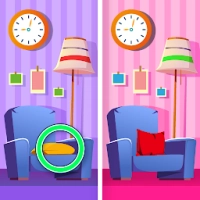
The concept is simple: compare two pictures, identify everything that has changed, and tap the correct locations.
The difficulty comes from how well the differences are disguised.
A missing object may be obvious, but a slightly different color, altered shape, missing line, changed window, or tiny background detail can be much harder to notice.
The best way to improve is not to stare randomly at the pictures. Instead, develop a repeatable scanning system.
A good player learns to divide each picture into sections, compare those sections systematically, and use visual landmarks to confirm suspicious details.
Game Information
Game: Find Differences - Spot it
Developer: Guru Puzzle Game
Genre: Puzzle / Casual
Game Type: Find-the-difference puzzle
Players: Single-player
Controls: Tap, zoom and visual comparison
Difficulty: Progressive
Hints: Available
Zoom: Available
Challenges: Daily challenges and special events
Main Objective: Find all differences between similar images
The current indexed version is 3.27.0, with the listing updated in August 2026.
What Is Find Differences - Spot it?
Find Differences - Spot it is built around the classic “spot the difference” puzzle.
Two images appear similar, but several details have been changed.
Your task is to find those changes.
Typical differences can include:
Missing objects
Added objects
Different colors
Changed shapes
Missing lines
Different patterns
Altered clothing
Changed facial details
Background changes
Different sizes
Changed positions
Small environmental details
Some differences are immediately visible. Others are deliberately placed in areas where the two pictures look almost identical.
Main Features
Picture Comparison Puzzles
The main gameplay revolves around comparing two similar pictures and locating visual differences.
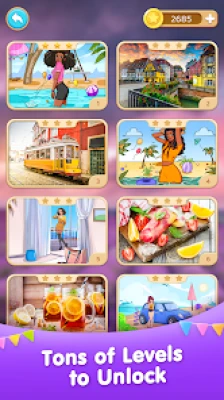
Large Variety of Scenes
Different themes and image styles keep the visual challenges from feeling identical.
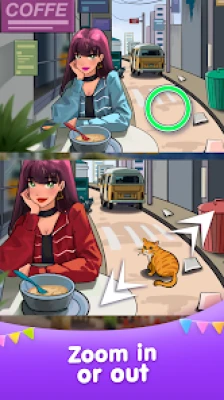
Zoom Function
Zoom is particularly useful when a difference is extremely small or hidden inside a detailed scene.
Hints
Hints provide assistance when you have searched the picture carefully but cannot identify the remaining difference.
No-Time-Limit Main Gameplay
The main puzzle experience is designed around relaxed observation, while special events can introduce timed challenges.
Daily Challenges
Daily content gives experienced players additional opportunities to test their observation skills.
Special Events
Timed events and additional challenges provide a faster alternative to the standard relaxed puzzle format.
How to Play Find Differences - Spot it
Start by looking at both pictures as complete scenes.
Do not immediately begin tapping.
First identify:
The main subject
The background
Large objects
Major colors
Strong lines
Distinctive shapes
Then begin comparing the pictures systematically.
When you see a likely difference, tap it.
If you are unsure, zoom into the area and compare the surrounding details before making a decision.
Complete Find Differences Strategy Guide
1. Do Not Scan Randomly
Random searching is one of the slowest ways to solve a difference puzzle.
Instead, divide each image into sections.
For example:
Top-left → top-center → top-right → middle-left → center → middle-right → bottom-left → bottom-center → bottom-right
Search one section at a time.
This prevents you from repeatedly checking the same areas.
2. Start With Large Objects
Before searching for tiny details, compare the major objects.
Look for:
Missing furniture
Different vehicles
Changed people
Missing animals
Altered buildings
Different signs
Large objects with changed shapes
Large differences can often be found quickly.
Once the obvious differences are removed, move toward the smaller details.
3. Compare Edges First
Edges are excellent places to search because changes often stand out against a contrasting background.
Inspect:
Roof edges
Tree outlines
Building borders
Object silhouettes
Clothing edges
Windows
Fences
Road boundaries
A missing or added object may become obvious when you compare its outline rather than its interior.
4. Use a Grid System
Imagine the image divided into a 3×3 grid.
Search each section carefully before moving to the next.
This creates a predictable routine:
Top-left
Top-center
Top-right
Middle-left
Center
Middle-right
Bottom-left
Bottom-center
Bottom-right
When you finish a section, mentally mark it as checked.
This greatly reduces repeated searching.
5. Compare Similar Objects
If the scene contains multiple similar objects, compare them against each other.
Examples include:
Two windows
Several trees
Multiple chairs
Similar cars
Repeated flowers
Several people
Matching decorations
Differences are often easier to identify when two objects can be directly compared.
6. Search for Missing Objects
One of the easiest difference types to overlook is a missing object.
Your brain naturally fills in familiar scenes, so you may look at a picture and mentally assume that an expected object is still there.
Force yourself to ask:
What is present in one image but absent in the other?
This simple question can reveal differences that passive observation misses.
7. Search for Added Objects
Use the opposite approach as well.
Ask:
What appears in one picture that should not be there?
An extra flower, bird, cloud, decoration, object, or small background detail may be the intended difference.
8. Check Colors Carefully
Some differences are not changes in shape but changes in color.
Compare:
Clothing
Cars
Flowers
Signs
Walls
Furniture
Sky details
Decorative objects
Do not assume two objects are identical simply because their shapes match.
9. Look for Shape Changes
A difference may be only a tiny change to the outline of an object.
For example:
A round object becomes square.
A handle disappears.
A leaf changes shape.
A window has a different pattern.
A character's hat changes.
A wheel loses a section.
Compare silhouettes carefully.
10. Inspect Repeated Patterns
Repeated patterns are useful because a single interruption is easier to detect.
Look at:
Brick walls
Floor tiles
Clothing patterns
Fences
Windows
Bookshelves
Decorative objects
Wallpaper
If one pattern suddenly breaks, compare that location in the other image.
The Best Scanning Order
A strong general scanning order is:
1. Large objects
2. Main subject
3. Strong outlines
4. Repeated objects
5. Colors
6. Patterns
7. Background
8. Tiny details
This prevents you from wasting time on microscopic details before checking obvious changes.
How to Find the Last Difference
The final difference is often the hardest.
Once you have found most of the required differences, stop searching the entire image.
Instead, use elimination.
Ask:
Which sections have I already checked carefully?
Then focus on the remaining areas.
If you have scanned the entire picture, switch from object-based searching to feature-based searching.
Look specifically for:
Tiny color changes
Missing lines
Slight shape changes
Small objects
Different textures
Minor facial details
Background elements
Use Zoom Correctly
Zoom is powerful, but constantly zooming in and out can make searching slower.
Use this sequence:
Normal view → identify suspicious area → zoom in → compare → zoom out → continue scanning
Do not zoom into every part of the picture immediately.
Use it when:
The difference is extremely small.
Several objects overlap.
The background contains fine detail.
Two colors are almost identical.
A line or pattern is difficult to inspect.
Advanced Zoom Technique
When zoomed in, do not look only at the suspected object.
Compare the entire local area.
A difference may be located next to the object you initially noticed.
For example, you may notice two similar flowers, zoom into them, and discover that the actual difference is a missing leaf beside one of them.
How to Handle Busy Scenes
Busy scenes contain many objects and can initially feel overwhelming.
Do not try to compare everything simultaneously.
Instead, identify the scene's major zones.
For example:
Sky → buildings → people → vehicles → road → foreground
Then scan each zone separately.
This turns a visually crowded puzzle into several smaller searches.
How to Handle Simple Scenes
Simple pictures can actually be difficult because there are fewer visual landmarks.
When the image contains large areas of similar color, focus on:
Small outlines
Texture changes
Tiny objects
Shadows
Color shades
Repeated patterns
Use zoom when necessary.
Strategy for Landscape Pictures
Landscapes often contain large areas of sky, trees, mountains, roads, water, and buildings.
Use the natural divisions of the scene:
Sky → horizon → middle distance → foreground
Compare the horizon carefully because small changes can be hidden among trees, buildings, or mountains.
Then inspect major foreground objects.
Strategy for City Scenes
City pictures usually contain many straight lines and repeated structures.
Focus on:
Windows
Doors
Signs
Traffic lights
Cars
Street furniture
Building details
Storefronts
Straight lines are particularly useful because a missing or altered line is often easier to identify than a subtle color difference.
Strategy for Animal Pictures
Animals provide strong visual anchors.
Check:
Eyes
Ears
Nose
Mouth
Fur markings
Spots
Stripes
Tail
Feet
Nearby objects
Do not assume the difference must be on the animal itself.
The changed detail may be in the background.
Strategy for People and Character Scenes
Start with the obvious features:
Hair
Hat
Face
Eyes
Mouth
Clothing
Shoes
Accessories
Then inspect objects around the person.
A difference may be something as simple as a missing button, altered sleeve, different accessory, or changed background item.
Strategy for Food Pictures
Food images often contain repetitive textures and many small objects.
Compare:
Plates
Cups
Utensils
Ingredients
Garnishes
Sauces
Table decorations
Food shapes
Strong color differences are usually easier to find first.
Strategy for Difficult Levels
When a level becomes difficult, do not increase your speed.
Decrease it.
Slow observation is often more effective than frantic scanning.
Use:
A section-by-section search.
Edge comparison.
Color comparison.
Object comparison.
Pattern comparison.
Zoom.
Hint only after a thorough search.
Daily Challenge Strategy
Daily challenges are a good opportunity to practice systematic observation.
Before starting:
Check the entire image.
Identify the main objects.
Divide the scene into sections.
Search large differences first.
Save tiny background areas for later.
If the challenge is timed, avoid spending too long on one difficult location.
Move on mentally and return once the easier differences have been found.
Timed Event Strategy
Timed gameplay changes the optimal approach.
You need both accuracy and speed.
A useful sequence is:
Large differences → obvious object changes → strong color changes → repeated patterns → tiny details
Do not waste several seconds repeatedly checking an area you have already confirmed.
If you cannot find the difference quickly, move to another section and return later.
How to Use Hints Wisely
Hints are most valuable when only one or two differences remain.
Before using one, ask:
Have I checked every section?
Did I inspect the background?
Did I compare repeated objects?
Did I check colors?
Did I look for missing objects?
If the answer is yes, a hint can save significant time.
Common Mistakes
Searching Randomly
Without a fixed scanning method, you repeatedly revisit the same locations.
Looking Only at the Main Object
The difference may be somewhere in the background.
Checking Only Color
Shape, texture, position, and missing objects can be equally important.
Ignoring the Edges
Object outlines often reveal differences quickly.
Zooming Too Much
Constant zooming can slow your overall scan.
Tapping Without Confirmation
Do not guess repeatedly. Study the suspected area first.
Spending Too Long on One Section
If you are stuck, move elsewhere and return later.
Forgetting Repeated Objects
Similar objects provide some of the strongest comparison opportunities.
Beginner Tips
Scan systematically.
Start with large objects.
Check edges and outlines.
Look for missing objects.
Compare colors.
Inspect repeated patterns.
Search the background.
Use zoom for tiny details.
Save hints for genuinely difficult moments.
Slow down when the puzzle becomes difficult.
Advanced Observation Techniques
Technique 1: Peripheral Comparison
Instead of focusing on one object, compare the overall shape of the surrounding area.
Your peripheral vision can sometimes detect an unexpected change before you consciously identify it.
Technique 2: Landmark Anchoring
Choose a distinctive object as an anchor.
For example:
Tree → nearby house → road → car
Compare the surrounding area relative to the anchor.
This helps prevent losing your position in complex scenes.
Technique 3: Negative-Space Detection
Look at the empty spaces around objects.
A missing object changes the shape of the surrounding empty space.
This is especially useful when the object itself blends into the background.
Technique 4: Pattern Interruption
When a repeating pattern suddenly changes, investigate it.
This works particularly well with:
Bricks
Windows
Trees
Flowers
Clothing
Fences
Tiles
Technique 5: Symmetry Checking
Some scenes contain naturally symmetrical objects.
Compare the two sides.
A missing or altered element may become obvious when the symmetry is broken.
How to Improve Your Speed
Speed should come from consistency rather than rushing.
Practice the same scanning order on every puzzle.
For example:
Top-left → top-right → center → bottom-left → bottom-right
Or use the full 3×3 grid system.
Once your eyes become accustomed to this routine, you will spend less time deciding where to look next.
How to Improve Accuracy
Accuracy improves when you confirm suspected differences before tapping.
Use three checks:
Visual difference + location + surrounding context
If all three make sense, the difference is probably genuine.
This reduces mistakes caused by shadows, image compression, perspective, or natural variations in complex pictures.
Pros and Cons
Pros
Simple and intuitive gameplay
Large variety of picture puzzles
Progressive difficulty
Zoom functionality
Hint system
Daily challenges
Special events
Relaxed main gameplay
Suitable for short sessions
Easy to learn but challenging to master
Cons
Very similar visual details can become difficult to distinguish
Busy scenes can require extensive searching
Timed events require faster decision-making
Frequent advertising is a recurring complaint in user reviews.
Is Find Differences - Spot it Worth Playing?
Yes, especially if you enjoy visual puzzles that can be played in short sessions.
The basic mechanic is immediately understandable, but the progressively harder pictures create enough difficulty to reward careful observation.
The strongest way to enjoy the game is to develop a consistent search pattern rather than tapping randomly. Once you learn to recognize missing objects, changed colors, altered outlines, interrupted patterns, and subtle background differences, difficult levels become much more manageable.
Who Should Play?
Find Differences - Spot it is a good choice for:
Spot-the-difference fans
Casual puzzle players
Visual observation enthusiasts
Players who enjoy picture-based challenges
People who prefer relaxed single-player games
Players who enjoy daily puzzle challenges
Anyone looking for a quick visual puzzle
Tips at a Glance
Start with: Large objects and obvious changes.
Best method: Scan systematically.
Useful tool: Zoom.
Hardest differences: Tiny background changes.
Best visual clues: Shape, color, texture and position.
Last-difference strategy: Use elimination.
Busy-scene strategy: Divide the picture into zones.
Timed strategy: Find easy differences first.
Hint strategy: Save hints for genuinely difficult locations.
Golden rule: Never assume the difference must be in the main subject.
Frequently Asked Questions
What is Find Differences - Spot it?
Find Differences - Spot it is a picture comparison puzzle game where players compare two similar images and identify the differences between them.
How do you find differences faster?
Use a systematic scanning pattern instead of searching randomly. Check large objects first, then edges, colors, patterns, and small background details.
What should I look for in a difficult puzzle?
Look for missing objects, changed colors, altered shapes, interrupted patterns, different shadows, small background details, and changes in object position.
Does the game have a zoom feature?
Yes. Zoom is available to help players inspect small details in the pictures.
Does Find Differences - Spot it have hints?
Yes. The game includes hints for difficult puzzles.
Are there daily challenges?
Yes. Daily challenges and special events are part of the current game experience.
How do I find the last difference?
Stop searching randomly. Review the sections you have already checked, then focus on small color changes, missing lines, background objects, patterns, and subtle shape differences.
Why are some differences so difficult to see?
Some differences are deliberately placed in visually similar areas where color, texture, and shape change only slightly.
Is there a time limit?
The main stages are described as having no time limit, while special events can introduce timed challenges.
Is Find Differences - Spot it suitable for beginners?
Yes. The basic controls are simple, and players can gradually develop a more systematic observation technique as the puzzles become harder.
Final Verdict
Find Differences - Spot it is a straightforward picture puzzle with surprising depth once the images become difficult.
The key to solving hard levels is methodical observation.
Start with the large objects, work through the picture in sections, compare edges and repeated patterns, then move toward subtle colors and background details. When only one difference remains, use elimination rather than repeatedly staring at the entire image.
With a consistent scanning routine, careful use of zoom, and sensible use of hints, even difficult spot-the-difference puzzles become much easier to solve.
Rate the Game
User Reviews












Popular Games
















 Android
 iOS
 Windows
 Xbox