

Latest Version
Visit PageMore About :game
Specific Game and App Information
Detail | Information |
|---|---|
App name | Cube Solver AI: Logic Tools |
Developer | Fruit Puzzle Games |
Genre | Puzzle, Logic, Educational Tool |
Platform | Android |
Package name | cube.solver.rubik.magic.guide.fast.speed.step.ai.robot.puzzle |
Release date | September 24, 2025 |
Latest identified version | 1.9 |
Latest identified update | March 9, 2026 |
Minimum Android version | Android 7.0 |
Content rating | Everyone |
Google Play downloads | 100,000+ |
Google Play rating | Approximately 4.2 stars in the retrieved listing data |
Price | Free with advertisements and in-app purchases |
Internet requirement | Offline functionality supported |
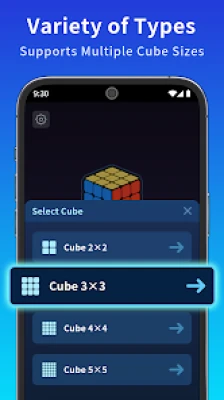
Supported cube sizes | 2x2, 3x3, 4x4 and 5x5 |
Main feature | Automated Rubik's Cube solving |
Camera support | Yes |
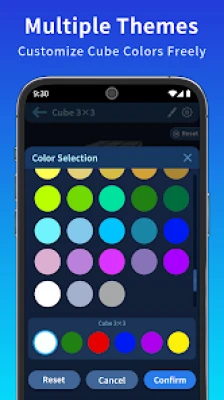
Manual color input | Yes |
3D visualization | Interactive cube viewer |
Solving instructions | Step-by-step guidance |
What Is Cube Solver AI: Logic Tools?
Cube Solver AI: Logic Tools is a practical Rubik's Cube solving application that helps players understand, solve, and practice different types of colorful cube puzzles. It is designed for anyone who enjoys mechanical brain teasers, wants to learn how to solve a scrambled cube, or needs assistance finding an efficient solution.
Unlike traditional puzzle games that require players to solve every challenge independently, this application works as an intelligent solving assistant. It examines the current arrangement of a cube and generates instructions that guide users through the required moves.
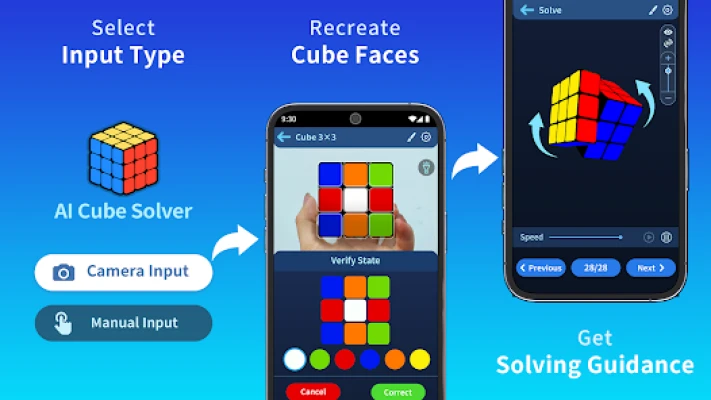
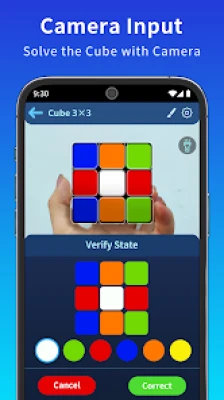
One of its most useful features is camera scanning. Instead of entering every color manually, users can scan their physical cube with their smartphone camera. The application detects the visible color arrangement and uses that information to prepare a solution.
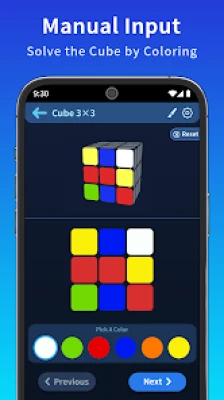
Players who prefer more control can also enter the cube colors manually through an interactive interface. This option is helpful when a camera scan needs correction or when users want to understand how the solving system interprets different cube configurations.
The application supports several popular cube sizes, including the 2x2 Pocket Cube, standard 3x3 Rubik's Cube, and larger 4x4 and 5x5 puzzles.
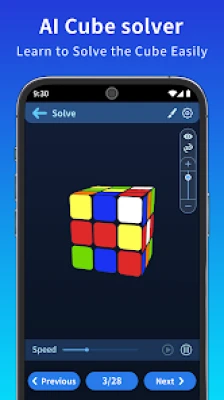
Another important feature is its interactive 3D viewer. Rather than presenting only a list of complicated instructions, the application displays the cube visually and demonstrates the moves required to reach the solution.
Users can rotate the cube, zoom in, examine different layers, and adjust animation speed. These options make the solving process easier to follow, especially for beginners who are unfamiliar with cube notation.
Cube Solver AI also supports offline functionality, allowing users to access its core solving features without relying on a continuous internet connection.
Whether you want to solve a difficult scramble, understand cube algorithms, or improve your puzzle-solving abilities, this application provides a convenient combination of automated assistance and visual learning.
Main Features of Cube Solver AI: Logic Tools
Smart Camera Cube Scanner
One of the application's most convenient features is its camera-based scanning system. Users can point their smartphone camera toward a physical Rubik's Cube and scan its colors.
The application analyzes the cube's arrangement and prepares a solution based on the detected color positions. This saves time compared with entering every color manually.
Manual Cube Color Input
For users who prefer greater control, the application offers manual color entry through an interactive cube interface.
This feature is particularly useful when a camera scan does not recognize a color correctly. You can review the arrangement and make adjustments before generating a solution.
Support for Multiple Cube Sizes
The application supports several popular cube formats, including:
2x2 Pocket Cube.
3x3 Magic Cube.
4x4 Rubik's Cube.
5x5 Rubik's Cube.
This variety makes the application useful for beginners and experienced cube enthusiasts who enjoy experimenting with different puzzle sizes.
Step-by-Step Solving Instructions
Instead of requiring users to memorize complicated algorithms, Cube Solver AI provides sequential instructions.
Each step explains which moves are needed to progress toward the completed cube. Following these instructions helps beginners understand how different rotations affect the puzzle.
Interactive 3D Cube Viewer
The 3D visualization feature allows users to examine the cube from different angles.
You can rotate the model, zoom in, explore individual layers, and follow the solving sequence visually. This makes the application more intuitive than relying entirely on written move notation.
Fast Solving Algorithms
The application uses an optimized solving engine to generate efficient move sequences.
Its purpose is to find a practical solution for the entered cube arrangement while presenting instructions that users can follow.
Adjustable Animation Speed
Different players prefer different learning speeds. Beginners may want to slow down the animations to understand every rotation, while experienced users may prefer faster demonstrations.
The adjustable speed feature makes the solving process more flexible.
Offline Cube Solving
Cube Solver AI supports offline use, making it convenient when traveling, studying, or practicing without an internet connection.
Beginner-Friendly Learning Experience
The application is designed to make cube solving more approachable. Its combination of visual instructions, manual input, and automated solutions helps new users understand a puzzle that can initially seem complicated.
Useful for Advanced Cube Enthusiasts
Experienced players can also use the application to check cube configurations, explore solving sequences, and practice recognizing different arrangements.
Understanding How Rubik's Cube Solving Works
Before using Cube Solver AI effectively, it helps to understand the basic structure of a standard 3x3 Rubik's Cube.
A traditional 3x3 cube contains six faces, each with a different center color. Every face has nine visible squares, creating a total of 54 colored facelets.
The center pieces determine the color identity of each face. Unlike the edge and corner pieces, the center positions remain fixed relative to one another during normal cube rotations.
The objective is to arrange the cube so that every face contains nine squares of the same color.
To achieve this, players rotate different layers in specific directions. Each movement changes the position of several pieces simultaneously.
A solution is created by combining these rotations in a particular sequence.
Basic Cube Notation
Learning cube notation makes it easier to understand solving instructions.
The standard letters represent the six faces:
Letter | Face | Meaning |
|---|---|---|
R | Right | Right face |
L | Left | Left face |
U | Up | Upper face |
D | Down | Lower face |
F | Front | Front face |
B | Back | Back face |
Additional symbols explain the direction of movement.
R means rotate the right face clockwise.
R' means rotate the right face counterclockwise.
R2 means rotate the right face 180 degrees.
U means rotate the upper face clockwise.
U' means rotate the upper face counterclockwise.
F2 means rotate the front face 180 degrees.
Clockwise and counterclockwise directions are determined while looking directly at the face being turned.
Understanding these symbols makes it easier to follow the application's step-by-step instructions.
How to Use Cube Solver AI
Start the Application
Open Cube Solver AI on your Android device and select the available cube-solving option.
Choose the puzzle size that matches the physical cube you want to solve.
Scan Your Physical Cube
If you want to use camera scanning, position your cube so that its colors can be recognized clearly.
Follow the application's scanning instructions and provide the required face information.
Make sure the cube is held steadily and that the lighting is sufficient to distinguish similar colors.
Enter Colors Manually if Necessary
If scanning is inconvenient or produces an incorrect result, use the manual color-entry option.
Select the appropriate colors on the interactive cube until the displayed arrangement matches your physical puzzle.
Check the entries carefully before continuing.
Generate the Solution
Once the cube arrangement has been entered, use the solving function to generate the suggested move sequence.
The application analyzes the configuration and prepares instructions for solving the puzzle.
Follow the 3D Instructions
Open the interactive viewer and examine the first suggested movement.
Rotate your physical cube in the corresponding direction, then continue through the remaining instructions.
Avoid skipping steps because each movement is part of the calculated solution.
Complete the Cube
Continue following the instructions until the application displays the completed arrangement.
Check your physical cube against the final 3D model to confirm that all faces have the correct colors.
Full Strategy Guide for Cube Solver AI: Logic Tools
Understand the Cube Before Trying to Solve It
The first step toward becoming better at Rubik's Cube puzzles is understanding how the pieces work.
A standard 3x3 cube contains three main types of pieces:
Center Pieces
These pieces are located in the middle of each face. They establish the color identity of that face.
Edge Pieces
Each edge piece contains two colors. These pieces connect two faces and occupy the positions between corners.
Corner Pieces
Each corner piece contains three colors and occupies one of the eight corners of the cube.
Understanding these differences makes it easier to recognize how individual pieces should be positioned during the solving process.
Scan the Cube Carefully
Camera scanning is convenient, but the quality of the scan can affect the solution.
Before scanning, make sure the cube is clean and the colors are easy to distinguish.
Avoid strong reflections, dark environments, and lighting conditions that make two colors appear similar.
Hold the cube steadily and follow the application's scanning instructions.
If the detected arrangement looks incorrect, review the colors rather than immediately generating a solution.
An inaccurate color arrangement can produce instructions that do not match your physical cube.
Use Manual Input When Scanning Fails
Manual color entry is a useful alternative when the camera cannot identify a particular face correctly.
Examine each side of the cube and compare its colors with the interactive model.
Enter the colors carefully, paying attention to the position of every center, edge, and corner.
Once all required faces have been entered, review the arrangement again.
Remember that a standard physical cube has a fixed relationship between its center colors. An impossible arrangement may indicate that one or more colors were entered incorrectly.
Follow Every Solving Step in Order
One of the most important rules is never to skip an instruction.
The application generates a sequence in which each movement depends on the previous configuration.
If you accidentally rotate the wrong face or turn it in the wrong direction, the physical cube may no longer match the application's expected arrangement.
When this happens, stop and check the current cube state.
If necessary, return to the beginning of the solution process and enter the updated arrangement again.
Following the instructions carefully is more reliable than attempting to guess the remaining moves.
Learn the Meaning of Each Rotation
Do not treat the solving instructions as random letters.
Take time to understand what each movement does.
For example, a right-face rotation moves the pieces on the right layer, while an upper-face rotation changes the positions of pieces around the top layer.
The 3D viewer can help you understand these movements.
Slow down the animation when necessary and observe how the corners and edges change positions.
Once you recognize the relationship between the notation and the physical movements, solving becomes easier.
Use the 3D Viewer as a Learning Tool
The interactive viewer is more than a visual presentation.
It can help you understand the relationship between different cube layers and rotations.
Rotate the model to examine the face you are working on. Zoom in when you need to distinguish edge and corner positions.
Compare the animation with your physical cube after every important movement.
This habit reduces mistakes and makes it easier to learn cube-solving techniques.
Adjust the Animation Speed
Beginners should consider using slower animations when learning unfamiliar algorithms.
A slower demonstration gives you more time to identify the face being turned and understand the direction of rotation.
Once the movements become familiar, increase the speed to follow the solution more efficiently.
Experienced cubers may prefer faster animations, while new players can benefit from a more gradual learning process.
The best setting is the one that allows you to follow every instruction accurately.
Start With the 2x2 Pocket Cube
If you have never solved a cube before, the 2x2 Pocket Cube is a useful starting point.
It has fewer pieces than a standard 3x3 cube, making its structure easier to understand.
Focus on learning how corner pieces move and how rotations affect their positions.
Once you become comfortable with the basic concepts, you can move to the standard 3x3 puzzle.
Master the Standard 3x3 Cube
The 3x3 Rubik's Cube is one of the most popular mechanical puzzles in the world.
A common beginner method involves solving the cube layer by layer.
The general process includes:
Creating a cross on the first face.
Completing the first-layer corners.
Solving the middle-layer edges.
Forming a cross on the final face.
Orienting the final-layer corners.
Positioning the remaining pieces correctly.
The exact algorithms depend on the cube's current arrangement.
Use Cube Solver AI to understand the required movements, but also practice recognizing the different stages independently.
This helps transform the application from a simple solving tool into a useful learning companion.
Develop Better 4x4 Cube Skills
The 4x4 cube introduces additional complexity because it has more pieces and does not have fixed center pieces in the same way as a standard 3x3.
A common solving approach involves building the centers, pairing corresponding edge pieces, and then solving the puzzle using methods similar to the 3x3.
Some situations may require special parity algorithms.
If you are using Cube Solver AI for a 4x4 puzzle, make sure the selected cube size matches your physical puzzle.
Take time to understand the extra pieces before attempting complicated sequences.
Learn the Basics of the 5x5 Cube
The 5x5 cube is a larger challenge that requires additional planning.
A common reduction-based approach involves solving the centers, pairing the edges, and then treating the puzzle similarly to a standard 3x3.
Because the larger cube contains more pieces, accurate color recognition becomes particularly important.
When using the scanning feature, examine every required face carefully.
The more accurately you enter the puzzle configuration, the easier it is to follow the generated solution.
Avoid Turning the Wrong Face
One of the most common mistakes when following cube instructions is confusing the direction or identity of a face.
For example, a right-face rotation is different from a front-face rotation, even if both movements appear similar from a particular viewing angle.
Before every movement, confirm the face shown in the instruction.
Use the 3D viewer to understand the correct orientation.
If you rotate the wrong layer, the remaining instructions may no longer produce the expected result.
Practice With Repeated Scrambles
Once you understand the basic solving process, try practicing with different cube arrangements.
Start with relatively simple scrambles and gradually move toward more complicated configurations.
Use the solver to check your understanding, then attempt to recognize the necessary movements yourself.
Repeated practice helps develop familiarity with cube notation, piece positioning, and common solving patterns.
The objective should be to understand the process rather than simply memorize one sequence.
Use Offline Functionality Effectively
Offline functionality makes the application convenient for practice in different situations.
You can use its supported core solving features without depending on a continuous internet connection.
This is particularly useful when traveling, studying, or practicing away from a reliable network.
If a feature requires an online service, follow the application's own connectivity requirements.
Improve Your Cube-Solving Speed
Although Cube Solver AI is primarily a solving assistant, it can also support more efficient practice.
To improve your speed:
Learn standard cube notation.
Become familiar with common algorithms.
Reduce unnecessary pauses between movements.
Practice turning each face accurately.
Learn to recognize common cube patterns.
Follow the 3D demonstrations regularly.
Use shorter solving sessions consistently.
Review mistakes instead of repeating them.
Speed should come after accuracy. Performing a movement incorrectly can waste more time than taking a few extra seconds to check it.
Common Mistakes to Avoid
Scanning Under Poor Lighting
Poor lighting can make different colors difficult to recognize. Use a well-lit environment when scanning your cube.
Entering Incorrect Colors
Even one incorrect color can make the entered arrangement invalid. Review every face before generating a solution.
Skipping Solving Instructions
The generated sequence depends on the previous movements. Follow every step in the correct order.
Rotating the Wrong Face
Always confirm which side needs to move before turning your physical cube.
Ignoring Cube Orientation
The way you hold your physical cube matters when following directional instructions. Keep its orientation consistent with the displayed guidance.
Using Fast Animations Too Early
Beginners may struggle to understand rapid demonstrations. Slow down the animations until the movements become familiar.
Trying Larger Cubes Without Learning the Basics
Start with smaller puzzles if you are unfamiliar with cube mechanics. Developing basic skills makes larger cubes easier to understand.
Ignoring Scan Corrections
Never assume that every camera scan is perfect. Check the detected colors before accepting the solution.
Advanced Tips for Better Cube Solving
Understand Algorithm Patterns
Rather than memorizing random sequences, learn how common algorithms affect corner and edge pieces. Understanding their purpose makes solving instructions easier to remember.
Keep the Cube Orientation Consistent
Choose a clear front and upper face before following an algorithm. Maintaining the same orientation helps prevent confusion between rotations.
Check the Centers First
On a standard 3x3 cube, center pieces establish the color arrangement of the six faces. Use them as reference points when examining the other pieces.
Learn From Every Solution
After completing a puzzle, review the moves and identify which rotations changed the most important pieces.
Practice Without Depending Entirely on the Solver
Use the application to check your work, but occasionally attempt familiar puzzles independently. This develops genuine solving skills.
Compare Different Cube Sizes
Practicing with 2x2, 3x3, 4x4, and 5x5 cubes helps you understand how additional pieces change the solving process.
Who Should Use Cube Solver AI?
Beginners: People who want to learn how to solve their first Rubik's Cube using visual instructions.
Puzzle Enthusiasts: Players who enjoy mechanical puzzles and want a convenient way to solve different cube arrangements.
Students: Learners interested in spatial awareness, logical thinking, and understanding algorithms.
Speedcubing Beginners: People who want to become familiar with cube notation and practice solving sequences.
Experienced Cubers: Players who need a quick solving assistant or want to examine different cube configurations.
Frequently Asked Questions About Cube Solver AI
What is Cube Solver AI: Logic Tools?
Cube Solver AI is an Android application that scans, analyzes, and solves Rubik's Cube puzzles. It provides step-by-step instructions and interactive 3D animations to help users complete scrambled cubes.
Who developed Cube Solver AI?
The application is developed by Fruit Puzzle Games.
Is Cube Solver AI free?
Yes. The application is free to download, although it includes advertisements and optional in-app purchases.
Can Cube Solver AI solve a 3x3 Rubik's Cube?
Yes. It supports standard 3x3 Rubik's Cube puzzles and provides instructions for completing scrambled arrangements.
Does the application support 2x2 cubes?
Yes. It supports the 2x2 Pocket Cube, making it useful for players who prefer smaller puzzles.
Can it solve 4x4 and 5x5 cubes?
Yes. The published app description lists support for both 4x4 and 5x5 cube puzzles.
How does camera scanning work?
The application uses the smartphone camera to recognize the colors on a physical cube. It then analyzes the entered arrangement and generates solving instructions.
Can I enter cube colors manually?
Yes. Manual color input is available for users who prefer entering the cube arrangement themselves or need to correct scanning results.
Does Cube Solver AI work offline?
Yes. The developer advertises offline cube-solving functionality, allowing users to access the supported solving features without continuous internet access.
Does the application show 3D solving instructions?
Yes. Its interactive 3D viewer demonstrates the movements required to solve a cube, helping users follow the instructions visually.
Can I slow down the solving animations?
Yes. The application offers adjustable animation speed, allowing beginners to follow movements more carefully.
Is Cube Solver AI suitable for beginners?
Yes. Its camera scanner, manual input, and visual instructions make it accessible to people who have never solved a Rubik's Cube before.
Does Cube Solver AI help improve solving skills?
Yes. By following the move sequences and examining the 3D demonstrations, users can become more familiar with cube notation, rotations, and solving algorithms.
What is the difference between a cube solver and a regular cube game?
A regular cube game usually challenges players to solve puzzles independently. A cube solver analyzes the current arrangement and provides instructions to help complete the puzzle.
What Android version does the application require?
The available listing information identifies Android 7.0 or later as the minimum requirement.
Is Cube Solver AI: Logic Tools Worth Using?
Cube Solver AI: Logic Tools is a useful choice for anyone who enjoys Rubik's Cube puzzles but sometimes struggles to find the correct sequence of movements.
Its biggest advantage is the combination of automatic solving and visual learning. Instead of presenting only a final answer, it guides users through the process with step-by-step instructions and interactive 3D animations.
The camera scanning feature makes entering a scrambled cube more convenient, while manual color input provides additional flexibility when corrections are necessary.
Support for multiple cube sizes also makes the application more versatile than a basic 3x3 solving tool.
Beginners can use it to understand the fundamentals of cube solving, while experienced players can use it to check arrangements and explore different solutions.
Its offline functionality adds another practical advantage, allowing users to practice in different environments without depending on constant connectivity.
Overall, Cube Solver AI is a practical companion for learning, practicing, and solving mechanical cube puzzles.
Final Thoughts
Cube Solver AI: Logic Tools brings together smart cube scanning, automated solving algorithms, interactive 3D visualization, and step-by-step learning in one convenient Android application.
Whether you are trying to solve your first 2x2 Pocket Cube, understand a standard 3x3 Rubik's Cube, or explore larger 4x4 and 5x5 puzzles, the application provides helpful tools to make the process more approachable.
Its visual demonstrations help explain complicated rotations, while adjustable animation speeds allow users to learn at their own pace.
More importantly, the application can be used as a learning companion rather than simply a shortcut to completing a puzzle. By understanding the suggested movements and practicing different algorithms, users can gradually develop their own cube-solving abilities.
For anyone interested in Rubik's Cube puzzles, logic challenges, and interactive learning tools, Cube Solver AI: Logic Tools offers a convenient way to explore the fascinating world of cube solving.
Rate the Game
User Reviews













Popular Games



















 Android
 iOS
 Windows
 Xbox