

Latest Version
October 25, 2024
SayGames Ltd
Simulation
0
com.supergame.ohmycar
Report a Problem
More About :game
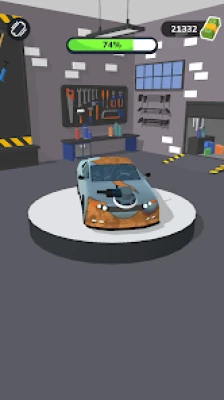
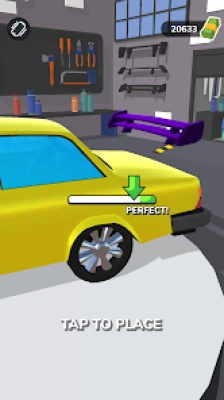
Car Master 3D is a car mechanic simulation game that puts you in charge of a busy automotive workshop. Instead of competing in traditional races, you focus on restoring vehicles, fixing damage, improving their appearance, and satisfying customers.
The gameplay combines hands-on repair activities with simple business progression. You might remove scratches, repair dents, inflate tires, repaint a vehicle, install new wheels, replace damaged windows, or add decorative features. Completing jobs earns money that you can use to upgrade your garage, improve your equipment, and access additional customization choices.
As you progress, you encounter different types of vehicles, including sports cars, police cars, ambulances, taxis, and food trucks. Special VIP jobs provide another reason to keep improving your skills and workshop.
Car Master 3D is designed for short, accessible gaming sessions. Its simple controls make the game easy to learn, while the variety of repair tasks keeps the experience moving from one activity to another.
Main Features of Car Master 3D
Car Repair and Restoration
Repairing damaged vehicles is central to the game. Customers arrive with cars that need attention, and your job is to complete the required tasks. Fixing dents, restoring damaged bodywork, and replacing broken components helps transform neglected vehicles into cleaner, more attractive rides.
Car Washing and Polishing
Cleaning is another important part of the restoration process. Washing and polishing vehicles improves their appearance and gives you a different type of task from mechanical repairs. Careful coverage helps ensure that the vehicle looks properly restored before the job ends.
Car Painting and Color Customization
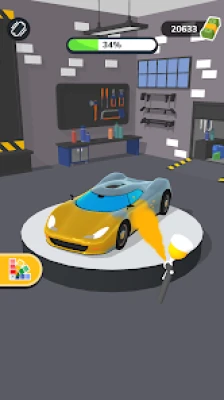
The painting mini-games let you refresh vehicle bodywork with different colors. You can also unlock additional visual options as you develop your workshop. Choosing an appealing finish gives each restoration a more personalized appearance.
Wheels, Spoilers, and Accessories
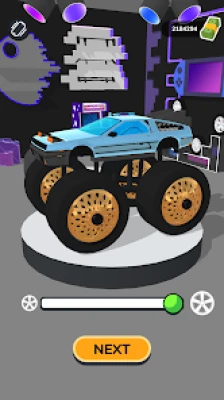
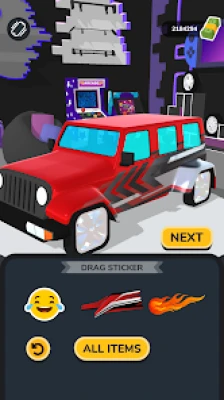
Car Master 3D includes customization options such as alternative wheels, spoilers, stickers, decals, logos, and tinted windows. These features allow you to change the appearance of vehicles beyond basic cleaning and repair.
Multiple Vehicle Types
The garage serves a variety of customers, and each vehicle can bring different repair requirements. Sports cars, emergency vehicles, taxis, and commercial vehicles add visual variety to the experience.
Garage Upgrades and Equipment Improvements
Money earned from completed jobs can be invested in the workshop. Improving your workspace and tools supports your continued progression and helps you access additional features.
VIP Vehicle Jobs
Special VIP levels introduce vehicles associated with more exclusive customers. These jobs add variety to the regular repair cycle and give you another goal as your garage develops.
Colorful 3D Graphics
The game uses stylized 3D visuals to present its cars, tools, and workshop environment. Clear visual feedback makes it easier to follow each repair activity and see the difference between a damaged vehicle and its restored version.
How to Play Car Master 3D
Accept a Customer's Vehicle
Each new job begins with a vehicle that needs specific services. Examine the car and follow the prompts to identify the available repair and customization activities.
Complete the Required Mini-Games
Use the appropriate tool for each task. Some activities involve tracing over damaged areas, while others require accurate timing or careful movement. Follow the on-screen instructions and pay attention to the game's visual indicators.
Restore the Vehicle's Appearance
Depending on the job, you may need to remove dents, grind away old paint, wash the bodywork, inflate tires, install wheels, or apply a fresh coat of paint. Complete the requested activities as carefully as possible.
Finish the Customization Tasks
Certain jobs let you select visual upgrades such as spoilers, decals, and different wheel designs. Follow the available options and make sure you complete the required steps before moving on.
Earn Cash and Upgrade Your Garage
Successful jobs provide money that can be spent on workshop improvements, tools, and additional customization options. Use these earnings to develop your garage and prepare for future jobs.
Progress to New Challenges
As you level up, your repair capabilities improve and more opportunities become available. Continue completing customer orders, investing in useful upgrades, and taking on special jobs as they appear.
Complete Car Master 3D Strategy Guide
How to Earn More Money
Your earnings depend partly on how well you complete the repair activities. Focus on accuracy rather than rushing through every mini-game. Correctly aligning tools, covering the intended work area, and hitting timing targets can help you earn better rewards.
Make each customer job an opportunity to improve both your skills and your garage balance. Consistent performance is more useful than repeatedly finishing tasks carelessly and missing opportunities for better results.
Rewarded advertisements may offer additional cash or bonus prizes. If these options appear, consider whether the extra reward is worth your time.
How to Repair Car Dents Correctly
Dent repair requires careful positioning. Move the tool or adjust the damaged area according to the on-screen guidance. When the game displays a green indicator, treat it as a sign that you have reached the preferred position.
Avoid making large, hurried adjustments. Small movements can make it easier to find the correct alignment and complete the repair successfully.
How to Paint Cars Efficiently
Painting and grinding tasks require you to cover the relevant bodywork. Move steadily across the car instead of concentrating on one small area for too long.
Pay particular attention to the roof, sides, and other visible sections that the mini-game asks you to treat. Follow the task's visual feedback rather than assuming that a single pass has covered everything.
The goal is to complete the requested work cleanly and thoroughly, not to move the tool as quickly as possible.
How to Inflate Tires Successfully
The tire inflation mini-game tests your timing. Watch the moving indicator and aim to activate the control when it is approaching the target zone, allowing for any delay between pressing and the action taking effect.
Pressing too early or too late may cause you to miss the preferred range. Practice observing the indicator's movement so that you can anticipate the correct moment instead of reacting at the last second.
How to Choose Wheels and Accessories
Different wheels, spoilers, and decorative parts give vehicles a distinct appearance. Explore the available choices and prioritize options that appeal to you or help you complete the current job.
Some customization items may need to be unlocked or obtained through progression and optional rewards. You do not need to pursue every accessory immediately. Focus on developing the garage while gradually expanding your collection of visual options.
How to Upgrade Your Workshop
Garage upgrades are an important part of long-term progression. Rather than spending money randomly, invest in improvements that support your next goals.
If you are still learning the repair mini-games, prioritize upgrades that help you progress through regular jobs. As additional options become available, consider investing in equipment and customization features that make your workshop more capable.
Keep enough money available for useful future improvements instead of spending your entire balance whenever a new item appears.
How to Unlock More Customization Options
Progress through customer jobs and level up to expand the options available in your workshop. New equipment and accessories give you more ways to personalize vehicles and improve your garage.
Check the available upgrades regularly, especially when you have accumulated enough cash to unlock something useful. If a rare item or special design becomes available, compare its value with other improvements before deciding how to spend your money.
How to Handle VIP Cars
VIP vehicles are special jobs that add variety to the usual repair routine. Approach them with the same attention to detail as regular customer orders.
Follow each task carefully, complete the required repairs, and avoid rushing through timing-based activities. Use your experience from earlier jobs to handle unfamiliar vehicles and make the most of the rewards offered.
How to Make the Most of Every Customer Job
Treat every vehicle as a series of individual objectives. Identify the required services, complete each mini-game carefully, and check whether any customization steps remain unfinished.
This approach helps you avoid overlooking tasks and makes the repair process easier to manage. As you become familiar with the controls, you will spend less time figuring out each activity and more time completing jobs efficiently.
Best Beginner Tips for Car Master 3D
Follow the On-Screen Instructions
Each mini-game can use different controls or timing requirements. Read the prompts before starting instead of assuming that every repair works the same way.
Focus on Accuracy First
Speed is not always the best way to complete a repair. Learn how the tools respond, watch the visual indicators, and make controlled movements until you understand the task.
Practice the Timing Mini-Games
Tire inflation and other timing-based activities become easier when you recognize the movement patterns. Anticipate the target rather than waiting until the indicator reaches it.
Complete the Entire Work Area
During painting, grinding, and cleaning activities, pay attention to all the sections the game expects you to cover. Check the visual feedback before finishing the task.
Spend Money With a Plan
Use your earnings to improve your garage and unlock useful options. Avoid making purchases simply because they are available if another upgrade would help you progress more effectively.
Try Different Customization Styles
Experiment with colors, wheels, spoilers, and decals whenever the game allows you to do so. Customization is one of the most enjoyable parts of Car Master 3D, so take advantage of the creative choices available.
Consider Optional Rewards
Rewarded advertisements may offer additional money or prizes. Use them selectively when the available reward would meaningfully support your progress.
Advanced Car Master 3D Tips and Tricks
Develop Consistent Repair Techniques
Once you understand a mini-game, repeat the same controlled approach instead of experimenting unnecessarily. Consistent tool movement can make painting and grinding more manageable, while careful positioning helps with dent repair.
Learn the Differences Between Tasks
Not every repair should be approached in the same way. Painting rewards thorough coverage, dent repair benefits from accurate positioning, and tire inflation depends on timing.
Recognizing these differences helps you adapt to each task instead of relying on one general technique.
Balance Garage Development With Personalization
Car customization is rewarding, but workshop development is also important. Balance purchases between useful upgrades and the accessories that make your vehicles look distinctive.
This approach lets you enjoy the creative side of the game without neglecting your overall progression.
Use Short Sessions Effectively
Car Master 3D works well for brief gaming sessions. Complete several customer jobs, collect your earnings, and make a useful upgrade before stopping.
When you return, you can continue developing your garage without needing to remember a complicated sequence of objectives.
Approach Repetitive Jobs as Practice
Some repair activities may begin to feel familiar after many completed orders. Use these opportunities to improve your timing, refine your movements, and complete the tasks more confidently.
Better familiarity with the mini-games can make routine jobs feel smoother and help you maintain consistent performance.
Common Mistakes to Avoid in Car Master 3D
Rushing Through Repairs
Moving too quickly can lead to poor alignment, missed timing windows, or incomplete coverage. Slow down enough to understand the objective and respond to the game's feedback.
Ignoring Visual Indicators
Colors and other on-screen signals help communicate whether you are performing a task correctly. Pay attention to them rather than relying entirely on guesswork.
Spending Cash Without Priorities
Buying every available upgrade can delay more useful improvements. Decide what you want to unlock next and direct your earnings toward that goal.
Forgetting the Roof and Other Body Panels
Painting and grinding tasks may require attention to less obvious areas of the vehicle. Check the roof and other visible surfaces whenever they are part of the current objective.
Treating Every Mini-Game Identically
Different activities require different approaches. Learn the specific technique for each repair rather than trying to complete everything with the same speed or movement pattern.
Expecting Every Accessory to Be Available Immediately
Some designs and equipment options require additional progression. Continue completing jobs and improving the workshop instead of assuming that every item can be unlocked at the beginning.
Is Car Master 3D a Racing Game?
Car Master 3D is primarily a car repair and customization simulation, not a traditional racing game. The main activities involve repairing damaged vehicles, painting bodywork, replacing parts, and improving cars' appearances rather than competing on race tracks.
Can You Customize Cars in Car Master 3D?
Yes. The game includes several customization options, such as paint colors, wheels, spoilers, stickers, decals, logos, and tinted windows. The available choices depend on your progression and the options unlocked in the workshop.
How Do You Get Better at Car Master 3D?
The best way to improve is to learn the mechanics of each repair mini-game. Practice careful positioning for dent repairs, steady movement for painting and grinding, and accurate timing when inflating tires. Combine these skills with sensible garage upgrades to make continued progression easier.
Is Car Master 3D Free to Play?
Car Master 3D is available as a free-to-play mobile game with advertisements and optional in-app purchases. Some rewards and customization opportunities may be associated with optional advertisements or purchases.
Can You Play Car Master 3D Offline?
The game is listed as supporting offline play. However, certain features, advertisements, purchases, or other online-dependent functions may require an internet connection.
Is Car Master 3D Suitable for Casual Players?
Yes. Its simple controls, colorful graphics, and short repair activities make it suitable for casual players. The game is particularly appealing to people who enjoy cars, creative customization, and straightforward simulation experiences.
Is Car Master 3D Worth Playing?
Car Master 3D is worth trying if you enjoy restoring vehicles and experimenting with different car designs. Its combination of repair mini-games, garage upgrades, and customization options provides a relaxed alternative to racing-focused mobile games.
Players who prefer complex mechanical simulations or deep vehicle engineering may find the mechanics relatively simple. However, those looking for accessible gameplay and satisfying visual transformations may appreciate its straightforward design.
Final Thoughts on Car Master 3D
Car Master 3D combines car restoration, garage management, and creative customization in an accessible mobile game. From repairing dents and painting bodywork to replacing wheels and adding spoilers, each customer job offers a chance to improve your workshop and develop your repair skills.
The best strategy is to learn each mini-game, pay attention to visual indicators, complete repair tasks carefully, and invest your earnings in useful upgrades. As your workshop develops, you can unlock additional customization options and take on a wider variety of vehicles.
Whether you enjoy fixing damaged cars, creating distinctive designs, or gradually upgrading your own virtual garage, Car Master 3D offers a straightforward and entertaining way to experience the world of car repair and customization.
Rate the Game
User Reviews












Popular Games



















 Android
 iOS
 Windows
 Xbox