





Latest Version
August 18, 2026
Easybrain Ltd
Puzzle
iOS
0
Report a Problem
More About :game
Sudoku.com is a mobile Sudoku game built around the familiar 9×9 number puzzle.
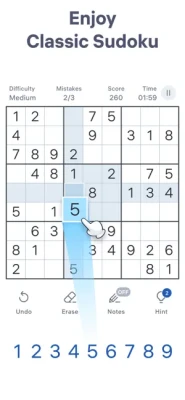
The objective is simple: fill every empty cell with numbers from 1 to 9 while making sure that each number appears only once in every row, column, and 3×3 block.
What makes this version more than a basic digital Sudoku book is the collection of supporting features around the puzzles. Players can use notes, hints, automatic checking, duplicate highlighting, statistics, daily challenges, trophies, seasonal events, medals, and other tools while progressing through thousands of puzzles.
Classic Sudoku Gameplay
The heart of the game remains traditional Sudoku.
Every puzzle uses a 9×9 grid divided into nine smaller 3×3 blocks. You must place numbers from 1 through 9 so that:
- Every row contains 1–9 without repetition.
- Every column contains 1–9 without repetition.
- Every 3×3 block contains 1–9 without repetition.
- The completed puzzle has one solution.
This familiar structure makes Sudoku.com easy to understand while leaving plenty of room for increasingly difficult logical challenges.
Thousands of Sudoku Puzzles
Sudoku.com offers a large collection of classic number puzzles.
The Android listing currently describes the game as having 10,000+ classic Sudoku puzzles, giving players a substantial amount of content across different difficulty levels.
That variety makes the game suitable for both quick daily sessions and longer puzzle-solving sessions.
Six Difficulty Levels
The game provides six difficulty levels:
- Fast
- Easy
- Medium
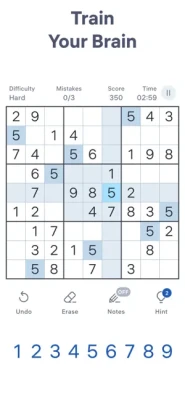
- Hard
- Expert
- Giant
This progression allows new players to learn the fundamentals before moving toward more demanding puzzles. Experienced Sudoku players can jump directly into the harder categories.
Fast and Easy Sudoku
These levels are suitable for beginners or players who want a quick mental workout.
They are useful for learning basic Sudoku techniques and becoming comfortable with the interface.
Medium Sudoku
Medium puzzles introduce more situations where you need to carefully compare rows, columns, and blocks.
Hard Sudoku
Hard puzzles require stronger logical reasoning and more careful candidate management.
Expert Sudoku
Expert puzzles are designed for experienced Sudoku players who enjoy more complex solving situations.
Giant Sudoku
The Giant difficulty provides an additional challenge for players looking for tougher number puzzles.
Daily Sudoku Challenges
Daily Challenges give you a reason to return every day.
Completing daily Sudoku puzzles allows you to work toward unique trophies, turning the simple daily puzzle into a longer-term achievement system.
A daily Sudoku routine can also be a convenient way to fit a short logic puzzle into your day.
Seasonal Events
Sudoku.com also includes seasonal events.
These events provide themed challenges and rewards, including unique medals. The current App Store listing, for example, highlights special events such as Student Life and Desert World.
This adds variety beyond the standard puzzle collection.
Notes for Better Solving
The Notes feature is especially useful for intermediate and advanced Sudoku players.
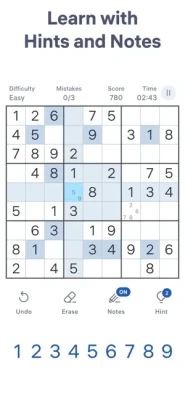
Instead of entering a final answer immediately, you can record possible numbers inside a cell.
The app automatically updates notes when numbers are entered, helping reduce manual bookkeeping and making the digital experience closer to solving Sudoku with pencil and paper.
Hints
If you become stuck, hints can help you continue.
Hints are useful for beginners who are still learning Sudoku techniques as well as experienced players who encounter a particularly difficult section.
The important advantage is that you can choose whether to use assistance or solve the puzzle entirely on your own.
Auto-Check
Auto-Check provides immediate feedback when you make a mistake.
Players who prefer a traditional solving experience can instead challenge themselves to identify their own errors.
This flexibility makes the game suitable for different playing styles.
Highlight Duplicate Numbers
Duplicate highlighting helps identify repeated numbers in a row, column, or 3×3 block.
This is particularly useful for beginners because it makes one of the fundamental Sudoku rules easier to understand visually.
Statistics and Progress Tracking
Sudoku.com includes statistics so you can monitor your performance.
The Android listing specifically mentions tracking statistics such as your best time and achievements for each difficulty level.
This creates a natural progression loop:
Solve → Track → Improve → Challenge Yourself
If you're trying to become faster or more accurate, the statistics provide useful feedback.
Unlimited Undo
Making a mistake doesn't necessarily mean starting over.
The Android version lists unlimited undos, allowing players to quickly reverse previous moves and experiment with different solving possibilities.
This is especially useful when testing advanced logical deductions.
Auto-Save
Sudoku.com also supports automatic saving.
If you leave an unfinished puzzle, your progress can be preserved so you can return later and continue solving.
This makes the game convenient for short sessions throughout the day.
Eraser
The eraser allows you to remove numbers you have entered.
This is useful when a deduction changes or when you realize that a previous assumption was incorrect.
Highlighting Rows, Columns and Blocks
Selecting a cell can highlight its related row, column, and 3×3 block.
This visual assistance makes it easier to understand which cells are connected to your current decision.
Offline Sudoku
The Android listing explicitly describes Sudoku.com as playable offline, making it useful when an internet connection isn't available.
This makes it a practical choice for travel, commuting, or places with limited connectivity.
How to Play Sudoku.com
Step 1: Choose a Difficulty
Start with Easy or Medium if you're learning, or select Expert if you're already comfortable with advanced Sudoku.
Step 2: Examine the Grid
Look for rows, columns, or blocks that are almost complete.
Step 3: Find Missing Numbers
Identify which numbers are missing and determine where they can legally go.
Step 4: Use Notes
When you're uncertain, record possible candidates instead of making a guess.
Step 5: Look for Singles
If only one number can fit into a particular cell, you've found a useful deduction.
Step 6: Check Rows and Columns
Every placement changes the possibilities elsewhere on the board.
Step 7: Use Advanced Techniques
As puzzles become harder, look for pairs, triples, hidden singles, and other logical patterns.
Step 8: Complete the Grid
Continue eliminating possibilities until every cell is correctly filled.
Beginner's Sudoku Guide
If you're new to Sudoku, don't try to solve the entire board at once.
Instead, look for easy opportunities.
Start With Nearly Completed Rows
If a row contains eight numbers, the missing number is immediately obvious.
Check 3×3 Blocks
Small blocks often provide easier deductions than large sections of the puzzle.
Use Notes
When more than one number could fit, write the candidates down.
Avoid Guessing
Sudoku is fundamentally a logic puzzle. Try to find a deduction rather than randomly placing numbers.
Advanced Sudoku Strategy
Experienced players can move beyond simple missing-number searches.
Useful techniques include:
- Naked singles
- Hidden singles
- Naked pairs
- Hidden pairs
- Triples
- Candidate elimination
- Box-line interactions
- Scanning rows and columns
- Pattern recognition
The harder the puzzle becomes, the more important it is to maintain accurate notes.
Sudoku Solving Tips
1. Scan the Whole Board
Don't spend too long staring at one area.
2. Look for Numbers With Limited Positions
If a particular number can only appear in one cell of a block, you have a strong deduction.
3. Keep Notes Updated
Outdated candidates can make difficult puzzles much harder.
4. Use the Highlight Feature
It can help you understand the relationship between cells.
5. Don't Rush
A fast completion time is useful, but accuracy should come first.
6. Learn From Mistakes
If you use Auto-Check, pay attention to why your assumption was wrong.
7. Challenge Yourself Gradually
Move from Easy to Medium, then Hard and Expert rather than jumping into the most difficult puzzle immediately.
Game Progression
Sudoku.com doesn't use a traditional character-based RPG progression system.
Instead, progression comes through:
- Difficulty levels
- Daily Challenges
- Trophies
- Seasonal Events
- Medals
- Statistics
- Completion records
- Best times
- Personal improvement
This makes the experience focused on mastering Sudoku rather than leveling up a character.
Game Modes & Activities
| Mode / Feature | Description |
|---|---|
| Classic Sudoku | Traditional 9×9 number puzzles |
| Daily Challenges | Daily puzzles with trophy rewards |
| Seasonal Events | Limited-time themed challenges |
| Difficulty Levels | Six levels from Fast to Giant |
| Statistics | Track times and achievements |
| Notes | Record possible candidates |
| Hints | Assistance when you're stuck |
| Auto-Check | Detect mistakes while solving |
| Offline Play | Solve puzzles without an internet connection on Android |
The core feature set is documented by the current App Store and Google Play listings.
Relaxing Brain Game
Sudoku.com is designed to work both as a competitive puzzle and as a relaxing mental activity.
You can complete a quick puzzle during a short break or spend considerably longer working through an Expert challenge.
The App Store describes the game as useful for keeping the brain active, unwinding from stress, and taking a short stimulating break.
Is Sudoku Good for Your Brain?
Sudoku is a logic puzzle that requires concentration, pattern recognition, memory of possibilities, and deductive reasoning.
It's better to describe Sudoku as a mental workout or brain-training activity rather than claim that it provides specific medical or cognitive benefits.
Sudoku.com itself presents its puzzles as a way to keep your mind active and challenge your thinking.
Player Experience
Sudoku.com has an exceptionally large player base.
The current US App Store listing shows approximately 4.8 out of 5 stars from 1.8 million ratings, demonstrating very strong overall reception.
Players frequently praise the app's:
- Clean interface
- Large puzzle selection
- Difficulty progression
- Daily challenges
- Statistics
- Events
- Simple controls
- Helpful solving tools
Some reviews also criticize advertising, input sensitivity, and certain default settings. The developer has responded to complaints about ads by pointing users toward the available ad-free purchase.
Pros & Cons
Pros
- Thousands of classic Sudoku puzzles
- 10,000+ puzzles listed on Google Play
- Six difficulty levels
- Beginner-friendly
- Expert-level challenges
- Daily Challenges
- Seasonal Events
- Trophies
- Medals
- Statistics
- Notes
- Auto-Check
- Duplicate highlighting
- Hints
- Unlimited undo
- Auto-save
- Eraser
- Offline play on Android
- iPhone and iPad support
- Strong player rating
- Simple interface
Cons
- Advertising is included
- Optional ad-free purchase costs extra
- Some players dislike interruptions during puzzles
- Small input areas can occasionally cause accidental taps
- Advanced players may want more specialized Sudoku variants
Advertising & In-App Purchases
Sudoku.com is free to download and includes advertising and optional purchases.
The current US App Store listing shows an ad-free purchase for $14.99.
Player reviews have specifically mentioned advertisements as one of the game's main frustrations, while the developer points to the ad-free option available through the app's settings.
Technical Details
Game: Sudoku.com – Number Games
Developer: Easybrain Ltd
Category: Board
Genre: Sudoku / Logic Puzzle / Number Game
Platform: iPhone, iPad
Price: Free
In-App Purchases: Yes
Advertising: Yes
Age Rating: 13+
Current App Store Size: Approximately 262.8 MB
iOS Requirement: iOS 15.0 or later
Languages: English plus 16 additional languages
Game Type: Single-player logic puzzle
Android: Available
Offline: Yes on Android
Google Play Update: July 2, 2026
Is Sudoku.com Free?
Yes. Sudoku.com is free to download, although it contains advertising and optional in-app purchases.
Does Sudoku.com Have Thousands of Puzzles?
Yes. The Android listing currently describes 10,000+ classic Sudoku puzzles.
How Many Difficulty Levels Does It Have?
The Google Play listing identifies six difficulty levels: Fast, Easy, Medium, Hard, Expert, and Giant.
Does Sudoku.com Have Daily Challenges?
Yes. Daily Challenges reward players with unique trophies.
Does Sudoku.com Have Events?
Yes. Seasonal and special events offer themed Sudoku challenges and rewards such as medals.
Does Sudoku.com Have Hints?
Yes. Hints are available when you need assistance solving a difficult section.
Can You Take Notes?
Yes. The Notes system allows you to record possible numbers in cells, with notes automatically updated as you enter numbers.
Does Sudoku.com Have Auto-Check?
Yes. Auto-Check can identify mistakes while you're solving. You can also disable it if you prefer to find mistakes yourself.
Can You Play Sudoku.com Offline?
The Android listing explicitly says the game can be played offline.
Is Sudoku.com Good for Beginners?
Yes. The lower difficulty levels, hints, duplicate highlighting, notes, and Auto-Check make it approachable for new Sudoku players.
Is Sudoku.com Good for Experts?
Yes. Expert and Giant puzzles provide substantially more challenging boards for experienced players.
Does Sudoku.com Track Your Progress?
Yes. Statistics allow you to track performance, including achievements and best times for different difficulty levels.
Does Sudoku.com Have Multiplayer?
The core game is single-player. Its main competitive elements are personal statistics, trophies, events, and other progression systems rather than traditional real-time multiplayer.
Is Sudoku.com Worth Playing?
Yes.
Sudoku.com is particularly strong if you want a straightforward Sudoku experience with a large puzzle library and plenty of optional tools.
The game successfully serves two audiences at once: beginners can use hints and Auto-Check to learn, while experienced players can disable assistance and work through Expert-level challenges.
Daily Challenges, seasonal events, trophies, medals, statistics, and thousands of puzzles also provide plenty of reasons to keep returning.
Its main weakness is advertising. Some players find the interruptions frustrating, although an ad-free purchase is available.
Expert Rating
| Category | Rating |
|---|---|
| Sudoku Gameplay | 9.6/10 |
| Puzzle Variety | 9.4/10 |
| Difficulty Progression | 9.5/10 |
| Beginner Accessibility | 9.5/10 |
| Advanced Challenge | 9.2/10 |
| Daily Content | 9.2/10 |
| Progress Tracking | 9.0/10 |
| Interface | 9.1/10 |
| Replay Value | 9.5/10 |
| Monetization | 7.5/10 |
| Overall | 9.2/10 |
Final Verdict
Sudoku.com – Number Games is one of the most comprehensive classic Sudoku apps for mobile players.
It keeps the traditional 9×9 Sudoku format at the center while adding thousands of puzzles, six difficulty levels, daily challenges, seasonal events, trophies, medals, notes, hints, Auto-Check, duplicate highlighting, statistics, undo, and auto-save.
Its enormous App Store audience and current 4.8/5 rating from about 1.8 million ratings also show how established the game has become.
The experience isn't perfect. Advertising remains a common criticism, and some users have reported frustrations with input sensitivity or default settings.
For anyone searching for a classic Sudoku game, free number puzzles, daily Sudoku challenges, brain games, logic puzzles, or expert Sudoku for iPhone and iPad, however, Sudoku.com remains a strong choice.
Overall Rating: 9.2/10
Frequently Asked Questions
What is Sudoku.com – Number Games?
It is a mobile Sudoku puzzle game from Easybrain featuring thousands of classic Sudoku puzzles, multiple difficulty levels, daily challenges, events, statistics, hints, notes, and other solving tools.
Who developed Sudoku.com?
Sudoku.com is developed by Easybrain Ltd.
Is Sudoku.com free?
Yes. The game is free to download with advertising and optional in-app purchases.
How many Sudoku puzzles are available?
The Google Play listing currently states that the game contains 10,000+ classic Sudoku puzzles.
What difficulty levels are available?
Fast, Easy, Medium, Hard, Expert, and Giant are listed on Google Play.
Does Sudoku.com have daily puzzles?
Yes. Daily Challenges provide a new reason to play regularly and offer trophy rewards.
Does Sudoku.com have hints?
Yes. Players can use hints when they get stuck.
Can I play without hints?
Yes. You can choose to solve puzzles without assistance.
Does it have a notes feature?
Yes. Notes allow you to record possible numbers inside cells and are automatically updated as you make progress.
Does Sudoku.com have Auto-Check?
Yes. Auto-Check can identify incorrect entries while you solve.
Can I undo moves?
Yes. The Android listing includes unlimited undo.
Does it save unfinished puzzles?
Yes. Auto-save allows you to return to unfinished games later.
Can I play Sudoku.com offline?
The Android version is explicitly described as playable offline.
Is Sudoku.com available on iPhone?
Yes. The current App Store listing supports iPhone and iPad.
What iOS version is required?
The current US App Store listing requires iOS 15.0 or later.
How large is the iOS app?
The current App Store listing reports approximately 262.8 MB.
Does Sudoku.com contain advertisements?
Yes. Advertising is included in the free version. An ad-free purchase is available.
Does Sudoku.com have in-app purchases?
Yes. The current US App Store listing includes optional purchases, including an ad-free option.
Does Sudoku.com have achievements?
Yes. Daily Challenges provide trophies, while seasonal events provide medals and statistics track your progress.
Page Summary
Sudoku.com – Number Games delivers the classic Sudoku experience with enough additional content to keep both casual and dedicated puzzle players engaged.
The traditional 9×9 grid remains the foundation, while hints, notes, Auto-Check, duplicate highlighting, statistics, unlimited undo, auto-save, daily challenges, seasonal events, trophies, medals, and multiple difficulty levels make the app much more flexible than a simple digital Sudoku book.
With 10,000+ classic puzzles listed on Google Play and a huge iOS audience, it offers a substantial library for players who want a quick daily puzzle or a demanding Expert challenge.
Rate the Game
User Reviews















Popular Games



















 Android
 iOS
iOS Windows
 Xbox
Xbox