







Latest Version
August 03, 2025
DEVGEIM
Simulation
iOS
0
Report a Problem
More About :game
The game combines retail management with incremental business progression. Success depends on keeping products available, serving shoppers efficiently, managing expenses, and making smart decisions about when to expand. If you enjoy grocery store simulators, shop management games, and tycoon experiences, this game offers a chance to run your own retail business.
What Is Store Manager: My Supermarket?
Store Manager: My Supermarket puts you in charge of a growing retail business. Your journey begins with a modest shop, where selling everyday goods provides the money needed to improve operations.
As the supermarket develops, you can introduce more products, employ additional staff, increase sales, and unlock more space. The challenge is to keep customers satisfied while making enough profit to support future upgrades.
The main objective is to transform a small mini mart into a thriving supermarket by managing inventory, employees, customer service, and store expansion.
Main Game Features
1. Build Your Own Supermarket
Start with a small retail shop and gradually develop a larger supermarket. Each improvement creates new opportunities to increase sales and serve more customers.
2. Stock Shelves With Different Products
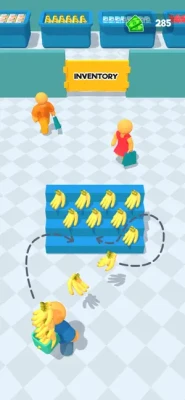
Sell a variety of goods, including vegetables, meat, fish, perfume, electronics, and other retail products. Keeping the right items available is essential for attracting shoppers and maintaining sales.
3. Hire Employees
Recruit sellers and cashiers to support daily operations. A capable team helps reduce the burden of managing every task yourself and allows the business to handle more customers.
4. Manage Cash Registers
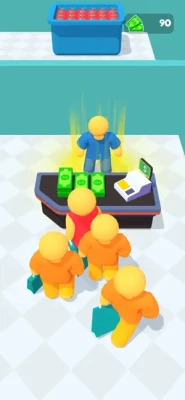
Process customer purchases and keep checkout operations moving. Efficient service helps reduce delays and supports a smoother shopping experience.
5. Earn Money and Increase Profits
Every successful sale contributes to your business earnings. Reinvest your income in useful improvements instead of spending it all on unnecessary upgrades.
6. Expand Your Store
Use your earnings to enlarge the supermarket and create room for additional products and operations. Expansion provides new goals as your retail business grows.
7. Casual Tycoon Gameplay
The straightforward management mechanics make the game accessible to players who enjoy business simulations without complicated financial systems.
Complete Strategy Guide for Store Manager: My Supermarket
1. Focus on Consistent Sales First
At the beginning, concentrate on establishing a reliable source of income. Keep your available products stocked and make sure customers can complete their purchases.
Avoid expanding too quickly. A small store that operates efficiently can be more profitable than a larger store with empty shelves and insufficient staff.
2. Keep Popular Products Available
Inventory management is one of the most important parts of running a successful supermarket.
Check which products need replenishing and prioritize goods that sell regularly. Empty shelves can mean missed sales, while purchasing too much stock can tie up money that could be used for important upgrades.
Aim for a balance between product variety and reliable availability.
3. Hire Staff When They Provide Real Value
Employees can help you manage sales and reduce the amount of work required to keep the store running.
Consider hiring cashiers and sales staff when customer demand begins to exceed what you can comfortably manage yourself. However, avoid spending your entire balance on employees before your business can support their cost.
Pro tip: Expand your workforce gradually, matching staffing levels to the size and needs of your supermarket.
4. Upgrade Before Expanding
Store expansion is exciting, but opening more space does not automatically guarantee higher profits.
Before unlocking a larger area, make sure your current shop has sufficient stock, a dependable income source, and enough staff to handle its workload.
Improving the existing store first can help you generate the money needed to support a larger operation.
5. Manage Your Money Carefully
Treat every purchase as a business decision. Some upgrades can improve daily operations, while others primarily create opportunities for future growth.
A practical spending priority is:
Maintain enough inventory to support regular sales.
Improve checkout and employee efficiency.
Invest in upgrades that help increase earnings.
Save money for worthwhile expansion opportunities.
Keep a reserve whenever possible. Having money available gives you more flexibility when new products, employees, or store upgrades become accessible.
6. Choose Products With Growth in Mind
As additional product categories become available, consider which ones best support your current business.
A wider product selection can attract more customers, but it also introduces additional stocking requirements. Unlock new categories when you can manage them without neglecting the products your store already sells.
7. Improve Customer Service
Customers are central to your supermarket's success. Delays, unavailable products, and inefficient checkout operations can undermine the shopping experience.
Keep shelves organized, maintain a suitable number of employees, and address the tasks that cause the most disruption.
If checkout becomes a bottleneck, prioritize improvements that help customers complete their purchases more quickly.
8. Expand at the Right Time
Before purchasing additional store space, consider three factors: your current earnings, your ability to maintain inventory, and the staffing needed to operate the larger supermarket.
Expansion is most useful when your existing business is stable enough to support it.
Avoid opening new sections simply because the option becomes available. Build a strong foundation first, then use expansion to increase your earning potential.
9. Avoid Common Beginner Mistakes
Expanding too early: More space creates additional management responsibilities. Improve your current operation before taking on a larger store.
Ignoring empty shelves: Customers cannot purchase products that are unavailable. Make replenishment a regular priority.
Hiring too many employees at once: Increase staffing gradually as your workload grows.
Spending all your earnings: Keep some money available for inventory and essential improvements.
Unlocking too many product categories: A larger selection is only helpful if you can keep it stocked.
Ignoring checkout efficiency: Slow service can make it harder to manage growing customer demand.
Advanced Tips for Building a Successful Supermarket
Develop a Balanced Retail Operation
A profitable supermarket needs more than a large selection of goods. Inventory, employees, checkout operations, and store space must work together.
If sales are growing but the store is becoming difficult to manage, focus on operational efficiency before making another expansion purchase.
Reinvest Profits Strategically
Instead of buying every available upgrade, select improvements that solve an immediate problem or support your next progression goal.
For example, if customers cannot find the products they need, improve inventory availability. If the checkout process is slowing down, invest in the systems or staff responsible for serving customers.
Set Clear Goals for Each Stage
Give yourself one main objective at a time. You might focus on stabilizing inventory, improving staffing, unlocking a new product category, or saving for a store expansion.
A clear goal makes it easier to decide where your money should go.
Graphics, Atmosphere, and Gameplay Experience
Store Manager: My Supermarket offers a casual retail management experience centered on the everyday activities of running a grocery business.
The appeal comes from watching a small shop gradually grow into a larger store with more products, staff, and customers. Inventory management and employee hiring provide simple strategic choices, while earning money and expanding the business create a steady sense of progression.
Players who enjoy organizing shops and building virtual businesses may appreciate its straightforward approach. However, those seeking a deep economic simulator may find the management systems relatively simple.
Honest Review: Is Store Manager: My Supermarket Worth Playing?
Store Manager: My Supermarket is worth considering if you enjoy supermarket simulators, casual tycoon games, and business management experiences.
Its main strengths are the accessible gameplay, variety of retail products, employee management, and the goal of growing a small shop into a larger supermarket.
The experience may become repetitive for players who prefer more complex management systems. Progress also depends on balancing inventory, staffing, and expansion rather than simply purchasing more store space.
The game's listing and available versions may change, so check the current App Store information for compatibility and the latest release details.
Pros
Easy-to-understand retail management.
A variety of products to sell.
Employee hiring and cashier management.
Gradual supermarket expansion.
A clear business-building objective.
Suitable for casual gaming sessions.
Cons
Repetitive stocking and selling activities.
Expansion requires careful financial management.
Inventory and employee tasks may become repetitive.
The management systems may feel simple to experienced tycoon players.
Availability of updates and support may vary.
Game Information
Game title: Store Manager: My Supermarket
Developer: DEVGEIM
Genre: Simulation, casual, supermarket management, and tycoon.
Platform: iPhone and iPad.
Price: Free to download, according to the available listing.
Main gameplay: Stocking products, selling goods, hiring employees, operating cash registers, earning money, and expanding a supermarket.
Target audience: Players who enjoy casual business simulations and retail management games.
Frequently Asked Questions
What is Store Manager: My Supermarket?
It is a supermarket simulation game in which players manage a mini mart, sell different products, hire employees, increase profits, and expand their retail business.
How do you make money in Store Manager: My Supermarket?
Sell available products, maintain sufficient inventory, serve customers efficiently, and reinvest your earnings in upgrades that support continued growth.
How do you expand your supermarket?
Earn money through sales and use your available funds to purchase additional store space when the required expansion options become available.
Which employees should you hire first?
Prioritize employees who address your biggest operational problem. Cashiers can help with checkout duties, while sales staff can support the wider retail operation.
Why are empty shelves a problem?
Unavailable products represent missed sales opportunities. Maintaining suitable inventory helps customers find what they want and supports consistent business income.
Is Store Manager: My Supermarket free?
The available listing identifies the game as free to download. Check the current store listing for any advertisements, in-app purchases, or other payment options.
Is the game suitable for casual players?
Yes. Its simple objectives and gradual progression make it suitable for players who enjoy relaxed store management without complicated business systems.
What is the best beginner strategy?
Keep your shelves stocked, establish consistent sales, hire employees when needed, save money for useful upgrades, and expand only when your current store is running efficiently.
YouTube Gameplay Video
Explore gameplay walkthroughs to see how the supermarket operates, how products are stocked, and how employees and store expansions contribute to business growth.
Suggested YouTube search title: Store Manager: My Supermarket Gameplay Walkthrough and Beginner Tips
Recommended gameplay topics:
Store Manager: My Supermarket full gameplay.
Store Manager: My Supermarket beginner guide.
Store Manager: My Supermarket employee hiring tips.
Store Manager: My Supermarket supermarket expansion guide.
Store Manager: My Supermarket money-making strategy.
A walkthrough can help new players understand the basic business cycle and identify useful priorities before investing their earnings.
Final Verdict
Store Manager: My Supermarket is a casual supermarket tycoon game built around stocking shelves, selling products, hiring staff, and growing a retail business. Its main appeal is the satisfaction of developing a small mini mart into a larger supermarket.
For the best results, maintain a reliable inventory, improve customer service, hire employees according to demand, and expand only when your finances can support the additional workload. A balanced approach to retail management will help you build a stronger business without wasting money on unnecessary upgrades.
Rate the Game
User Reviews















Popular Games



















 Android
 iOS
 Windows
 Xbox