


Latest Version
March 06, 2024
Unico Studio
Casual
Android
0
com.unicostudio.sentencethat
Report a Problem
More About :game
Why Players Love Sentence That
Sentence That combines classic word puzzles with sentence-building mechanics, creating a fresh challenge for fans of language games. Every completed sentence feels rewarding while helping players recognize common phrases and improve reading skills.
Whether you enjoy relaxing word games or brain-training puzzles, Sentence That provides a satisfying experience that works both online and offline.
Main Features
- Thousands of unique sentence puzzles
- Famous quotes and movie lines
- Inspirational sayings
- Proverbs and idioms
- Daily life expressions
- Offline gameplay
- Unlimited time to solve puzzles
- Helpful boosters
- Relaxing background music
- Smooth animations
- User-friendly interface
- Suitable for beginners and experienced word game players
- Regular performance improvements and bug fixes.
Gameplay
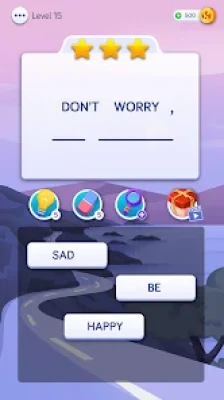
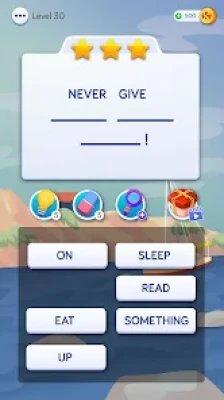
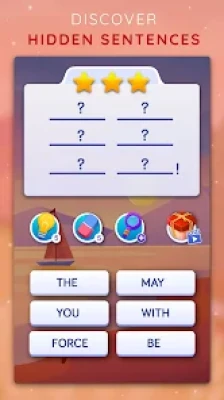
Each level presents several scrambled words.
Your objective is simple:
- Read every available word.
- Identify the logical sentence.
- Tap the words in the correct order.
- Complete the sentence to unlock the next puzzle.
Unlike crossword games, there are no clues or grids. Success depends on vocabulary, grammar, and logical thinking.
How to Play
- Read all available words carefully.
- Look for the subject and verb first.
- Identify common expressions.
- Arrange the remaining words logically.
- Use boosters if you become stuck.
- Finish the puzzle and collect rewards.
- Continue unlocking new challenges.
Helpful Tips for Beginners
- Start by identifying common phrases.
- Look for verbs before arranging other words.
- Read the entire sentence aloud in your mind.
- Don't rush—there is no time limit.
- Save boosters for more difficult puzzles.
- Practice daily to improve recognition speed.
Advanced Strategies
Experienced players can solve puzzles faster by:
- Recognizing common English sentence patterns.
- Looking for connecting words such as "the," "is," "are," "of," and "to."
- Identifying famous quotes before arranging every word.
- Eliminating impossible word combinations.
- Using punctuation hints whenever available.
Brain Training Benefits
Playing Sentence That regularly may help improve:
- Vocabulary
- Grammar recognition
- Reading comprehension
- Memory
- Logical thinking
- Pattern recognition
- Concentration
- Language skills
Because there is no countdown timer, players can think carefully before making decisions.
Difficulty Progression
The game starts with simple everyday sentences.
As you progress, you'll encounter:
- Longer sentences
- Famous quotations
- Movie quotes
- Idioms
- Proverbs
- Challenging word combinations
The gradual increase in difficulty keeps gameplay engaging without becoming overwhelming.
Offline Experience
One of the biggest advantages of Sentence That is its offline mode.
You can enjoy puzzles:
- During travel
- On flights
- While commuting
- Without Wi-Fi
- Without mobile data
Offline support makes it a great choice for casual daily gaming.
Player Feedback
Most players praise:
- Relaxing gameplay
- Easy-to-understand mechanics
- Large variety of sentence puzzles
- Excellent vocabulary practice
- Smooth user interface
- Educational value
- Good progression
Some players mention:
- Advertisements can appear frequently between levels.
- They would prefer fewer interruptions during extended play sessions.
Pros
- Easy to learn
- Thousands of puzzles
- Excellent brain exercise
- Offline support
- Relaxing gameplay
- Helpful boosters
- Clean interface
- Suitable for all ages
Cons
- Frequent ads in the free version
- Some advanced puzzles may be difficult for beginners
- Limited challenge for highly experienced language experts
Best Recommendations
To enjoy the game even more:
- Play a few levels every day.
- Don't rely on hints too quickly.
- Read completed sentences carefully.
- Learn unfamiliar idioms and sayings.
- Challenge yourself by completing puzzles without boosters.
- Use the game as a fun way to improve English vocabulary.
Who Should Play?
Sentence That is recommended for:
- Word puzzle fans
- Crossword lovers
- Brain-training enthusiasts
- Students
- English learners
- Adults
- Seniors
- Casual gamers
- Anyone looking for a relaxing offline game
Similar Games
If you enjoy Sentence That, you may also like:
- Word Pearls
- Popular Words
- Brain Test
- Brain Test 2
- Brain Test 3
- CodyCross
- Word Collect
- Word Search
- Crossword Jam
- Word Connect
Frequently Asked Questions
Is Sentence That free to play?
Yes. The game is free to download and includes optional in-app purchases and advertisements.
Can I play without an internet connection?
Yes. Most gameplay works completely offline.
Is Sentence That suitable for children?
Yes. Its simple gameplay and educational focus make it suitable for both kids and adults.
Does the game include famous quotes?
Yes. Players solve puzzles based on movie quotes, inspirational sayings, proverbs, idioms, and everyday expressions.
Does the game have a time limit?
No. You can solve puzzles at your own pace without any countdown timer.
YouTube Gameplay
Sentence That: Word Game Gameplay (YouTube)
Final Verdict
Sentence That: Word Game offers a refreshing twist on traditional word puzzles by focusing on sentence construction rather than simple word searches. Its thousands of handcrafted levels, offline support, educational value, and relaxing pace make it an excellent choice for players who enjoy language-based challenges. Although the free version contains advertisements, the engaging gameplay, smooth progression, and satisfying brain-training experience make it well worth trying for fans of word and puzzle games.
Rate the Game
User Reviews












Popular Games



















 Android
 iOS
iOS Windows
 Xbox
Xbox