

Latest Version
Update
February 28, 2026
February 28, 2026
Developer
Al Enthusiast Corp
Al Enthusiast Corp
Categories
Puzzle
Puzzle
Platforms
iOS
iOS
Views
0
0
Report
Report a Problem
Report a Problem
More About :game
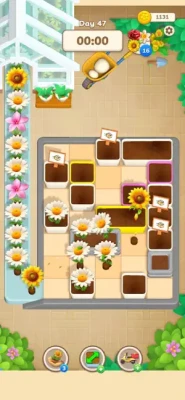
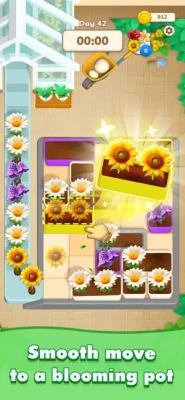
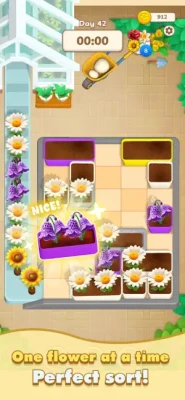
My Lovely Garden is a relaxing flower sorting puzzle game where colorful blooms must be moved into the correct pots according to their colors. Plan each move carefully, untangle tricky flower jams, use helpful boosters when you're stuck, and watch your garden become more vibrant as you progress. With soft animations, peaceful music, and simple drag-and-sort gameplay, it offers a calm puzzle experience that's easy to learn but increasingly challenging to master.
My Lovely Garden combines color sorting, strategic puzzle solving, and a relaxing garden theme.
Instead of simply matching identical objects, you need to slide flowers into their appropriate pots based on color. The challenge comes from planning your moves so that one incorrect placement doesn't create a difficult flower jam.
Every successful sorting decision helps bring more color and life to your virtual garden.
Flower Sorting Puzzle Gameplay
The central mechanic is straightforward:
Slide → Sort → Clear → Bloom
You move colorful flowers into the correct pots and organize them according to their colors.
The simplicity of the controls makes the game accessible from the first level, while the need to plan ahead gives the puzzles greater depth as situations become more complicated.
The developer describes the game as easy to pick up but hard to master, with careful planning required to avoid getting stuck.
How the Flower Sorting System Works
Each puzzle presents flowers that need to be organized into appropriate pots.
Your job is to determine:
Which flower should move first
Where it should be placed
Whether the move will block another flower
Which pot should receive the next bloom
How to avoid creating a flower jam
The key isn't simply making a correct move. It's making the right move at the right time.
Clear Tricky Flower Jams
One of the game's defining challenges is the flower jam.
A poorly planned move can leave flowers tangled or prevent you from making the next useful move.
When that happens, you need to rethink the board and find a way to restore order.
This turns what initially looks like a simple color-sorting game into a small exercise in planning and spatial reasoning.
Plan Ahead Before Every Move
The most important skill in My Lovely Garden is anticipation.
Before sliding a flower, ask yourself:
Where will this move leave the other flowers?
A move that appears correct in the short term might make the next several moves much harder.
Planning ahead helps you:
Avoid blocked pots
Prevent flower jams
Keep useful spaces available
Complete sorting sequences efficiently
Solve increasingly complicated puzzles
Boosters for Difficult Puzzles
Sometimes the puzzle becomes difficult enough that normal sorting isn't enough.
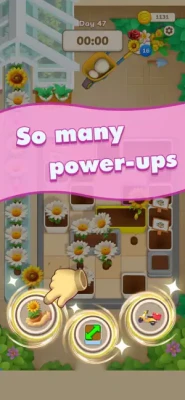
My Lovely Garden includes boosters designed to help clear the way when you're stuck.
These tools provide another option when a puzzle reaches an awkward state and help keep the experience moving instead of forcing you to restart immediately.
Grow Your Virtual Garden
The garden isn't simply a background.
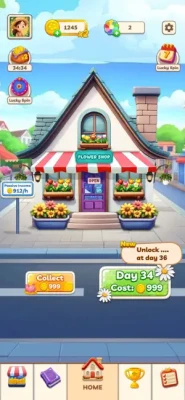
Successful flower sorting contributes to the game's overall garden-building experience.
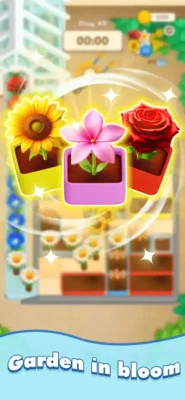
Every correctly sorted flower adds more life and color to your growing garden, creating a visual sense of progress alongside the puzzle progression.
The result is a simple progression loop:
Solve → Sort → Bloom → Grow
Relaxing Floral Atmosphere
My Lovely Garden is designed around a calm and peaceful presentation.
The game combines:
Colorful flowers
Soft animations
Peaceful music
A vibrant garden setting
Gentle puzzle mechanics
The floral presentation gives the game a more relaxing identity than many traditional sorting puzzles.
Game Theme and Atmosphere
The entire experience is built around nature, flowers, color, and tranquility.
Rather than using an intense competitive environment, My Lovely Garden creates a peaceful digital garden where puzzle solving becomes the main activity.
It's particularly suited to players who enjoy casual games that can be played at their own pace.
Main Features
Color-Based Flower Sorting
Move flowers into the correct pots according to their colors.
Tricky Flower Jams
Solve tangled situations by carefully planning your next moves.
Strategic Puzzle Gameplay
Think ahead instead of making random moves.
Helpful Boosters
Use boosters when you're stuck and need assistance clearing the puzzle.
Growing Garden
Every successfully sorted flower contributes to a more colorful garden.
Beautiful Floral Design
Enjoy colorful flowers and a vibrant nature-inspired visual style.
Soft Animations
Gentle animations complement the relaxing puzzle experience.
Peaceful Music
The soundtrack is designed to reinforce the game's calm atmosphere.
Easy-to-Learn Controls
The basic slide-and-sort system can be understood quickly.
Increasing Challenge
The game starts simply but requires more careful planning as puzzles become harder.
Game Story
My Lovely Garden doesn't appear to have a traditional story campaign with named characters, dialogue, or a narrative-driven adventure.
Instead, the player's progression is represented through the development of the garden itself.
Your goal is simple:
Bring order to every flower puzzle and create a beautiful blooming garden.
The garden functions as the visual reward for successful puzzle solving.
Flowers and Garden Elements
Flowers are the central gameplay objects.
Each bloom has a color-based destination, and organizing these flowers correctly is the foundation of every puzzle.
Rather than treating flowers as decorative collectibles, the game makes them an active part of the puzzle system.
This creates a natural connection between gameplay and presentation: sorting flowers makes the garden bloom.
Controls and Interface Guide
The control system is intentionally simple.
Slide
Touch a flower and slide it toward the appropriate pot.
Sort
Place the flower in the pot corresponding to its color.
Plan
Check how the move affects the remaining flowers.
Use Boosters
If you're trapped in a difficult flower jam, use an available booster.
Continue Growing
Complete successful sorting sequences to add more color and life to the garden.
How to Play My Lovely Garden
Step 1: Examine the Puzzle
Look at all flowers and pots before making your first move.
Step 2: Identify Colors
Determine which flowers belong to each pot.
Step 3: Find the Safest Move
Don't automatically move the first flower you see.
Step 4: Slide the Flower
Move it toward the correct color-matching pot.
Step 5: Check the Board
After each move, reassess the remaining flowers.
Step 6: Avoid a Jam
Don't make a move that prevents future flowers from reaching their destinations.
Step 7: Use a Booster if Necessary
If the puzzle becomes blocked, a booster may help clear the way.
Step 8: Complete the Sort
Continue until the flowers are properly organized.
Step 9: Grow the Garden
Your completed sorting work contributes to the garden's colorful progression.
Beginner's Guide
Start by Studying the Entire Board
Don't rush into the first available move.
Take a moment to identify the flower colors and their destination pots.
Keep Future Moves in Mind
The best move isn't always the easiest move.
Think about what you'll need to do next.
Protect Open Space
Avoid creating situations where flowers become trapped behind other flowers.
Don't Waste Boosters
Save boosters for situations where they genuinely help.
Learn From Failed Moves
If a move creates a jam, use it as a lesson for your next attempt.
Advanced Strategy Tips
1. Think Two or Three Moves Ahead
Try to predict the consequences of every flower movement.
2. Prioritize the Most Restricted Flowers
If a flower has fewer available paths, consider dealing with it early.
3. Keep Pots Accessible
Avoid filling a useful area too early if you still need it for another color.
4. Create Sorting Chains
When possible, arrange moves so that one completed placement naturally opens the next.
5. Don't Panic During a Jam
Stop moving randomly. Re-examine the board and identify the move that restores flexibility.
6. Use Boosters Strategically
Boosters are most valuable when they solve a genuine obstacle rather than a minor inconvenience.
7. Optimize Your Order
Two correct moves can have completely different consequences depending on their sequence.
Puzzle Difficulty
Beginner:
The color-based sorting concept is easy to understand, making the opening experience accessible.
Intermediate:
Players need to start thinking about move order and potential flower jams.
Advanced:
The challenge comes from predicting several moves ahead and avoiding situations that restrict future options.
The game's difficulty comes primarily from planning and spatial organization, rather than fast reflexes.
Progression System
My Lovely Garden uses a straightforward puzzle-to-garden progression structure.
Flower Sorting → Puzzle Completion → Garden Growth
As you successfully organize flowers, your garden becomes more vibrant.
The visual progression provides a relaxing reward for completing challenging sorting situations.
Game Modes
The current App Store listing does not advertise a collection of separately named game modes.
The primary gameplay experience consists of:
Flower sorting puzzles
Color organization
Flower jam challenges
Booster-assisted puzzle solving
Garden growth
It is therefore best described as a casual flower sorting puzzle game rather than a multi-mode title.
Game Difficulty and Replay Value
My Lovely Garden is designed to appeal to players who want a puzzle game that can be enjoyed in short or extended sessions.
The rules are simple enough for newcomers, but the increasing importance of move planning provides a challenge for players who want to solve puzzles efficiently.
The combination of puzzle progression and garden development also gives players an additional reason to keep playing.
Player Ratings and Reviews
The current U.S. App Store page states that My Lovely Garden has not received enough ratings or reviews to display an overall rating summary.
Because there isn't sufficient public review data, assigning a supposed community rating would be misleading.
Updates and Version History
The current App Store listing shows:
Version 1.0 — July 23, 2025
Version 1.1 — July 29, 2025 — Improved game quality and added more game content
Version 2.5 — December 2, 2025 — Improved game quality
This indicates that the game has received post-launch content and quality improvements.
Technical Details
Detail Information
Game My Lovely Garden
Category Puzzle
Developer AI Enthusiast Corp
Seller VGS SERVICE TRADING COMPANY LIMITED
Price Free
Platforms iPhone, iPad
Size 399.5 MB
Language English
Age Rating 18+
iPhone iOS 15.6 or later
iPad iPadOS 15.6 or later
Mac macOS 12.5 or later + Apple M1 or later
Apple Vision visionOS 1.0 or later
Game Center Supported
These details are based on the current U.S. App Store listing.
Compatibility
My Lovely Garden supports:
iPhone
iPad
iPod touch
Mac with Apple M1 or later
Apple Vision
The iPhone version requires iOS 15.6 or later, while iPad requires iPadOS 15.6 or later. Mac compatibility requires macOS 12.5 or later and an Apple M1 chip or later.
The App Store also notes that the Mac version is not verified for macOS.
Pros and Cons
Pros
Relaxing flower theme
Simple color-sorting mechanics
Easy-to-learn controls
Requires strategic planning
Tricky flower jam challenges
Helpful boosters
Garden-building progression
Soft animations
Peaceful music
Free to download
Game Center support
Cons
Large 399.5 MB download
English is the only listed language
Limited public review data
18+ App Store rating
Accessibility features haven't been specified
No traditional story campaign
No separately advertised multiplayer mode
Who Should Play My Lovely Garden?
My Lovely Garden is particularly suitable for players who enjoy:
Flower sorting games
Color sorting puzzles
Casual puzzle games
Relaxing mobile games
Garden-themed games
Sorting and organizing games
Brain-training puzzles
Offline-style casual puzzle experiences
iPhone puzzle games
iPad puzzle games
It's a good choice if you prefer quiet, thoughtful gameplay over fast-paced action.
My Lovely Garden vs Traditional Sorting Games
Traditional sorting games often focus entirely on clearing a board.
My Lovely Garden adds a softer visual objective by connecting puzzle success with a growing flower garden.
That gives the game two simultaneous goals:
Solve the puzzle and make the garden more beautiful.
The garden theme also helps differentiate it from generic color-sorting titles.
Expert Rating
Category Rating
Puzzle Gameplay 8.5/10
Relaxing Atmosphere 9.0/10
Controls 9.0/10
Visual Theme 8.7/10
Strategic Depth 8.2/10
Progression 8.3/10
Replay Value 8.0/10
Overall 8.5/10
Editorial assessment based on the advertised gameplay and available App Store information, not a user-review average.
Final Verdict
My Lovely Garden is a calming take on the modern color-sorting puzzle formula.
Its strongest idea is the way it combines simple flower organization with increasingly demanding flower jam puzzles. The controls are easy to understand, but successful play depends on thinking ahead and choosing the correct order for your moves.
The garden theme gives the experience a clear personality. Instead of simply clearing anonymous puzzle pieces, players watch their work contribute to a colorful virtual garden.
The addition of boosters, soft animations, peaceful music, and garden progression makes it particularly appealing to players searching for a relaxing puzzle game.
The biggest limitations are the relatively large 399.5 MB size, the limited public review data, and the absence of detailed accessibility information on the current App Store listing.
For players searching for a flower sorting game, relaxing puzzle game, color sorting game, garden puzzle, or casual iPhone and iPad game, My Lovely Garden is a strong candidate.
Frequently Asked Questions
What is My Lovely Garden?
My Lovely Garden is a casual puzzle game based on sorting colorful flowers into the correct pots.
Is My Lovely Garden free?
Yes. The U.S. App Store lists My Lovely Garden as a free game.
What type of game is My Lovely Garden?
It is a color-based flower sorting puzzle game.
How do you play My Lovely Garden?
You slide flowers into the correct pots according to their colors while planning your moves to avoid creating flower jams.
Is My Lovely Garden easy to play?
Yes. The basic slide-and-sort mechanic is easy to understand, although later puzzles require more planning.
What is a flower jam?
A flower jam occurs when poor positioning or move order leaves the puzzle difficult to solve. Players need to think strategically to untangle the situation.
Does My Lovely Garden have boosters?
Yes. Boosters can help clear the way when you're stuck in a difficult flower-sorting puzzle.
Does the game have a garden-building system?
The game's progression is connected to growing and adding color to your virtual garden as flowers are successfully sorted.
Is My Lovely Garden a relaxing game?
Yes. The game is specifically designed around a peaceful floral atmosphere, soft animations, and relaxing music.
Does My Lovely Garden have multiplayer?
The current App Store listing does not advertise a multiplayer game mode.
Does My Lovely Garden have a story?
There is no traditional narrative campaign described in the current App Store listing. The main progression centers on solving flower puzzles and growing the garden.
Does My Lovely Garden support Game Center?
Yes. The App Store lists Game Center support.
Is My Lovely Garden available on iPhone?
Yes. It requires iOS 15.6 or later.
Is My Lovely Garden available on iPad?
Yes. It requires iPadOS 15.6 or later.
Is My Lovely Garden available on Mac?
The App Store lists Mac compatibility with macOS 12.5 or later and an Apple M1 chip or later. The listing notes that the Mac version is not verified for macOS.
How large is My Lovely Garden?
The current App Store listing reports a size of 399.5 MB.
What languages does My Lovely Garden support?
The U.S. App Store currently lists English as the supported language.
Rate the Game
Add Comment & Review
User Reviews
Based on 0 reviews
No reviews added yet.
Comments will not be approved to be posted if they are SPAM, abusive, off-topic, use profanity, contain a personal attack, or promote hate of any kind.













More »

Popular Games

Dream League Soccer 2026First Touch Games Ltd.

An Elmwood Trail 5Sparsh Tyagi

Butcher hero: hook'n'chew RPGMULTICAST GAMES

Real Cricket™Nautilus Mobile

Speed StarsMiniclip SA

Car Parking Multiplayer: Open-World Driving Tuning Simulator 1Aidana Kengbeiil

MWT: Tank BattlesArtstorm FZE

Business Empire: RichManAAA Fun

No Limit Drag Racing 2Battle Creek Games, LLC

City Smash: Sandbox SimulatorParadyme Games










 Android
 iOS
iOS Windows
 Xbox
Xbox