


Latest Version
March 02, 2026
M8 OYUN YAZILIM VE PAZARLAMA ANONIM SIRKETI
Puzzle
iOS
0
Report a Problem
More About :game
1. Description
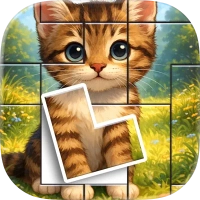
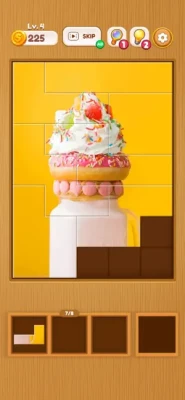
The game moves away from scattered, randomly cut cardboard pieces and instead uses a "Block Jigsaw" mechanic. Players are presented with beautiful HD imagery—ranging from serene landscapes and intricate art to cute characters—and a set of geometric fragments. The goal is to strategically fit these fragments into a pre-defined silhouette to reveal the final masterpiece. It’s a game of visual reconstruction that emphasizes the "satisfaction" of a perfect fit.
2. Key Features
HD Visuals: A vast collection of beautiful, high-definition images across multiple categories like Nature, Animals, Art, and Architecture.
Jigsaw-Block Hybrid: Combines the image-matching of jigsaws with the shape-fitting logic of block puzzles (similar to Tangrams).
Satisfying Levels: Smooth animations and "snapping" mechanics designed to create a sense of tactile accomplishment.
Endless Content: A constantly updated library of puzzles, ensuring players always have a new image to discover.
No Time Pressure: No timers or competitive countdowns, allowing for a pure, zen-like focus on the imagery.
Optimized Interface: A clean, minimalist layout that makes it easy to manage pieces on both smaller iPhone screens and larger iPad displays.
3. How to Play
Choose Your Image: Browse the gallery and select a puzzle to start.
The Silhouette: Each level provides a hollow outline that represents the final picture.
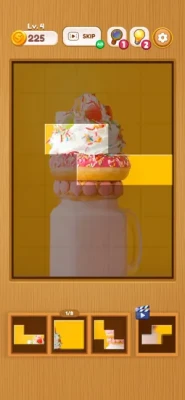
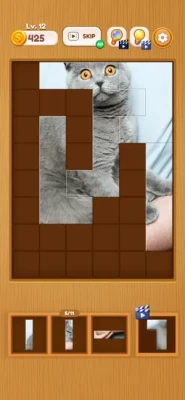
Drag and Fit: Move the picture fragments from the tray into the outline. Unlike traditional jigsaws, these pieces are often shaped like geometric blocks but contain portions of the overall image.
Completion: Once every piece is correctly placed, the image "comes to life" with a final polish or animation, and you move to the next challenge.
4. How to Win: Strategy & Tips
Match by Texture and Color: Don't just look at the shape of the block. Look at the colors and patterns on the piece and match them to where they would logically fit in the overall picture (e.g., sky colors at the top, grass at the bottom).
Work the Edges First: Just like a traditional jigsaw, defining the boundaries of the puzzle makes the interior much easier to navigate.
Identify "Anchor" Pieces: Find pieces that have highly distinct features, like a character's face or a bright sun. These serve as fixed points from which you can build out the rest of the shape.
Use the "Preview": If you're stuck, use the preview button to see a faint version of the completed image behind the silhouette. This helps you understand the spatial relationship between the fragments.
Clear the Tray: Keep your piece tray organized. If you know a piece doesn't fit a certain section, move it to the far side of the tray so you don't keep re-testing it in the wrong spot.
5. Technical Details
Developer: M8 OYUN YAZILIM VE PAZARLAMA ANONIM SIRKETI (M8 Games)
Platform: iOS, iPadOS, and macOS (with Apple Silicon)
Size: 307.4 MB
Compatibility:
iPhone/iPad: Requires iOS 16.0 or later.
Mac: Requires macOS 13.0 or later and an M1 chip or later.
Apple Vision: Requires visionOS 1.0 or later.
Languages: English, Spanish, and Turkish.
Rating: 4.8 out of 5 stars (based on 68+ ratings).
Privacy: Minimal data collection focused on identifiers and diagnostics for analytics and advertising; data is not linked to your identity.
Monetization: Free-to-play with integrated ads.
Rate the Game
User Reviews





Popular Games




















 Android
 iOS
iOS Windows
 Xbox
Xbox