
Latest Version
August 24, 2025
Ivan Ivanov
Simulation
iOS
0
Report a Problem
More About :game
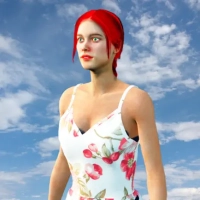
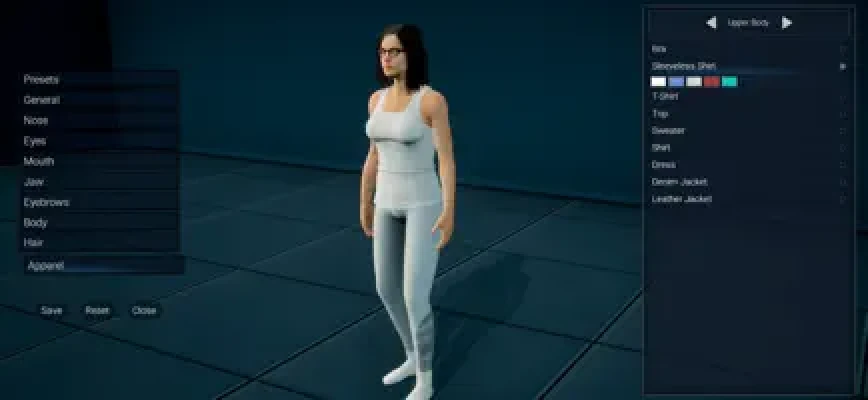
Custom Female 3D is a character creator and simulation game developed by Ivan Ivanov. It allows players to build and personalize a female 3D character by adjusting different aspects of her appearance, from skin tone and facial features to hairstyles, clothing, accessories, and piercings.
Rather than focusing on combat, missions, or competitive challenges, Custom Female 3D puts creativity at the center of the experience. Players can experiment with different combinations to create a character with a distinctive appearance, whether they prefer casual fashion, elegant outfits, bold hairstyles, or a more individual look.
The customization options make the game suitable for players who enjoy dress-up games, avatar creators, and digital character design. Instead of following a single predefined style, you can explore different looks and decide which details work best together.
The game is available for iPhone and iPad, and the US App Store lists it as a free download. Its main appeal is the freedom to experiment with a character's appearance without needing advanced design skills.
Custom Female 3D Gameplay
The gameplay revolves around selecting appearance options and combining them to create a personalized 3D female character. Each choice contributes to the character's overall style, making experimentation an important part of the experience.
Skin Tone Customization
Skin tone is one of the available character customization options. It helps establish the overall appearance of your character and can influence how different hairstyles, clothing colors, and accessories look together.
Try several combinations before settling on a final design. The goal is to create a balanced appearance that fits the style you have in mind.
Facial Feature Customization
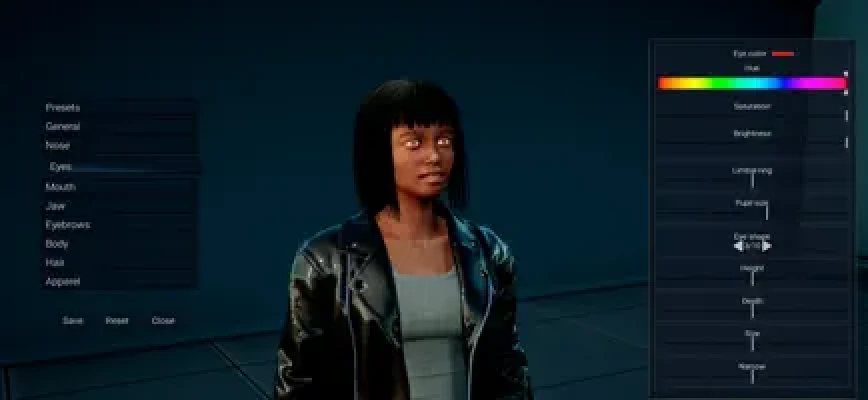
The game allows players to customize facial features. This gives you an opportunity to experiment with different looks rather than relying entirely on a default character design.
When creating a character, consider the face as part of the overall style. A consistent approach to facial appearance, hairstyle, and accessories can make the finished design feel more distinctive.
Body Part Customization
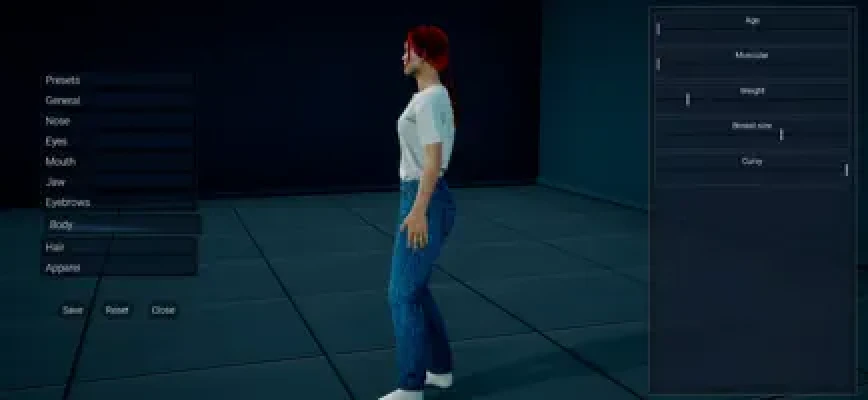
Custom Female 3D includes options for adjusting parts of the character's body. These controls provide another way to personalize the avatar beyond the face and clothing.
Make changes gradually and review the complete character after each adjustment. This helps you see how individual choices affect the overall appearance.
Hairstyles and Haircuts
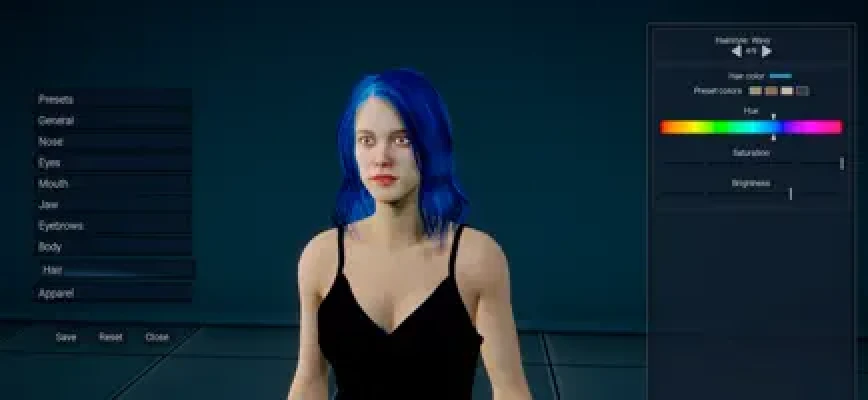
Hair customization is an important part of character design. Different hairstyles can create very different impressions, even when the character's other features remain unchanged.
Experiment with hairstyles that complement your chosen outfit and accessories. A simple hairstyle can work well with detailed clothing, while a more distinctive haircut may suit a minimal outfit.
Clothing and Fashion Styling
Custom Female 3D lets players select clothing for their characters. This gives the game a dress-up element, allowing you to explore different fashion styles.
You can approach outfit selection in several ways, including casual everyday looks, elegant styles, coordinated color themes, or more expressive combinations. The best results often come from choosing pieces that work together rather than selecting every item independently.
Accessories and Piercings
Accessories and piercings provide additional ways to personalize a character. Small details can help distinguish one design from another and add personality to the final look.
Use these options thoughtfully. If an outfit already contains several strong visual elements, a smaller number of accessories may create a cleaner result.
Main Features of Custom Female 3D
1. Female 3D Character Creator
Create and customize a female character in a three-dimensional visual environment. The main focus is personal expression through appearance design.
2. Skin Tone Options
Adjust the character's skin tone to suit your preferred design.
3. Facial Customization
Explore available facial features to create a more personalized appearance.
4. Body Customization
Modify parts of the character's body using the available customization options.
5. Hairstyles and Haircuts
Experiment with different hairstyles to change the character's overall look.
6. Clothing Selection
Choose clothing and build outfits that match your preferred fashion style.
7. Accessories and Piercings
Add finishing details to make the character look more individual.
8. Creative Dress-Up Gameplay
The game emphasizes appearance customization rather than traditional action or story progression, making it suitable for players who enjoy visual creativity.
Complete Custom Female 3D Strategy Guide
Although Custom Female 3D is a creative simulation rather than a competitive game, having a plan can make character creation easier and more enjoyable. These tips will help you develop a consistent design, experiment with the available options, and avoid common styling mistakes.
1. Start With a Clear Character Concept
Before changing individual features, decide what kind of character you want to create. You might aim for a casual everyday appearance, an elegant fashion style, a bold modern look, or a character with distinctive accessories.
A clear concept helps you make decisions more quickly. Without one, it is easy to keep changing features without developing a consistent final design.
Strategy tip: Choose a general style first, then customize the character to match it.
2. Choose the Skin Tone First
Start by selecting a skin tone that fits the character you have in mind. This provides a useful foundation for making decisions about the remaining appearance options.
Once you have selected a tone, compare how different hairstyles and clothing colors look with it. The objective is not to follow a single fashion rule, but to find a combination that suits your preferred design.
3. Work on the Face Before Choosing the Outfit
The face is one of the most recognizable parts of a character. Spend time exploring the available facial customization options before finalizing clothing and accessories.
Make adjustments gradually so you can see how each choice changes the character's appearance. Avoid changing several facial features at once if you want to understand the effect of each adjustment.
4. Select a Hairstyle That Matches the Character
A hairstyle can strongly influence the character's overall look. Consider whether you want the design to appear understated, fashionable, dramatic, or playful.
Once you choose a hairstyle, review the face and outfit together. If the hair already attracts a lot of attention, a simpler outfit may help create a balanced appearance.
5. Build the Outfit Around a Color Theme
Choosing a small group of complementary colors is an easy way to make a character look coordinated.
For example, you might use neutral shades for a minimalist outfit, combine a main color with a contrasting accent, or select colors that create a brighter and more expressive appearance.
Do not feel restricted to conventional combinations. Experimentation is part of the creative process, and an unusual color scheme may produce the exact style you want.
6. Use Accessories to Add Personality
Accessories and piercings can help make your character more distinctive. However, adding too many details at once can make the design feel visually crowded.
Start with one or two accessories and review the result. Add more only when they improve the overall appearance.
7. Customize Body Parts With a Consistent Goal
When adjusting body parts, think about the overall character concept rather than treating every setting as an isolated decision.
Make gradual changes and examine the complete character after each adjustment. This approach helps you maintain a design that feels intentional instead of a collection of unrelated choices.
8. Review the Character From Different Angles
Three-dimensional character design is easier to evaluate when you can see how the appearance works from different viewpoints.
If the camera controls allow you to rotate the view, inspect the face, hairstyle, clothing, and accessories from more than one angle. This can reveal details that are difficult to judge from a single perspective.
If camera movement feels awkward, make small adjustments and avoid repeatedly tapping different parts of the screen without a clear intention.
9. Compare Different Looks Before Settling on One
Do not feel that your first design must be the final one. Try different combinations of hairstyles, clothing, and accessories to discover which version you prefer.
If you are unsure which look works best, change one category at a time. For example, keep the face and body settings consistent while testing different hairstyles or outfits.
This makes comparisons easier and helps you identify the changes that improve the design.
10. Create a Distinctive Final Look
A successful character design does not need the maximum number of customizations. What matters is how well the different elements work together.
Choose a few features that define your character, such as a particular hairstyle, a coordinated outfit, or distinctive accessories. Use the remaining options to support that visual identity.
If the app provides a way to save or capture your finished character, use it to preserve the result. The available store description does not clearly confirm a dedicated character-saving feature, so check the app's current options before relying on one.
Advanced Character Design Tips
Create a Recognizable Style
Think of your character as a complete design rather than a collection of separate settings. A consistent color palette, complementary hairstyle, and carefully selected accessories can make the result easier to recognize.
Experiment With Different Fashion Themes
Try more than one approach to discover the range of looks available through the customization tools. You could explore casual fashion, elegant clothing, sporty styling, or more expressive combinations, depending on the available items.
These are design ideas rather than confirmed in-game outfit categories.
Balance Facial Details and Hair
The face and hairstyle work together to define the character's appearance. Review both after making a major change, especially if a new haircut changes how the face looks.
Avoid Making Every Element Compete for Attention
A character can look distinctive without using the most noticeable option in every category. Choose a main visual feature and let the remaining elements complement it.
Use Small Adjustments to Refine the Design
Once you have a character you like, avoid changing everything at once. Make small refinements and compare the result with your previous version.
This is particularly helpful when adjusting facial features, body parts, or camera positioning.
Beginner's Guide to Custom Female 3D
If you are new to character creator games, begin with the main appearance options rather than trying to perfect every detail immediately.
First, select a skin tone and establish the character's basic appearance. Next, experiment with facial features and hairstyles. Once the face and hair look the way you want, move on to clothing and accessories.
Review the entire character after each major stage. This helps you see whether the choices work together and prevents unnecessary adjustments later.
Remember that character design is subjective. There is no single correct appearance, and the most satisfying result is the one that matches your creative idea.
Common Mistakes to Avoid
Changing Too Many Features at Once
Making several changes simultaneously can make it difficult to identify which option improved or weakened the design. Adjust one category at a time when refining a character.
Choosing Clothing Before Establishing a Style
Without a general concept, outfit selection can become repetitive. Decide on a broad style before exploring clothing options.
Adding Too Many Accessories
Accessories should support the character's overall appearance. Review the complete design before adding more details.
Ignoring the Hairstyle
Hair can significantly change the impression created by a face and outfit. Check that the hairstyle complements the rest of the design.
Making Large Adjustments Without Reviewing the Result
Gradual customization makes it easier to judge changes. Pause to review the character after adjusting facial features or body parts.
Expecting Advanced Character Animation
The App Store description emphasizes creating, customizing, and dressing a female character. It does not establish a full animation studio, story mode, or extensive character interaction system, so treat the game primarily as an appearance customization experience.
Graphics, Controls, and Overall Experience
Custom Female 3D focuses on three-dimensional character presentation and appearance customization. Its main attraction is the ability to adjust several aspects of a character, including skin tone, face, body parts, hairstyles, clothing, accessories, and piercings.
The experience is best approached as a creative dress-up simulator rather than a traditional game with missions, combat, or progression-based challenges. Players who enjoy exploring different appearances may appreciate the freedom to experiment with combinations.
However, camera control and the customization interface are worth considering. Some App Store reviewers have reported difficulty adjusting the camera and viewing facial details, as well as finding the customization text small. These issues may affect how comfortably some players can work on detailed designs.
Overall, the game is most appealing to people who want a straightforward way to experiment with female 3D character appearance on a mobile device.
Is Custom Female 3D Worth Playing?
Custom Female 3D is worth considering if you enjoy character creators, fashion styling, and virtual dress-up games. Its range of appearance options allows you to experiment with skin tone, facial features, body parts, hairstyles, clothing, accessories, and piercings.
Its main strength is creative flexibility. You can develop a character around a particular style and adjust different details until the overall appearance feels right.
There are also limitations to consider. The experience centers on character creation rather than a detailed story or a wide variety of gameplay modes. Some users have criticized the camera controls and the size of the customization text, which may make precise editing less comfortable.
The US App Store lists the game as free to download and gives it a 13+ age rating. Its current displayed rating is based on a relatively small number of ratings, so it should not be treated as a definitive measure of quality.
In short, Custom Female 3D may appeal to players who want a simple creative character-design experience. If your main interest is building a personalized 3D avatar and exploring different fashion combinations, it is worth considering.
Pros and Cons
Pros
Customizable female 3D characters.
Skin tone and facial feature options.
Body part customization.
Different hairstyles and haircuts.
Clothing and fashion styling.
Accessories and piercings for additional personalization.
Free to download according to the App Store listing.
Suitable for casual creative sessions.
Cons
Focuses primarily on appearance customization rather than a full story or action experience.
Some users report difficulties with camera controls.
Small customization text may make detailed editing harder for some players.
The App Store rating is based on a limited number of ratings.
The store description does not clearly confirm character-saving or sharing options.
Game Information
Game title: Custom Female 3D
Subtitle: Female Character Creator
Developer: Ivan Ivanov
Genre: Simulation, character creation, dress-up
Platform: iPhone and iPad
Price: Free to download according to the US App Store
Main activity: Creating, customizing, and dressing a female 3D character
Customization options: Skin tone, facial features, body parts, clothes, hairstyles, accessories, and piercings
Age rating: 13+ on the US App Store
Languages: English, Japanese, and Simplified Chinese
App size: Approximately 196.5 MB
Minimum operating system: iOS 12.0 or later
Developer: Ivan Ivanov
Store information and device requirements may change, so check the current listing for the latest details.
Frequently Asked Questions
What is Custom Female 3D?
Custom Female 3D is a character creator and dress-up simulation that lets players design a female 3D character by customizing her appearance, clothing, hairstyle, and accessories.
What can you customize in Custom Female 3D?
The App Store description lists skin tone, facial features, body parts, clothing, haircuts, accessories, and piercings among the available customization options.
Is Custom Female 3D free?
The US App Store lists Custom Female 3D as free to download. Check the current listing for any changes to availability or purchase options.
Who developed Custom Female 3D?
The game was developed by Ivan Ivanov.
Is Custom Female 3D a dress-up game?
Yes. Dressing the character is one of its core activities, alongside customizing facial features, body parts, hairstyles, skin tone, and accessories.
Can I change the character's hairstyle?
Yes. Haircuts and hairstyles are included among the listed customization options.
Can I customize the character's face and body?
Yes. The game description confirms facial and body part customization, allowing players to personalize more than just clothing.
Does Custom Female 3D include accessories?
Yes. Accessories and piercings are listed as part of its character customization features.
Is Custom Female 3D available on Android?
The link covered in this guide is the iOS version. A separate Google Play listing exists for Custom Female Creator 3D, but availability and features may vary between versions.
Does Custom Female 3D have a story mode?
The available App Store description focuses on character creation and dressing. It does not establish a dedicated story mode.
Can I save my character in Custom Female 3D?
The available App Store description does not clearly confirm a dedicated save feature. Check the current app interface for any options to save, capture, or share your finished design.
Is Custom Female 3D suitable for children?
The US App Store assigns the game a 13+ age rating. Parents should review the current rating and content details before deciding whether the app is appropriate for a younger player.
Why might character customization feel difficult?
Some user reviews mention camera-control difficulties and small customization text. Try making gradual camera adjustments and reviewing the character carefully when working on facial details.
What is the best way to create a good character?
Start with a clear style, customize the skin tone and face, choose a complementary hairstyle, and then build the outfit around a coordinated color palette. Add accessories last so the final design feels balanced.
Final Verdict
Custom Female 3D is a mobile character creator for players who enjoy designing virtual characters and experimenting with fashion. Its customization options cover several important aspects of appearance, including skin tone, facial features, body parts, hairstyles, clothing, accessories, and piercings.
The best approach is to develop a clear style, make gradual adjustments, and review the entire character after each major change. This makes it easier to create a cohesive appearance instead of selecting options without a plan.
Although the game is focused on character design rather than traditional action or story gameplay, it may appeal to fans of dress-up simulators and 3D avatar customization. Players who value precise camera controls should keep the reported interface concerns in mind before deciding whether it is the right fit.
Rate the Game
User Reviews







Popular Games













 Android
 iOS
 Windows
 Xbox