


Latest Version
March 06, 2024
Unico Studio
Casual
Android
1
com.unicostudio.trickywords
Report a Problem
More About :game
Game Information
- Game: Brain Test: Tricky Words
- Developer: Unico Studio
- Genre: Word Puzzle
- Category: Brain Games
- Platform: Android
- Game Mode: Single Player
- Offline Play: Yes
- Content Rating: Everyone
Short Game Description
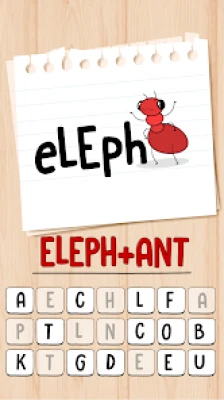
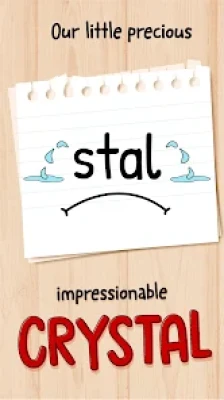
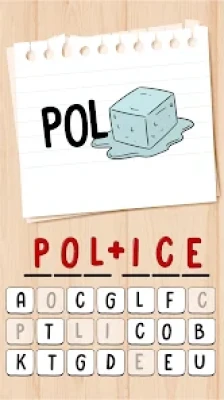
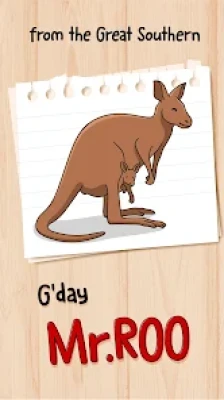
Brain Test: Tricky Words is a picture-based word puzzle game where every level challenges you to identify hidden words using visual clues, logic, and creative thinking.
Gameplay Overview
Each level displays one or more pictures that represent a hidden word, phrase, or concept.
Your task is to:
- Study every image carefully.
- Think about what the pictures represent.
- Guess the hidden word.
- Use hints if needed.
- Complete levels to unlock new challenges.
The puzzles gradually become more difficult, requiring stronger observation skills and a larger vocabulary.
Main Features
- Hundreds of picture-based word puzzles
- Creative dingbat and rebus challenges
- Offline gameplay
- Helpful hint system
- Family-friendly puzzles
- One-handed controls
- Increasing difficulty
- Relaxing gameplay
- Brain-training experience
- Suitable for all ages
Why This Game Stands Out
Unlike ordinary word games, Brain Test: Tricky Words asks you to interpret images rather than simply arrange letters.
Players must combine:
- Observation
- Vocabulary
- Logical thinking
- Pattern recognition
- Creativity
This unique approach keeps every puzzle feeling fresh.
How to Play
- Open a puzzle.
- Examine every picture carefully.
- Identify visual clues.
- Think about possible words or phrases.
- Enter your answer.
- Use hints if you're stuck.
- Continue unlocking new levels.
Beginner Tips
Look at the Whole Picture
Small details often reveal the answer.
Think Beyond the Obvious
Many puzzles use symbols, metaphors, or visual tricks.
Read Every Hint Carefully
Hints usually guide you without giving away the complete solution.
Build Your Vocabulary
Knowing synonyms and common expressions makes solving puzzles much easier.
Stay Patient
Some puzzles require creative thinking rather than quick guessing.
Advanced Strategies
Experienced players recommend:
- Breaking complex images into smaller parts.
- Looking for wordplay and visual puns.
- Considering multiple meanings of objects.
- Avoiding repeated guesses.
- Saving hints for the hardest puzzles.
- Revisiting difficult levels with a fresh perspective.
Hint System
If you become stuck, the game offers helpful hints that gradually point you toward the correct answer.
For the best experience:
- Try solving the puzzle yourself first.
- Use hints only after testing several ideas.
- Save hint resources for later levels.
Difficulty Progression
The game begins with straightforward visual puzzles before introducing:
- Complex picture combinations
- Multi-word answers
- Abstract clues
- Clever visual tricks
- More challenging vocabulary
Each chapter encourages players to improve both observation and language skills.
Educational Benefits
Regular play can help improve:
- English vocabulary
- Spelling
- Visual reasoning
- Critical thinking
- Memory
- Problem-solving
- Pattern recognition
Graphics and Sound
The game features:
- Bright cartoon artwork
- Clear illustrations
- Smooth animations
- Relaxing music
- Simple interface
- Responsive controls
Its clean design keeps players focused on solving puzzles instead of navigating menus.
Best Tips for Faster Progress
- Study every image before answering.
- Think about idioms and common phrases.
- Don't rush difficult puzzles.
- Expand your vocabulary.
- Use hints wisely.
- Practice regularly.
- Learn from previous answers.
Player Feedback
Many players enjoy:
- Original picture puzzles
- Clever word challenges
- Relaxing gameplay
- Offline support
- Family-friendly content
- Excellent brain exercise
Some players mention:
- Advertisements appear between levels in the free version.
- A few puzzles are intentionally tricky and may require hints.
- They would like additional puzzle packs and daily challenges.
Pros
- Unique picture-based gameplay
- Excellent brain training
- Offline support
- Hundreds of puzzles
- Easy controls
- Suitable for all ages
- Fun and educational
Cons
- Free version includes ads
- Some puzzles can be very challenging
- Hint resources may run out during difficult stages
Similar Games
If you enjoy Brain Test: Tricky Words, you may also like:
- Brain Test: Tricky Puzzles
- Brain Test 2: Tricky Stories
- Who Is? Tricky Riddles
- Brain Out
- Brain Find
- Easy Game
- Braindom
- Dingbats
Frequently Asked Questions
Is Brain Test: Tricky Words free to play?
Yes. The game is free to play and offers optional in-app purchases.
Can I play offline?
Yes. Most puzzles can be completed without an internet connection.
Is the game suitable for children?
Yes. The puzzles are family-friendly and designed for players of various ages.
What makes this game different from other word games?
Instead of crossword grids or letter searches, Brain Test: Tricky Words uses pictures and visual clues to create clever word puzzles.
Does the game help improve vocabulary?
Yes. Regular play can strengthen vocabulary, spelling, observation, and logical thinking through engaging visual challenges.
YouTube Gameplay
Brain Test: Tricky Words Gameplay Walkthrough
Final Verdict
Brain Test: Tricky Words offers an enjoyable blend of picture puzzles, word guessing, and brain teasers that challenges players to think differently. With its creative visual riddles, offline support, intuitive controls, and steadily increasing difficulty, it provides hours of entertaining mental exercise. Whether you're looking to improve your vocabulary or simply enjoy clever puzzle-solving, Brain Test: Tricky Words is an excellent choice for fans of brain games and word puzzles.
Rate the Game
User Reviews








Popular Games



















 Android
 iOS
iOS Windows
 Xbox
Xbox