

Latest Version
December 24, 2024
Vector Unit
Action
0
com.vectorunit.mercury.googleplay
Report a Problem
More About :game
The current Google Play listing features 88 challenging platform-style levels, while the free-to-play mobile version is presented by Vector Unit as having more than 65 levels. The game combines puzzle-like navigation, platforming, timing challenges, collectible hunting, and cartoon-style destruction.
MouseBot Game Overview
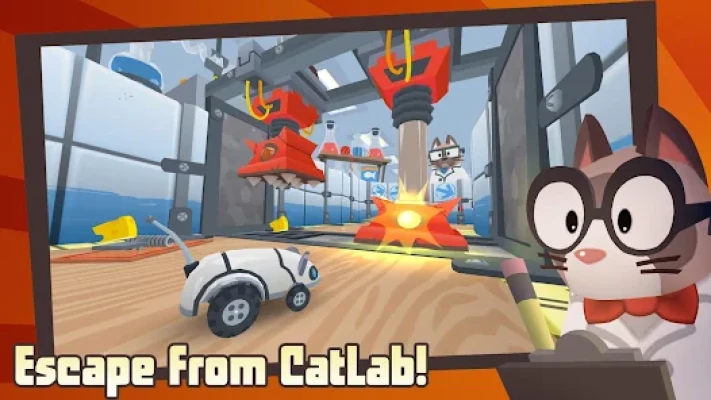
MouseBot looks cute, but CatLab is anything but safe.
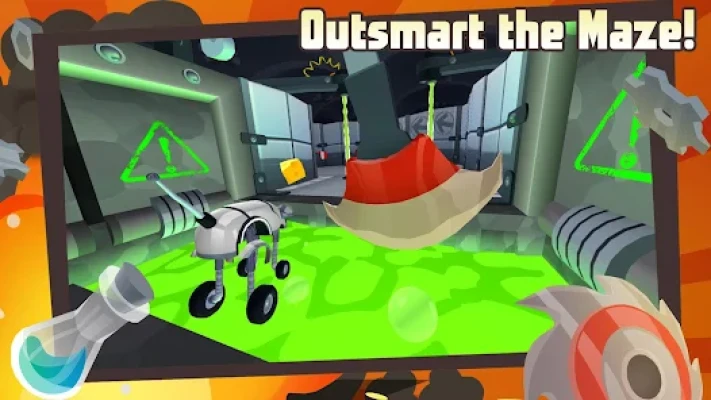
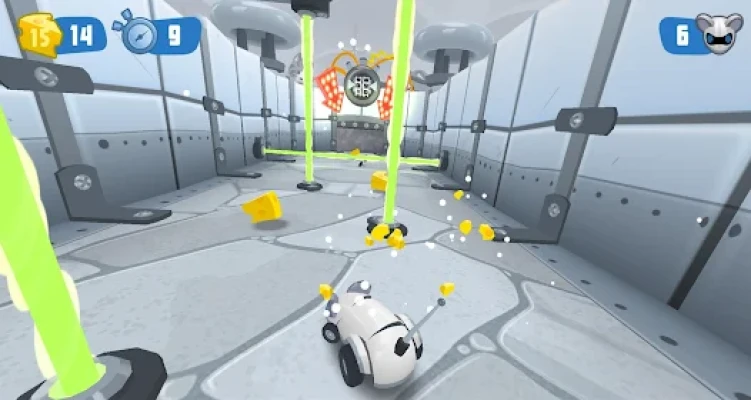
The laboratory is packed with mechanical hazards designed specifically to stop your robotic mouse. Giant crushers, rotating grates, mines, lasers, acid pools, moving platforms, and other traps turn every room into a timing challenge.
Instead of fighting enemies with weapons, MouseBot relies on movement, reflexes, timing, transformations, and careful observation.
The result is an unusual mobile adventure that mixes platforming with maze navigation and trap avoidance.
<iframe width="560" height="315" src="https://www.youtube.com/embed/Emk2dZy_7Vo?si=yLOzBNrVL2MgKlfQ" title="YouTube video player" frameborder="0" allow="accelerometer; autoplay; clipboard-write; encrypted-media; gyroscope; picture-in-picture; web-share" referrerpolicy="strict-origin-when-cross-origin" allowfullscreen></iframe>
The Story of MouseBot
MouseBot is a robotic mouse held captive inside CatLab, a strange laboratory operated by mysterious cat scientists.
The cats have created an elaborate collection of mechanical traps, apparently designed to test, capture, and destroy their robotic experiment.
MouseBot must navigate deeper into the facility while collecting cheese and avoiding increasingly dangerous obstacles.
As the adventure progresses, the laboratory reveals more of the cats' plans, turning what initially looks like a simple maze game into a larger escape adventure.
Vector Unit describes the game as an epic quest for cheese and freedom.
CatLab
CatLab is the central setting of MouseBot.
Rather than presenting a conventional fantasy world, the game places the player inside a bizarre mechanical laboratory filled with traps.
Each area introduces different hazards and movement challenges.
The laboratory environment also helps create the game's distinctive humor: MouseBot is a tiny, vulnerable machine surrounded by enormous devices apparently designed to crush, grind, zap, or melt it.
88 Challenging Levels
The current Google Play listing advertises 88 platform-style levels.
These stages gradually introduce new traps and mechanics.
Early levels help players understand movement and basic hazards, while later stages demand much better timing and more careful route planning.
The level structure makes MouseBot suitable for short play sessions because players can concentrate on completing individual mazes rather than committing to a long continuous adventure.
Mechanical Mouse Traps
Traps are the heart of MouseBot's gameplay.
CatLab contains a large collection of mechanical hazards, each requiring a different response.
Kitty Krushers
Large mechanical crushers can slam down onto MouseBot.
The key to surviving them is learning their timing and moving through the danger zone at the right moment.
Roller Graters
Rotating grates can quickly destroy MouseBot if you approach them carelessly.
Players need to understand their movement pattern and identify safe opportunities to cross.
Mines
Mines punish careless movement.
They force players to watch the floor and think about their route before moving forward.
Lasers
Laser traps add another timing challenge.
Rather than simply running toward the objective, players must wait for the correct opening or move through the laser's pattern without getting hit.
Acid Pools
Acid is one of the most visually memorable hazards in CatLab.
Falling into the acid can destroy MouseBot, so players must use platforms, jumps, and special abilities carefully.
Vector Unit specifically highlights pools of acid capable of destroying the robotic mouse.
Platforming Gameplay
MouseBot isn't simply a maze game.
It incorporates platforming mechanics that require players to jump, move between platforms, avoid hazards, and carefully control their position.
Some sections are about finding the correct route, while others are primarily tests of timing and reflexes.
This mixture keeps the gameplay varied.
Movement and Timing
The most important skills in MouseBot are movement and timing.
You don't need complicated combat combinations.
Instead, success depends on knowing:
- When to move
- When to stop
- When to jump
- When to wait
- Which route is safe
- Which trap is about to activate
- When to use a special ability
A player who rushes through every room will often fail.
A patient player who observes the environment can usually find a safer path.
MouseBot's Abilities
MouseBot isn't limited to basic movement.
As you progress, you can unlock new abilities that expand how the robotic mouse navigates the laboratory.
Vector Unit specifically describes abilities that allow MouseBot to run, jump, and transform for land and water.
These abilities are important because later levels can require more than ordinary walking and jumping.
Transformation Mechanics
Transformation is one of the features that gives MouseBot additional variety.
Instead of using the same movement style throughout the entire game, MouseBot can change its capabilities to deal with different environments.
This becomes particularly useful when a level introduces water or areas that require specialized movement.
Cheese Collectibles
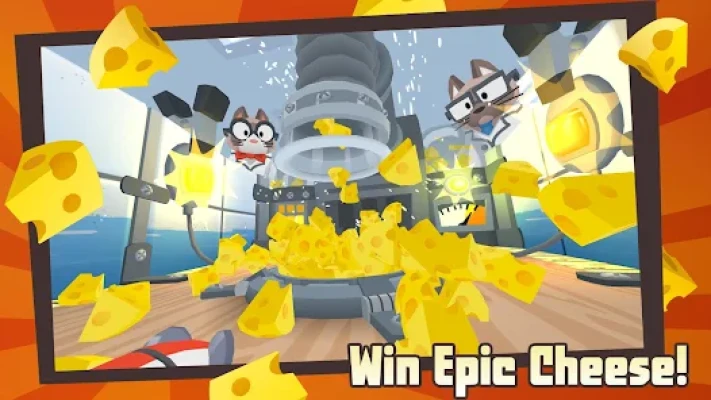
Cheese is the main collectible in MouseBot.
As you explore CatLab, you'll encounter piles of cheese that can be collected during levels.
Collecting cheese adds another objective beyond simply reaching the exit.
Players who want to complete stages thoroughly can search for optional cheese rather than taking the fastest route to the finish.
Cheese and Customization
Cheese isn't simply a score item.
The collected cheese can be used to unlock new cosmetic options for MouseBot.
Vector Unit describes cheese as a way to obtain new skins and accessories for the robotic mouse.
This gives exploration a useful reward.
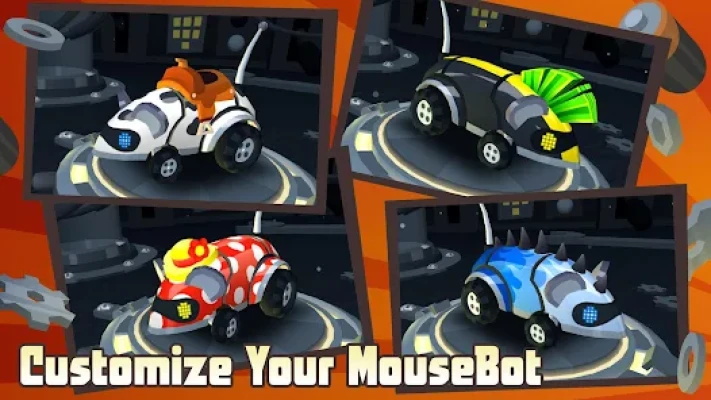
MouseBot Customization
Players can personalize their robotic companion with different cosmetic options.
Customization includes:
- New skins
- Paint jobs
- Accessories
- Different visual appearances
The customization system doesn't fundamentally change the core platforming mechanics, but it gives players an additional reason to collect cheese.
Cartoon Visual Style
MouseBot uses bright, colorful 3D visuals combined with exaggerated cartoon destruction.
The contrast between the cute robotic mouse and the ridiculous mechanical traps creates much of the game's personality.
MouseBot can be crushed, zapped, blown apart, or melted in ways that feel more humorous than frightening.
Vector Unit itself describes the game's destruction as humorous cartoon-style destruction.
Game Atmosphere
The atmosphere combines:
- Cartoon comedy
- Mechanical experimentation
- Laboratory mystery
- Platforming adventure
- Trap-based challenges
- Lighthearted danger
Although MouseBot constantly faces lethal obstacles, the presentation remains playful and family-friendly rather than dark.
Controls
MouseBot is designed around straightforward mobile controls.
The game focuses on movement and timing rather than complicated button combinations.
Vector Unit also lists support for phone, tablet, and TV configurations, including gamepad and remote-control options for supported versions.
The simplicity makes the game easy to understand, but mastering later traps requires precise control.
Beginner's Guide
1. Don't Rush
The biggest beginner mistake is moving too quickly.
Observe the trap before entering its range.
2. Learn the Pattern
Most mechanical hazards follow recognizable patterns.
Watch them before committing to a move.
3. Look for Safe Areas
Platforms and corners can provide temporary safety while you wait for a trap to deactivate.
4. Collect Cheese
Don't automatically run toward the exit.
Explore side areas when possible to find additional cheese.
5. Learn Your Abilities
New abilities can completely change how you approach certain sections.
6. Expect Failure
Some levels are designed around trial and error.
A failed attempt teaches you the timing needed for the next run.
Advanced Strategy
Experienced players should start thinking about routes rather than individual traps.
Instead of asking:
"How do I avoid this obstacle?"
ask:
"Where do I need to be after this obstacle?"
This small change in thinking helps you plan complete sequences through difficult sections.
For example:
Wait → move through crusher → jump → land safely → avoid mine → transform → cross water → collect cheese → reach exit
Planning several moves ahead can make difficult levels much easier.
How to Collect More Cheese
If you're trying to collect as much cheese as possible:
- Explore side paths.
- Check areas above and below the main route.
- Look behind platforms.
- Don't immediately activate the exit.
- Replay levels where you missed collectibles.
- Use unlocked abilities to reach previously inaccessible areas.
The fastest route isn't always the route with the most cheese.
How to Handle Moving Traps
Moving traps should be treated like timing puzzles.
Watch the trap for several seconds.
Identify:
- Starting position
- Movement direction
- Pause duration
- Attack range
- Safe zone
Then move when the opening appears.
This is usually safer than trying to react after entering the danger zone.
How to Handle Laser Sections
Laser areas are easier when you stop thinking of them as obstacles and start thinking of them as patterns.
Observe the sequence.
Wait for the opening.
Move decisively.
Don't hesitate halfway through the danger zone unless the level requires it.
How to Survive Acid Sections
Acid sections often combine jumping and transformation mechanics.
Before making a jump, consider where MouseBot will land.
A successful jump isn't useful if the landing position places you directly in front of another trap.
Always think about the landing zone, not only the jump itself.
Level Progression
MouseBot gradually introduces new challenges rather than presenting every trap immediately.
This creates a natural learning curve.
Players begin by learning basic movement and then encounter more complicated combinations of hazards.
Later levels can combine multiple mechanics in the same section, requiring players to use everything they've learned.
Difficulty
MouseBot starts as an accessible platforming game but becomes more demanding as the levels progress.
Controls: Easy
Early Levels: Easy to Moderate
Trap Timing: Moderate
Cheese Collection: Moderate
Later Levels: Challenging
Completionist Play: Challenging
The difficulty comes primarily from precision and timing rather than complex controls.
Replay Value
MouseBot has several reasons to replay completed levels.
Players can return to:
- Find missed cheese
- Improve completion
- Learn faster routes
- Experiment with abilities
- Complete objectives
- Unlock additional customization
- Improve their platforming skills
This gives the game more longevity than a simple one-time maze experience.
Game Modes
Main Adventure
The primary experience takes players through the CatLab laboratory and its collection of increasingly difficult mazes.
Arcade Mode
The remastered version of MouseBot adds an extra-fast Arcade mode, according to Vector Unit.
This mode gives experienced players a faster alternative to the traditional adventure progression.
Mobile Free-to-Play Version
The mobile edition is structured as a free-to-play experience.
Vector Unit notes that its mobile version includes advertising and recharge-time mechanics, with a premium option available to remove advertising and recharge times.
Ads and In-App Purchases
The current Google Play listing identifies MouseBot as containing ads and in-app purchases.
Google Play also indicates that the game can be played without ads and in-app purchases through Google Play Pass where supported.
Player Ratings
The current Google Play listing shows approximately 4.2 stars from 77.6K reviews and 10M+ downloads.
Those numbers indicate that MouseBot has developed a substantial audience on Android.
Graphics and Performance
MouseBot's 3D cartoon presentation is designed to make traps easy to recognize.
Large crushers, lasers, mines, grates, acid pools, platforms, and other hazards are visually distinct, which helps players understand the environment quickly.
The game also supports phone, tablet, and TV configurations according to Vector Unit.
Android Compatibility
The current package is:
com.vectorunit.mercury.googleplay
A recent Android build listed for this package supports Android 7.0 and later, ARM64 and ARMv7 architectures, and Android TV. The listed 2026.02.26 build also added support for Google Play Sidekick.
For your page, it is better to describe the Android requirement as Android 7.0+ based on the recent package build, rather than relying on old system requirements.
Technical Details
Game: MouseBot
Full Title: MouseBot: Escape from CatLab
Developer: Vector Unit
Genre: Platformer / Action / Maze Adventure
Platform: Android
Package ID: com.vectorunit.mercury.googleplay
Current Google Play Downloads: 10M+
Current Google Play Rating: Approximately 4.2/5
Reviews: Approximately 77.6K
Content Rating: Everyone 10+
Monetization: Free-to-play
Ads: Yes
In-App Purchases: Yes
Levels: 88 currently listed
Recent Android Requirement: Android 7.0+
TV Support: Yes on supported configurations
Updates and Current Version
MouseBot continues to receive Android maintenance.
A recent build dated February 26, 2026 added support for Google Play Sidekick.
This is useful for a current game page because MouseBot is not simply an abandoned mobile title from its original release period.
What Makes MouseBot Different?
MouseBot stands out because it doesn't rely on traditional combat.
There are no armies to defeat and no complicated weapon system.
Instead, the challenge comes from the environment itself.
The laboratory is effectively the enemy.
Every crusher, laser, mine, grate, acid pool, and moving platform becomes a puzzle that the player must solve.
That makes MouseBot particularly appealing to players who enjoy platforming games, maze games, obstacle courses, reflex challenges, and puzzle-like level design.
MouseBot vs Traditional Platform Games
Traditional platformers often focus on enemies, combat, and exploration.
MouseBot puts much more emphasis on environmental hazards.
The basic gameplay loop is:
Explore → Observe → Time Your Move → Avoid Trap → Collect Cheese → Reach Exit
That simple structure makes the game easy to understand while allowing later levels to become surprisingly demanding.
Who Should Play MouseBot?
MouseBot is a good choice for players who enjoy:
- Platform games
- Maze games
- Puzzle platformers
- Trap games
- Robot games
- Mouse games
- Casual adventure games
- Reflex games
- Timing challenges
- Family-friendly action games
- 3D mobile games
- Collectible-based games
- Obstacle-course games
- Cartoon adventure games
It is particularly suitable for players who prefer clever environmental challenges over traditional combat.
Pros
- 88 challenging levels currently listed
- Creative mechanical traps
- Colorful 3D graphics
- Fun cartoon presentation
- Simple controls
- Increasing difficulty
- Cheese collectibles
- Character customization
- Unlockable abilities
- Land and water gameplay
- Strong level variety
- Easy to understand
- Good replay potential
- 10M+ Android downloads
- Large player community
Cons
- Contains advertisements
- Includes in-app purchases
- Some levels can require repeated attempts
- Timing-heavy sections may frustrate impatient players
- Free-to-play mechanics can interrupt longer sessions
- The main gameplay is more about environmental puzzles than combat
Expert Rating
Gameplay: 8.7/10
Level Design: 9/10
Controls: 8.5/10
Graphics: 8.5/10
Creativity: 9/10
Replay Value: 8/10
Difficulty Curve: 8.5/10
Overall: 8.6/10
Final Verdict
MouseBot: Escape from CatLab is a charming platforming adventure built around a wonderfully simple idea: put a tiny robotic mouse inside a laboratory full of absurdly dangerous traps and see if the player can get it out alive.
The game's strongest feature is its level design. Instead of relying on conventional combat, MouseBot challenges players to understand movement patterns, predict traps, time jumps, use special abilities, and search the laboratory for cheese.
The current Android version lists 88 challenging levels, while Vector Unit continues to support the title and its broader platform releases.
Its combination of maze exploration, platforming, trap avoidance, collectibles, customization, cartoon destruction, and transforming abilities gives MouseBot a personality that is easy to recognize.
For anyone searching for a maze adventure game for Android, robot mouse game, platform game with traps, puzzle platformer, or casual obstacle game, MouseBot is a particularly interesting choice.
Frequently Asked Questions
What is MouseBot?
MouseBot: Escape from CatLab is a platforming and maze adventure game developed by Vector Unit. Players guide a robotic mouse through a laboratory filled with mechanical traps.
How many levels does MouseBot have?
The current Google Play listing advertises 88 challenging platform-style levels.
Is MouseBot free on Android?
Yes. The Android version is available as a free-to-play game with advertising and optional in-app purchases.
Does MouseBot have ads?
Yes. Google Play currently identifies the game as containing ads.
Does MouseBot have in-app purchases?
Yes. The current Google Play listing identifies in-app purchases.
Who developed MouseBot?
MouseBot was developed by Vector Unit, the studio behind several mobile racing and action games.
What is CatLab?
CatLab is the mysterious laboratory where MouseBot is trapped. It contains the mechanical traps and maze-like environments that make up the game's levels.
What does MouseBot collect?
MouseBot collects cheese throughout the laboratory.
What is the cheese used for?
Collected cheese can be transformed into new skins and accessories for MouseBot.
Can MouseBot transform?
Yes. The game allows MouseBot to unlock abilities that include transformations for different environments, including land and water.
What traps are in MouseBot?
The game includes crushers, roller grates, mines, lasers, acid pools, platforms, and other mechanical hazards.
Is MouseBot a puzzle game?
MouseBot can be described as a platforming adventure with puzzle-like environmental challenges. Players must understand trap patterns and choose the correct timing and route.
Is MouseBot difficult?
The basic controls are easy to learn, but later levels can become challenging because they require precise timing, route planning, and quick reactions.
Does MouseBot have customization?
Yes. Players can unlock skins, paint jobs, and accessories for the robotic mouse.
Does MouseBot support controllers?
Vector Unit lists gamepad support for supported versions and devices.
Does MouseBot support Android TV?
Yes. Vector Unit lists TV support, and recent Android package information also identifies Android TV support.
What Android version does MouseBot require?
A recent 2026 Android build for the supplied package lists Android 7.0 or later. Requirements can change with future updates.
How many people have downloaded MouseBot?
The current Google Play listing shows 10M+ downloads.
What is MouseBot's Google Play rating?
The current listing shows approximately 4.2 stars from 77.6K reviews.
Is MouseBot suitable for children?
Google Play currently gives MouseBot an Everyone 10+ content rating, including fantasy violence and digital purchases.
Is MouseBot still updated?
Yes. A recent Android build dated February 26, 2026 added Google Play Sidekick support.
Is MouseBot worth playing?
Yes, especially if you enjoy platforming, maze exploration, trap avoidance, collectibles, and lighthearted cartoon games. Its strongest feature is the variety of environmental challenges inside CatLab.
Rate the Game
User Reviews











Popular Games



















 Android
 iOS
iOS Windows
 Xbox
Xbox