

Latest Version
November 22, 2026
Azur Interactive Games Limited
Casual
iOS
0
Report a Problem
More About :game
Game Overview
Line Color 3D is a casual arcade game developed by Azur Interactive Games Limited. It combines simple one-touch controls, colorful environments, and obstacle-based challenges to create an accessible gaming experience.
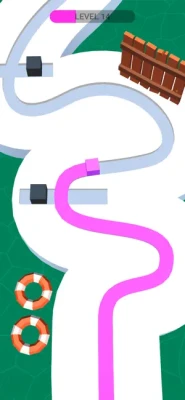
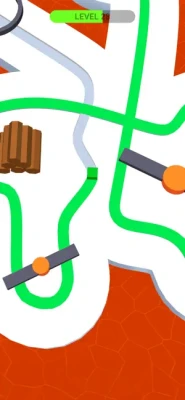
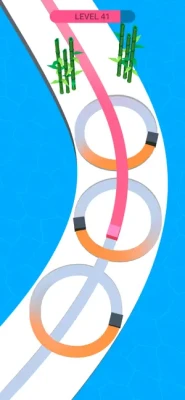
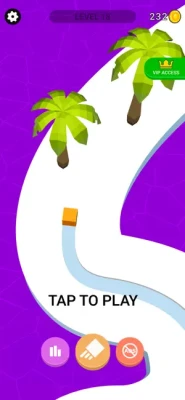
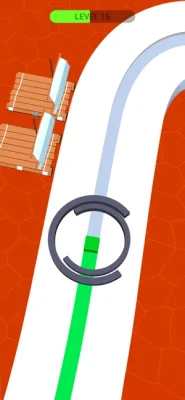
The main objective is to guide a moving cube along a designated path while leaving a colorful trail behind it. Players tap and hold the screen to make the cube move forward, allowing it to paint the route as it travels.
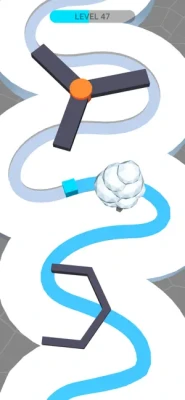
Although the controls are easy to understand, completing levels requires attention, timing, and quick reactions. The paths can include turns and obstacles that demand careful movement. Players must decide when to continue moving and when to release their finger to avoid dangerous situations.
One of the game's most appealing features is its combination of colorful visuals and straightforward gameplay. Each completed section adds more color to the environment, creating a satisfying visual effect as the cube travels along the track.
Line Color 3D also includes different cube skins, allowing players to personalize their experience. These cosmetic options add variety without changing the central objective of guiding the cube and completing the colorful paths.
With numerous levels, minimalistic 3D graphics, and easy-to-learn mechanics, Line Color 3D is a suitable choice for players who enjoy casual runner games, reflex challenges, and simple arcade puzzles.
Main Features of Line Color 3D
Simple Tap-and-Hold Controls
The game uses an intuitive control system. Players press and hold the screen to move the cube forward and release their finger when they need to stop.
Colorful Path Painting
As the cube travels along the track, it paints the path with vibrant colors. Watching the route gradually become colorful is an enjoyable part of the experience.
Challenging Levels
The game offers numerous stages with different paths and obstacles. Each level provides another opportunity to improve timing and movement skills.
Obstacle Avoidance
Players must pay attention to the route and react to obstacles. Poor timing can interrupt progress, making concentration essential.
3D Graphics
Minimalistic three-dimensional environments provide a clean and colorful visual experience without distracting players from the main challenge.
Customizable Cube Skins
Different cube skins allow players to personalize their character and add visual variety to the game.
Relaxing Arcade Gameplay
The straightforward mechanics make the game suitable for short gaming sessions and casual entertainment.
Progressive Challenges
As players advance, they can encounter new routes and more demanding situations that require better timing and concentration.
Game Center Support
The App Store listing also indicates support for Apple's Game Center leaderboards, allowing players to participate in competitive score-based activities.
Gameplay Mechanics and Basic Rules
The gameplay in Line Color 3D revolves around controlling a cube that automatically follows a colorful track when the player holds the screen.
The basic controls are simple:
Tap and hold to move the cube forward.
Release your finger to stop the movement.
Watch the path and identify upcoming obstacles.
Control movement carefully around turns and dangerous sections.
Continue painting the route until you reach the finish.
The main challenge is knowing when to keep moving and when to stop.
Holding the screen for too long can cause the cube to move into a dangerous section. Releasing too early, however, can interrupt your progress and make navigating certain routes more difficult.
The best approach is to observe the path ahead and use short, controlled movements whenever necessary.
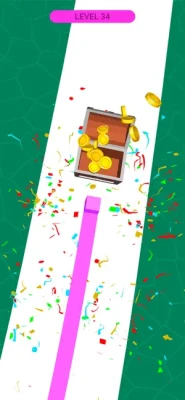
Every successful level provides a sense of progression as the cube completes another colorful route.
Complete Strategy Guide for Line Color 3D
Becoming better at Line Color 3D requires patience, observation, and consistent control. Although the game looks simple, careless movements can make difficult sections harder to complete.
The following strategies can help beginners understand the mechanics and improve their performance.
Understand the Tap-and-Hold System
The first step is learning how the movement controls respond.
Pressing and holding the screen makes the cube move along the path. Releasing your finger stops the movement.
Do not assume that holding continuously is always the best approach.
Instead, learn to control the cube through short movement intervals. This gives you more opportunities to react when the track changes direction or an obstacle appears.
Practice this basic technique until controlling the cube feels natural.
Observe the Track Before Moving
Before starting a level or entering a difficult section, examine the visible route.
Look for sharp turns, narrow sections, obstacles, and areas where movement may require more careful timing.
Knowing what comes next can help you make better decisions.
Avoid focusing exclusively on the cube's current position. Try to anticipate what is happening farther along the track.
Use Controlled Movements
One of the most useful techniques is avoiding unnecessary continuous movement.
Instead of keeping your finger pressed throughout the entire level, use controlled intervals.
Move forward when the path is clear, then release when you need to reassess the situation.
This approach helps prevent rushed decisions and gives you more time to respond to unexpected obstacles.
Learn to Recognize Dangerous Sections
Pay attention to sections that appear more difficult than the surrounding path.
Sharp corners, narrow routes, and obstacles require additional concentration.
When approaching these areas, reduce your movement speed through careful tap-and-release timing.
Do not wait until the cube is already in a dangerous position before reacting.
Anticipating difficult sections is more effective than trying to correct mistakes at the last moment.
Improve Your Reaction Time
Quick reactions are important when the path changes unexpectedly.
However, reacting quickly does not mean tapping randomly.
Train yourself to recognize visual clues and respond with deliberate movements.
As you complete more levels, you will become familiar with the game's movement patterns and may find it easier to anticipate upcoming challenges.
Focus on the Path Ahead
A common mistake is watching only the cube while ignoring the rest of the track.
Instead, keep your attention slightly ahead of the moving character.
This allows you to recognize upcoming turns and obstacles before reaching them.
Developing this habit can make your movements smoother and reduce unnecessary mistakes.
Avoid Rushing Through Easy Sections
Even when the route appears simple, maintain control.
Moving too aggressively can make it difficult to respond when a new obstacle appears.
Use straightforward sections to maintain a comfortable rhythm rather than treating every part of the level as a race.
Consistent movement is often more effective than unnecessary speed.
Learn From Failed Attempts
If you fail to complete a section, think about what caused the problem.
Did you hold the screen for too long? Did you overlook a turn? Did you react too late?
Identifying the reason behind a mistake helps you improve on your next attempt.
Instead of repeating the same movement pattern, adjust your timing and approach.
Choose Cube Skins You Enjoy
The game features different cube skins that allow players to customize their character.
Explore the available options and choose a design that you like.
Although skins are primarily a visual customization feature, personalizing the cube can make repeated gameplay feel more enjoyable.
Stay Focused During Difficult Levels
Concentration becomes particularly important when the track contains several challenging sections.
Avoid unnecessary distractions and keep your attention on the path.
If a level becomes frustrating, take a short break before trying again.
Returning with a fresh mindset can make it easier to recognize mistakes and control the cube accurately.
Advanced Tips and Tricks
Use Shorter Holds Near Obstacles
When approaching difficult sections, use controlled movement rather than holding the screen continuously.
Watch for Changes in the Track
Pay attention to the direction and shape of the path. Recognizing changes early gives you more time to react.
Maintain a Comfortable Rhythm
Develop a consistent tap-and-release pattern that helps you control the cube without rushing.
Avoid Unnecessary Movements
Do not press and release repeatedly without a reason. Every movement should help you progress safely along the track.
Concentrate on Upcoming Turns
Looking slightly ahead makes it easier to prepare for changes in direction.
Practice Difficult Sections
Repeated attempts help you become more familiar with challenging movement patterns.
Keep Your Eyes on the Route
The colorful trail is visually appealing, but your main focus should remain on the track and potential obstacles.
Use Patience Instead of Speed
Completing a level successfully is more important than moving as quickly as possible.
Common Mistakes to Avoid
Holding the Screen Continuously
Keeping your finger pressed throughout the entire level can make it difficult to react to obstacles and changes in the route.
Ignoring Upcoming Turns
Watching only the cube can cause you to overlook dangerous sections ahead.
Moving Too Quickly
Rushing through a level increases the possibility of making mistakes.
Releasing at the Wrong Moment
Stopping unnecessarily can interrupt your movement rhythm and make some sections more difficult.
Ignoring Visual Clues
Changes in the track can indicate that a more careful approach is necessary.
Repeating the Same Failed Strategy
If a particular movement causes failure, change your timing rather than repeating it.
Losing Concentration
Even simple routes require attention. Staying focused helps you maintain consistent control.
Best Beginner Strategy
New players should focus on understanding the controls before attempting to complete levels quickly.
A good starting approach is to:
Practice Basic Movement: Learn how holding and releasing the screen affects the cube.
Observe the Track: Identify turns and obstacles before moving forward.
Use Controlled Taps: Avoid holding the screen continuously when the route becomes difficult.
Watch Ahead: Keep your attention on upcoming sections rather than only the cube.
Learn From Mistakes: Identify what caused a failed attempt and adjust your timing.
Explore Cube Skins: Try the available customization options to personalize your gameplay.
Following these simple principles can make the early stages easier to understand and help you develop better control.
What Makes Line Color 3D Enjoyable?
The biggest attraction of Line Color 3D is its simple combination of movement and color.
The idea of guiding a cube along a path while painting the track creates an entertaining visual experience. The controls are easy to understand, so players can begin enjoying the game without spending time learning complicated mechanics.
The obstacle challenges add another layer of interest. Although the objective remains consistent, players must pay attention to the route and adjust their timing to progress.
The customizable cube skins also provide additional variety, while the minimalistic graphics keep the experience visually clean.
Another advantage is the flexibility of its gameplay. Players can enjoy short sessions whenever they have a few free minutes.
Is Line Color 3D Good for Casual Players?
Yes. Line Color 3D is designed around accessible controls and straightforward objectives, making it suitable for casual gaming.
Its tap-and-hold mechanics are easy to learn, and the colorful visual presentation creates an enjoyable arcade atmosphere.
However, the obstacles and increasingly demanding routes require concentration and good timing.
Players who enjoy simple runner games, color-based challenges, and reflex-focused puzzles may find the experience particularly appealing.
Game Information
Category | Details |
|---|---|
Game Title | Line Color 3D |
Developer | Azur Interactive Games Limited |
Publisher | Azur Interactive Games Limited |
Genre | Casual |
Game Type | 3D arcade and runner |
Main Objective | Paint the path and complete levels |
Main Character | Moving cube |
Controls | Tap and hold |
Gameplay | Colorful path navigation |
Graphics | Minimalistic 3D |
Customization | Different cube skins |
Competition | Game Center leaderboards |
Platform | iPhone and iPad |
Price | Free to download |
Monetization | In-app purchases |
App Store Age Rating | 13+ |
iOS Compatibility | iOS 13.0 or later on the US listing |
Languages | English, Arabic, and other supported languages |
App specifications can vary by storefront and may change with future updates. The US App Store listing identifies the game as a free download with advertising and optional purchases.
Frequently Asked Questions
What is Line Color 3D?
Line Color 3D is a casual arcade game where players control a moving cube and paint colorful tracks while navigating different paths and obstacles.
Who developed Line Color 3D?
The game was developed by Azur Interactive Games Limited.
How do you play Line Color 3D?
Players tap and hold the screen to move the cube forward. Releasing the screen stops its movement, allowing players to control their progress along the track.
Is Line Color 3D difficult?
The basic controls are easy to learn, but some levels require better timing, concentration, and obstacle awareness.
Can you customize your cube?
Yes. The game includes different cube skins that allow players to personalize their character.
Does Line Color 3D have multiple levels?
Yes. The game offers numerous levels with different routes and challenges.
Is Line Color 3D free to play?
Yes. It is free to download, although it includes advertising and optional in-app purchases.
Does Line Color 3D support iPhone and iPad?
Yes. The App Store listing identifies compatibility with both iPhone and iPad.
Does Line Color 3D have leaderboards?
Yes. The game supports Apple's Game Center leaderboards.
What is the best way to avoid obstacles?
Observe the track ahead, use controlled movements, and release the screen when you need to stop the cube before a difficult section.
What makes Line Color 3D different from ordinary runner games?
Its central mechanic focuses on painting the path with a colorful trail while controlling a cube through 3D routes, rather than simply running through a traditional environment.
Final Verdict
Line Color 3D is an entertaining casual arcade game that combines colorful path painting, simple controls, and obstacle-based challenges. Its straightforward gameplay makes it easy to start, while the different routes encourage players to improve their timing and concentration.
The moving cube, vibrant color trails, and minimalistic 3D environments create a distinctive visual experience. Customizable cube skins add another layer of variety, giving players more ways to personalize their adventures.
The key to success is learning when to move and when to stop. By observing the track, anticipating obstacles, and using controlled movements, players can approach challenging levels with greater confidence.
Whether you enjoy relaxing color games, simple arcade adventures, or reflex-based runner challenges, Line Color 3D offers an accessible and colorful mobile gaming experience.
Rate the Game
User Reviews










Popular Games














 Android
 iOS
 Windows
 Xbox