

Latest Version
November 26, 2026
Alper Sarıkaya
Action
Android
0
com.Alper.GravityProject
Report a Problem
More About :game
Specific Game Information
Game Title: Gravity Project
Developer: Alper Sarıkaya
Game Designer: Alper Sarıkaya
Game Genre: Action, Arcade, Running
Game Category: 3D Gravity-Based Runner
Gameplay Style: Fast-Paced Automatic Running
Main Mechanic: Gravity Switching
Main Objective: Navigate dangerous environments and avoid obstacles while progressing through the running challenges.
Movement Controls: Running, jumping, swiping, and sliding
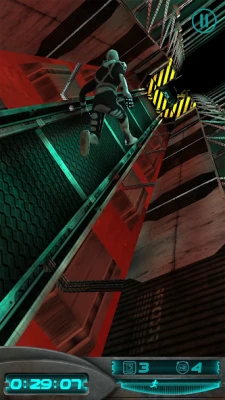
Gravity Mechanic: Change the direction of gravity to move across different surfaces.
Environment Design: Three-dimensional obstacle courses and specially designed maps
Physics: Gravity-oriented movement and moving objects
Graphics: 3D environments and realistic character animations
Level Design: Multiple carefully designed maps and challenging sections
Special Features: Additional bonus features
Game Type: Single-player
Platform: Android
Developer: Independent developer Alper Sarıkaya
Monetization: Free to play with advertisements.
Content Rating: Everyone 10+
Latest listed update: October 8, 2025
All About Gravity Project
A Different Kind of Running Adventure
Gravity Project offers a distinctive approach to the mobile running genre by making gravity manipulation the central gameplay mechanic.
Instead of simply moving between traditional running lanes, players must learn how to change the direction of gravity to navigate the environment.
This creates a different type of challenge because the character can move across surfaces that would normally be impossible to use in conventional running games.
The objective is to keep moving while avoiding obstacles and responding to changes in the environment.
Players must rely on their reflexes, visual awareness, and understanding of the game's physics to survive increasingly demanding sections.
Gravity Switching: The Main Gameplay Mechanic
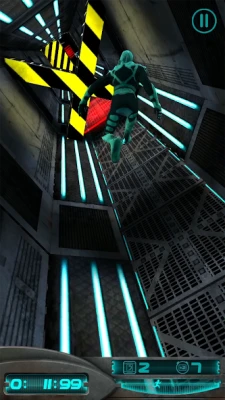
The most important feature of Gravity Project is its gravity-changing system.
Traditional runners generally require players to move left or right to avoid obstacles. Gravity Project introduces another dimension by allowing players to change the surface on which the character runs.
This mechanic transforms ordinary obstacle avoidance into a more interesting spatial challenge.
Players must recognize when the current route becomes dangerous and decide whether changing gravity provides a safer path.
Successful navigation requires understanding the relationship between the character, surrounding surfaces, and upcoming barriers.
Learning how to use gravity changes efficiently is the key to mastering the game.
Fast-Paced Automatic Running
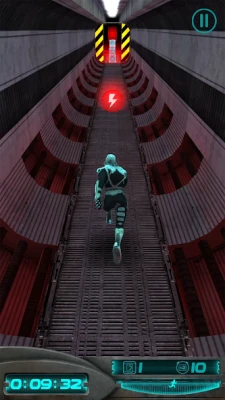
The character continuously runs through the environment, creating a constant sense of urgency.
Players cannot simply relax and wait for obstacles to disappear. They must remain alert and prepare for upcoming challenges.
The automatic running system makes the gameplay easy to understand, while the combination of jumping, swiping, sliding, and gravity manipulation adds complexity.
As the character moves forward, players must make decisions quickly.
A delayed reaction can lead to a collision, while an unnecessary movement can place the character in an even more dangerous position.
Challenging Three-Dimensional Environments
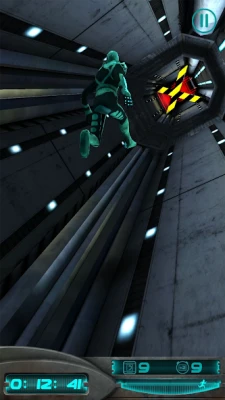
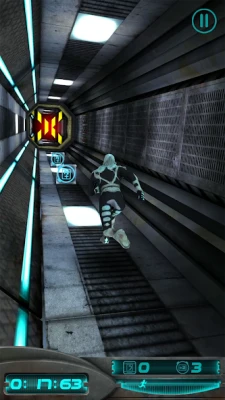
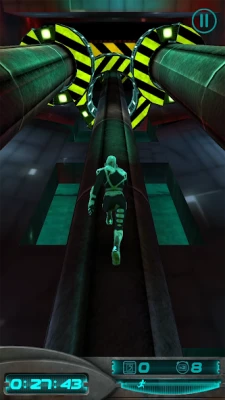
Gravity Project features carefully designed three-dimensional environments that create a distinctive visual experience.
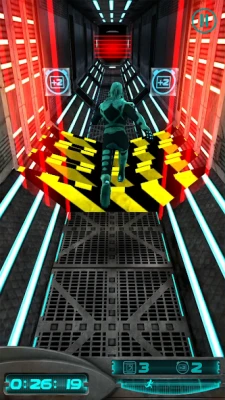
The courses include different spaces, surfaces, barriers, and moving objects.
These elements are arranged to test the player's ability to recognize obstacles and respond to changing situations.
The 3D perspective also helps create a greater sense of depth, making the gravity mechanic more interesting.
Players must understand where the character is moving and which surfaces can provide a safe route.
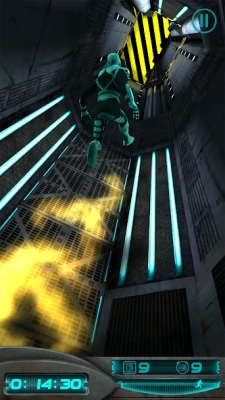
Realistic Gravity-Oriented Physics
Physics plays an important role in the overall experience.
Gravity-oriented moving objects and character movement create additional challenges that require accurate timing.
Players must consider how environmental objects move and how changing gravity affects the character's position.
This makes the game more than a simple reaction-based running experience.
Understanding the physics helps players anticipate obstacles rather than responding only after they become dangerous.
Jumping and Sliding Mechanics
Although gravity switching is the main attraction, jumping and sliding remain important parts of the gameplay.
Jumping allows the character to overcome certain barriers and gaps, while sliding helps avoid obstacles that cannot be passed safely through ordinary movement.
The key is to recognize the type of obstacle before choosing an action.
Using the wrong movement at the wrong moment can interrupt a run.
Players should practice the basic controls until they become comfortable performing different actions without hesitation.
Different Types of Obstacles
Gravity Project introduces a variety of barriers and environmental hazards.
Some obstacles remain stationary, while others move according to their own patterns.
Certain barriers require jumping, while others are better handled by sliding or changing gravity.
The variety keeps players attentive because the same strategy cannot be used in every situation.
Recognizing the type of obstacle ahead is essential for choosing the correct response.
Bonus Features
In addition to its main running mechanics, Gravity Project includes additional bonus features.
These provide extra elements beyond ordinary obstacle avoidance and help add variety to the overall experience.
Players should pay attention to available bonus opportunities while navigating the courses.
However, survival should remain the priority when approaching dangerous sections.
Character Animations and Visual Presentation
Gravity Project uses 3D graphics and realistic character animations to support its fast-moving gameplay.
The character's movements are designed to work with the gravity-based mechanics, while the environmental objects help create a sense of continuous action.
The visual presentation makes the game feel different from traditional two-dimensional runners.
Its combination of 3D spaces, moving barriers, and gravity-oriented objects gives the adventure a recognizable identity.
Designed for Reflexes and Concentration
One of the biggest challenges in Gravity Project is maintaining concentration.
Because the character is always moving, players must continuously observe the environment.
A successful run depends on reacting at the correct moment rather than making random movements.
Players who enjoy games that test their reflexes and spatial awareness will find the gravity mechanic particularly interesting.
Complete Gravity Project Strategy Guide
Understanding the Basic Controls
Before attempting difficult running sections, become familiar with the basic controls.
Gravity Project uses simple movement inputs, including running, jumping, swiping, and sliding.
Each action has a different purpose.
Jumping helps overcome certain barriers, sliding provides a way to pass underneath obstacles, and swiping controls important movement and gravity-related actions.
The most important skill is learning when to use each input.
Spend your first attempts understanding how the character responds to different commands.
Avoid making several unnecessary movements at once because this can make it harder to understand what caused a mistake.
Mastering Gravity Switching
Gravity switching is the most important skill in Gravity Project.
Instead of thinking only about the path directly in front of the character, pay attention to the surrounding surfaces.
When the current route becomes dangerous, consider whether another surface offers a safer way forward.
The timing of the gravity change is essential.
Changing gravity too early can place the character in an unfavorable position, while changing it too late may result in a collision.
A useful approach is to observe the next section before making a decision.
Try to identify a safe landing or running surface before activating the gravity-changing action.
With practice, you will become better at recognizing when switching surfaces is necessary.
Developing Better Reflexes
Fast reactions are essential because the character never stops running.
However, reacting quickly does not mean pressing controls randomly.
Good reflexes involve recognizing a situation and selecting the correct action immediately.
Focus on the next obstacle rather than becoming distracted by the character's current position.
Try to anticipate what may happen after passing each barrier.
This habit makes it easier to prepare for consecutive obstacles.
Learning When to Jump
Jumping is useful when the character approaches barriers that cannot be avoided through ordinary running.
The most common mistake is jumping too early or too late.
Watch the distance between the character and the obstacle.
Activate the jump when the character is close enough to clear the barrier safely.
Avoid unnecessary jumping when a gravity change or slide would be more effective.
The goal is to choose the movement that provides the safest route.
Using Sliding Effectively
Sliding is particularly important when facing low barriers.
Instead of attempting to jump over every obstacle, identify situations where moving underneath is the better solution.
Activate sliding at the appropriate moment and avoid interrupting the action before the character has cleared the barrier.
Good timing is essential, especially when the character is moving at high speed.
Practice sliding in different situations to become more comfortable with its timing.
Understanding Moving Obstacles
Moving objects create additional difficulty because their positions change continuously.
A route that appears safe at one moment may become dangerous shortly afterward.
Observe the movement of each object before deciding how to proceed.
Try to identify repeated movement patterns.
If an object moves between two positions, wait for the moment when it provides enough space to continue.
Avoid reacting too early because unnecessary movements can place the character directly in danger.
Handling Stationary Barriers
Stationary obstacles are generally easier to understand because their positions remain fixed.
However, they can still be dangerous when approaching at high speed.
Identify the obstacle early and determine whether jumping, sliding, or changing gravity is the most appropriate action.
Do not wait until the last possible moment to react.
Preparing in advance gives you more time to perform the correct movement.
Using Gravity Changes to Avoid Collisions
One of the most effective strategies is learning to use gravity changes before reaching a dangerous section.
Do not wait until the character is almost touching an obstacle.
Instead, observe the available surfaces and identify a suitable alternative route.
A well-timed gravity change can help avoid several hazards in succession.
However, avoid changing gravity repeatedly without a clear reason.
Unnecessary changes can make it harder to understand the character's position and movement direction.
Combining Jumping, Sliding, and Gravity Switching
The best results come from understanding how the different movement mechanics work together.
Some sections may require a combination of actions rather than a single movement.
For example, you may need to change gravity to reach another surface and then slide beneath an obstacle.
In other situations, jumping may be the safest way to clear a barrier after moving onto a different surface.
Practice these combinations until the controls become familiar.
The more comfortable you become with the movement system, the easier it will be to handle complex obstacle sequences.
Improving Your Spatial Awareness
Gravity Project requires players to think about the environment in three dimensions.
Do not concentrate exclusively on the character's current running surface.
Pay attention to nearby walls, alternative surfaces, and moving objects.
This awareness is particularly important when preparing to change gravity.
Try to predict where the character will move after performing an action.
Understanding the environment before making a movement can prevent many unnecessary collisions.
Managing High-Speed Sections
Fast sections can be difficult because they provide less time to react.
The best approach is to focus on the upcoming obstacles and avoid unnecessary actions.
Keep your attention on the route ahead.
When several barriers appear close together, determine the order in which they must be handled.
Do not attempt to perform every action simultaneously.
Concentrate on completing one movement successfully before preparing for the next.
Making the Most of Bonus Features
Gravity Project includes additional bonus features that can provide extra gameplay opportunities.
Pay attention to bonus elements when they appear, but do not take unnecessary risks to reach them.
Your main objective should always be maintaining a safe route through the environment.
Once you become familiar with the controls and obstacle patterns, you can start incorporating bonus opportunities into your normal running strategy.
How to Improve After Failing
Failure is part of learning Gravity Project.
When a run ends, think about what caused the collision.
Was the gravity change too late?
Did you jump at the wrong moment?
Did you fail to recognize a moving object?
Did you slide when another movement would have been safer?
Identifying the exact problem helps you improve on the next attempt.
Instead of repeating the same movements, adjust your timing and choose a different strategy.
Gradual improvement is more effective than rushing through repeated attempts.
Advanced Tips for Experienced Players
Once you understand the basic mechanics, focus on making your movements more efficient.
Try to anticipate obstacle combinations rather than reacting to each one separately.
Learn which surfaces provide safer routes and become familiar with the timing of gravity changes.
Avoid unnecessary jumps and slides because every movement should have a clear purpose.
Maintain concentration during long running sections and keep your attention on upcoming hazards.
The most effective players combine quick reactions with an understanding of the game's physics.
Common Mistakes to Avoid
Changing gravity too late: Waiting until the character is close to an obstacle can leave insufficient time to move safely.
Switching surfaces unnecessarily: Frequent gravity changes can make navigation more difficult.
Jumping over every barrier: Some obstacles are better handled through sliding or gravity manipulation.
Ignoring moving objects: Their changing positions require careful observation.
Reacting without understanding the route: Random movements often create additional problems.
Losing concentration: A brief distraction can cause a collision during a fast section.
Making repeated control inputs: Unnecessary swipes can lead to incorrect movements.
Ignoring the surrounding environment: Looking only at the current surface makes it harder to anticipate gravity-related challenges.
Failing to learn from mistakes: Repeating the same unsuccessful actions will not improve your performance.
Frequently Asked Questions About Gravity Project
What is Gravity Project?
Gravity Project is a 3D action running game that introduces gravity switching as its central gameplay mechanic. Players must avoid obstacles by running, jumping, sliding, and changing gravity.
Who developed Gravity Project?
The game was developed by independent game developer Alper Sarıkaya.
What makes Gravity Project different from other running games?
Its gravity-changing mechanic allows players to move across different surfaces instead of relying exclusively on traditional left-and-right movement.
How does gravity switching work?
Players use the game's movement controls to change the direction of gravity, allowing the character to navigate alternative surfaces and avoid obstacles.
What types of controls does Gravity Project use?
The game features running, jumping, swiping, and sliding controls.
Does Gravity Project feature 3D graphics?
Yes. It uses three-dimensional environments, realistic character animations, and gravity-oriented moving objects.
Is Gravity Project difficult?
The game can be challenging because the character runs continuously and players must react quickly to changing obstacles. Learning the gravity mechanic makes the experience easier.
Does Gravity Project include moving obstacles?
Yes. The game features different barriers and moving objects that require careful timing and accurate movement.
Does Gravity Project have bonus features?
Yes. Additional bonus features are included alongside the main running gameplay.
Who designed Gravity Project?
Alper Sarıkaya handled the game's design, programming, and 3D art.
Can Gravity Project be played offline?
The official Google Play description does not clearly specify offline availability, so offline functionality should not be assumed.
Is Gravity Project a multiplayer game?
It is presented as a single-player running adventure rather than a multiplayer game.
Is Gravity Project suitable for beginners?
The basic controls are straightforward, but mastering gravity switching and reacting to fast-moving obstacles requires practice.
Does Gravity Project contain advertisements?
Yes. The Google Play listing identifies the game as containing advertisements.
Final Thoughts
Gravity Project is an interesting alternative to conventional mobile running games because it transforms gravity manipulation into the central part of its gameplay.
Its combination of automatic running, jumping, sliding, and gravity switching creates a challenging experience that rewards quick reactions and spatial awareness.
The carefully designed environments, varied obstacles, realistic character animations, and physics-oriented moving objects help distinguish the game from ordinary obstacle-running adventures.
Whether you enjoy testing your reflexes, mastering unusual movement mechanics, or navigating challenging three-dimensional environments, Gravity Project offers an engaging action experience.
The most important lesson is to understand the environment before making a movement. Once you master gravity switching and learn when to jump or slide, you will be much better prepared to handle the game's demanding running challenges.
Rate the Game
User Reviews










Popular Games

















 Android
 iOS
 Windows
 Xbox