






Latest Version
November 24, 2026
Dreamland Games
Casual
iOS
0
Report a Problem
More About :game
About GameX – No WiFi Play Offline
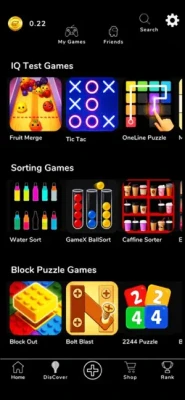
GameX is designed for players who enjoy exploring different types of mobile games without installing a separate application for every experience. It brings a large collection of entertainment options into one accessible platform, allowing users to move between games through a simple swipe-based interface.
The application includes hundreds of gaming experiences covering several popular categories. Whether someone enjoys solving puzzles, racing against opponents, testing strategic thinking, playing sports games, or exploring action-packed challenges, GameX provides different options in one place.
One of its most interesting features is its instant-play approach. Rather than searching through an app store and downloading individual games, users can browse the available content and launch supported experiences directly from the game feed.
GameX also introduces voice interaction through its AI Friends experience. This feature supports multiple languages and provides another way to interact with compatible gaming experiences.
The application combines casual entertainment with social and competitive elements. Players can record gameplay clips, share their experiences, participate in challenges, and explore leaderboards.
Its variety makes GameX suitable for people who prefer switching between different gaming styles rather than spending all their time playing one particular title.
Main Features of GameX
Hundreds of Games in One Application
One of the biggest attractions of GameX is its extensive game collection. The platform brings together numerous genres, making it easier to discover something interesting whenever you want to play.
Instead of limiting users to one gameplay experience, it offers a constantly evolving selection of games.
Swipe and Play Experience
GameX uses a swipeable feed that makes discovering games straightforward.
Players can browse different experiences, move between available games, and find new entertainment without navigating through complicated menus.
This approach is particularly convenient for people who enjoy trying different games throughout the day.
Multiple Gaming Categories
The platform covers a wide variety of genres, including:
Arcade games
Puzzle games
Racing games
Strategy games
Shooter games
Sports games
Card games
Simulation games
Casual games
Role-playing games
Multiplayer experiences
Action games
Games designed for younger audiences
This variety allows users to explore different challenges according to their interests and moods.
Voice Interaction and AI Friends
GameX introduces voice-based interaction through its AI Friends experience.
The advertised voice language support includes English, Urdu, Hindi, Punjabi, Bengali, Indonesian, Filipino, Spanish, Arabic, Portuguese, French, German, Turkish, Japanese, Korean, and Russian.
This multilingual approach makes voice interaction accessible to a wider international audience.
Players can explore compatible voice features and discover alternative ways to interact with the platform.
Instant Cloud Gaming
The platform promotes instant cloud gaming, allowing supported experiences to start without downloading every individual game.
This is useful for people who want to try different gaming experiences without filling their devices with numerous separate applications.
Cloud-based features may require an active internet connection, so players should check connectivity requirements before relying on the app during offline periods.
Augmented Reality Games
GameX also advertises augmented reality experiences.
AR gaming introduces digital elements into real-world surroundings, creating a different type of interaction compared with traditional mobile games.
These experiences can make gameplay feel more immersive by combining the physical environment with digital entertainment.
Record and Share Gameplay
Another useful feature is the ability to record gameplay and share clips.
Players can capture interesting moments, preserve entertaining achievements, and share selected experiences with friends.
This adds a social dimension to the platform and gives users another reason to explore its different games.
Leaderboards and Challenges
Competitive players can enjoy challenges and global leaderboard features.
Leaderboards provide opportunities to compare performance and follow progress, while challenges add extra objectives beyond ordinary gameplay.
These features make GameX appealing to players who enjoy improving their skills and competing with others.
Short and Casual Games
Not every gaming session needs to last several hours.
GameX includes short experiences that are suitable for quick breaks, allowing players to enjoy simple entertainment without committing to lengthy gameplay sessions.
Exploring the Different Game Categories
Arcade Games
Arcade games are ideal for players who enjoy quick challenges, simple controls, and immediate action.
These experiences often focus on reaction speed, timing, accuracy, and achieving higher scores.
The arcade category is a good starting point for users who want something entertaining and easy to understand.
Puzzle Games
Puzzle games provide opportunities to improve logical thinking, concentration, and problem-solving skills.
Depending on the individual experience, players may need to match objects, organize pieces, recognize patterns, or complete specific objectives.
These games are particularly suitable for people who prefer thoughtful challenges.
Racing Games
Racing experiences introduce speed, competition, and quick decision-making.
Players can explore different racing challenges and work on improving their performance.
Learning the controls, understanding movement mechanics, and maintaining control are important skills for racing gameplay.
Strategy Games
Strategy games require players to think ahead and make decisions based on available resources and objectives.
Rather than relying entirely on reaction speed, these experiences encourage planning, patience, and effective decision-making.
They can be particularly rewarding for players who enjoy overcoming challenges through careful thinking.
Shooter Games
Shooter games offer action-focused experiences that may involve aiming, movement, target recognition, and quick reactions.
Players can improve their performance by becoming familiar with the controls and understanding the objectives of each individual game.
Sports Games
Sports games bring familiar competitive activities into a mobile environment.
Players can discover different sports-inspired challenges and enjoy experiences that emphasize timing, accuracy, coordination, and competition.
Card Games
Card games provide a different type of entertainment, often involving memory, decision-making, and strategic thinking.
They are suitable for players who prefer slower-paced challenges and games that reward careful planning.
Simulation Games
Simulation games allow users to explore activities and environments through interactive digital experiences.
Depending on the game, players may manage resources, complete tasks, develop virtual environments, or experience different everyday activities.
Action and Role-Playing Games
Action games focus on movement, challenges, and exciting gameplay moments, while role-playing experiences may introduce character development, progression, and adventure-based objectives.
These categories provide additional variety for players looking for more involved gaming experiences.
Complete GameX Strategy Guide
Because GameX is a multi-game platform rather than a single puzzle or action title, the best strategy is to understand how to explore its library, select suitable experiences, manage your saved games, and make the most of its available features.
The following guide explains how to get more value from the application.
Start by Exploring the Game Feed
When opening GameX, begin by exploring the available game feed.
Take some time to understand how the swipe-based interface works and how different experiences are presented.
Avoid selecting the first game you see without considering your preferences.
Browse several options and look for games that match the type of entertainment you want.
For example, choose puzzle experiences when you want something relaxing or explore racing and action games when you prefer faster gameplay.
Choose Games According to Your Mood
One advantage of having multiple genres in one application is the ability to change gaming styles whenever you want.
You do not need to stay with one category throughout your entire session.
Consider choosing games according to the amount of time you have available.
Short arcade games are suitable for quick breaks, while strategy and simulation games may offer more involved experiences.
This approach helps you enjoy the platform without feeling restricted to a single gameplay style.
Learn the Controls of Each Game
Different games have different mechanics.
A racing experience may require steering and timing, while a puzzle game may involve dragging, matching, or organizing objects.
Before trying to achieve high scores, understand the basic controls and objectives.
Learning the mechanics first can prevent unnecessary mistakes and make each experience more enjoyable.
Focus on One Game at a Time
Although GameX provides many entertainment options, switching between games too frequently can make it difficult to improve.
When you discover something you enjoy, spend enough time learning its mechanics.
Understand the objectives, identify the most effective actions, and practice until you become comfortable.
You can always return to the game feed when you want a different experience.
Save Your Favorite Games
GameX provides a feature for saving games.
According to the app's instructions, you can use the Save button while browsing the display feed and later access your saved experiences through the My Games section.
This feature is useful when you discover an enjoyable game and want to find it again without browsing the entire collection.
Build a personal collection of your favorite experiences to make future sessions more convenient.
Use Voice Features When Appropriate
Voice interaction can provide another way to explore compatible experiences.
If you want to use this feature, check the available voice options and select a supported language.
Speak clearly and follow the instructions provided by the application.
Remember that voice functionality may depend on the individual experience and its supported features.
Take Advantage of Different Categories
Do not limit yourself to one genre.
Trying different categories can help you discover experiences you might not normally search for.
For example, someone who usually enjoys racing games might discover an interesting puzzle experience.
Similarly, players who prefer casual entertainment may enjoy exploring strategy or simulation games.
Exploration is one of the main advantages of GameX.
Participate in Challenges and Leaderboards
If you enjoy competition, explore the available challenges and leaderboard features.
Pay attention to the objectives and understand how performance is evaluated.
Practice regularly and focus on improving your results rather than trying to achieve everything immediately.
Comparing progress can help make repeated gaming sessions more interesting.
Record Interesting Gameplay Moments
Use the gameplay recording feature to capture memorable moments.
You might want to preserve a particularly successful run, an entertaining challenge, or an impressive achievement.
Before sharing anything, review your recording and make sure it contains the moments you want others to see.
Manage Your Device Storage
Although individual games are advertised as instantly playable without separate downloads, GameX itself has a substantial installation size.
The App Store listing reports an application size of approximately 422.1 MB.
Make sure your device has sufficient storage and keep some free space available for normal application operation and other content.
Check Your Internet Connection
The app's name highlights offline gaming, but its description also advertises cloud gaming, multiplayer features, online leaderboards, and social sharing.
These features may require connectivity.
Do not assume that every game and feature works without an internet connection. Check which experiences are available offline before relying on the application when Wi-Fi or mobile data is unavailable.
Explore New Experiences Regularly
GameX is designed around discovering different gaming experiences.
Return to the feed regularly to explore available content and updates.
New additions can introduce different challenges and provide fresh reasons to revisit the application.
Advanced Tips for Getting the Most Out of GameX
Build a Personal Game Collection
Save experiences you enjoy instead of repeatedly searching for them.
Explore Unfamiliar Genres
Trying new categories can reveal enjoyable games that you might otherwise overlook.
Practice Before Competing
Understand the mechanics of a game before participating in competitive challenges.
Use Voice Interaction Selectively
Explore voice controls in compatible experiences when they make gameplay more convenient.
Record Your Best Moments
Capture interesting achievements and share selected clips with friends.
Keep Your App Updated
Install available updates to benefit from interface improvements, bug fixes, and new features.
Choose the Right Experience for Your Available Time
Short arcade and casual games are useful for brief sessions, while more involved genres can provide longer entertainment.
Check Connectivity Before Playing Offline
Confirm whether the particular experience you want to play supports offline access.
Common Mistakes to Avoid
Downloading the App Without Checking Storage
GameX requires approximately 422.1 MB according to its App Store listing. Check your available device storage before installation.
Expecting Every Game to Work Offline
The application advertises offline play, but some cloud-based, multiplayer, and social features may need an internet connection.
Ignoring the Saved Games Feature
Saving your favorite experiences makes it easier to return to them later.
Switching Games Too Frequently
Exploration is useful, but spending enough time learning individual games helps you improve your performance.
Overlooking Voice Features
Players interested in alternative interaction methods should explore the advertised multilingual voice functionality.
Forgetting About In-App Purchases
GameX is free to download, but optional premium offers, packs, and an advertisement-removal purchase are available.
Review purchase details carefully before buying anything.
Graphics, Interface, and User Experience
GameX focuses on providing a convenient environment for discovering different games.
Its swipeable interface is designed to reduce the effort involved in finding new experiences.
Instead of navigating through separate applications, players can browse a variety of entertainment options from one central location.
The platform also combines traditional mobile gaming with additional features such as voice interaction, augmented reality, gameplay recording, and competitive challenges.
This combination creates an experience that appeals to different types of mobile players.
Whether someone enjoys relaxing puzzles, exciting racing challenges, or action-oriented games, the platform offers multiple directions to explore.
Is GameX Suitable for Offline Gaming?
GameX is marketed as an offline gaming application, making it interesting for players looking for entertainment while traveling or in places with limited connectivity.
However, there is an important distinction between offline games and cloud-based gaming.
The app advertises instant cloud gaming, multiplayer rankings, social sharing, and voice-related experiences. These functions may require an active internet connection.
Consequently, players should test individual experiences and confirm their offline availability before depending on GameX without Wi-Fi.
The safest approach is to distinguish between games that can operate locally and features that depend on online services.
Is GameX Suitable for Children?
The App Store assigns GameX an age rating of 4+.
Its advertised library includes kid-friendly games, casual experiences, puzzles, and other accessible entertainment.
However, the application also contains advertising and user-generated content.
Parents should review the available experiences and consider the social, sharing, and purchasing features before allowing younger children to use the platform independently.
The age rating should not be treated as a guarantee that every individual experience is appropriate for every child.
GameX App Information
App Name: GameX – No wifi play Offline
Developer: Dreamland Games
Provider: Mobify
Category: Casual
Platform: iPhone and iPad
Price: Free to Download
Application Size: Approximately 422.1 MB
Minimum Operating System: iOS 15.0 or later
iPad Compatibility: iPadOS 15.0 or later
Age Rating: 4+
Languages Listed by the App Store: English, French, German, Japanese, Korean, Simplified Chinese, Spanish, and Traditional Chinese
Voice Language Support: English, Urdu, Hindi, Punjabi, Bengali, Indonesian, Filipino, Spanish, Arabic, Portuguese, French, German, Turkish, Japanese, Korean, and Russian
In-App Purchases: Yes
Advertisements: Yes
User-Generated Content: Yes
Game Center: Supported
Family Sharing: Available for some eligible purchases
In-App Purchases and Premium Options
GameX is free to download, but it offers optional purchases for users who want additional content or premium features.
The listed purchase options include:
GameX Premium Offer
Party Pack
Festival Pack
Dinner Pack
Lunch Pack
Chewing Gum Pack
Snack Pack
Remove Ads
The availability and pricing of these options may vary by country and storefront.
Players can explore the free experience before deciding whether any optional purchase is worthwhile.
Frequently Asked Questions
What is GameX – No WiFi Play Offline?
GameX is a mobile gaming platform that brings hundreds of gaming experiences together in one application. It includes arcade, puzzle, racing, sports, strategy, action, simulation, and casual games.
Is GameX free to download?
Yes. GameX is free to download from the Apple App Store. However, it offers optional in-app purchases and contains advertisements.
Can I play GameX without Wi-Fi?
The application is marketed for offline entertainment, but not every feature necessarily works without an internet connection. Cloud gaming, multiplayer functions, and social features may require connectivity.
How many games are available in GameX?
The developer advertises hundreds of gaming experiences across multiple genres, including arcade, puzzle, racing, sports, action, strategy, and simulation.
Does GameX support voice controls?
Yes. The application advertises voice interaction through its AI Friends experience, with support for multiple languages.
Which languages are supported by GameX voice features?
The advertised voice language options include English, Urdu, Hindi, Punjabi, Bengali, Indonesian, Filipino, Spanish, Arabic, Portuguese, French, German, Turkish, Japanese, Korean, and Russian.
Does GameX include racing games?
Yes. Racing is one of the advertised categories, allowing users to explore driving and speed-based experiences.
Can I play puzzle games in GameX?
Yes. The application includes puzzle games for players who enjoy matching, logical thinking, problem-solving, and other brain challenges.
Does GameX have multiplayer features?
The application advertises multiplayer experiences, global leaderboards, and competitive challenges. Availability depends on the particular game and its supported features.
Can I save my favorite games?
Yes. GameX includes a Save feature that allows users to keep selected games in the My Games section for easier access later.
Can I record and share gameplay?
Yes. The application advertises gameplay recording and sharing capabilities, allowing players to capture and share selected gaming moments.
Does GameX support augmented reality?
Yes. AR gaming is one of its advertised features, offering interactive experiences that combine digital content with real-world surroundings.
Is GameX available for iPad?
Yes. GameX is designed for both iPhone and iPad devices.
What is the minimum iOS version required?
The App Store listing specifies iOS 15.0 or later for iPhone and iPadOS 15.0 or later for iPad.
Is GameX suitable for casual players?
Yes. Its swipeable game feed, short gaming experiences, and variety of genres make it suitable for people who enjoy accessible mobile entertainment.
Does GameX contain advertisements?
Yes. The App Store listing indicates that the application contains advertisements. An optional purchase to remove ads is also available.
Does GameX require a large amount of storage?
The listed application size is approximately 422.1 MB. Players should ensure that their devices have sufficient available storage before installation.
Final Thoughts
GameX – No WiFi Play Offline offers a different approach to mobile entertainment by combining hundreds of gaming experiences in one convenient application.
Its biggest advantage is variety. Players can move between arcade challenges, puzzles, racing games, sports experiences, strategy adventures, and other genres without needing to install a separate application for every individual game.
The swipeable interface makes discovering new experiences straightforward, while voice interaction, augmented reality, gameplay recording, and leaderboards introduce additional entertainment possibilities.
The platform is particularly interesting for people who enjoy experimenting with different types of games and want a central place to discover casual entertainment.
Although its offline branding is attractive, players should remember that cloud gaming and certain online features may require an internet connection.
Overall, GameX provides a versatile gaming environment for mobile users who value variety, convenience, and the freedom to explore different gaming styles.
Whether you want to solve a puzzle, enjoy a quick arcade challenge, race against the clock, or discover something completely new, GameX brings plenty of gaming possibilities together in one place.
Rate the Game
User Reviews















Popular Games



















 Android
 iOS
 Windows
 Xbox