
Latest Version
August 28, 2026
Crazy Labs
Puzzle
iOS
0
Report a Problem
More About :game
Drawing Carnival turns mobile coloring into a playful creative activity. Instead of simply filling an entire picture with a single coloring method, the game divides artwork into sections and lets you approach different parts using a variety of artistic tools.
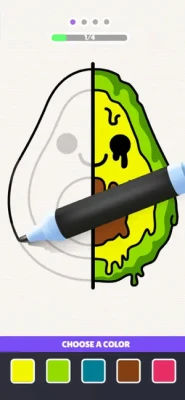
You can trace outlines, color areas, add decorative effects, and combine different styles to create a finished picture. CrazyLabs describes the core experience around two simple mechanics: tapping and holding to draw an outline and using a joystick to color.
The result is a game that sits somewhere between a drawing game, coloring game, art puzzle, casual simulation, and relaxing ASMR experience.
Drawing Carnival Gameplay
The main gameplay revolves around completing colorful artworks.
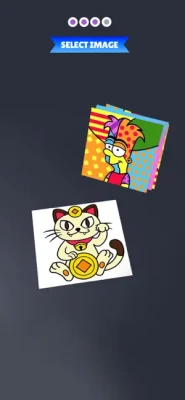
A typical session involves selecting an image and working through its different sections. You may need to outline part of the picture before filling it with color, then switch to another artistic tool to complete another section.
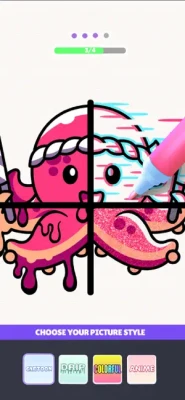
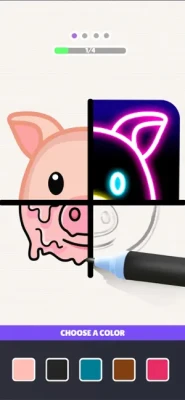
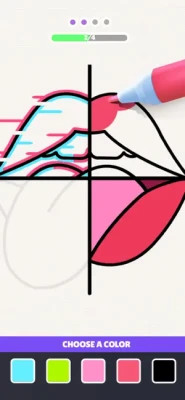
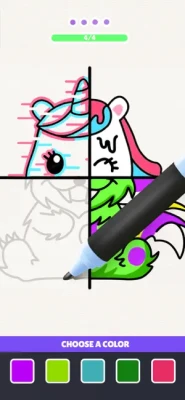
The four-part artwork concept gives each picture a structured progression while still allowing you to experiment with different visual styles.
Basic Gameplay Loop
- Choose an artwork.
- Select the section you want to complete.
- Trace or draw the required outline.
- Choose an appropriate coloring tool.
- Apply the color or artistic effect.
- Complete the remaining sections.
- Combine the finished pieces into one artwork.
- Enjoy the completed colorful masterpiece.
Four-Part Artwork System
One of Drawing Carnival's defining mechanics is its four-part artwork structure.
Instead of completing every image in exactly the same way, the picture can be divided into separate sections. Each section can introduce a different coloring or drawing style.
This creates a satisfying sense of progression because the final picture gradually comes together as each part is completed.
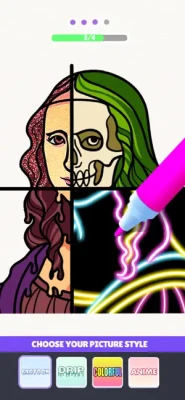
The App Store specifically describes dividing portraits or paintings into four parts and combining different artistic styles into one finished creation.
Drawing and Outline Mechanics
Drawing Carnival isn't only about choosing colors.
Some sections require you to trace an outline using a tap-and-hold gesture. This gives the game a slightly more interactive feel than traditional paint-by-number games.
The mechanic is simple enough for beginners but still requires attention when following the shape of an artwork.
CrazyLabs officially identifies tap-and-hold outlining as one of the game's two core mechanics.
Coloring With a Joystick
After completing an outline, the coloring process can involve a joystick-style control.
This allows you to guide the coloring tool across the artwork while controlling where the paint is applied.
The combination of drawing with touch gestures and coloring through movement gives Drawing Carnival a more game-like feel than a conventional coloring book app.
Spray Paint
Spray paint is one of the standout artistic tools available in Drawing Carnival.
It creates a different visual texture from traditional coloring and can give artwork a softer, more colorful appearance.
Using spray paint is particularly satisfying when larger areas of an image need to be covered quickly.
Neon Markers
Neon markers provide a brighter and more energetic style.
They are ideal for artwork that calls for glowing colors, vivid highlights, or a more playful pop-art appearance.
The combination of neon colors with other tools means a single image can contain several contrasting artistic styles.
Glitter Powder
Glitter powder adds sparkle and texture to completed artwork.
It is one of the game's more decorative options and helps transform ordinary colored sections into something more visually striking.
For players who enjoy satisfying visual effects, glitter provides an especially rewarding finishing touch.
Gems and Decorative Effects
Drawing Carnival also features gems and other decorative effects.
These tools allow you to move beyond basic coloring and add details that make the final artwork feel more polished.
The App Store lists spray paint, neon markers, gems, and glitter powder among the game's creative tools.
Different Art Styles
A major attraction of Drawing Carnival is the ability to combine multiple art styles in one image.
One part of a picture might use spray paint while another uses neon colors, glitter, gems, or another drawing technique.
This creates artwork that feels more varied than a standard coloring page.
Color Matching Challenges
Drawing Carnival also incorporates color-matching elements.
Instead of simply coloring without restrictions, some challenges encourage you to select appropriate colors and tools for the artwork.
This adds a small puzzle element to the otherwise relaxing creative gameplay.
Color Page ASMR
Drawing Carnival is designed to provide satisfying visual and sensory feedback while you draw and color.
Its color-page ASMR presentation emphasizes the feeling of watching an unfinished picture gradually become a polished piece of art.
For players who enjoy relaxing coloring games and satisfying mobile gameplay, this can be one of the game's biggest attractions.
Drawing Carnival Art Experience
The game encourages experimentation rather than requiring traditional artistic skills.
You don't need to be an experienced artist to start creating colorful pictures. The controls are straightforward, while the game's artistic tools provide different ways to transform the same type of artwork.
This makes Drawing Carnival approachable for casual players who want a creative activity without the complexity of a professional drawing application.
How to Play Drawing Carnival
Step 1: Pick an Artwork
Start by selecting one of the available pictures.
Step 2: Examine the Sections
Look at the different areas of the image and identify what needs to be completed.
Step 3: Trace the Outline
Use the tap-and-hold drawing mechanic when the level requires you to create an outline.
Step 4: Choose Your Tool
Select the appropriate brush, marker, paint, glitter, gems, or other available artistic effect.
Step 5: Add Color
Use the coloring controls to fill the required section.
Step 6: Add Decorative Effects
Experiment with different artistic styles to make the picture more distinctive.
Step 7: Finish the Artwork
Complete all four sections and watch the separate pieces come together as a finished creation.
Beginner's Guide
New players should focus on accuracy before speed.
When tracing an outline, follow the shape carefully instead of rushing through it. When coloring, pay attention to the boundaries of the section you're working on.
It is also worth experimenting with different tools rather than relying on the same coloring style every time.
The game is designed to be accessible, so beginners can learn the basic mechanics quickly.
Advanced Drawing Tips
Follow the Shape Carefully
Accuracy is important when tracing detailed areas. Slow, controlled movements are usually easier than trying to finish a section as quickly as possible.
Match the Tool to the Artwork
Different tools create different textures. Use spray paint for broader effects and neon or decorative tools when you want stronger visual contrast.
Don't Overdecorate
A picture can become visually cluttered if every possible effect is used at once. Sometimes a simple combination produces the best result.
Experiment With Contrasts
Bright neon colors can work particularly well alongside darker or softer tones.
Complete Each Section Carefully
Because the artwork is divided into multiple parts, each completed section contributes to the final composition.
Game Progression
Drawing Carnival uses a level-based structure built around completing artworks and unlocking additional creative possibilities.
Rather than relying on traditional combat progression, the game rewards players by giving them new pictures, artistic tools, styles, and creative challenges to explore.
Its progression is therefore centered on artistic variety and completion.
Artistic Tools
Drawing Carnival includes a broad selection of visual tools and effects, including:
- Spray paint
- Neon markers
- Crayons
- Glitter powder
- Gems
- Painting effects
- Decorative styles
- Color palettes
- Other creative drawing tools
The official Google Play description also highlights spray paint, neon markers, crayons, glitter, gems, and other artistic effects.
Graphics and Visual Style
The visual identity of Drawing Carnival is built around bright colors and satisfying transformations.
Artwork changes noticeably as each section is completed, making the progression easy to see.
The colorful presentation works especially well with the game's different artistic tools because spray paint, neon effects, glitter, and gems each produce their own distinctive appearance.
Controls and Interface
The controls are designed specifically for touchscreen devices.
The core interactions include:
- Tap and hold to draw
- Drag or use the joystick to color
- Select different artistic tools
- Choose colors and effects
- Complete individual artwork sections
CrazyLabs' official case study confirms the tap-and-hold drawing mechanic and joystick coloring system.
Difficulty
Difficulty: Easy to Moderate
Drawing Carnival is primarily a casual game, so its controls are easy to understand.
The challenge comes from accurately following outlines, choosing suitable colors, and completing artwork without making mistakes.
Players who want a more relaxing experience can take their time, while players who enjoy precision can focus on completing each section accurately.
Who Should Play Drawing Carnival?
Drawing Carnival is especially suitable for people who enjoy:
- Drawing games
- Coloring games
- Art games
- Creative mobile games
- Relaxing games
- ASMR games
- Color-matching puzzles
- Casual simulation games
- Pop-art games
- Digital painting
- Satisfying gameplay
Why Drawing Carnival Is Fun
The appeal comes from seeing a blank or incomplete image gradually transform into a finished piece of art.
Every completed section provides visual feedback, while the different tools prevent the experience from feeling like ordinary coloring.
The combination of drawing, painting, color matching, decorative effects, and satisfying transformations gives the game a distinct casual-art identity.
Pros and Cons
Pros
- Creative drawing and coloring mechanics
- Multiple artistic tools
- Four-part artwork system
- Spray paint and neon effects
- Glitter and gem decorations
- Satisfying visual transformations
- Simple touchscreen controls
- Relaxing ASMR-style experience
- Suitable for short play sessions
- Available on iPhone and iPad
Cons
- Advertising may interrupt the experience
- Some players have reported glitches or performance issues in reviews
- Players looking for advanced free-form drawing may find the structured gameplay limiting
- Repetition may become noticeable for some players
The current U.S. App Store listing shows a 4.7/5 rating from approximately 113K ratings. User feedback is generally positive about the creative gameplay, although some reviews mention glitches, advertisements, or concerns about artwork variety.
Technical Information
Game: Drawing Carnival
Developer: Crazy Labs
Genre: Simulation / Casual / Drawing
Platform: iPhone and iPad
Price: Free with in-app purchases
Age Rating: 13+
Languages: English plus additional supported languages
Current App Store Size: Approximately 302.4 MB
Current Listed Version: 2.5.0
Minimum iOS Version: iOS 15 or later
The current U.S. App Store listing confirms the developer, category, rating, age rating, price model, supported devices, and approximately 302 MB size. The current version history lists version 2.5.0 and recent bug-fix updates.
Latest Updates
The current App Store version history lists version 2.5.0 as a recent update, with the developer describing bug fixes and smoother gameplay. Previous updates have also included improvements to graphics, gameplay, upgrades, path selection, and feature unlocking.
This indicates that the developer continues to maintain the game rather than leaving the original release untouched.
Drawing Carnival on Android
Drawing Carnival is also available on Android.
The current Google Play listing shows the game from CrazyLabs with more than 10 million downloads and approximately 114K reviews, demonstrating a substantial Android player base as well.
Drawing Carnival vs. Traditional Coloring Games
Traditional coloring games generally provide an image with predefined areas that players fill with colors.
Drawing Carnival adds more interaction by combining outlining, coloring, different artistic tools, decorative effects, and four-part artwork.
This makes it feel more like a small drawing challenge than a simple digital coloring book.
Drawing Carnival vs. Drawing Apps
Professional drawing applications usually provide extensive brushes, layers, canvases, and free-form creative tools.
Drawing Carnival takes a completely different approach.
It is structured as a game, with predefined artworks, guided interactions, levels, visual effects, and objectives.
That makes it much easier to pick up for casual players who want entertainment rather than a full digital art studio.
Drawing Carnival vs. ASMR Coloring Games
Drawing Carnival shares the relaxing qualities of ASMR coloring games, but it adds more active drawing mechanics.
Instead of simply tapping areas to fill them, players may trace outlines and control coloring movements.
The combination creates a more interactive form of satisfying coloring gameplay.
Player Experience
Drawing Carnival has built a large audience around its colorful and accessible gameplay. The U.S. App Store currently displays a 4.7/5 rating from approximately 113K ratings.
Players frequently praise the variety of ways to color and the satisfying artistic results. At the same time, some user reviews criticize advertising frequency, glitches, or limited artwork variety. These differences are worth considering before recommending the game to every type of player.
Expert Rating
Overall Rating: 8.6/10
| Category | Rating |
|---|---|
| Creativity | 9/10 |
| Gameplay | 8.5/10 |
| Visual Appeal | 9/10 |
| Controls | 8.5/10 |
| Artistic Variety | 9/10 |
| Accessibility | 9/10 |
| Replay Value | 8/10 |
| Relaxation Factor | 9/10 |
Final Verdict
Drawing Carnival is a colorful and satisfying mobile art game that successfully combines drawing, coloring, puzzle elements, and relaxing visual effects.
Its four-part artwork system gives each creation a sense of progression, while spray paint, neon markers, glitter, gems, crayons, and other artistic tools provide plenty of visual variety.
The game is particularly appealing to players who want a relaxing coloring game with more interaction than traditional paint-by-number apps.
If you enjoy creative mobile games, drawing challenges, pop-art designs, satisfying transformations, or ASMR-style coloring, Drawing Carnival is worth trying.
Frequently Asked Questions
What is Drawing Carnival?
Drawing Carnival is a casual drawing and coloring game from Crazy Labs where players complete colorful artworks using different drawing, painting, and decorative tools.
Is Drawing Carnival free?
Yes. Drawing Carnival is free to download and includes in-app purchases.
What can you draw in Drawing Carnival?
The game features portraits, illustrations, and other colorful artworks that can be divided into sections and completed using different artistic styles.
What drawing tools are available?
The game includes tools and effects such as spray paint, neon markers, crayons, glitter powder, gems, and other painting styles.
Is Drawing Carnival a coloring game?
Yes. Coloring is one of the main parts of the gameplay, but the game also includes drawing, outlining, color matching, and decorative effects.
Does Drawing Carnival have ASMR gameplay?
Yes. The App Store describes a color-page ASMR feature intended to provide a satisfying sensory experience while creating artwork.
Is Drawing Carnival available for iPhone?
Yes. The current App Store listing supports iPhone and iPad.
Is Drawing Carnival available on Android?
Yes. Drawing Carnival is also available through Google Play.
Who developed Drawing Carnival?
Drawing Carnival was developed by Crazy Labs.
Is Drawing Carnival difficult?
The basic controls are easy to learn. The challenge mainly comes from accurately tracing outlines, selecting appropriate tools, and completing the artwork.
Does Drawing Carnival contain ads?
Yes. The game is supported by advertising and also offers in-app purchases.
Drawing Carnival brings together drawing, coloring, color matching, and satisfying visual effects in a simple mobile game designed for creativity and relaxation.
With four-part artworks, spray paint, neon markers, crayons, glitter, gems, and multiple artistic styles, each completed picture can feel different from a standard coloring page.
Its combination of accessible controls and colorful presentation makes it a strong choice for players searching for a drawing game, coloring game, art puzzle, relaxing mobile game, or satisfying ASMR coloring experience.
Rate the Game
User Reviews




Popular Games



















 Android
 iOS
iOS Windows
 Xbox
Xbox