

Latest Version
January 13, 2026
Arcadian Lab Inc.
management
iOS
0
Report a Problem
More About :game
The official App Store listing highlights crops such as tomatoes and corn, processing them into products including ketchup, popcorn, and flour, while upgrading machines, unlocking new crops, automating production, and opening new processing lines.
The result is a progression loop that connects farming directly with factory management:
Grow → Harvest → Process → Sell → Earn → Upgrade → Automate → Expand
What Is Crop to Craft: Idle Farm Game?
Crop to Craft is a casual idle farming and factory management game developed by ARCADIAN LAB INC.
The game starts with agricultural production and gradually introduces industrial processing. Crops aren't simply harvested and stored; they become raw materials for products that can generate greater profits.
As your operation expands, you can improve machinery, unlock additional crops, discover new processing lines, and automate parts of the business.
The App Store describes the game as an idle tycoon experience centered on farming and factory management.
Farming Gameplay
Farming is the foundation of the entire production chain.
Players cultivate different crops and harvest them when they are ready. The available crop selection includes familiar agricultural products such as tomatoes and corn, with more crops becoming available through progression.
The important difference from a traditional farming simulator is what happens after harvesting.
Your crops become ingredients for the factory.
Crop Harvesting
Harvesting provides the raw materials needed to keep your processing operation running.
A productive farm means a steady supply of resources. The more efficiently you manage your crops, the more opportunities you have to keep your factories operating and increase your income.
This creates a satisfying connection between agriculture and manufacturing.
From Crops to Crafted Products
The defining feature of Crop to Craft is the ability to transform farm produce into finished goods.
The official listing gives several examples:
- Tomatoes → Ketchup
- Corn → Popcorn
- Wheat or similar crops → Flour
The game also promises additional products and processing opportunities as the farm develops.
This crafting system gives harvested crops a greater purpose and makes factory upgrades an important part of progression.
Factory Management
Once your crops are harvested, factory management becomes a major part of the game.
Players can manage processing machines, improve production efficiency, and unlock new processing lines.
Rather than operating only as a farmer, you gradually become a farm and factory tycoon.
The official description specifically encourages players to optimize both farm and factory operations to increase profits.
Processing Lines
New processing lines become available as your agricultural empire expands.
The App Store specifically mentions processing facilities such as ketchup factories and flour mills, with each processing line introducing new opportunities for production and growth.
This gives the game a layered progression system:
Farm → Raw Materials → Processing → Finished Goods → Profits
Idle Income and Automation
Automation is a central part of the experience.
Instead of manually controlling every production task indefinitely, players can automate processes and continue generating idle income.
This makes Crop to Craft particularly suitable for players who enjoy incremental progression and tycoon games where a small operation gradually becomes more efficient.
The official App Store description specifically highlights automated processes for idle income.
Machine Upgrades
Machines are critical to increasing production efficiency.
Players can invest their earnings into upgrades that improve factory performance and help increase profits.
The basic upgrade philosophy is straightforward:
Earn more → Upgrade machines → Produce more efficiently → Earn more
This creates the familiar but satisfying progression loop found in successful idle tycoon games.
Key Features
Grow Different Crops
Cultivate a variety of crops and harvest them for use in your production chain.
Craft Valuable Products
Turn raw agricultural materials into finished goods such as ketchup, popcorn, and flour.
Manage a Factory
Operate processing machines and expand your manufacturing capabilities.
Automate Production
Automate processes to generate idle income and reduce the need for constant manual management.
Upgrade Machines
Invest your earnings into machinery upgrades that improve production efficiency.
Unlock New Crops
Progress through the game to access additional crops and expand your agricultural possibilities.
Discover New Processing Lines
Unlock additional factories and production systems as your empire grows.
Build a Farming Empire
Combine agriculture and manufacturing to create a larger and more profitable operation.
How to Play Crop to Craft
Step 1: Grow Crops
Start by cultivating the available farmland and producing your initial crops.
Step 2: Harvest Resources
Collect crops once they're ready.
Step 3: Process Your Harvest
Send raw materials into the appropriate processing facilities.
Step 4: Produce Finished Goods
Transform agricultural resources into products with greater value.
Step 5: Earn Coins
Sell your products and build up your available resources.
Step 6: Upgrade Machines
Use your earnings to increase factory efficiency.
Step 7: Automate Production
Invest in automation so your operation can continue generating idle income.
Step 8: Unlock New Processing Lines
Expand into additional products and manufacturing systems.
Beginner's Guide
The biggest mistake new players can make is treating the farm and factory as separate systems.
They are connected.
Your farm supplies the factory, while the factory transforms those resources into products that generate income. Keeping the entire production chain moving is more important than focusing exclusively on one part.
Start by establishing a reliable crop supply. Once production becomes stable, invest your earnings into the machines that offer the greatest improvement to your overall operation.
Farming and Factory Strategy
Keep Production Moving
An idle factory represents a missed opportunity. Maintain a steady supply of raw materials whenever possible.
Upgrade the Bottleneck
If one part of the production chain is slower than everything else, improving that stage can have a larger impact than upgrading an already efficient machine.
Reinvest Profits
Use your earnings to strengthen the production system instead of allowing your economy to stagnate.
Automate as You Expand
Automation becomes increasingly valuable as the number of production processes grows.
Unlock New Processing Lines
New processing lines provide additional ways to turn crops into valuable products and expand your farming empire.
Best Upgrade Strategy
A good upgrade strategy should focus on improving the weakest part of your production chain.
For example, if crops are being harvested faster than the factory can process them, upgrading processing equipment may be more useful than increasing agricultural output.
Likewise, if the factory is waiting for raw materials, improving crop production can have a larger effect.
Think of your farm as a production pipeline rather than a collection of unrelated upgrades.
Idle Tycoon Progression
The idle mechanics make Crop to Craft different from a traditional hands-on farming simulator.
The goal isn't to manually perform every task forever. Instead, you gradually build a system that can produce more efficiently and generate income with less direct intervention.
That progression creates a satisfying sense of growth:
Small Farm → Efficient Farm → Processing Factory → Automated Production → Agricultural Empire
Crops and Products
The current App Store description specifically mentions several examples of the farm-to-factory system:
Tomatoes: Can be processed into ketchup.
Corn: Can be turned into popcorn.
Other Crops: The game allows players to unlock additional crops and expand their processing capabilities.
Flour Production: Flour mills are specifically mentioned as one of the processing lines available during progression.
Factory Expansion
Factory expansion gives players another reason to continue progressing.
As new processing lines become available, the farm becomes more than a simple crop-growing operation. It evolves into a network of agricultural and manufacturing activities.
Each new line adds another production opportunity and another reason to optimize your resources.
Game Difficulty
Crop to Craft is designed to be accessible rather than mechanically difficult.
The challenge comes from deciding how to manage production and where to invest your earnings.
Players who enjoy idle games will recognize the progression structure quickly, while newcomers can learn the system through the straightforward connection between crops, processing, and profits.
Graphics and Atmosphere
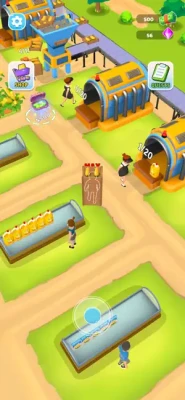
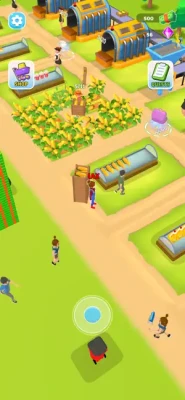
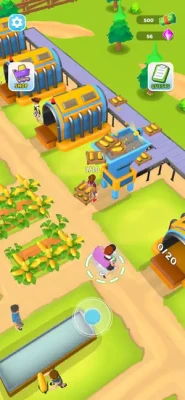
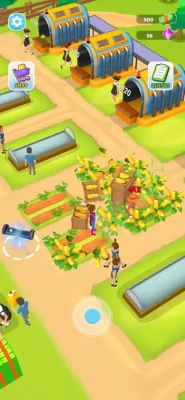
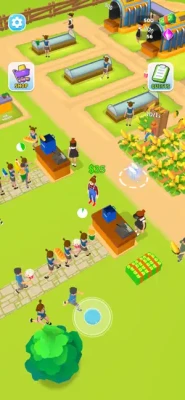
The game uses a colorful, casual farming-and-factory presentation.
Its atmosphere is focused on productivity and progression rather than realism. Fields, machines, factories, crops, and production lines form the visual foundation of the experience.
The overall presentation fits the relaxed nature of an idle farming tycoon.
Controls and Interface
Crop to Craft is designed for touchscreen devices and supports iPhone and iPad.
The interface is primarily focused on management actions such as selecting upgrades, managing production, unlocking new crops, and expanding processing capabilities.
This makes the game accessible to players who prefer strategic tapping and management over complex controls.
Game Modes
The official listing focuses on the game's main idle farming and factory-management experience rather than advertising a collection of traditional multiplayer modes.
The central gameplay revolves around:
- Farming
- Harvesting
- Processing
- Factory management
- Machine upgrades
- Automation
- Idle income
- Unlocking crops
- Expanding processing lines
Progression System
Progression is driven by economic growth.
As your production becomes more efficient, your profits increase. Those profits can then be invested into better machines and new processing opportunities.
The overall progression can be summarized as:
Harvest → Process → Earn → Upgrade → Automate → Unlock → Expand
This makes the game easy to understand while still providing a clear reason to keep improving your operation.
Quests and Long-Term Progression
The game has also included quests as part of its progression experience. Player reviews on the App Store mention completing quest objectives, although some users have reported issues with quest availability or progression.
Because player feedback indicates that some progression can currently feel limited, expectations should be kept realistic if you're looking for a very long-term farming simulation.
Player Ratings and Reviews
The current U.S. App Store listing shows 4.5 out of 5 from 390 ratings, indicating generally positive reception overall.
Player feedback is mixed, however. Some reviewers describe the game as entertaining and addictive, while others criticize the frequency of advertising and report concerns about progression or limited content.
This is useful context for prospective players: the core farming-and-factory loop appears to appeal to many users, but advertising and longer-term progression are notable criticisms in some reviews.
Advertising and In-App Purchases
Crop to Craft is free to download and contains optional in-app purchases.
The current App Store listing includes several purchases, including:
- Remove Ads options
- Gem packs
- Hoverboard booster
- Gloves booster
- Bundled ad-removal and gem offers
Prices currently range from $1.99 to $9.99 for the listed individual offers, with some ad-removal offers at $3.99–$4.99 and larger bundles at $7.99.
Several App Store reviewers specifically criticize the amount of advertising in the free version, so this is worth mentioning clearly on a game page.
Updates and Development
The App Store version history shows multiple updates throughout 2024.
Updates included:
- Improved game economy
- Improved stability
- Gameplay improvements
- Minor fixes
- Bug fixes
- Enhanced gameplay features
- User-experience improvements
The latest listed version history entry is dated December 11, 2024, describing improvements to the game's economy, stability, and user experience.
Technical Details
Game: Crop to Craft - Idle Farm Game
Developer: ARCADIAN LAB INC.
Seller: Arcadian Lab Inc.
Genre: Adventure
Platform: iPhone, iPad, iPod touch
Price: Free
In-App Purchases: Yes
Size: 305.5 MB
Age Rating: 9+
Required iOS: iOS 13.0 or later
Required iPadOS: iPadOS 13.0 or later
Languages: English, French, German, Japanese, Korean, Simplified Chinese, Spanish, Traditional Chinese
These details come from the current U.S. App Store listing.
System Requirements
Crop to Craft requires iOS 13.0 or later on iPhone and iPadOS 13.0 or later on iPad.
Apple also lists compatibility with Macs running macOS 11.0 or later with an Apple M1 chip or later, as well as Apple Vision.
Accessibility
The current App Store listing does not identify specific accessibility features for Crop to Craft.
Privacy Information
According to Apple's App Store disclosure, the developer indicates that location, identifiers, and usage data may be used for tracking. Other data may be used for advertising, analytics, diagnostics, and app functionality. Apple notes that these privacy practices have not been verified by Apple.
Pros and Cons
Pros
- Farming and factory management in one game
- Crop harvesting system
- Crafting and processing mechanics
- Ketchup, popcorn, flour, and other products
- Machine upgrades
- Idle income
- Automation
- New processing lines
- Additional crops to unlock
- Simple progression system
- Free to download
- Supports iPhone and iPad
- Strong overall App Store rating
Cons
- Advertising can be frequent
- Some players report limited long-term progression
- Some reviews mention quest issues
- In-app purchases are present
- The game is more casual than a detailed farming simulator
Who Should Play Crop to Craft?
Crop to Craft is a strong fit for players who enjoy:
- Farming games
- Idle farming games
- Farm tycoon games
- Factory management games
- Crafting games
- Idle factory games
- Resource management
- Production simulators
- Agricultural tycoon games
- Casual management games
- Incremental games
It's especially appealing if you like watching a small operation gradually transform into a larger production empire.
Crop to Craft vs. Traditional Farming Games
Traditional farming simulators often focus on realistic agriculture, machinery, livestock, seasons, and land management.
Crop to Craft takes a much more casual approach.
Its main appeal comes from connecting farming with factory production. Instead of selling crops immediately, you can process them into more valuable products and use the profits to expand your operation.
That makes it closer to a combination of an idle farm game and factory tycoon than a realistic agricultural simulator.
Crop to Craft vs. Idle Factory Games
Compared with a standard idle factory game, Crop to Craft adds a farming layer.
You don't simply operate machines. You first need to produce the agricultural resources that feed the processing system.
This farm-to-factory connection gives the game a more distinctive progression loop.
Frequently Asked Questions
What is Crop to Craft: Idle Farm Game?
Crop to Craft is an idle farming and factory management game where players grow crops, process them into finished goods, upgrade machines, automate production, and build a larger agricultural empire.
Is Crop to Craft free?
Yes. The game is free to download, with optional in-app purchases.
Can you grow crops in Crop to Craft?
Yes. Growing and harvesting crops are fundamental parts of the game.
What can you make in Crop to Craft?
The official App Store description specifically mentions products such as ketchup, popcorn, and flour, along with additional products that can be unlocked through progression.
Does Crop to Craft have a factory?
Yes. Factory management is one of the central features, with processing machines and multiple production lines.
Does Crop to Craft have idle income?
Yes. The game includes automated processes designed to generate idle income.
Can you upgrade machines?
Yes. Machine upgrades are an important part of improving production efficiency and increasing profits.
Can you unlock new crops?
Yes. New crops and processing capabilities can be unlocked as you progress.
Is Crop to Craft available on iPhone?
Yes. The game supports iPhone and requires iOS 13.0 or later.
Is Crop to Craft available on iPad?
Yes. The App Store lists iPad compatibility and requires iPadOS 13.0 or later.
Does Crop to Craft have ads?
Yes. The free version contains advertising, and the game offers optional purchases to remove ads. Some App Store reviewers have specifically criticized the frequency of advertisements.
Does Crop to Craft have in-app purchases?
Yes. The current App Store listing includes gem packs, boosters, and several ad-removal options.
Crop to Craft: Idle Farm Game offers a satisfying combination of farming, crafting, factory management, and idle progression.
Its most interesting feature is the way these systems connect. You don't simply grow crops—you turn those crops into products, use machinery to process them, earn money from your production, and reinvest that money into a larger and more efficient agricultural empire.
The combination of crop harvesting, ketchup and popcorn production, flour mills, machine upgrades, automation, idle income, and new processing lines gives the game more depth than a basic tap-to-harvest farming game.
The main drawbacks are advertising and questions about longer-term progression raised by some players. Nevertheless, the current App Store rating of 4.5/5 from 390 ratings shows that the game has attracted a generally positive audience.
Our Rating: 8.3/10
Best for: Farming fans, idle-game players, factory tycoon enthusiasts, crafting-game fans, and players who enjoy watching a small production system grow into a larger empire.
Platform: iPhone & iPad
Genre: Adventure / Farming / Idle Tycoon
Price: Free with in-app purchases
Developer: ARCADIAN LAB INC.
Required iOS: 13.0 or later
Rate the Game
User Reviews










Popular Games



















 Android
 iOS
iOS Windows
 Xbox
Xbox