
Latest Version
January 23, 2026
H2T GLOBAL PTE. LTD.
Arcade
0
Report a Problem
More About :game
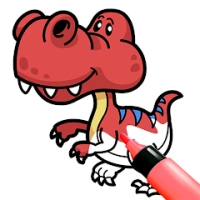
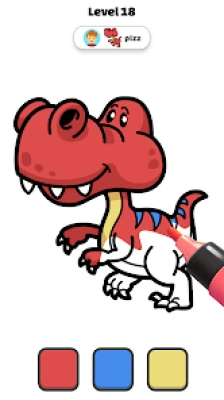
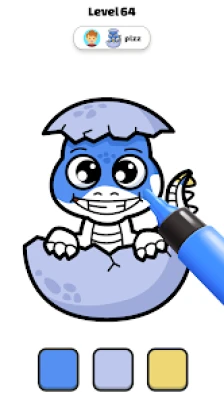
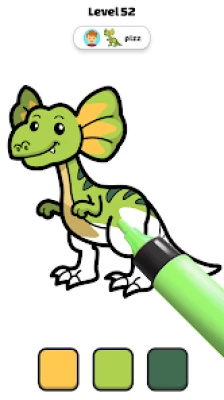
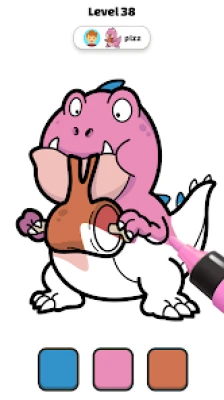
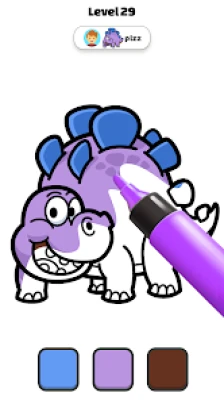
Coloring Paint Master ASMR is an arcade-style coloring game from H2T GLOBAL PTE. LTD. The current Google Play listing describes hundreds of painting levels featuring designs such as dinosaurs and characters, along with different alphabet-themed characters.
Rather than focusing on complicated rules or fast reflexes, the game centers on completing artwork and enjoying the coloring process. The straightforward interface makes it accessible even if you have little experience with mobile coloring games.
Main Features
Hundreds of Coloring Levels
The game offers a large collection of pictures to color. Designs include characters, dinosaurs, alphabet-themed artwork, and other colorful illustrations. This variety gives players plenty of images to work through.
Alphabet Characters
One of the recognizable themes is alphabet artwork. Different letters are presented as characters that players can color and customize, giving the game an entertaining educational-art angle.
Relaxing Gameplay
Coloring is the main activity, so there is no need to master complicated controls. The relaxed pace makes it suitable for players who want a casual game rather than an intense challenge.
Creative Coloring
The artwork can also serve as inspiration for players who enjoy drawing and experimenting with colors. The game's description specifically presents its pictures as templates that can help players develop their coloring skills.
Relaxing Sounds and Graphics
Bright artwork is combined with relaxing sounds to create a calmer atmosphere. This audio-visual combination is an important part of the game's casual experience.
Simple Interface
The controls are designed to be easy to understand. Players can concentrate on the artwork instead of learning complicated mechanics.
Gameplay Overview
The basic gameplay loop is straightforward:
- Choose an available coloring picture.
- Examine the different areas of the artwork.
- Select an appropriate color.
- Fill the required sections carefully.
- Complete the picture.
- Move on to another design and continue coloring.
The simplicity is part of the appeal. There is no complicated combat system, character build, or resource-management mechanic competing for attention.
Full Strategy Guide
1. Look at the Entire Picture First
Before immediately coloring the first section you see, take a moment to examine the complete illustration.
Identify:
- Large background areas
- Main characters
- Smaller details
- Repeated shapes
- Areas that need contrasting colors
This gives you a better idea of how the finished picture should look.
2. Start With Large Areas
Large sections are usually easier to complete first. Coloring these areas establishes the main visual structure of the image before you move to smaller details.
A useful order is:
Background → large objects → characters → small details
This approach also makes it easier to see which areas still need attention.
3. Use Contrasting Colors for Important Details
When several parts of an illustration are close together, choosing noticeably different colors can make the artwork easier to read.
For example, if a character has several overlapping sections, using contrasting shades can help separate the face, clothing, accessories, and surrounding objects.
4. Don't Rush Small Sections
Tiny areas can be easy to overlook. After finishing the major portions of an image, zoom in mentally on the smaller details and check each section before considering the artwork complete.
This is particularly useful with detailed character and alphabet designs.
5. Experiment With Color Combinations
You don't always have to think about coloring as simply matching one obvious color to each object.
Try combinations such as:
- Light and dark versions of the same color
- Warm colors against cool colors
- Bright characters with softer backgrounds
- Contrasting colors for facial or decorative details
Experimenting makes repeated coloring levels feel less predictable.
6. Develop a Consistent Coloring Style
If you play regularly, try developing your own visual style.
You might prefer:
- Bright cartoon colors
- Pastel combinations
- Strong contrasts
- Darker outlines with vivid interiors
- Soft, relaxing color palettes
A consistent style can make your completed pictures feel more personal.
7. Take Your Time
Coloring Paint Master ASMR is not designed around fast action. There is value in slowing down and treating each picture as a small creative project.
Instead of trying to finish every image as quickly as possible, concentrate on accuracy and the overall appearance.
8. Use Easy Levels to Practice
If the game presents simpler designs alongside more detailed artwork, use the easier pictures to experiment with different color combinations.
Once you become comfortable with your preferred approach, more detailed images become easier to handle.
9. Pay Attention to Repeated Patterns
Some artwork can contain repeated shapes or related elements. Once you establish a color scheme for one part, consider whether the same palette would work elsewhere.
This can make the final picture look more balanced.
10. Review the Finished Artwork
Before moving on, inspect the entire picture.
Look for:
- Uncolored sections
- Details that need another color
- Colors that blend together too much
- Areas that could benefit from stronger contrast
- Small sections you accidentally skipped
A final check can noticeably improve the finished result.
Tips for Coloring Alphabet Characters
Alphabet-themed artwork gives you a particularly good opportunity to experiment.
Try giving each letter its own personality through color. For example, you could use a strong combination for one character and softer shades for another.
Pay special attention to:
- Eyes and facial features
- Clothing or accessories
- Letter outlines
- Background elements
- Decorative details
Because alphabet characters often have recognizable shapes, keeping the main letter visually distinct from the surrounding artwork helps the finished design stand out.
Tips for Coloring Dinosaur Pictures
Dinosaur artwork can be especially fun because there isn't one correct natural color scheme.
You can experiment with:
- Green and brown combinations
- Blue or purple fantasy dinosaurs
- Bright cartoon colors
- Darker prehistoric themes
- Multiple shades across the same dinosaur
Use different shades to separate the dinosaur from its environment. This prevents the character from visually disappearing into the background.
How to Make Coloring Sessions More Relaxing
One of the game's strengths is its casual pace. For a more comfortable session:
- Choose a quiet environment.
- Turn the game volume to a comfortable level.
- Avoid rushing through pictures.
- Focus on one illustration at a time.
- Experiment with colors rather than worrying about perfection.
- Take breaks between longer sessions.
The Google Play listing specifically highlights the game's relaxing sounds, bright graphics, and stress-relieving creative focus.
Difficulty
Overall difficulty: Easy
The core mechanics are simple, and the game does not require complicated controls or advanced gaming knowledge.
The challenge is more about completing artwork carefully than defeating difficult opponents or solving complex puzzles.
Players looking for a relaxing coloring experience should find the basic mechanics easy to understand.
Who Is This Game For?
Coloring Paint Master ASMR can appeal to players who enjoy:
- Coloring games
- Drawing and painting apps
- Relaxing mobile games
- Alphabet coloring
- Character coloring
- Dinosaur artwork
- Casual arcade games
- Creative activities
- ASMR-style relaxing experiences
Its PEGI 3 rating also reflects its broadly accessible presentation.
Graphics and Atmosphere
The visual presentation focuses on colorful illustrations rather than realistic graphics. Characters, alphabet designs, dinosaurs, and other pictures provide the main visual attraction.
The atmosphere is intentionally light and relaxing, while the sound system adds another layer to the coloring experience.
Controls
The game is designed around simple touch interaction.
The main actions revolve around:
- Selecting colors
- Touching coloring areas
- Filling sections
- Moving between pictures
- Completing artwork
There is no complicated control scheme to memorize, making the game approachable for casual players.
Progression
Progression primarily comes from completing the available artwork and moving through the game's collection of coloring pictures.
Rather than building a powerful character or unlocking complex equipment, the motivation comes from discovering new pictures and finishing more designs.
Current Version and Platform
The Google Play listing identifies the game as Coloring Paint Master ASMR, developed by H2T GLOBAL PTE. LTD. It is categorized as an Arcade game and is available on Android, with the listing also indicating Windows availability through Google Play's supported experience.
The listing shows an update on April 9, 2026, with the latest update notes mentioning improvements and bug fixes.
Rating and Player Reception
At the time checked, Google Play displays a 4.1-star rating from approximately 5.99K reviews and 10M+ downloads. The game is listed as containing ads and offering in-app purchases.
These figures can change as additional players install and review the game.
Pros and Cons
Pros
- Hundreds of coloring pictures
- Simple and accessible gameplay
- Alphabet character artwork
- Dinosaur and character designs
- Relaxing sound effects
- Bright visual presentation
- Suitable for short casual sessions
- Creative approach to mobile gaming
Cons
- Players looking for competitive gameplay may find it too simple.
- The experience is primarily focused on coloring rather than traditional arcade challenges.
- Ads and optional in-app purchases are present according to Google Play.
Beginner Tips
If you're starting for the first time, remember these simple rules:
Start big: Complete large areas before small details.
Plan your palette: Choose a few complementary colors before filling the entire picture.
Use contrast: Make important characters stand out from their backgrounds.
Check your work: Look for missed sections before leaving a picture.
Don't rush: The game is better suited to relaxed creative sessions than speed-running.
Frequently Asked Questions
What is Coloring Paint Master ASMR?
Coloring Paint Master ASMR is a casual Android coloring game featuring hundreds of pictures, including characters, dinosaurs, and alphabet-themed artwork.
Is Coloring Paint Master ASMR easy to play?
Yes. The game uses a simple coloring-focused interface designed to be easy to understand.
Does the game have alphabet coloring?
Yes. Alphabet characters are one of the themes featured in the game's artwork.
Are there dinosaur coloring pictures?
Yes. The game's Google Play description specifically mentions dinosaur designs among its coloring levels.
Is Coloring Paint Master ASMR relaxing?
The game is designed around a relaxed coloring experience and includes relaxing sounds and bright graphics.
Does Coloring Paint Master ASMR contain ads?
Yes. Google Play currently identifies the game as containing ads and offering in-app purchases.
What age rating does the game have?
Google Play currently lists the game with a PEGI 3 rating.
What is the package name?
The Android package name is bounce.Coloring.Lore.
Final Thoughts
Coloring Paint Master ASMR keeps its formula simple: choose artwork, pick colors, complete the picture, and enjoy the finished result. Its large selection of coloring designs, alphabet characters, dinosaurs, bright graphics, and relaxing sounds make it primarily a casual creative experience rather than a traditional action-focused arcade game.
For players who enjoy mobile coloring games and want something straightforward to play during a quiet break, the game's simple controls and large collection of artwork provide plenty of room for experimentation.
Rate the Game
User Reviews




Popular Games



















 Android
 iOS
iOS Windows
 Xbox
Xbox