
Latest Version
August 24, 2026
Oakever Games
Puzzle
iOS
0
Report a Problem
More About :game
Colorever turns gem placement into a relaxing picture-completion experience. Instead of searching for hidden objects or racing against a clock, you can see the completed artwork from the beginning and plan how to move each group of gems into its correct location.
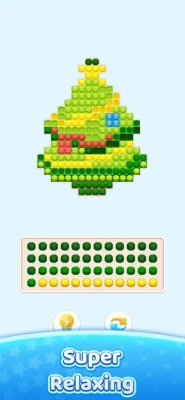
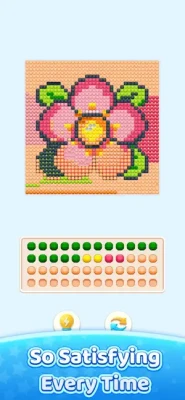
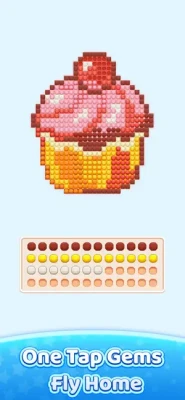
Tap one gem and every connected gem of the same color moves together. Each destination space already indicates the color it needs, giving you all the information necessary to work out the solution.
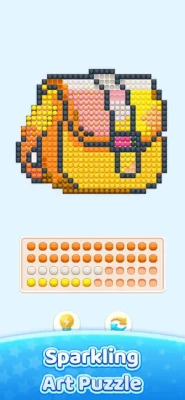
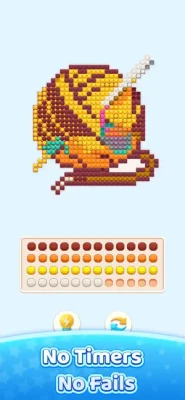
As the board gradually fills, the colorful gems form a complete pixel-art picture. Once the final piece is placed, the finished artwork lights up and becomes part of your personal gallery.
How to Play Colorever
The basic gameplay is easy to understand:
- Examine the entire puzzle board.
- Find a gem or connected group of gems.
- Tap the gem to move the matching-color cluster.
- Guide the cluster toward its corresponding spaces.
- Use the tray when a gem cannot be placed immediately.
- Plan future moves so the board doesn't become blocked.
- Complete the final spaces to reveal the finished artwork.
The game is intentionally designed so that every level has a solution. There is no need to rely on guessing or hope for a lucky move.
Gem Sorting and Cluster Mechanics
The most distinctive part of Colorever is its connected-gem system.
When you tap a gem, connected gems of the same color are picked up together. They then travel toward their matching spaces one at a time.
This creates a simple but surprisingly thoughtful puzzle loop. You aren't merely matching colors; you need to understand how moving one group will affect the rest of the board.
That makes Colorever appealing to players who enjoy sorting games, color puzzles, gem puzzles, and relaxing logic challenges.
Complete Pixel Art Pictures
Every puzzle has a visual reward.
As gems are placed correctly, the board gradually transforms into a recognizable pixel-art scene. The App Store listing describes hundreds of pictures covering themes such as animals, food, flowers, cities, and cozy scenes, with new sets added regularly.
Finished images are saved to a personal gallery, giving players an ongoing collection of completed gem artwork.
The Gem Tray
The tray is an important part of the puzzle strategy.
Not every gem is immediately ready to be placed. The tray allows you to temporarily store gems while you open space on the main board.
Learning when to use the tray is particularly important on larger and more complicated puzzles. Rather than making every available move immediately, experienced players can use the tray to organize the board and prepare a better sequence.
Relaxing Gameplay Without Timers
Colorever is designed around a calm, pressure-free experience.
There are no countdown timers, losing streaks, or traditional game-over screens. You can spend as much time as necessary studying the board and planning your next move.
That makes it a good choice for a quick coffee-break puzzle or a much longer session.
Always Solvable
A major advantage for casual players is that the levels are designed to be solvable.
The App Store describes every level as having a solution, meaning getting stuck should be temporary rather than the result of an unwinnable puzzle.
This keeps the focus on planning rather than frustration.
Helpful Tools and Power-Ups
Colorever includes several optional helpers for situations where you need assistance.
Extra Tray Space
An additional tray space gives you more room to temporarily hold gems and reorganize the board.
Undo
The Undo feature allows you to reverse a move, which is useful when you realize that a previous placement created an awkward position.
Hint
The Hint option can provide guidance when you're unsure which move to make next.
Smart Tap
Smart Tap can help tidy up easier gem placements automatically, giving players another way to get through a simple section of the board.
These tools make the game accessible without removing the underlying puzzle mechanics.
Beginner's Guide
If you're new to Colorever, don't rush to move every gem you see.
Start With the Obvious Moves
Look for colors that already have a clear path to their destination.
Study Connected Groups
Remember that tapping one gem can move an entire connected group of the same color. Consider the group as a single unit.
Use the Tray Carefully
The tray is useful for temporarily storing difficult pieces, but don't fill it unnecessarily.
Think About Space
Before moving a cluster, consider whether the move will make the next few placements easier or harder.
Use Undo When Necessary
If a move doesn't produce the result you expected, don't be afraid to reverse it and try another sequence.
Advanced Strategy
Later boards can become much more interesting because the order of your moves matters.
Plan Several Moves Ahead
The App Store specifically describes later puzzles as wider and more layered, with enough depth for players who enjoy planning several moves in advance.
Protect Open Spaces
An available destination can be extremely valuable. Avoid blocking it unnecessarily with another cluster.
Think in Groups
Don't analyze every gem separately. Identify connected same-color groups and determine how moving the group changes the rest of the puzzle.
Use the Tray as a Temporary Holding Area
Rather than treating the tray as storage for random pieces, use it strategically to open the board and create a better sequence.
Growing Gem Art Gallery
One of the game's strongest progression features is the gallery.
Every completed picture is saved, allowing your collection of gem artwork to grow as you progress through the levels. The available artwork includes animals, food, flowers, cities, and cozy scenes.
This gives players an additional reason to keep completing puzzles beyond simply reaching the next level.
Visual Style and Atmosphere
Colorever uses sparkling gems, glowing diamonds, soft sounds, and subtle haptic feedback to make each successful placement feel satisfying.
The visual presentation works particularly well with the game's relaxed philosophy. Rather than filling the screen with fast animations and competitive effects, the focus stays on watching the picture gradually come together.
Offline Gameplay
Colorever supports offline play, so you don't need a constant internet connection to work through your puzzles. The App Store specifically states that the game can be played offline and that you can pause a puzzle and return later exactly where you left it.
This makes it convenient for travel, commuting, flights, or simply playing somewhere with unreliable connectivity.
Difficulty and Progression
Difficulty: Easy to Learn, Increasingly Challenging
The first puzzles introduce the mechanics naturally, allowing new players to understand how gems and destinations work.
Later boards become wider and more layered, requiring players to think about the order of moves and the relationship between different gem clusters.
The result is a gentle learning curve that gradually introduces more demanding logic.
Who Should Play Colorever?
Colorever is especially suitable for:
- Gem puzzle fans
- Pixel art enthusiasts
- Relaxing game players
- Color sorting fans
- Casual puzzle enthusiasts
- Logic-game players
- Jigsaw and picture puzzle fans
- Players who enjoy organizing and sorting
- People looking for offline puzzle games
- Players who prefer games without timers
Key Features
- Relaxing gem art puzzles
- Color-based gem sorting
- Connected gem cluster mechanics
- Hundreds of pixel-art pictures
- Animals, food, flowers, cities, and cozy scenes
- Growing personal art gallery
- No countdown timer
- No losing streak
- No traditional game-over screen
- Every level has a solution
- Extra tray-space helper
- Undo function
- Hint system
- Smart Tap assistance
- Offline gameplay
- Soft sounds and light haptics
- Gradual difficulty progression
- iPhone and iPad support
Controls and Interface
The controls are deliberately simple.
Tap a gem: Move the connected group of the same color.
Use the tray: Temporarily store gems that aren't ready for placement.
Undo: Reverse a previous move when needed.
Hint: Receive assistance when you're unsure about the next step.
The straightforward interface allows the puzzle itself to remain the main focus.
Player Experience
The current U.S. App Store listing shows 4.8 out of 5 from approximately 1.3K ratings, indicating a strong early reception.
Player feedback highlights the relaxing and satisfying nature of the game. One reviewer reported reaching more than 1,000 levels and described the experience as simple, relaxing, and engaging enough to play regularly. Other feedback has praised the extra tray space and absence of an energy system.
Some recent reviews, however, criticize a newer Bonus Time feature that can automatically complete much of a puzzle. The developer acknowledged this feedback and said it would be shared with the team.
Latest Updates
The current App Store version is 1.17.0, with the version history showing a series of frequent feature updates, bug fixes, and optimization releases. Version 1.17.0 is listed alongside version 1.16.1 on August 11, followed by earlier updates throughout July and June.
The regular update schedule suggests that the developer continues to refine the game's features and performance.
Technical Details
| Information | Details |
|---|---|
| Game | Colorever: Gem Art Puzzle |
| Developer | Oakever Games |
| Category | Casual |
| Price | Free |
| In-App Purchases | Yes |
| Age Rating | 4+ |
| Size | 235.2 MB |
| iPhone | Supported |
| iPad | Supported |
| Minimum iOS | iOS 15.0 |
| Minimum iPadOS | iPadOS 15.0 |
| Mac | macOS 12.0+ with Apple M1 or later |
| Apple Vision | visionOS 1.0 or later |
| Languages | English + 61 more |
| Offline Play | Yes |
| Advertising | Yes |
These details are based on the current U.S. App Store listing.
Pros and Cons
Pros
- Relaxing and easy-to-understand gameplay
- Hundreds of gem art pictures
- Beautiful pixel-art completion system
- No timers
- No game-over screens
- Every puzzle is solvable
- Offline support
- Helpful optional tools
- Growing picture gallery
- Simple controls
- Gradual difficulty
- Strong player rating
Cons
- Advertising is included
- Some players dislike the newer Bonus Time auto-completion feature
- The large number of levels can make the experience feel repetitive for players seeking greater mechanical variety
- Some players may prefer traditional coloring or jigsaw puzzles rather than gem sorting
Colorever vs. Traditional Coloring Games
| Feature | Colorever | Traditional Coloring |
| Main activity | Gem placement | Coloring areas |
| Pixel art | Yes | Often |
| Color matching | Yes | Yes |
| Logic element | Strong | Usually limited |
| Finished picture | Yes | Yes |
| Timers | No | Usually no |
| Offline play | Yes | Varies |
| Gallery | Yes | Varies |
Colorever stands apart because the artwork is completed through logical gem placement rather than simply selecting colors and filling spaces.
Colorever vs. Match and Sort Games
Players familiar with color-sorting games will recognize the importance of organizing pieces, but Colorever adds a visual art objective.
Every correct sequence contributes directly to a finished picture, giving the sorting mechanics a clear and satisfying purpose.
Is Colorever a Good Relaxing Game?
Yes. The game is specifically designed around calm puzzle solving, with no countdown timer, no losing streak, and no game-over screen.
Its offline support and ability to pause and resume puzzles also make it well suited to casual play throughout the day.
Final Verdict
Colorever: Gem Art Puzzle successfully blends color sorting, light logic, gem placement, and pixel-art creation into a relaxing mobile puzzle.
Its biggest strength is the way every move contributes to something visual. Instead of solving an abstract board and immediately moving on, players gradually watch a colorful picture emerge and then add that artwork to their growing gallery.
The simple controls make it accessible to almost anyone, while larger boards and more layered layouts provide enough strategic depth for players who enjoy planning several moves ahead.
The inclusion of offline play and a completely timer-free core experience further strengthens its appeal.
Expert Rating: 8.8/10
Best for: Relaxing puzzle fans, gem-art enthusiasts, color sorting players, pixel-art lovers, and anyone looking for a calm offline brain game.
Frequently Asked Questions
What is Colorever: Gem Art Puzzle?
Colorever is a gem-based logic puzzle where players move connected groups of same-color gems into matching spaces to gradually complete pixel-art pictures.
Is Colorever free?
Yes. The game is free to download and includes in-app purchases. The App Store also lists advertising.
How do you play Colorever?
Tap a gem to move every connected gem of the same color toward its matching destination. Continue organizing the board until the entire picture is complete.
Does Colorever have a timer?
No. The game does not use countdown timers, losing streaks, or traditional game-over screens.
Can Colorever be played offline?
Yes. The App Store states that no internet connection is needed to play.
What kind of pictures can you complete?
The game features hundreds of pixel-art pictures, including animals, food, flowers, cities, and cozy scenes.
Does Colorever have hints?
Yes. A Hint tool is available alongside other helpers such as Undo, extra tray space, and Smart Tap.
Is there a tray for storing gems?
Yes. The tray provides temporary storage for gems that cannot be placed immediately.
Is Colorever available on iPhone?
Yes. The game supports iPhone devices running iOS 15.0 or later.
Is Colorever available on iPad?
Yes. It supports iPad with iPadOS 15.0 or later.
What is the latest version of Colorever?
The current App Store listing shows version 1.17.0, with recent releases focused on feature updates, bug fixes, and optimization.
Rate the Game
User Reviews








Popular Games



















 Android
 iOS
iOS Windows
 Xbox
Xbox